> For the complete documentation index, see [llms.txt](https://docs.bindplane.com/llms.txt). Markdown versions of documentation pages are available by appending `.md` to page URLs; this page is available as [Markdown](https://docs.bindplane.com/integrations/sources/azure-blob-rehydration.md).
# Azure Blob Rehydration
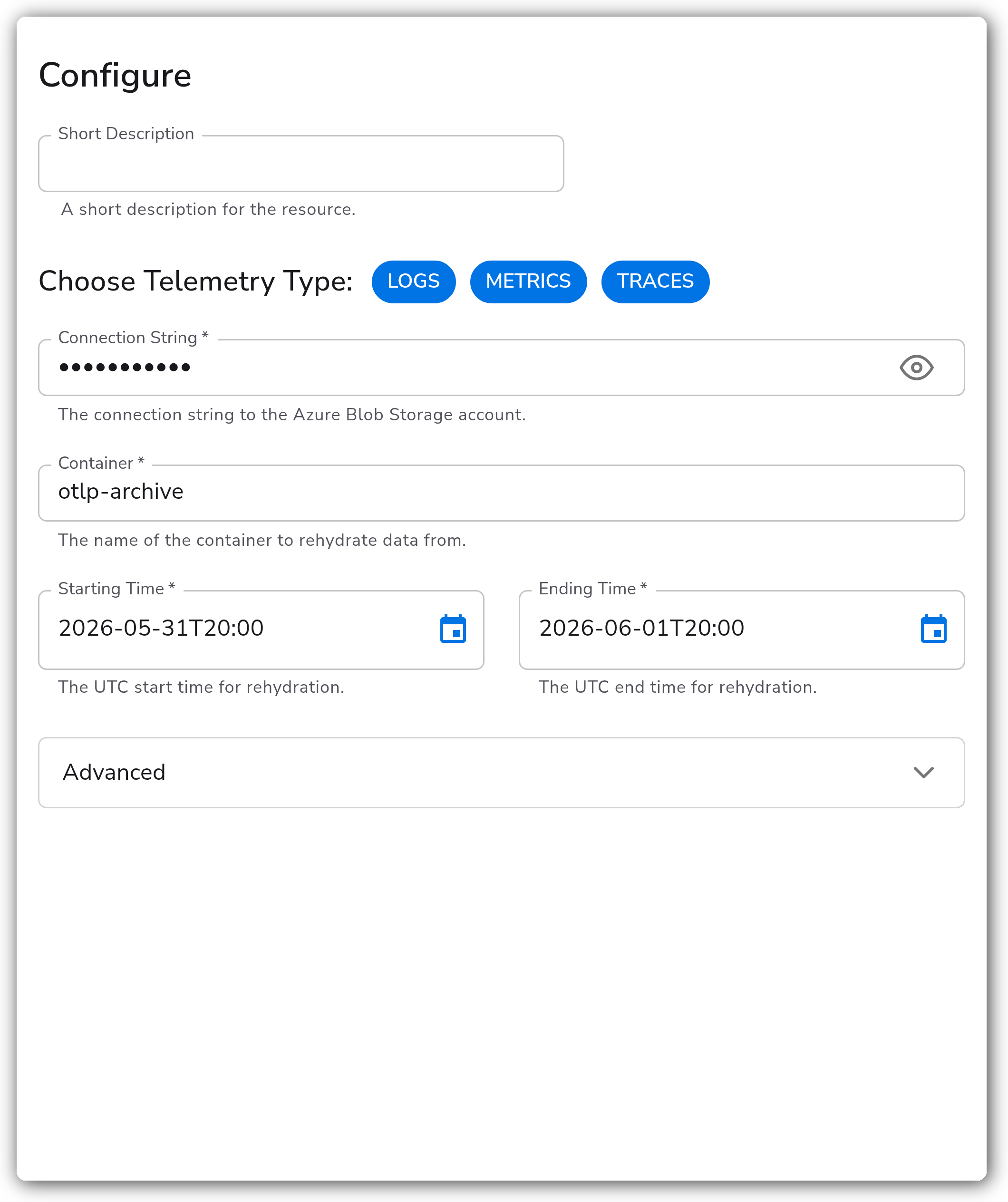
The Azure Blob Rehydration source reads OTLP data previously archived to [Azure Blob Storage](https://learn.microsoft.com/en-us/azure/storage/blobs/) and replays it through the collector. It processes blobs within a specified UTC time range, so you can reprocess historical telemetry into a new destination on demand.
### Supported Telemetry Types
| Platform | Metrics | Logs | Traces |
| ------------------ | ------- | ---- | ------ |
| Linux | ✓ | ✓ | ✓ |
| Windows | ✓ | ✓ | ✓ |
| macOS | ✓ | ✓ | ✓ |
| Kubernetes Cluster | ✓ | ✓ | ✓ |
### Prerequisites
* An Azure Blob Storage account and its connection string.
* The storage container holding the archived telemetry, which must be in [OTLP format](https://github.com/open-telemetry/opentelemetry-proto) for correct processing. Data written by Bindplane's Azure Blob Storage destination is already in this format.
* The UTC start and end time that bound the blobs you want to rehydrate.
### Configuration
#### General
| Parameter | Type | Default | Description |
| --------------------- | ------------------ | ----------------------------- | ----------------------------------------------------------------------------------------------- |
| Choose Telemetry Type | Telemetry Selector | `["Logs","Metrics","Traces"]` | Which types of telemetry to rehydrate. Select any combination of Logs, Metrics, and Traces. |
| Connection String | String | | The connection string to the Azure Blob Storage account. Required. Stored as a sensitive value. |
| Container | String | | The name of the container to rehydrate data from. Required. |
| Starting Time | Timestamp | | The UTC start time for rehydration. Required. |
| Ending Time | Timestamp | | The UTC end time for rehydration. Required. |
#### Advanced
| Parameter | Type | Default | Description |
| -------------------- | ------- | ------------------------------------ | --------------------------------------------------------------------------------------------------------------------------------------- |
| Page Size | Integer | `1000` | The maximum number of blob entries to return in a single API call. |
| Batch Size | Integer | `30` | The number of blobs to download at once. This controls the number of concurrent blob downloads and directly impacts rehydration rate. |
| Delete on Read | Boolean | `false` | If true, blobs are deleted after being rehydrated. |
| Enable Checkpoint | Boolean | `true` | Enable to specify a storage extension for checkpointing rehydration progress. |
| Checkpoint Directory | String | `${OIQ_OTEL_COLLECTOR_HOME}/storage` | Directory for storing rehydration checkpoint state, useful for resuming after disruptions. Relevant only when `storage_enable` is true. |
### Example Configuration
#### Standalone Source
```yaml
apiVersion: bindplane.observiq.com/v1
kind: Source
metadata:
id: azure_blob_rehydration_v2
name: azure_blob_rehydration_v2
spec:
type: azure_blob_rehydration_v2
parameters:
- name: telemetry_types
value:
- Logs
- Metrics
- Traces
- name: connection_string
value: 'DefaultEndpointsProtocol=https;AccountName=...;AccountKey=...;EndpointSuffix=core.windows.net'
- name: container
value: 'otlp-archive'
- name: starting_time
value: '2026-06-01T00:00:00Z'
- name: ending_time
value: '2026-06-02T00:00:00Z'
- name: batch_size
value: '30'
- name: page_size
value: '1000'
- name: storage_enable
value: 'true'
```
### Configuration Tips
#### Tuning batch and page size
* `batch_size` controls how many blobs download concurrently. If your host has many cores and ample network bandwidth, raising it increases the rate of rehydration. Lower it if the collector is memory or bandwidth constrained.
* `page_size` controls how many blob entries each list API call returns. The default of `1000` suits most containers. Adjusting it changes how often Bindplane calls the Azure list API while enumerating blobs, not how fast data downloads.
#### Checkpointing and resuming
* Leave `storage_enable` on so progress is checkpointed to `storage_directory`. If the collector restarts mid-rehydration, it resumes from the last checkpoint instead of reprocessing the whole time range.
* On a Kubernetes Cluster collector, deploy as a `StatefulSet` so the checkpoint directory is backed by persistent storage.
#### Reprocessing safely
* Keep `delete_on_read` set to `false` while validating a rehydration. Only enable it once you are sure the archived blobs are no longer needed, since enabling it removes blobs from the container after they are read.
### Troubleshooting
**Symptom:** The source connects but no data is rehydrated. **Solution:** Confirm the `starting_time` and `ending_time` window actually contains archived blobs and that both are expressed in UTC. Blobs outside the configured range are skipped.
**Symptom:** Rehydration is slower than expected. **Solution:** Increase `batch_size` to download more blobs concurrently, provided the host has the CPU, memory, and network headroom. If the collector becomes resource constrained, lower it instead.
**Symptom:** A restarted collector reprocesses telemetry it already rehydrated. **Solution:** Ensure `storage_enable` is true and that `storage_directory` points to durable storage. On Kubernetes, deploy the collector as a `StatefulSet` so the checkpoint state survives pod restarts.
### Related Resources
* [Azure Blob Storage documentation](https://learn.microsoft.com/en-us/azure/storage/blobs/)
* [Azure Blob Storage connection strings](https://learn.microsoft.com/en-us/azure/storage/common/storage-configure-connection-string)
---
# Agent Instructions
This documentation is published with GitBook. GitBook is the documentation platform designed so that both humans and AI agents can read, navigate, and reason over technical content effectively. Learn more at gitbook.com.
## Querying This Documentation
If you need additional information that is not directly available in this page, you can query the documentation by asking a question.
Perform an HTTP GET request on the following URL with the `ask` and `goal` query parameters:
```
GET https://docs.bindplane.com/integrations/sources/azure-blob-rehydration.md?ask=&goal=
```
`ask` is the immediate question: it should be specific, self-contained, and written in natural language.
`goal` is what the user is ultimately trying to achieve, the reason they need the answer. Sharing it helps GitBook give you a better, more relevant answer. A goal is most helpful when it describes the outcome the user wants rather than restating the question. For example, with `ask=how do I create an API token`, a goal like `automate deployments from our CI pipeline` lets GitBook tailor the answer to that use case.
The response will contain a direct answer to the question and relevant excerpts and sources from the documentation.
Use this mechanism when the answer is not explicitly present in the current page, you need clarification or additional context, or you want to retrieve related documentation sections.