> For the complete documentation index, see [llms.txt](https://docs.bindplane.com/llms.txt). Markdown versions of documentation pages are available by appending `.md` to page URLs; this page is available as [Markdown](https://docs.bindplane.com/integrations/sources/splunk-tcp.md).
# Splunk (TCP)
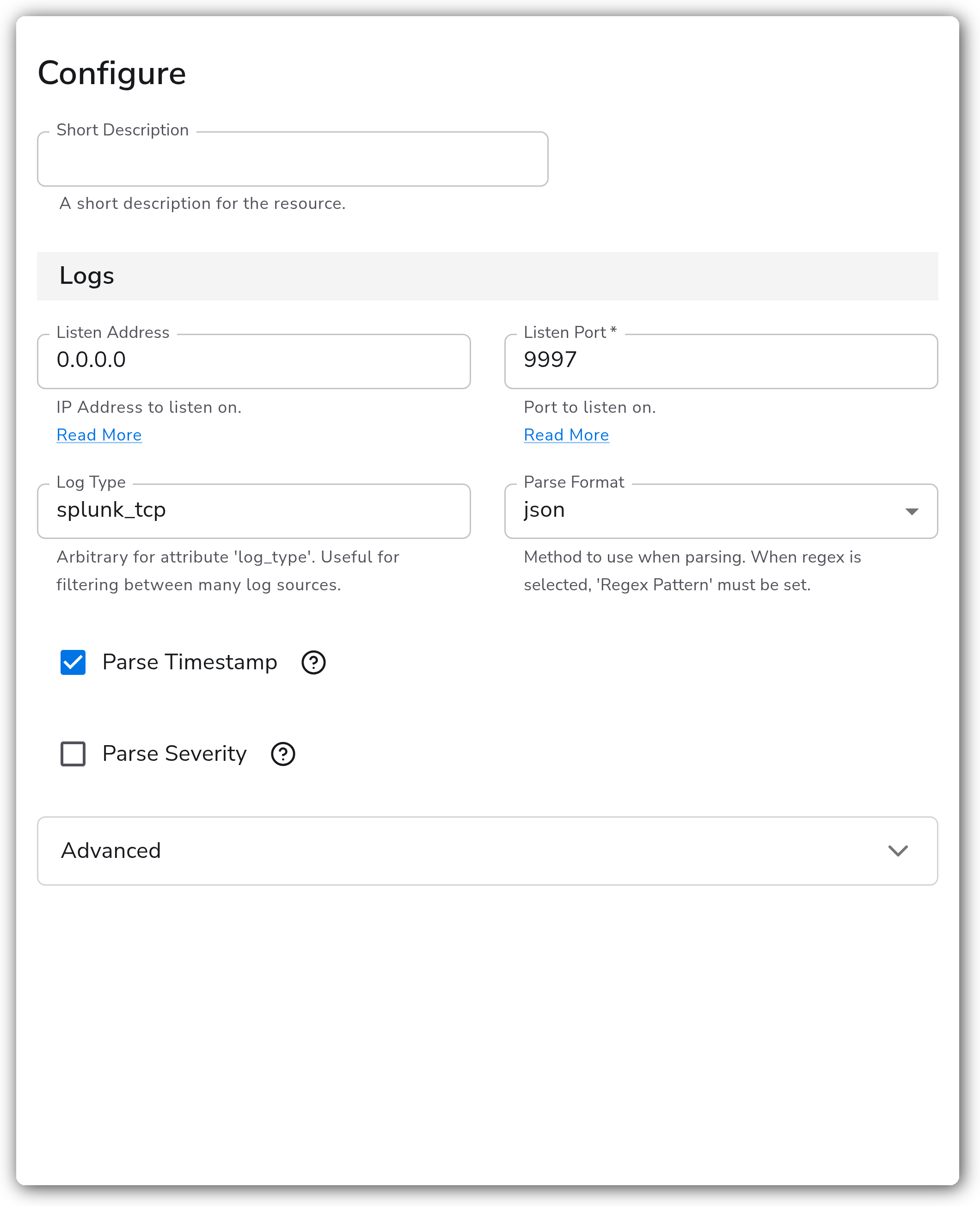
The Splunk (TCP) source runs a TCP listener that receives logs from Splunk universal or heavy forwarders. Incoming records are accepted on a configurable address and port, optionally parsed as JSON or with a regex pattern, and tagged with a `log_type` attribute for downstream filtering.
### Supported Telemetry Types
| Platform | Metrics | Logs | Traces |
| ------------------ | ------- | ---- | ------ |
| Linux | | ✓ | |
| Windows | | ✓ | |
| macOS | | ✓ | |
| Kubernetes Gateway | | ✓ | |
| OpenShift Gateway | | ✓ | |
### Prerequisites
* A Splunk forwarder (universal or heavy) configured to send data to a third-party TCP destination. See [Forward data to third-party systems](https://docs.splunk.com/Documentation/Splunk/latest/Forwarding/Forwarddatatothird-partysystemsd).
* The collector reachable from the forwarder on the configured listen port (default `9997`).
* For Kubernetes Gateway and OpenShift Gateway deployments, a Service that exposes the listen port to the forwarders (see [Configuration Tips](#kubernetes-and-openshift)).
* If TLS is enabled, a TLS certificate and private key reachable on the collector host.
### Configuration
#### General
| Parameter | Type | Default | Description |
| -------------- | ------- | ------------ | ---------------------------------------------------------------------------------- |
| Listen Address | String | `0.0.0.0` | IP address to listen on. |
| Listen Port | Integer | `9997` | Port to listen on. Required. |
| Log Type | String | `splunk_tcp` | Value for the `log_type` attribute. Useful for filtering between many log sources. |
#### Parsing
| Parameter | Type | Default | Description |
| -------------- | ------- | ---------- | ---------------------------------------------------------------------------------------------- |
| Parse Format | Enum | `none` | Method to use when parsing. One of `none`, `json`, `regex`. |
| Regex Pattern | String | | The regex pattern used when parsing log entries. Required when `parse_format` is `regex`. |
| Parse Severity | Boolean | `false` | Whether to parse severity from the log entry. Available when `parse_format` is not `none`. |
| Severity Field | String | `severity` | The field containing the severity in the log entry. Required when `parse_severity` is enabled. |
#### Timestamp
| Parameter | Type | Default | Description |
| ---------------- | -------- | ------------------------ | -------------------------------------------------------------------------------------------------------------------------------------------------------- |
| Parse Timestamp | Boolean | `false` | Whether to parse the timestamp from the log entry. Available when `parse_format` is not `none`. |
| Timestamp Field | String | `timestamp` | The field containing the timestamp in the log entry. Required when `parse_timestamp` is enabled. |
| Timestamp Format | Enum | `RFC3339` | The format of the timestamp. One of `RFC3339`, `ISO8601`, `Epoch`, `Manual`. Available when `parse_timestamp` is enabled. |
| Epoch Layout | Enum | `s` | The layout of the epoch-based timestamp. One of `s`, `ms`, `us`, `ns`, `s.ms`, `s.us`, `s.ns`. Required when `parse_timestamp_format` is `Epoch`. |
| Timestamp Layout | String | `%Y-%m-%dT%H:%M:%S.%f%z` | The strptime layout of the timestamp. Required when `parse_timestamp_format` is `Manual`. |
| Timezone | Timezone | `UTC` | The timezone to use if the timestamp format doesn't include one. Available when `parse_timestamp` is enabled and the format is not `RFC3339` or `Epoch`. |
#### Advanced
| Parameter | Type | Default | Description |
| -------------------- | ------- | ------- | -------------------------------------------------------------------------------------------------------------------------------------------------- |
| Parse To | Enum | `body` | The field the log will be parsed to. One of `body`, `attributes`. Available when `parse_format` is not `none`. |
| Enable TLS | Boolean | `false` | Whether or not to use TLS. |
| TLS Certificate File | String | | Path to the TLS certificate to use for TLS-required connections. Available when TLS is enabled. |
| TLS Private Key File | String | | Path to the TLS private key to use for TLS-required connections. Available when TLS is enabled. |
| Minimum TLS Version | Enum | `1.2` | The minimum TLS version to support. One of `1.3`, `1.2`, `1.1`, `1.0`. 1.0 and 1.1 should not be considered secure. Available when TLS is enabled. |
### Example Configuration
#### Standalone Source
```yaml
apiVersion: bindplane.observiq.com/v1
kind: Source
metadata:
id: splunk_tcp
name: splunk_tcp
spec:
type: splunk_tcp
parameters:
- name: listen_ip
value: '0.0.0.0'
- name: listen_port
value: '9997'
- name: log_type
value: 'splunk_tcp'
- name: parse_format
value: 'json'
- name: parse_timestamp
value: 'true'
- name: timestamp_field
value: 'timestamp'
- name: parse_timestamp_format
value: 'RFC3339'
```
### Configuration Tips
#### Parsing incoming records
* Leave `parse_format` set to `none` to forward raw log bodies. Choose `json` for structured forwarder output, or `regex` when you need to extract fields from a fixed line format. When you select `regex`, `regex_pattern` is required.
* Timestamp and severity parsing only apply once `parse_format` is set to something other than `none`. Enable `parse_timestamp` and point `timestamp_field` at the field carrying event time so records aren't stamped with ingestion time.
#### Kubernetes and OpenShift
* The source supports Kubernetes Gateway and OpenShift Gateway collectors. Set Listen Address to `0.0.0.0` and Listen Port to `9997`.
* Point forwarders at the gateway Service, for example `bindplane-gateway-collector.bindplane-collector.svc.cluster.local:9997`. If the forwarders live outside the cluster, expose the `bindplane-gateway-collector` Service in the `bindplane-collector` namespace through TCP ingress or a custom Service. See [Custom Service](https://docs.bindplane.com/deployment/kubernetes/collector/custom-service).
A matching Splunk forwarder `outputs.conf` looks like:
```ini
[tcpout]
defaultGroup = bindplane-gateway-collector
[tcpout:bindplane-gateway-collector]
server = bindplane-gateway-collector.bindplane-collector.svc.cluster.local:9997
compressed = false
useACK = false
sendCookedData = false
```
### Troubleshooting
**Symptom:** No logs arrive from the forwarder. **Solution:** Confirm the forwarder's `outputs.conf` targets the collector host and the configured listen port, and that the collector is reachable on that port. The default port is `9997`.
**Symptom:** Records arrive but parse to a single unstructured body. **Solution:** Set `parse_format` to `json` or `regex` to match the forwarder output. For `regex`, make sure `regex_pattern` matches the incoming line format.
**Symptom:** Log timestamps reflect ingestion time instead of event time. **Solution:** Set `parse_format` to a value other than `none`, enable `parse_timestamp`, and set `timestamp_field` to the field containing the event time. Match `parse_timestamp_format` to the format of that field.
### Related Resources
* [Forward data to third-party systems (Splunk)](https://docs.splunk.com/Documentation/Splunk/latest/Forwarding/Forwarddatatothird-partysystemsd)
* [Configure forwarder outputs (outputs.conf)](https://docs.splunk.com/Documentation/Splunk/latest/Forwarding/Configureforwardersoutputs)
* [Custom Service for Kubernetes collectors](https://docs.bindplane.com/deployment/kubernetes/collector/custom-service)
---
# Agent Instructions
This documentation is published with GitBook. GitBook is the documentation platform designed so that both humans and AI agents can read, navigate, and reason over technical content effectively. Learn more at gitbook.com.
## Querying This Documentation
If you need additional information that is not directly available in this page, you can query the documentation by asking a question.
Perform an HTTP GET request on the following URL with the `ask` and `goal` query parameters:
```
GET https://docs.bindplane.com/integrations/sources/splunk-tcp.md?ask=&goal=
```
`ask` is the immediate question: it should be specific, self-contained, and written in natural language.
`goal` is what the user is ultimately trying to achieve, the reason they need the answer. Sharing it helps GitBook give you a better, more relevant answer. A goal is most helpful when it describes the outcome the user wants rather than restating the question. For example, with `ask=how do I create an API token`, a goal like `automate deployments from our CI pipeline` lets GitBook tailor the answer to that use case.
The response will contain a direct answer to the question and relevant excerpts and sources from the documentation.
Use this mechanism when the answer is not explicitly present in the current page, you need clarification or additional context, or you want to retrieve related documentation sections.