> For the complete documentation index, see [llms.txt](https://docs.bindplane.com/llms.txt). Markdown versions of documentation pages are available by appending `.md` to page URLs; this page is available as [Markdown](https://docs.bindplane.com/integrations/sources/elasticsearch.md).
# Elasticsearch
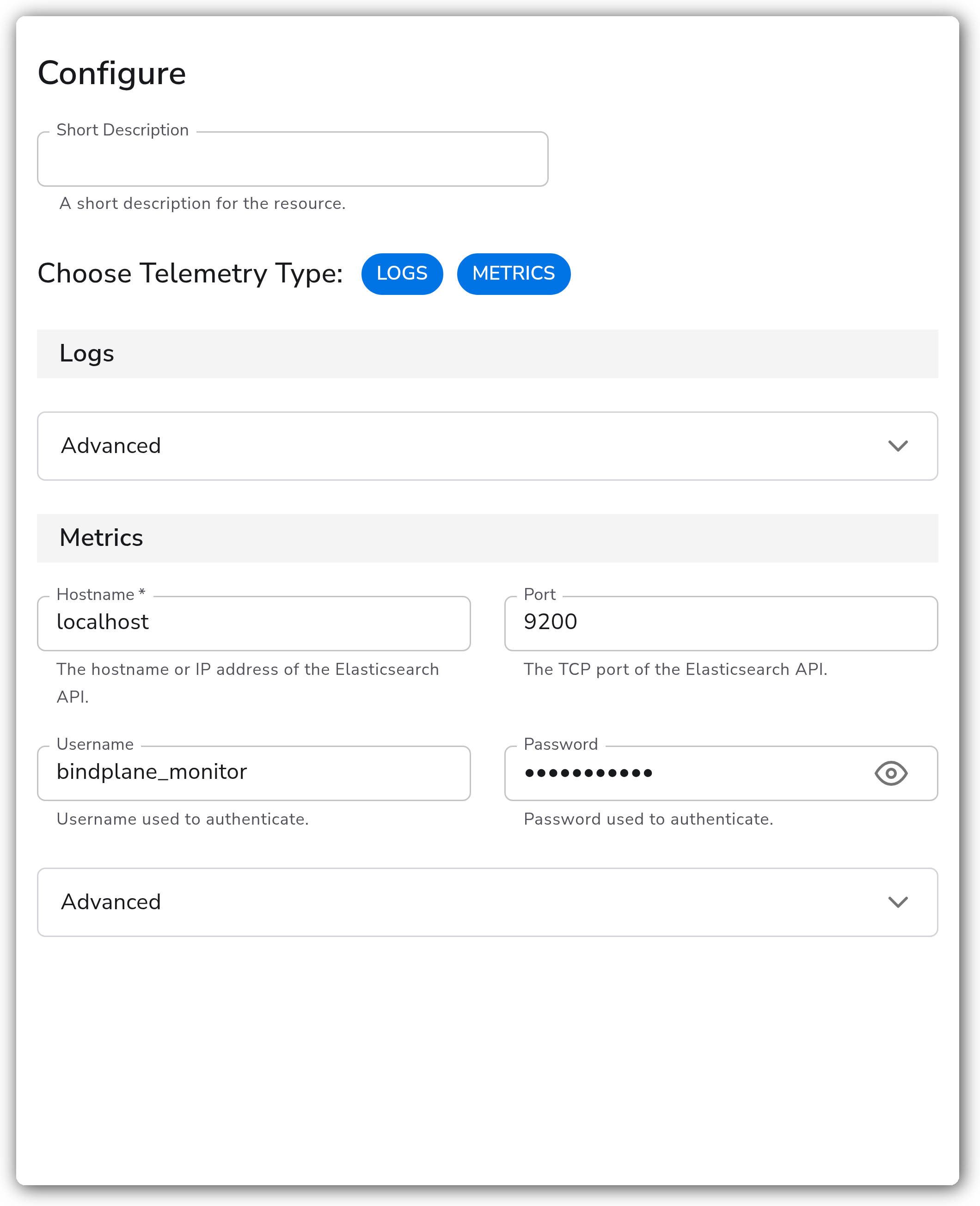
The Elasticsearch source collects metrics and logs from Elasticsearch. Metrics are scraped from the Elasticsearch stats API (node, cluster, OS, and JVM metrics) over HTTP or HTTPS using an optional monitoring user. Logs are read from the Elasticsearch JSON log files (server, deprecation, slow logs, audit) and the garbage collection log files. Each signal can be enabled independently with the Choose Telemetry Type selector.
### Supported Telemetry Types
| Platform | Metrics | Logs | Traces |
| -------- | ------- | ---- | ------ |
| Linux | ✓ | ✓ | |
| Windows | ✓ | ✓ | |
| macOS | ✓ | ✓ | |
### Prerequisites
This source supports Elasticsearch versions 7.9 and later.
**For metrics:**
* A reachable Elasticsearch HTTP API endpoint (default `localhost:9200`) from the collector host.
* If Elasticsearch security features are enabled, a monitoring user with the minimum required privileges. The receiver scrapes read-only cluster, node, and index stats, so the user needs either the `monitor` or `manage` cluster privilege. Grant the least-privileged option (`monitor`). See the [Elasticsearch security privileges reference](https://www.elastic.co/docs/reference/elasticsearch/security-privileges).
* If TLS is enabled, the certificate authority file to validate the server certificate (for strict verification), and a client certificate and key if mutual TLS is required.
**For logs:**
* Elasticsearch configured to write JSON-formatted logs and garbage collection logs to disk (the default file paths are under `/var/log/elasticsearch/`).
* The collector running on the Elasticsearch host with read access to those log files. Logs are read locally per node, so the collector is typically installed on each node.
### Configuration
**Telemetry**
| Parameter | Type | Required | Default | Description |
| --------------------- | ------------------ | -------- | --------------------- | ---------------------------------------------------------------- |
| Choose Telemetry Type | Telemetry Selector | No | `["Logs", "Metrics"]` | Which signals this source collects. Valid values: Logs, Metrics. |
**Metrics**
| Parameter | Type | Required | Default | Description |
| --------- | ------- | -------- | ----------- | ------------------------------------------------------------------------------------ |
| Hostname | String | Yes | `localhost` | The hostname or IP address of the Elasticsearch API. Shown when Metrics is selected. |
| Port | Integer | No | `9200` | The TCP port of the Elasticsearch API. Shown when Metrics is selected. |
| Username | String | No | *(empty)* | Username used to authenticate. Shown when Metrics is selected. |
| Password | String | No | *(empty)* | Password used to authenticate. Sensitive value. Shown when Metrics is selected. |
**Advanced**
| Parameter | Type | Required | Default | Description |
| ---------------------------- | -------------------- | -------- | ---------------------------------------------------------------------------------------------------------------------------------------------------------------------------------------------------------------------------------------- | --------------------------------------------------------------------------------------------------------------------------------------------------------------------------------------------------------------------------------------------------------------------------------------------------------------------------------------------------- |
| Collection Interval | Integer | No | `60` | How often (seconds) to scrape for metrics. Shown when Metrics is selected. |
| Collection Scope | Strings | No | `_node` | Filters that define which nodes are scraped for node-level metrics. Use `_node` if the collector is installed on every node, or `_all` if a single collector scrapes the entire cluster. See the [cluster nodes reference](https://www.elastic.co/guide/en/elasticsearch/reference/7.9/cluster.html#cluster-nodes). Shown when Metrics is selected. |
| Disable Cluster Metrics | Boolean | No | `false` | Enable to disable the collection of cluster-level metrics. Shown when Metrics is selected. |
| Start At | Enum: beginning, end | No | `end` | Start reading logs from `beginning` or `end`. Shown when Logs is selected. |
| Parse | Boolean | No | `true` | Parses the log fields into structured data. Shown when Logs is selected. |
| System Log Paths | Strings | No | `/var/log/elasticsearch/*_server.json`, `/var/log/elasticsearch/*_deprecation.json`, `/var/log/elasticsearch/*_index_search_slowlog.json`, `/var/log/elasticsearch/*_index_indexing_slowlog.json`, `/var/log/elasticsearch/*_audit.json` | File paths for the JSON formatted logs. Shown when Logs is selected. |
| Garbage Collection Log Paths | Strings | No | `/var/log/elasticsearch/gc.log*` | File paths for the garbage collection logs. Shown when Logs is selected. |
| Disable Metrics | Metrics | No | *(empty)* | Toggle individual metrics on and off across the Breaker, Cluster, Node, OS, and JVM categories. Shown when Metrics is selected. |
**TLS (Advanced)**
| Parameter | Type | Required | Default | Description |
| ----------------------------------- | ------- | -------- | --------- | ------------------------------------------------------------------------------------------------------------------------- |
| Enable TLS | Boolean | No | `true` | Whether or not to use TLS when connecting to Elasticsearch. Shown when Metrics is selected. |
| Strict TLS Certificate Verification | Boolean | No | `false` | Enable to require TLS certificate verification. Shown when Enable TLS is true. |
| TLS Certificate Authority File | String | No | *(empty)* | Certificate authority used to validate TLS certificates. Shown when Strict TLS Certificate Verification is true. |
| Mutual TLS Authentication | Boolean | No | `false` | Enable to require TLS mutual authentication. Shown when Strict TLS Certificate Verification is true. |
| TLS Client Certificate File | String | Yes | *(empty)* | A TLS certificate used for client authentication, if mutual TLS is enabled. Shown when Mutual TLS Authentication is true. |
| TLS Client Private Key File | String | Yes | *(empty)* | A TLS private key used for client authentication, if mutual TLS is enabled. Shown when Mutual TLS Authentication is true. |
### Examples
#### Collect metrics from a secured cluster over HTTPS
This source scrapes a single Elasticsearch node over HTTPS using a monitoring user, with strict certificate verification against a custom CA. Cluster-level metrics are collected because this collector is the only one scraping the cluster, so the collection scope is set to `_all`.
```yaml
apiVersion: bindplane.observiq.com/v1
kind: Source
metadata:
name: elasticsearch
spec:
type: elasticsearch
parameters:
- name: telemetry_types
value:
- Metrics
- name: hostname
value: es-node-1.internal
- name: port
value: 9200
- name: username
value: bindplane_monitor
- name: password
value: "((secret))"
- name: nodes
value:
- _all
- name: enable_tls
value: true
- name: strict_tls_verify
value: true
- name: ca_file
value: /etc/otel/certs/elastic-ca.crt
```
### Configuration Tips
* Set Collection Scope to `_node` when the collector runs on every Elasticsearch node, or `_all` when a single collector scrapes the whole cluster. Leaving it at `_node` while scraping remotely collects metrics only for the local node.
* When connecting to a cluster without TLS, disable Enable TLS so the endpoint is built with `http` instead of `https`.
* Use the Disable Metrics control to turn off metric categories you do not need (for example JVM or OS metrics) to reduce ingest volume.
### Troubleshooting
#### Connection refused
Symptoms: the receiver cannot reach the Elasticsearch API.
Solutions:
1. Confirm the Hostname and Port match a reachable Elasticsearch HTTP listener (default `9200`).
2. Verify the collector host can reach that port (firewall and network rules).
#### Authentication failed
Symptoms: the stats API returns 401 or 403 errors.
Solutions:
1. Confirm the Username and Password are correct.
2. Ensure the monitoring user has the `monitor` (or `manage`) cluster privilege. See the [Elasticsearch security privileges reference](https://www.elastic.co/docs/reference/elasticsearch/security-privileges).
#### TLS handshake failure
Symptoms: the connection fails during the TLS handshake.
Solutions:
1. If using strict verification, set the TLS Certificate Authority File to a CA that validates the server certificate.
2. For mutual TLS, provide both the TLS Client Certificate File and TLS Client Private Key File.
#### No logs collected
Symptoms: log telemetry is empty.
Solutions:
1. Verify the System Log Paths and Garbage Collection Log Paths match where Elasticsearch writes its logs.
2. Confirm the collector has read access to those files, and set Start At to `beginning` to read pre-existing log content.
### Standalone Source
```yaml
apiVersion: bindplane.observiq.com/v1
kind: Source
metadata:
name: elasticsearch
spec:
type: elasticsearch
parameters:
- name: telemetry_types
value:
- Logs
- Metrics
- name: hostname
value: localhost
- name: port
value: 9200
- name: username
value: bindplane_monitor
- name: password
value: "((secret))"
- name: collection_interval
value: 60
- name: nodes
value:
- _node
- name: skip_cluster_metrics
value: false
- name: enable_tls
value: true
- name: strict_tls_verify
value: false
- name: json_log_paths
value:
- /var/log/elasticsearch/*_server.json
- /var/log/elasticsearch/*_deprecation.json
- /var/log/elasticsearch/*_index_search_slowlog.json
- /var/log/elasticsearch/*_index_indexing_slowlog.json
- /var/log/elasticsearch/*_audit.json
- name: gc_log_paths
value:
- /var/log/elasticsearch/gc.log*
- name: start_at
value: end
- name: parse
value: true
```
### Related Resources
* [Elasticsearch security privileges reference](https://www.elastic.co/docs/reference/elasticsearch/security-privileges)
* [OpenTelemetry elasticsearchreceiver](https://github.com/open-telemetry/opentelemetry-collector-contrib/tree/main/receiver/elasticsearchreceiver)
---
# Agent Instructions
This documentation is published with GitBook. GitBook is the documentation platform designed so that both humans and AI agents can read, navigate, and reason over technical content effectively. Learn more at gitbook.com.
## Querying This Documentation
If you need additional information that is not directly available in this page, you can query the documentation by asking a question.
Perform an HTTP GET request on the following URL with the `ask` and `goal` query parameters:
```
GET https://docs.bindplane.com/integrations/sources/elasticsearch.md?ask=&goal=
```
`ask` is the immediate question: it should be specific, self-contained, and written in natural language.
`goal` is what the user is ultimately trying to achieve, the reason they need the answer. Sharing it helps GitBook give you a better, more relevant answer. A goal is most helpful when it describes the outcome the user wants rather than restating the question. For example, with `ask=how do I create an API token`, a goal like `automate deployments from our CI pipeline` lets GitBook tailor the answer to that use case.
The response will contain a direct answer to the question and relevant excerpts and sources from the documentation.
Use this mechanism when the answer is not explicitly present in the current page, you need clarification or additional context, or you want to retrieve related documentation sections.