> For the complete documentation index, see [llms.txt](https://docs.bindplane.com/llms.txt). Markdown versions of documentation pages are available by appending `.md` to page URLs; this page is available as [Markdown](https://docs.bindplane.com/integrations/sources/kafka-cluster.md).
# Kafka Cluster
The Kafka Cluster source collects cluster-level metrics from an Apache Kafka deployment. It connects to one or more brokers over the native Kafka protocol and scrapes broker, topic, and consumer-group metrics. It does not read from a JMX endpoint, so no JMX port or metrics JAR is required. Optional SASL, Kerberos, basic, and TLS authentication are supported.
### Supported Telemetry Types
| Platform | Metrics | Logs | Traces |
| -------- | ------- | ---- | ------ |
| Linux | ✓ | | |
| Windows | ✓ | | |
| macOS | ✓ | | |
### Prerequisites
* One or more reachable Kafka brokers, addressed as `host:port`. The collector scrapes the cluster through this broker list.
* Network reachability from the collector to each broker's listener port (default `9092`).
* A Kafka client identity the broker accepts. If your cluster requires authentication, you need credentials for one of the supported mechanisms (basic, SASL, or Kerberos) and any TLS material the listener requires.
* If the broker listener enforces TLS, the CA certificate that signed the broker certificates, plus a client certificate and private key when the listener requires mutual TLS.
The source uses Kafka's standard client metadata and metrics APIs, so no broker-side JMX configuration is needed. For background on what Kafka exposes and how, see the [Apache Kafka monitoring documentation](https://kafka.apache.org/documentation/#monitoring).
### Configuration
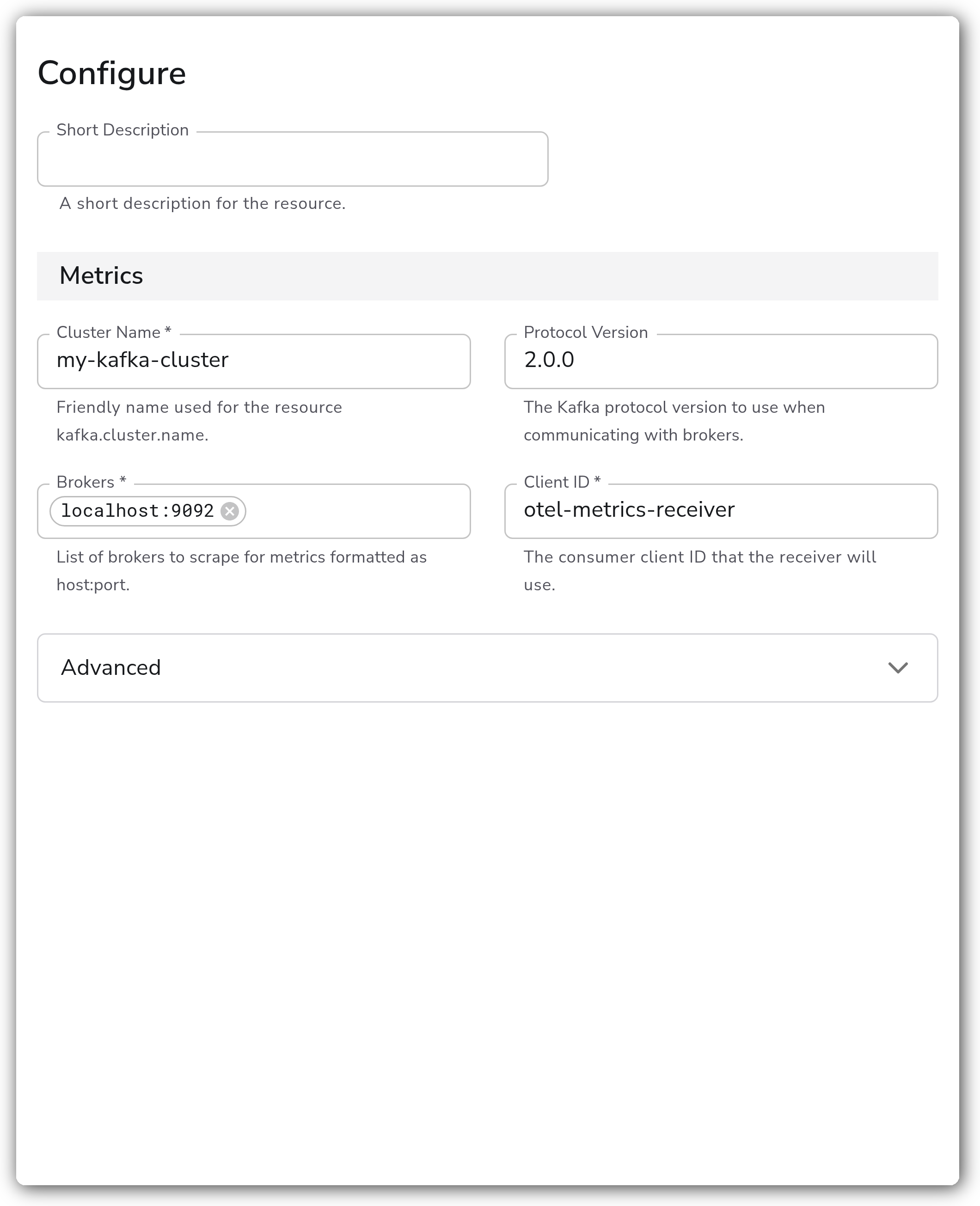
**Metrics**
| Parameter | Type | Required | Default | Description |
| ------------------- | ---------------------------------------------------------------- | -------- | ----------------------- | ------------------------------------------------------------------ |
| Cluster Name | String | Yes | *(empty)* | Friendly name used for the resource `kafka.cluster.name`. |
| Protocol Version | Enum: `2.2.1`, `2.2.0`, `2.0.0`, `1.0.0` (custom values allowed) | No | `2.0.0` | The Kafka protocol version to use when communicating with brokers. |
| Brokers | Strings | Yes | `localhost:9092` | List of brokers to scrape for metrics, formatted as `host:port`. |
| Client ID | String | Yes | `otel-metrics-receiver` | The consumer client ID that the receiver will use. |
| Collection Interval | Integer | No | `60` | How often (seconds) to scrape for metrics. Advanced option. |
**Authentication**
| Parameter | Type | Required | Default | Description |
| --------------------- | ----------------------------------------------- | -------- | ---------------------------- | ------------------------------------------------------------------------------------------------------------------------------------------- |
| Enable Authentication | Boolean | No | `false` | Enable to authenticate to the brokers. Advanced option. Reveals the authentication parameters below. |
| Auth Type | Enum: `basic`, `sasl`, `kerberos`, `tls` | No | `basic` | Authentication mechanism to use. Advanced option. Shown when Enable Authentication is `true`. Each value reveals its own credential fields. |
| Username | String | Yes | *(empty)* | Basic-auth username. Shown when Enable Authentication is `true` and Auth Type is `basic`. Advanced option. |
| Password | String | Yes | *(empty)* | Basic-auth password. Shown when Enable Authentication is `true` and Auth Type is `basic`. Advanced option. |
| Username | String | Yes | *(empty)* | SASL username. Shown when Enable Authentication is `true` and Auth Type is `sasl`. Advanced option. |
| Password | String | Yes | *(empty)* | SASL password. Shown when Enable Authentication is `true` and Auth Type is `sasl`. Advanced option. |
| Mechanism | Enum: `SCRAM-SHA-256`, `SCRAM-SHA-512`, `PLAIN` | No | `SCRAM-SHA-256` | SASL mechanism. Shown when Enable Authentication is `true` and Auth Type is `sasl`. Advanced option. |
| Service Name | String | Yes | *(empty)* | Kerberos service name. Shown when Enable Authentication is `true` and Auth Type is `kerberos`. Advanced option. |
| Realm | String | Yes | *(empty)* | Kerberos realm. Shown when Enable Authentication is `true` and Auth Type is `kerberos`. Advanced option. |
| Config File | String | Yes | `/etc/krb5.conf` | Path to the Kerberos configuration file. Shown when Enable Authentication is `true` and Auth Type is `kerberos`. Advanced option. |
| Kerberos Auth Type | Enum: `keytab`, `basic` | No | `keytab` | How to authenticate to Kerberos. Shown when Enable Authentication is `true` and Auth Type is `kerberos`. Advanced option. |
| Keytab File | String | Yes | `/etc/security/kafka.keytab` | Path to the Kerberos keytab file. Shown when Auth Type is `kerberos` and Kerberos Auth Type is `keytab`. Advanced option. |
| Username | String | Yes | *(empty)* | Kerberos username. Shown when Auth Type is `kerberos` and Kerberos Auth Type is `basic`. Advanced option. |
| Password | String | Yes | *(empty)* | Kerberos password. Shown when Auth Type is `kerberos` and Kerberos Auth Type is `basic`. Advanced option. |
**TLS**
| Parameter | Type | Required | Default | Description |
| ---------------------------------- | ------- | -------- | --------- | ---------------------------------------------------------------------------------------------------------- |
| Enable TLS | Boolean | No | `false` | Whether or not to use TLS. Advanced option. Reveals the TLS parameters below. |
| Skip TLS Certificate Verification | Boolean | No | `false` | Enable to skip TLS certificate verification. Shown when Enable TLS is `true`. Advanced option. |
| TLS Certificate Authority File | String | No | *(empty)* | Certificate authority used to validate TLS certificates. Shown when Enable TLS is `true`. Advanced option. |
| Mutual TLS Client Certificate File | String | No | *(empty)* | A TLS certificate used for client authentication. Shown when Enable TLS is `true`. Advanced option. |
| TLS Client Private Key File | String | No | *(empty)* | A TLS private key used for client authentication. Shown when Enable TLS is `true`. Advanced option. |
### Examples
#### Scraping a multi-broker cluster with SASL/SCRAM
This source scrapes a three-broker cluster, authenticates with SASL using SCRAM-SHA-512, and tags every metric with the cluster name `prod-east`.
```yaml
apiVersion: bindplane.observiq.com/v1
kind: Source
metadata:
name: kafka-cluster-prod-east
spec:
type: kafka_cluster
parameters:
- name: cluster_name
value: prod-east
- name: brokers
value:
- broker-1.example.com:9092
- broker-2.example.com:9092
- broker-3.example.com:9092
- name: protocol_version
value: "2.2.1"
- name: enable_auth
value: true
- name: auth_type
value: sasl
- name: sasl_username
value: monitoring
- name: sasl_password
value: REDACTED
- name: sasl_mechanism
value: SCRAM-SHA-512
```
### Configuration Tips
* Set a meaningful **Cluster Name** per deployment. Its value is written to the `kafka.cluster.name` resource attribute, which is how you distinguish metrics from multiple Kafka clusters in the same pipeline.
* List multiple **Brokers** for resiliency. The receiver uses the list for cluster metadata discovery, so additional entries keep collection working if one broker is unreachable.
* Pin the **Protocol Version** to a value your brokers support. The field is creatable, so you can enter a version that is not in the dropdown if your cluster runs a newer release.
### Troubleshooting
**No metrics appear and the collector logs a connection error**
**Symptoms:** The collector reports connection refused or dial timeouts to the broker address, and no `kafka.*` metrics are produced.
**Solution:** Confirm the **Brokers** list uses reachable `host:port` values and that the collector host can reach each broker's listener port (default `9092`). Check firewall and security-group rules between the collector and the brokers.
**Authentication or authorization failures**
**Symptoms:** The collector logs SASL, Kerberos, or authorization errors and fails to fetch metadata.
**Solution:** Verify the credentials for the selected **Auth Type** and that the account is permitted to read cluster, topic, and consumer-group metadata. For SASL, confirm the **Mechanism** matches the broker's configured mechanism. For Kerberos, confirm the **Config File**, **Realm**, and **Service Name** are correct and that the keytab or username/password is valid.
**TLS handshake failures**
**Symptoms:** The collector logs a TLS handshake or certificate verification error when connecting to the brokers.
**Solution:** Ensure **Enable TLS** matches the broker listener. Provide the **TLS Certificate Authority File** that signed the broker certificates, and a client certificate and key if the listener requires mutual TLS. As a temporary diagnostic only, **Skip TLS Certificate Verification** bypasses verification; do not leave it enabled in production.
### Standalone Source
```yaml
apiVersion: bindplane.observiq.com/v1
kind: Source
metadata:
name: kafka-cluster
spec:
type: kafka_cluster
parameters:
- name: cluster_name
value: my-kafka-cluster
- name: brokers
value:
- localhost:9092
- name: protocol_version
value: "2.0.0"
- name: client_id
value: otel-metrics-receiver
- name: collection_interval
value: 60
```
### Related Resources
* [Apache Kafka monitoring documentation](https://kafka.apache.org/documentation/#monitoring)
* [OpenTelemetry Kafka Metrics Receiver (`kafkametricsreceiver`)](https://github.com/open-telemetry/opentelemetry-collector-contrib/tree/main/receiver/kafkametricsreceiver)
---
# Agent Instructions
This documentation is published with GitBook. GitBook is the documentation platform designed so that both humans and AI agents can read, navigate, and reason over technical content effectively. Learn more at gitbook.com.
## Querying This Documentation
If you need additional information that is not directly available in this page, you can query the documentation by asking a question.
Perform an HTTP GET request on the following URL with the `ask` and `goal` query parameters:
```
GET https://docs.bindplane.com/integrations/sources/kafka-cluster.md?ask=&goal=
```
`ask` is the immediate question: it should be specific, self-contained, and written in natural language.
`goal` is what the user is ultimately trying to achieve, the reason they need the answer. Sharing it helps GitBook give you a better, more relevant answer. A goal is most helpful when it describes the outcome the user wants rather than restating the question. For example, with `ask=how do I create an API token`, a goal like `automate deployments from our CI pipeline` lets GitBook tailor the answer to that use case.
The response will contain a direct answer to the question and relevant excerpts and sources from the documentation.
Use this mechanism when the answer is not explicitly present in the current page, you need clarification or additional context, or you want to retrieve related documentation sections.