> For the complete documentation index, see [llms.txt](https://docs.bindplane.com/llms.txt). Markdown versions of documentation pages are available by appending `.md` to page URLs; this page is available as [Markdown](https://docs.bindplane.com/integrations/sources/filestats.md).
# Filestats
The File Stats source collects metrics about files and folders on the collector's host. It watches paths matched by a glob pattern and reports metrics such as size, modification time, and access time on a configurable interval.
### Supported Telemetry Types
| Platform | Metrics | Logs | Traces |
| -------- | ------- | ---- | ------ |
| Linux | ✓ | | |
| Windows | ✓ | | |
| macOS | ✓ | | |
### Prerequisites
* A collector running on the host whose files you want to monitor (Linux, Windows, or macOS).
* The collector process must have read access to the directories and files matched by the glob path. On Linux and macOS this includes traversal (execute) permission on each parent directory.
### Configuration
#### General
| Parameter | Type | Default | Description |
| ------------- | ------- | ------- | ------------------------------------------------------------------------------------ |
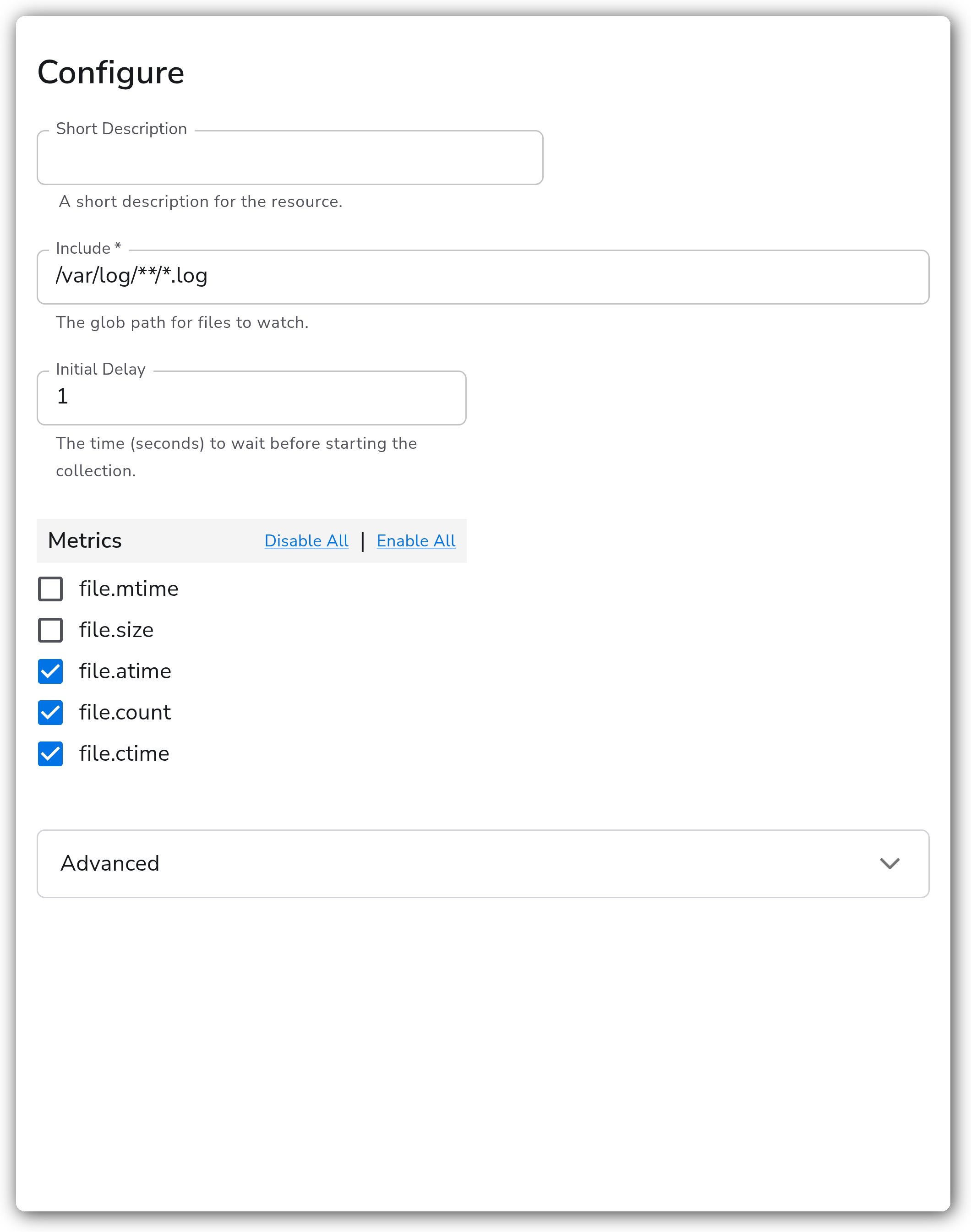
| Include | String | | The glob path for files to watch. Required. |
| Initial Delay | Integer | `1` | The time (seconds) to wait before starting the collection. |
| metrics | Metrics | | Which metrics to collect for the matched files and folders. See [Metrics](#metrics). |
#### Advanced
| Parameter | Type | Default | Description |
| --------------------------- | ------- | ------- | ------------------------------------------------------------------- |
| Include File Path Attribute | Boolean | `false` | Whether to add the file path as the resource attribute `file.path`. |
| Collection Interval | Integer | `60` | How often (seconds) to scrape for metrics. |
#### Metrics
The `metrics` parameter selects which metrics are collected. `file.mtime` and `file.size` are enabled by default; `file.atime`, `file.count`, and `file.ctime` are disabled by default and must be enabled explicitly.
| Name | Unit | Type | Default | Description |
| ------------ | --------- | ------- | -------- | ------------------------------------------------------------------------------------------------------------------------------------------------------------------------------ |
| `file.mtime` | `seconds` | `Sum` | Enabled | Elapsed time since the last modification of the file or folder, in seconds since Epoch. |
| `file.size` | `bytes` | `Gauge` | Enabled | The size of the file or folder, in bytes. |
| `file.atime` | `seconds` | `Sum` | Disabled | Elapsed time since the last access of the file or folder, in seconds since Epoch. |
| `file.count` | `int` | `Gauge` | Disabled | The number of files matched. |
| `file.ctime` | `seconds` | `Sum` | Disabled | Elapsed time since the last change of the file or folder, in seconds since Epoch. Tracks metadata changes such as permissions or renames in addition to content modifications. |
### Example Configuration
#### Standalone Source
```yaml
apiVersion: bindplane.observiq.com/v1
kind: Source
metadata:
id: filestats
name: filestats
spec:
type: filestats
parameters:
- name: include
value: '/var/log/**/*.log'
- name: initial_delay
value: '1'
- name: collection_interval
value: '60'
- name: include_file_path_attribute
value: 'true'
```
### Configuration Tips
#### Glob and path patterns
* `include` accepts a single glob path. Use `**` to match files recursively across subdirectories, for example `/var/log/**/*.log`.
* Match a single file by giving its full path, for example `/var/log/syslog`.
* On Windows, use the platform's path style, for example `C:\\inetpub\\logs\\**\\*.log`.
* The source reports metrics for both files and matched folders, so a broad glob can produce a high series count. Narrow the pattern to the files you actually need to monitor.
#### Choosing metrics and interval
* Enable `file.count` when you want to track how many files match the glob, for example to detect log rotation or directory growth.
* Enable `file.atime` and `file.ctime` only when access time or metadata-change tracking is required, as they add series per matched file.
* `collection_interval` defaults to 60 seconds. Lower it for more responsive monitoring at the cost of more frequent disk stat calls.
### Troubleshooting
**Symptom:** No metrics are produced, or the source reports nothing for a path that exists. **Solution:** Confirm the `include` glob matches the intended files and uses the correct path style for the platform. Verify the collector process has read and directory-traversal permission on the path.
**Symptom:** `file.atime`, `file.count`, or `file.ctime` metrics are missing. **Solution:** These metrics are disabled by default. Enable them in the `metrics` parameter (Web Interface) so the receiver emits them.
**Symptom:** The metric count is much higher than expected. **Solution:** A broad glob such as `/var/log/**` matches every nested file and folder, and each match emits its own metrics. Narrow the `include` pattern to reduce the series count.
### Related Resources
* [Bindplane Sources documentation](https://docs.bindplane.com/resources/sources)
---
# Agent Instructions
This documentation is published with GitBook. GitBook is the documentation platform designed so that both humans and AI agents can read, navigate, and reason over technical content effectively. Learn more at gitbook.com.
## Querying This Documentation
If you need additional information that is not directly available in this page, you can query the documentation by asking a question.
Perform an HTTP GET request on the following URL with the `ask` and `goal` query parameters:
```
GET https://docs.bindplane.com/integrations/sources/filestats.md?ask=&goal=
```
`ask` is the immediate question: it should be specific, self-contained, and written in natural language.
`goal` is what the user is ultimately trying to achieve, the reason they need the answer. Sharing it helps GitBook give you a better, more relevant answer. A goal is most helpful when it describes the outcome the user wants rather than restating the question. For example, with `ask=how do I create an API token`, a goal like `automate deployments from our CI pipeline` lets GitBook tailor the answer to that use case.
The response will contain a direct answer to the question and relevant excerpts and sources from the documentation.
Use this mechanism when the answer is not explicitly present in the current page, you need clarification or additional context, or you want to retrieve related documentation sections.