> For the complete documentation index, see [llms.txt](https://docs.bindplane.com/llms.txt). Markdown versions of documentation pages are available by appending `.md` to page URLs; this page is available as [Markdown](https://docs.bindplane.com/integrations/sources/filelog.md).
# Filelog
The File source tails one or more log files on the collector host and streams their contents as log records. It uses the OpenTelemetry filelog receiver to follow files matched by glob patterns, track read offsets across restarts, and optionally reassemble multiline entries. This version does not parse log content itself, so pair it with a parsing processor when you need structured fields.
### Supported Telemetry Types
| Platform | Metrics | Logs | Traces |
| -------- | ------- | ---- | ------ |
| Linux | | ✓ | |
| Windows | | ✓ | |
| macOS | | ✓ | |
| AIX | | ✓ | |
### Prerequisites
* The collector must run on the host where the log files live, with read access to the configured paths.
* For `delete_after_read`, the collector must also have permission to delete the matched files.
{% hint style="danger" %}
**Warning**
`delete_after_read` deletes every file that matches the configured glob patterns after it is read. Combined with broad globbing, this can delete more than intended. Use it with care and scope the file paths tightly.
{% endhint %}
### Configuration
#### General
| Parameter | Type | Default | Description |
| -------------------- | ------- | ------- | --------------------------------------------------------------------------------- |
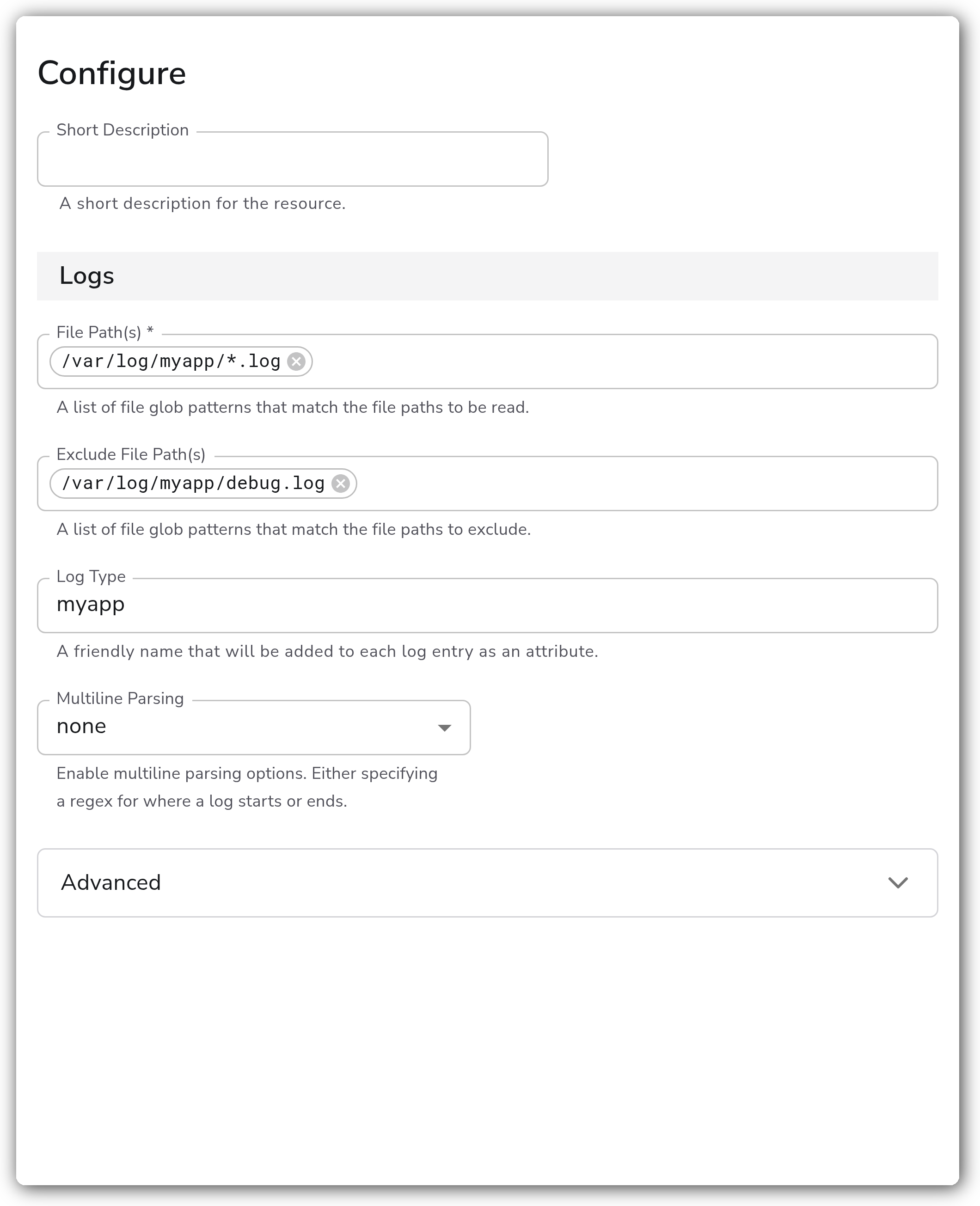
| File Path(s) | Strings | `[]` | A list of file glob patterns that match the file paths to be read. Required. |
| Exclude File Path(s) | Strings | `[]` | A list of file glob patterns that match the file paths to exclude. |
| Log Type | String | `file` | A friendly name that will be added to each log entry as the `log_type` attribute. |
#### Multiline Parsing
| Parameter | Type | Default | Description |
| ----------------------- | ------ | ------- | ------------------------------------------------------------------------------------------------------------------- |
| Multiline Parsing | Enum | `none` | Enable multiline parsing. One of `none`, `specify line start`, or `specify line end`. |
| Multiline Start Pattern | String | | Regex pattern that matches the beginning of a log entry. Required when `multiline_parsing` is `specify line start`. |
| Multiline End Pattern | String | | Regex pattern that matches the end of a log entry. Required when `multiline_parsing` is `specify line end`. |
#### Advanced
| Parameter | Type | Default | Description |
| ------------------------------------ | -------- | ------- | ------------------------------------------------------------------------------------------------------------------------ |
| Include File Name Attribute | Boolean | `true` | Whether to add the file name as the attribute `log.file.name`. |
| Include File Path Attribute | Boolean | `false` | Whether to add the file path as the attribute `log.file.path`. |
| Include File Name Resolved Attribute | Boolean | `false` | Whether to add the file name after symlink resolution as the attribute `log.file.name_resolved`. |
| Include File Path Resolved Attribute | Boolean | `false` | Whether to add the file path after symlink resolution as the attribute `log.file.path_resolved`. |
| Delete After Read | Boolean | `false` | Whether files should be deleted after they are read. Only available when `start_at` is not `end`. See the warning above. |
| Encoding | Enum | `utf-8` | The encoding of the file being read. One of `nop`, `utf-8`, `utf-16le`, `utf-16be`, `ascii`, or `big5`. |
| Compression | Enum | `none` | The compression format of the file being read. One of `none` or `gzip`. |
| Filesystem Poll Interval | Integer | `200` | The duration in milliseconds between filesystem polls. |
| Force Flush Period | Duration | `500ms` | Time since the last read after which buffered logs are sent to the pipeline. `0` disables forced flushing. Required. |
| Max Log Size | String | `1MiB` | The maximum size of a log entry to read. Larger entries are truncated. Required. |
| Max Concurrent Files | Integer | `1024` | The maximum number of files from which logs are read concurrently. |
| Start At | Enum | `end` | Start reading logs from `beginning` or `end`. |
| Fingerprint size | String | `1kb` | The size of the file fingerprint used to distinguish unique files. |
#### File Offset Storage
| Parameter | Type | Default | Description |
| -------------------------- | ------- | ------------------------------------ | ----------------------------------------------------------------------------------------------------------------------------- |
| Enable File Offset Storage | Boolean | `true` | When enabled, the current position in a file is saved to disk so reading resumes where it left off after a collector restart. |
| Offset Storage Directory | String | `${OIQ_OTEL_COLLECTOR_HOME}/storage` | The directory where the offset storage file is created. Applies when `enable_offset_storage` is `true`. |
#### Retry on Failure
| Parameter | Type | Default | Description |
| ----------------------- | ------- | ------- | -------------------------------------------------------------------------------------------------------------- |
| Enable Retry on Failure | Boolean | `false` | Attempt to resend telemetry that failed to transmit to the destination. |
| Initial interval | Integer | `1` | Time in seconds to wait after the first failure before retrying. Applies when retry on failure is enabled. |
| Max interval | Integer | `30` | The upper bound in seconds on backoff. Applies when retry on failure is enabled. |
| Max elapsed time | Integer | `300` | The maximum time in seconds spent retrying a batch before giving up. Applies when retry on failure is enabled. |
#### File Sorting
| Parameter | Type | Default | Description |
| ------------------------ | --------- | ------- | ---------------------------------------------------------------------------------------------------------------------------------------------------- |
| Exclude Files Older Than | Duration | | Exclude files whose last modification time is older than this duration. Useful for daily-rotated logs. Uses Go duration format (e.g. `24h`, `168h`). |
| Enable File Sorting | Boolean | `false` | When enabled, files are sorted before processing and only the first file is processed. |
| Method | Enum | `regex` | The method used to sort files. One of `regex` or `date modified`. Applies when sorting is enabled. |
| Top N | Integer | `5` | The number of files to track when sorting is enabled. Applies when sorting is enabled with the `regex` method. |
| Sorting Regex | String | | Regex used to sort files. Required when sorting is enabled with the `regex` method. |
| Sort Rules | File Sort | `[]` | The rules used to sort files, applied in order. Applies when sorting is enabled with the `regex` method. |
### Example Configuration
#### Standalone Source
```yaml
apiVersion: bindplane.observiq.com/v1
kind: Source
metadata:
id: file_v2
name: file_v2
spec:
type: file_v2
parameters:
- name: file_path
value:
- '/var/log/myapp/*.log'
- name: exclude_file_path
value:
- '/var/log/myapp/debug.log'
- name: log_type
value: 'myapp'
- name: start_at
value: 'end'
- name: enable_offset_storage
value: 'true'
```
### Configuration Tips
#### Reading existing files vs. new data
* `start_at` defaults to `end`, so only data written after the source starts is collected. Set it to `beginning` to ingest the full contents of existing files on first run.
* Keep `enable_offset_storage` on (the default) so the collector resumes from its last read position after a restart instead of re-reading from `start_at`.
#### Multiline logs
* Stack traces and other multi-line records are split per line by default. Set `multiline_parsing` to `specify line start` and provide a `multiline_line_start_pattern` regex (for example, a leading timestamp) so each entry is captured as one record.
* Use `specify line end` with `multiline_line_end_pattern` instead when entries are reliably terminated by a known trailing marker.
#### Parsing file contents
* This source emits raw log lines and does not parse fields. The original body is preserved on the `log.record.original` attribute. Add a parsing processor downstream to extract structured fields:
* JSON lines: [Parse JSON](https://docs.bindplane.com/integrations/processors/parse-json)
* Delimited or pattern-based lines: [Parse with Regex](https://docs.bindplane.com/integrations/processors/parse-with-regex)
* `key=value` formatted lines: [Parse Key Value](https://docs.bindplane.com/integrations/processors/parse-key-value)
* Normalizing log level: [Parse Severity](https://docs.bindplane.com/integrations/processors/parse-severity)
* Extracting event time: [Parse Timestamp](https://docs.bindplane.com/integrations/processors/parse-timestamp)
### Troubleshooting
**Symptom:** No logs arrive even though the file exists and is being written to. **Solution:** `start_at` defaults to `end`, so only new lines are read. Set `start_at` to `beginning` to read existing content, and confirm the collector user has read access to the files matched by `file_path`.
**Symptom:** After a collector restart, previously read lines are ingested again. **Solution:** Ensure `enable_offset_storage` is `true` and that `offset_storage_dir` is writable and persists across restarts. If the offset directory is reset or unwritable, the source falls back to `start_at`.
**Symptom:** Multiline records (such as stack traces) are split into one record per line. **Solution:** Configure `multiline_parsing`. Use `specify line start` with a `multiline_line_start_pattern` that matches the first line of each entry, or `specify line end` with a `multiline_line_end_pattern`.
**Symptom:** Long log lines are cut off. **Solution:** Increase `max_log_size` (default `1MiB`). Entries larger than this value are truncated.
### Related Resources
* [Parse JSON Processor](https://docs.bindplane.com/integrations/processors/parse-json)
* [Parse with Regex Processor](https://docs.bindplane.com/integrations/processors/parse-with-regex)
* [Parse Key Value Processor](https://docs.bindplane.com/integrations/processors/parse-key-value)
* [Parse Severity Processor](https://docs.bindplane.com/integrations/processors/parse-severity)
* [Parse Timestamp Processor](https://docs.bindplane.com/integrations/processors/parse-timestamp)
---
# Agent Instructions
This documentation is published with GitBook. GitBook is the documentation platform designed so that both humans and AI agents can read, navigate, and reason over technical content effectively. Learn more at gitbook.com.
## Querying This Documentation
If you need additional information that is not directly available in this page, you can query the documentation by asking a question.
Perform an HTTP GET request on the following URL with the `ask` and `goal` query parameters:
```
GET https://docs.bindplane.com/integrations/sources/filelog.md?ask=&goal=
```
`ask` is the immediate question: it should be specific, self-contained, and written in natural language.
`goal` is what the user is ultimately trying to achieve, the reason they need the answer. Sharing it helps GitBook give you a better, more relevant answer. A goal is most helpful when it describes the outcome the user wants rather than restating the question. For example, with `ask=how do I create an API token`, a goal like `automate deployments from our CI pipeline` lets GitBook tailor the answer to that use case.
The response will contain a direct answer to the question and relevant excerpts and sources from the documentation.
Use this mechanism when the answer is not explicitly present in the current page, you need clarification or additional context, or you want to retrieve related documentation sections.