> For the complete documentation index, see [llms.txt](https://docs.bindplane.com/llms.txt). Markdown versions of documentation pages are available by appending `.md` to page URLs; this page is available as [Markdown](https://docs.bindplane.com/integrations/sources/kafka-otlp.md).
# Kafka Stream
Joins a Kafka consumer group and reads telemetry from the topics you name. Each signal gets its own topic list and its own encoding, so metrics, logs, and traces can arrive on separate topics in different formats through a single source.
### Supported Telemetry Types
| Platform | Metrics | Logs | Traces |
| ------------------ | ------- | ---- | ------ |
| Linux | ✓ | ✓ | ✓ |
| Windows | ✓ | ✓ | ✓ |
| macOS | ✓ | ✓ | ✓ |
| Kubernetes Gateway | ✓ | ✓ | ✓ |
| OpenShift Gateway | ✓ | ✓ | ✓ |
### Prerequisites
* Reachable Kafka brokers, and the topics already created. This source consumes rather than creates topics.
* A consumer group the collector may join. Every collector sharing a Group ID splits the partitions between them, so scaling out means adding collectors to the same group rather than duplicating the source.
### Configuration
#### Basic Configuration
| Parameter | Type | Required | Default | Description |
| --------------------- | ------------------ | -------- | --------------------- | --------------------------------------------------------------------------------------------------------- |
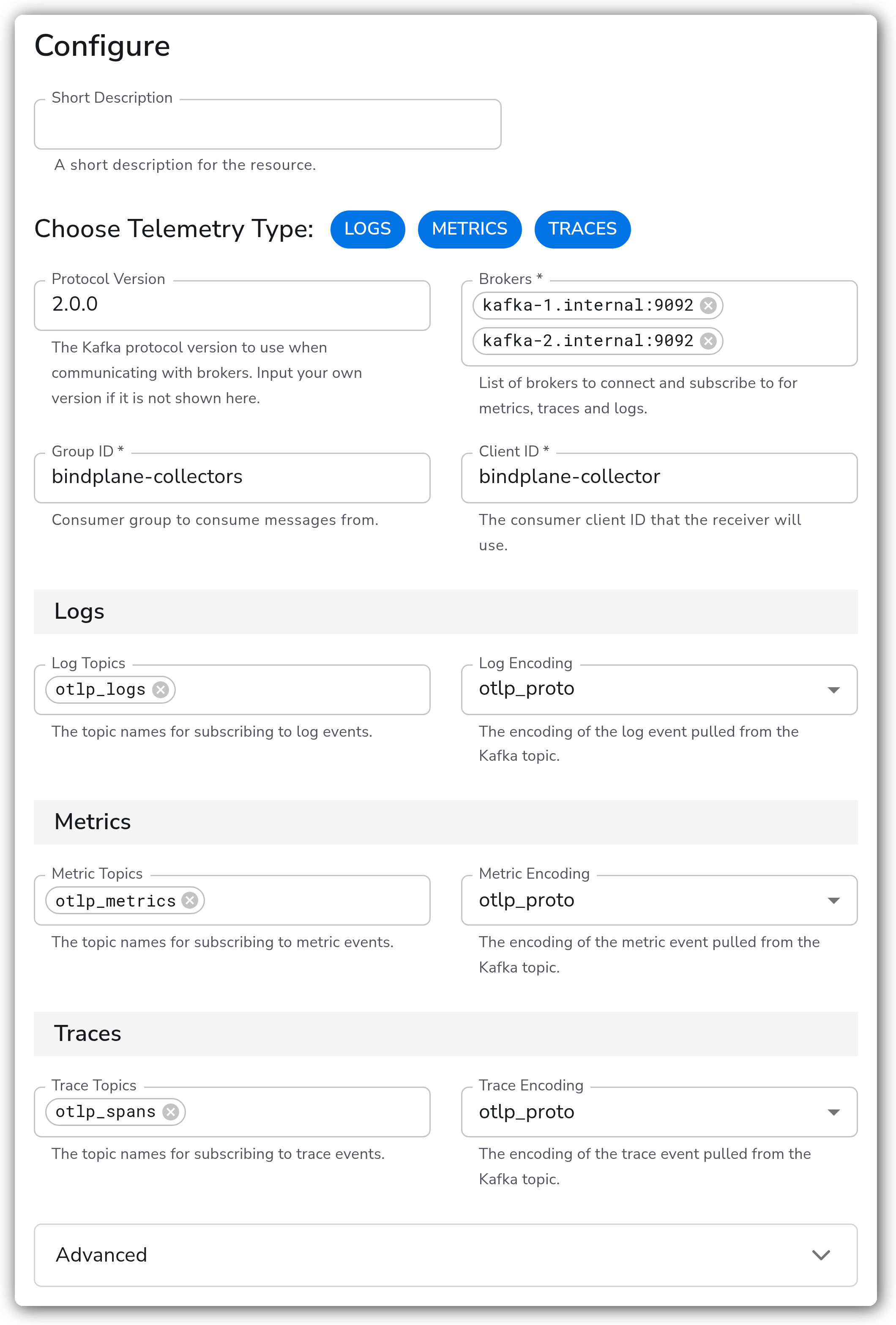
| Choose Telemetry Type | Telemetry Selector | No | Logs, Metrics, Traces | Which signals this source consumes. Each selected signal reveals its own topic and encoding fields below. |
| Protocol Version | Enum | No | `2.0.0` | Kafka protocol version used when talking to the brokers. A version not in the list can be typed in. |
| Brokers | Strings | Yes | `localhost:9092` | Broker addresses to connect and subscribe to. |
| Group ID | String | Yes | `otel-collector` | Consumer group the collector joins. Collectors sharing this value divide the partitions between them. |
| Client ID | String | Yes | `otel-collector` | Client identifier the consumer presents to the brokers. |
#### Per-Signal Topics and Encoding
Each group appears only when its signal is selected in Choose Telemetry Type.
| Parameter | Signal | Type | Required | Default | Description |
| --------------- | ------- | ------- | -------- | -------------- | ---------------------------------------------------------------------------------------------------------------------------------------- |
| Log Topics | Logs | Strings | No | `otlp_logs` | Topics to subscribe to for log events. |
| Log Encoding | Logs | Enum | No | `otlp_proto` | Wire format of the log messages: otlp\_proto, otlp\_json, text, json, raw, or azure\_resource\_logs. |
| Text Encoding | Logs | Enum | Yes | `utf-8` | Character encoding for text logs. Appears when Log Encoding is `text`. One of nop, utf-8, utf-16le, utf-16be, ascii, or big5. |
| Metric Topics | Metrics | Strings | No | `otlp_metrics` | Topics to subscribe to for metric events. |
| Metric Encoding | Metrics | Enum | No | `otlp_proto` | Wire format of the metric messages: otlp\_proto or otlp\_json. |
| Trace Topics | Traces | Strings | No | `otlp_spans` | Topics to subscribe to for trace events. |
| Trace Encoding | Traces | Enum | No | `otlp_proto` | Wire format of the trace messages: otlp\_proto, otlp\_json, jaeger\_proto, jaeger\_json, zipkin\_proto, zipkin\_json, or zipkin\_thrift. |
#### Authentication
Everything in this group sits behind the form's Advanced section.
| Parameter | Type | Required | Default | Description |
| --------------------- | ------- | --------------- | ---------------------------- | --------------------------------------------------------------------------------------------- |
| Enable Authentication | Boolean | No | `false` | Authenticate to the brokers. Off means an unauthenticated connection. |
| Auth Type | Enum | No | `basic` | Mechanism to use: basic, sasl, kerberos, or tls. The fields below change with it.1 |
| Username | String | Yes2 | *(empty)* | User for basic or SASL authentication. |
| Password | String | Yes2 | *(empty)* | Password for basic or SASL authentication. Stored as a sensitive value. |
| Mechanism | Enum | No | `SCRAM-SHA-256` | SASL mechanism: SCRAM-SHA-256, SCRAM-SHA-512, or PLAIN. Appears for sasl only. |
| Service Name | String | Yes3 | *(empty)* | Kerberos service name. |
| Realm | String | Yes3 | *(empty)* | Kerberos realm. |
| Config File | String | Yes3 | `/etc/krb5.conf` | Path to the Kerberos configuration file on the collector host. |
| Kerberos Auth Type | Enum | No | `keytab` | Whether Kerberos authenticates with a keytab or a username and password. |
| Keytab File | String | Yes4 | `/etc/security/kafka.keytab` | Path to the keytab. Appears when Kerberos Auth Type is `keytab`. |
1. *Username and Password exist separately for basic and for SASL, so only the selected mechanism's pair is shown.*
2. *Required when Auth Type is basic or sasl.*
3. *Required when Auth Type is kerberos.*
4. *Required when Auth Type is kerberos and Kerberos Auth Type is keytab. With `basic` instead, Kerberos uses a username and password.*
#### TLS
Also behind the Advanced section. This secures the connection out to the brokers.
| Parameter | Type | Required | Default | Description |
| ---------------------------------- | ------- | -------- | --------- | ----------------------------------------------------------------------------------------------------------------------------------- |
| Enable TLS | Boolean | No | `false` | Connect to the brokers over TLS. |
| Skip TLS Certificate Verification | Boolean | No | `false` | Accept the brokers' certificates without verifying them. Useful against a test cluster, and it removes the protection TLS provides. |
| TLS Certificate Authority File | String | No | *(empty)* | Certificate authority used to verify the brokers' certificates. |
| Mutual TLS Client Certificate File | String | No | *(empty)* | Client certificate the collector presents, when the brokers require mutual TLS. |
| TLS Client Private Key File | String | No | *(empty)* | Private key paired with that client certificate. |
### Examples
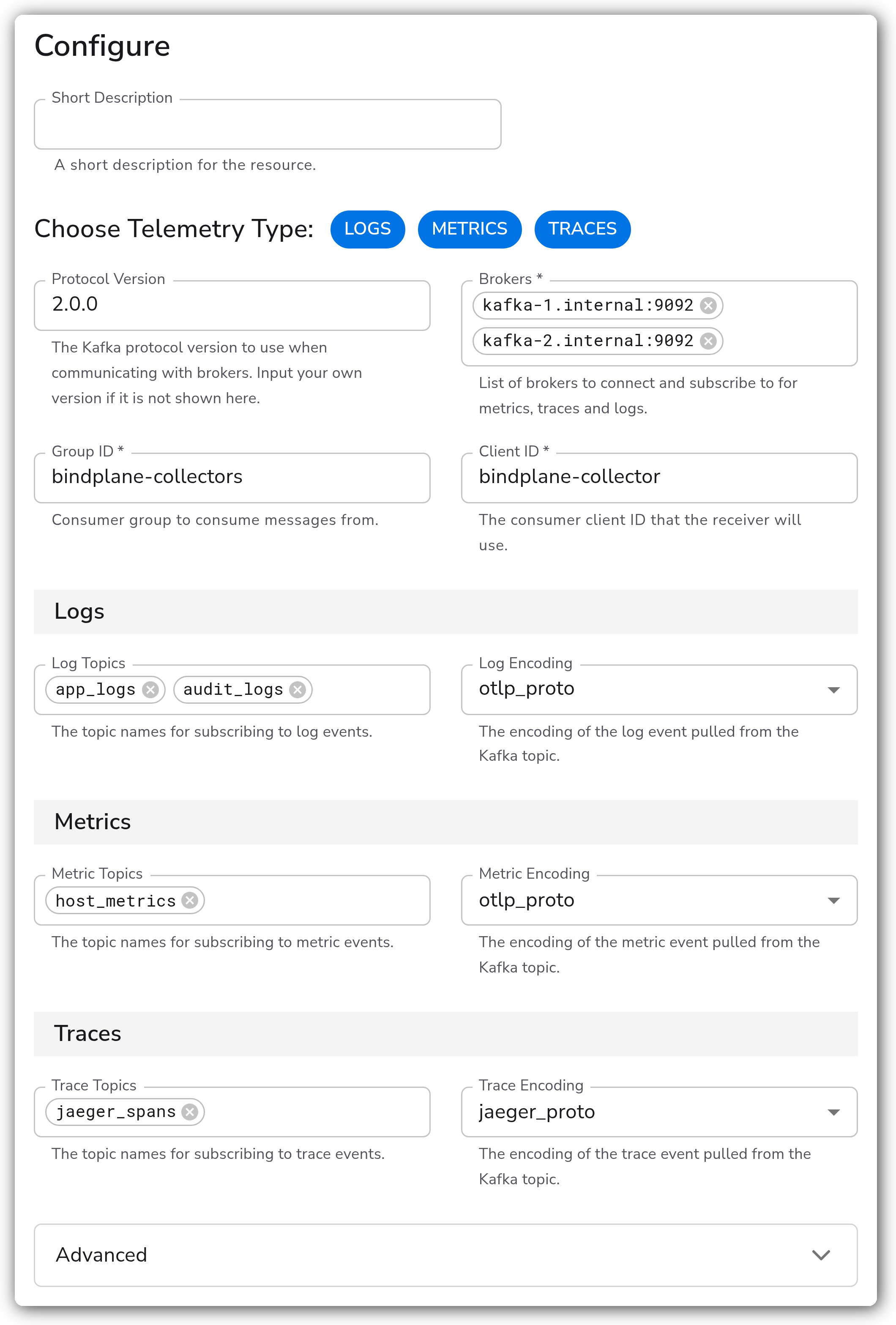
#### Separate topics per signal
Consumes all three signals from three dedicated topics, with traces arriving as Jaeger protobuf from an existing Jaeger pipeline while metrics and logs stay OTLP.
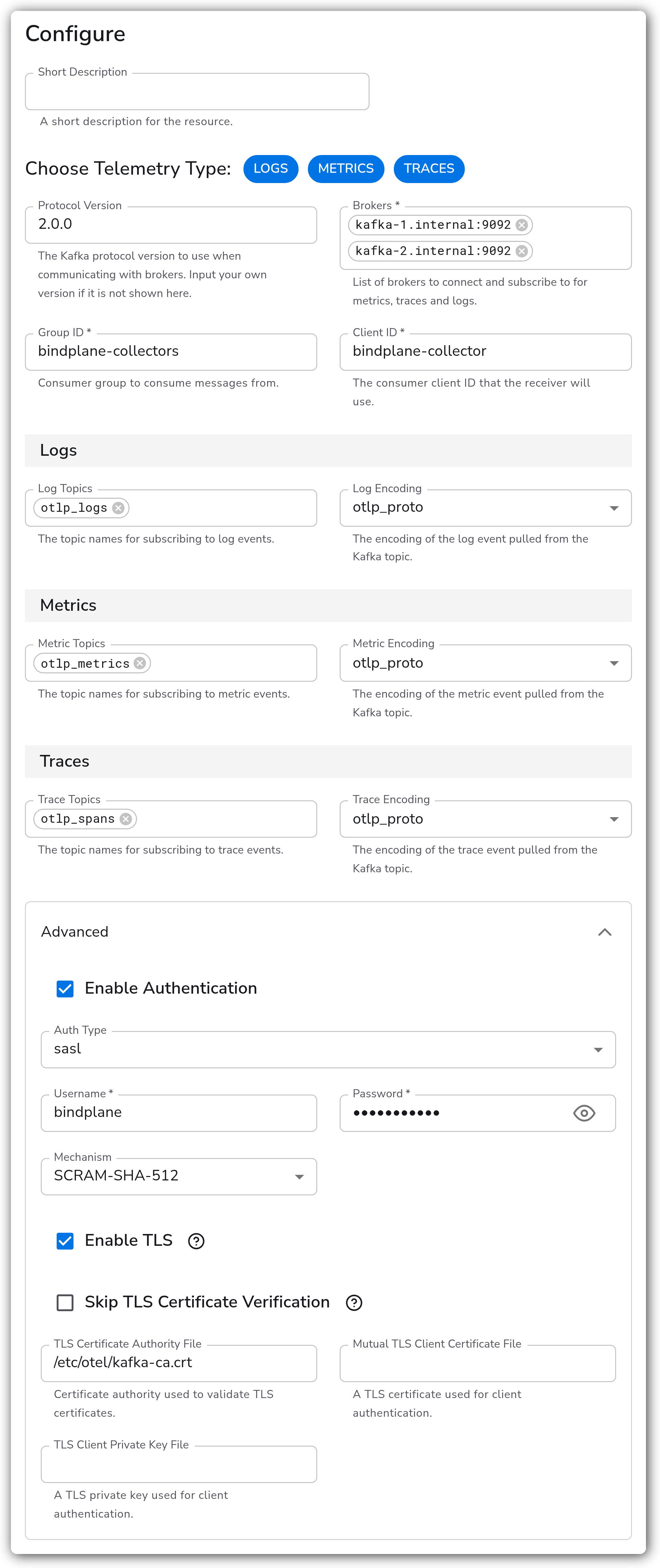
#### SASL over TLS against a managed cluster
Authenticates with SCRAM-SHA-512 over TLS, verifying the brokers against a supplied certificate authority. This is the shape most managed Kafka services expect.
### Configuration Tips
#### Scaling consumers
* Partitions are divided across the collectors sharing a Group ID, so throughput scales by adding collectors to the group rather than by adding sources.
* A group can consume no faster than its partition count allows. More collectors than partitions leaves the extras idle.
#### Choosing an encoding
* `otlp_proto` is the default and the right choice when a Bindplane collector or another OpenTelemetry component produced the messages.
* The `text` and `raw` log encodings are for messages that were never OTLP, such as an application writing plain lines to a topic. `text` decodes using Text Encoding, and `raw` keeps the bytes as-is.
* Trace encodings cover Jaeger and Zipkin, so a topic fed by an existing tracing pipeline can be consumed without re-encoding upstream.
### Troubleshooting
#### The consumer connects but no telemetry arrives
Symptoms: the collector reports no error and the destination stays empty.
Solutions:
1. Confirm the topic names. A topic that does not exist produces no error here, since the source subscribes rather than creates.
2. Check whether another consumer in the same group is taking the partitions. Two collectors sharing a Group ID split the work, so one may look idle.
3. Confirm the signal is selected in Choose Telemetry Type. Topic and encoding fields for an unselected signal are ignored.
#### Messages are dropped as undecodable
Symptoms: the collector logs decode or unmarshal errors for each batch.
Solutions:
1. Match the encoding to what the producer actually writes. An `otlp_proto` consumer against a topic of plain JSON fails on every message.
2. For plain-text logs, set Log Encoding to `text` and Text Encoding to the producer's character set.
3. Confirm the topic carries one signal only. A topic mixing traces and logs cannot be decoded by a single per-signal encoding.
#### Authentication or TLS handshake failures
Symptoms: the collector cannot establish a broker connection, logging SASL or certificate errors.
Solutions:
1. Confirm Auth Type matches the cluster. Basic and SASL both collect a username and password, and they are not interchangeable on the wire.
2. For SASL, confirm the Mechanism matches the broker's configuration. SCRAM-SHA-256 against a SCRAM-SHA-512 broker fails.
3. For TLS against a private certificate authority, supply the TLS Certificate Authority File rather than enabling Skip TLS Certificate Verification.
4. Lower Protocol Version if the brokers predate the negotiated version.
### Standalone Source
```yaml
apiVersion: bindplane.observiq.com/v1
kind: Source
metadata:
name: kafka-stream
spec:
type: kafka_otlp_source_v2
parameters:
- name: telemetry_types
value:
- Logs
- Metrics
- Traces
- name: protocol_version
value: 2.0.0
- name: brokers
value:
- kafka-1.internal:9092
- kafka-2.internal:9092
- name: group_id
value: bindplane-collectors
- name: client_id
value: bindplane-collector
- name: log_topics
value:
- otlp_logs
- name: log_encoding
value: otlp_proto
- name: metric_topics
value:
- otlp_metrics
- name: metric_encoding
value: otlp_proto
- name: trace_topics
value:
- otlp_spans
- name: trace_encoding
value: otlp_proto
```
### Related Resources
* [Kafka Receiver (kafkareceiver) reference](https://github.com/open-telemetry/opentelemetry-collector-contrib/tree/main/receiver/kafkareceiver)
* [Kafka: Consumer group protocol](https://kafka.apache.org/documentation/#intro_consumers)
* [Kafka: SASL authentication](https://kafka.apache.org/documentation/#security_sasl)
### Bindplane Resources
* [Kafka Destination](/integrations/destinations/kafka.md)
---
# Agent Instructions
This documentation is published with GitBook. GitBook is the documentation platform designed so that both humans and AI agents can read, navigate, and reason over technical content effectively. Learn more at gitbook.com.
## Querying This Documentation
If you need additional information that is not directly available in this page, you can query the documentation by asking a question.
Perform an HTTP GET request on the following URL with the `ask` and `goal` query parameters:
```
GET https://docs.bindplane.com/integrations/sources/kafka-otlp.md?ask=&goal=
```
`ask` is the immediate question: it should be specific, self-contained, and written in natural language.
`goal` is what the user is ultimately trying to achieve, the reason they need the answer. Sharing it helps GitBook give you a better, more relevant answer. A goal is most helpful when it describes the outcome the user wants rather than restating the question. For example, with `ask=how do I create an API token`, a goal like `automate deployments from our CI pipeline` lets GitBook tailor the answer to that use case.
The response will contain a direct answer to the question and relevant excerpts and sources from the documentation.
Use this mechanism when the answer is not explicitly present in the current page, you need clarification or additional context, or you want to retrieve related documentation sections.