> For the complete documentation index, see [llms.txt](https://docs.bindplane.com/llms.txt). Markdown versions of documentation pages are available by appending `.md` to page URLs; this page is available as [Markdown](https://docs.bindplane.com/integrations/sources/aws-s3-rehydration.md).
# AWS S3 Rehydration
The AWS S3 Rehydration source reads previously exported OTLP data back out of an AWS S3 bucket and replays it through a Bindplane pipeline. It processes objects whose paths fall within a configured UTC time range, so you can backfill or reprocess telemetry that was archived to S3 (for example, data written by the [AWS S3 destination](/integrations/destinations/aws-s3.md)).
Rehydrated objects must be in [OTLP JSON format](https://github.com/open-telemetry/opentelemetry-proto). The receiver detects and handles both `gzip`-compressed and uncompressed objects automatically.
### Supported Telemetry Types
| Platform | Metrics | Logs | Traces |
| ------------------ | ------- | ---- | ------ |
| Linux | ✓ | ✓ | ✓ |
| Windows | ✓ | ✓ | ✓ |
| macOS | ✓ | ✓ | ✓ |
| Kubernetes Cluster | ✓ | ✓ | ✓ |
### Prerequisites
* An AWS S3 bucket containing OTLP JSON objects (optionally `gzip`-compressed).
* AWS credentials with read access to the bucket. The receiver also needs delete access if **Delete on Read** is enabled.
* The collector able to reach the AWS S3 API for the configured region.
* When deploying on Kubernetes, select `StatefulSet` as the deployment method so checkpoint state persists across restarts.
### Configuration
#### General
| Parameter | Type | Default | Description |
| --------------------- | ------------------ | ----------------------- | ------------------------------------------------------------------------------------------------------- |
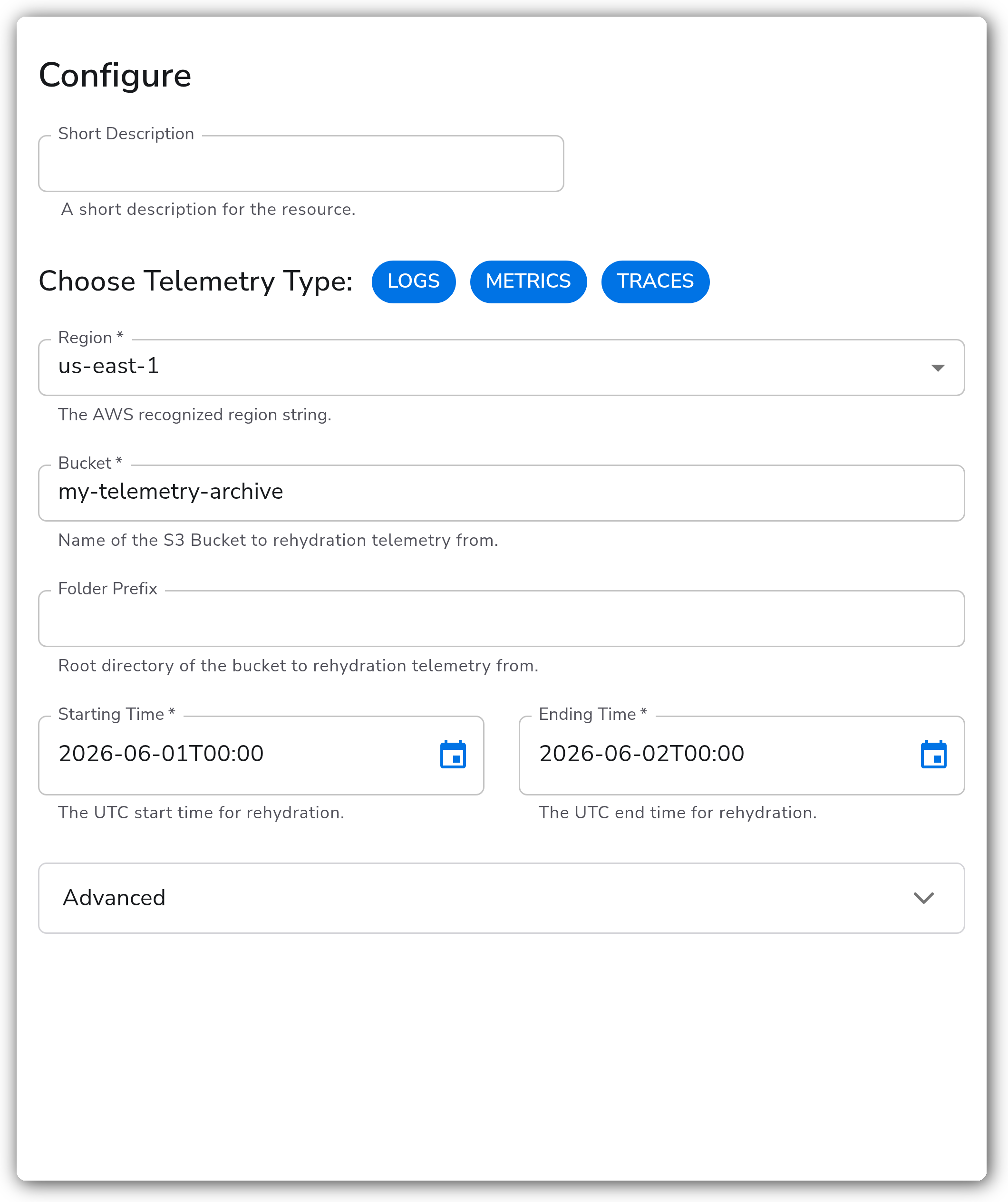
| Choose Telemetry Type | Telemetry Selector | `Logs, Metrics, Traces` | Select which types of telemetry to rehydrate. A separate receiver is configured for each selected type. |
| Region | Enum | `us-east-1` | The AWS recognized region string for the bucket. Required. |
| Bucket | String | | Name of the S3 bucket to rehydrate telemetry from. Required. |
| Folder Prefix | String | `""` | Root directory (key prefix) of the bucket to rehydrate telemetry from. |
| Starting Time | Timestamp | | The UTC start time for rehydration, in the format `YYYY-MM-DDTHH:MM`. Required. |
| Ending Time | Timestamp | | The UTC end time for rehydration, in the format `YYYY-MM-DDTHH:MM`. Required. |
#### Advanced
| Parameter | Type | Default | Description |
| -------------------- | ------- | ------------------------------------ | ------------------------------------------------------------------------------------------------------------------------------------------------------------------------------- |
| Delete on Read | Boolean | `false` | If true, objects are deleted after being rehydrated. |
| Enable Checkpoint | Boolean | `true` | Enable to use a storage extension that checkpoints rehydration progress, allowing the source to resume after a restart. |
| Poll Size | Integer | `1000` | The max number of object descriptions returned by a single poll against the S3 API. |
| Batch Size | Integer | `100` | The max number of object descriptions to process and rehydrate at once after retrieving them from the S3 API. |
| Checkpoint Directory | String | `${OIQ_OTEL_COLLECTOR_HOME}/storage` | Directory for storing rehydration checkpoint state, useful for resuming operations after disruptions. Relevant only when checkpointing is enabled (`storage_enable` is `true`). |
### Example Configuration
This configuration rehydrates logs, metrics, and traces from a bucket over a fixed UTC time range.
Adjust the Region, Bucket, Starting Time, and Ending Time to match your configuration.
#### Standalone Source
```yaml
apiVersion: bindplane.observiq.com/v1
kind: Source
metadata:
id: aws_s3_rehydration_v2
name: aws_s3_rehydration_v2
spec:
type: aws_s3_rehydration_v2
parameters:
- name: telemetry_types
value: ['Logs', 'Metrics', 'Traces']
- name: region
value: 'us-east-1'
- name: bucket
value: 'my-telemetry-archive'
- name: prefix
value: ''
- name: starting_time
value: '2026-06-01T00:00'
- name: ending_time
value: '2026-06-02T00:00'
- name: storage_enable
value: 'true'
- name: storage_directory
value: '${OIQ_OTEL_COLLECTOR_HOME}/storage'
```
### Configuration Tips
#### Scoping the rehydration
* Set `starting_time` and `ending_time` to the smallest window that covers the data you need. The receiver only processes objects whose paths fall within this UTC range, so a tight window reduces the number of S3 objects scanned.
* Use `prefix` to limit rehydration to a single folder within the bucket when the bucket holds more than one data set.
#### Checkpointing and resuming
* Leave `storage_enable` on so progress is checkpointed to `storage_directory`. If the collector restarts mid-rehydration, it resumes from the last checkpoint instead of starting over.
* Enable `delete_on_read` only when you intend to remove rehydrated objects from the bucket. The AWS credentials must include delete permission for this to succeed.
#### AWS authentication
* On Linux, Windows, and macOS, the receiver uses the standard AWS credential chain. Provide credentials through the `AWS_ACCESS_KEY_ID` and `AWS_SECRET_ACCESS_KEY` environment variables, a shared credentials file (`~/.aws/credentials`), or an attached IAM role when running on EC2.
* On Kubernetes, set credentials explicitly in the deployment manifest. Edit the manifest downloaded from Bindplane's collector install page and add the following environment variables to the `opentelemetry-container` container:
```yaml
spec:
template:
spec:
containers:
- name: opentelemetry-container
env:
- name: AWS_ACCESS_KEY_ID
value: ''
- name: AWS_SECRET_ACCESS_KEY
value: ''
```
### Troubleshooting
**Symptom:** No data is rehydrated, even though objects exist in the bucket. **Solution:** Confirm `starting_time` and `ending_time` are in UTC and use the `YYYY-MM-DDTHH:MM` format, and that they bracket the object paths you expect. Also verify the `region` matches the bucket's region and that `prefix` points at the correct folder.
**Symptom:** The receiver logs access-denied or permission errors against the S3 API. **Solution:** Check that the AWS credentials reachable by the collector have read access to the bucket. If `delete_on_read` is enabled, the credentials also need delete permission. On Kubernetes, confirm the `AWS_ACCESS_KEY_ID` and `AWS_SECRET_ACCESS_KEY` environment variables are set on the `opentelemetry-container`.
**Symptom:** Rehydration restarts from the beginning after a collector restart. **Solution:** Ensure `storage_enable` is `true` and that `storage_directory` is writable and persists across restarts. On Kubernetes, deploy with `StatefulSet` so the checkpoint volume survives pod restarts.
### Related Resources
* [Amazon S3 documentation](https://docs.aws.amazon.com/s3/)
* [Amazon S3 buckets](https://docs.aws.amazon.com/AmazonS3/latest/userguide/UsingBucket.html)
* [AWS S3 destination](/integrations/destinations/aws-s3.md)
---
# Agent Instructions
This documentation is published with GitBook. GitBook is the documentation platform designed so that both humans and AI agents can read, navigate, and reason over technical content effectively. Learn more at gitbook.com.
## Querying This Documentation
If you need additional information that is not directly available in this page, you can query the documentation by asking a question.
Perform an HTTP GET request on the following URL with the `ask` and `goal` query parameters:
```
GET https://docs.bindplane.com/integrations/sources/aws-s3-rehydration.md?ask=&goal=
```
`ask` is the immediate question: it should be specific, self-contained, and written in natural language.
`goal` is what the user is ultimately trying to achieve, the reason they need the answer. Sharing it helps GitBook give you a better, more relevant answer. A goal is most helpful when it describes the outcome the user wants rather than restating the question. For example, with `ask=how do I create an API token`, a goal like `automate deployments from our CI pipeline` lets GitBook tailor the answer to that use case.
The response will contain a direct answer to the question and relevant excerpts and sources from the documentation.
Use this mechanism when the answer is not explicitly present in the current page, you need clarification or additional context, or you want to retrieve related documentation sections.