> For the complete documentation index, see [llms.txt](https://docs.bindplane.com/llms.txt). Markdown versions of documentation pages are available by appending `.md` to page URLs; this page is available as [Markdown](https://docs.bindplane.com/integrations/sources/okta.md).
# Okta
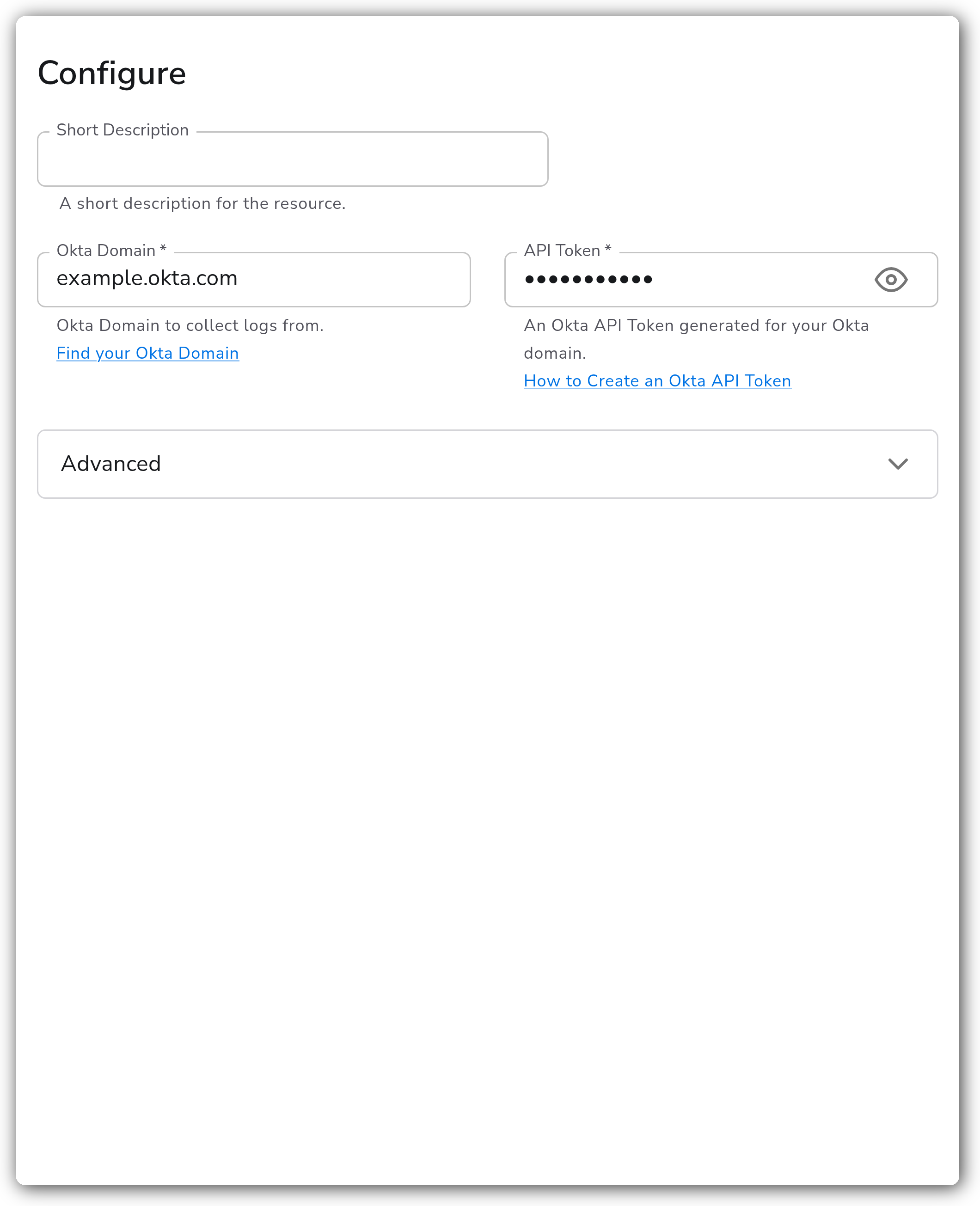
The Okta source collects [System Log](https://developer.okta.com/docs/reference/system-log-query/) events from an Okta organization. Bindplane polls the Okta System Log API on a configurable interval and emits each event as a log record. It authenticates with an Okta API token scoped to the domain you want to collect from.
### Supported Telemetry Types
| Platform | Metrics | Logs | Traces |
| -------- | ------- | ---- | ------ |
| Linux | | ✓ | |
| Windows | | ✓ | |
| macOS | | ✓ | |
### Prerequisites
* An Okta organization and its **Okta domain** (for example, `example.okta.com`), excluding the `https://` scheme. See [Find your Okta domain](https://developer.okta.com/docs/guides/find-your-domain/main/).
* An **Okta API token** generated for that domain. The token inherits the permissions of the admin account that created it, so use an account with at least read access to the System Log.
* Outbound network access from the collector to the Okta domain over HTTPS.
### Configuration
#### General
| Parameter | Type | Default | Description |
| ----------- | ------ | ------- | ------------------------------------------------------------------------------------------------------- |
| Okta Domain | String | | The Okta domain to collect logs from, excluding `https://` (for example, `example.okta.com`). Required. |
| API Token | String | | An Okta API token generated for the above Okta domain. Stored as a sensitive value. Required. |
#### Advanced
| Parameter | Type | Default | Description |
| ------------- | -------- | ------- | ---------------------------------------------------------------------------------------------------------------------------------------------------------------------------------------------------------------------------------------- |
| Poll Interval | Duration | `1m` | The rate at which the receiver polls Okta for logs. Must be in the range 1 second to 24 hours and be a value readable by Go's [time.ParseDuration](https://pkg.go.dev/time#ParseDuration). Okta recommends a value between 60s and 300s. |
### Creating an Okta API Token
The source authenticates with a standard Okta API token. To create one:
1. Sign in to the Okta Admin Console for the domain you want to collect from.
2. Go to **Security** > **API**, then open the **Tokens** tab.
3. Select **Create Token**, give it a descriptive name (for example, `bindplane-system-log`), and create it.
4. Copy the token value shown. Okta displays it only once, so store it securely.
5. Paste the value into the `api_token` parameter when configuring the source.
The token inherits the role of the admin who created it. For least privilege, create it under an account that has only the read access the System Log requires. See [How to create an Okta API token](https://support.okta.com/help/s/article/How-to-create-an-API-token).
### Example Configuration
#### Standalone Source
```yaml
apiVersion: bindplane.observiq.com/v1
kind: Source
metadata:
id: okta
name: okta
spec:
type: okta
parameters:
- name: okta_domain
value: 'example.okta.com'
- name: api_token
value: '(sensitive)'
- name: poll_interval
value: '60s'
```
### Configuration Tips
#### Tuning the poll interval
* Okta recommends a `poll_interval` between 60s and 300s. The default of `1m` is a safe starting point.
* A shorter interval lowers ingestion latency but increases the number of API calls and the risk of rate limiting (see Troubleshooting below).
* The value must parse as a Go duration string (for example, `90s`, `2m`, `5m`) and stay within Okta's accepted range of 1 second to 24 hours.
#### Domain format
* Enter only the host portion of the domain (`example.okta.com`), not a full URL. Including `https://` or a trailing path causes authentication to fail.
### Troubleshooting
**Symptom:** No logs arrive and the collector reports authentication or `401 Unauthorized` errors. **Solution:** Confirm the `api_token` is valid and was created for the same Okta domain set in `okta_domain`. Tokens are scoped to a single org, and an expired or revoked token returns `401`. Generate a new token if needed.
**Symptom:** The collector logs `429 Too Many Requests` or events stop arriving intermittently. **Solution:** You are hitting Okta's API rate limits. Increase `poll_interval` (for example, to `300s`) to reduce call frequency, and consider raising the rate limit allocated to the API token. See [Okta API rate limits](https://developer.okta.com/docs/reference/rate-limits/) and [Set token rate limits](https://help.okta.com/en-us/content/topics/security/api.htm#Set). Avoid setting `poll_interval` below 10 seconds on plans with low rate limits.
**Symptom:** Connection errors or timeouts reaching the Okta domain. **Solution:** Verify the collector has outbound HTTPS access to the Okta domain and that `okta_domain` is the host only (`example.okta.com`), with no `https://` prefix or trailing path.
### Related Resources
* [Okta System Log API](https://developer.okta.com/docs/reference/system-log-query/)
* [Find your Okta domain](https://developer.okta.com/docs/guides/find-your-domain/main/)
* [How to create an Okta API token](https://support.okta.com/help/s/article/How-to-create-an-API-token)
* [Okta API rate limits](https://developer.okta.com/docs/reference/rate-limits/)
* [Set token rate limits](https://help.okta.com/en-us/content/topics/security/api.htm#Set)
---
# Agent Instructions
This documentation is published with GitBook. GitBook is the documentation platform designed so that both humans and AI agents can read, navigate, and reason over technical content effectively. Learn more at gitbook.com.
## Querying This Documentation
If you need additional information that is not directly available in this page, you can query the documentation by asking a question.
Perform an HTTP GET request on the following URL with the `ask` and `goal` query parameters:
```
GET https://docs.bindplane.com/integrations/sources/okta.md?ask=&goal=
```
`ask` is the immediate question: it should be specific, self-contained, and written in natural language.
`goal` is what the user is ultimately trying to achieve, the reason they need the answer. Sharing it helps GitBook give you a better, more relevant answer. A goal is most helpful when it describes the outcome the user wants rather than restating the question. For example, with `ask=how do I create an API token`, a goal like `automate deployments from our CI pipeline` lets GitBook tailor the answer to that use case.
The response will contain a direct answer to the question and relevant excerpts and sources from the documentation.
Use this mechanism when the answer is not explicitly present in the current page, you need clarification or additional context, or you want to retrieve related documentation sections.