> For the complete documentation index, see [llms.txt](https://docs.bindplane.com/llms.txt). Markdown versions of documentation pages are available by appending `.md` to page URLs; this page is available as [Markdown](https://docs.bindplane.com/integrations/sources/w3c.md).
# W3C
The W3C source tails log files written in the [W3C Extended Log Format](https://www.w3.org/TR/WD-logfile.html) and parses each delimited line into structured log records. It reads the field definitions from the `#Fields` header in the log file and maps each value to the matching field name. This format is produced by Microsoft IIS, Exchange, and other services that emit W3C-style access logs.
### Supported Telemetry Types
| Platform | Metrics | Logs | Traces |
| -------- | ------- | ---- | ------ |
| Linux | | ✓ | |
| Windows | | ✓ | |
| macOS | | ✓ | |
### Prerequisites
* Read access for the collector's user to the log files or directories you want to tail.
* Log files in W3C Extended Log Format that include a `#Fields` header line defining the column names.
### Configuration
#### General
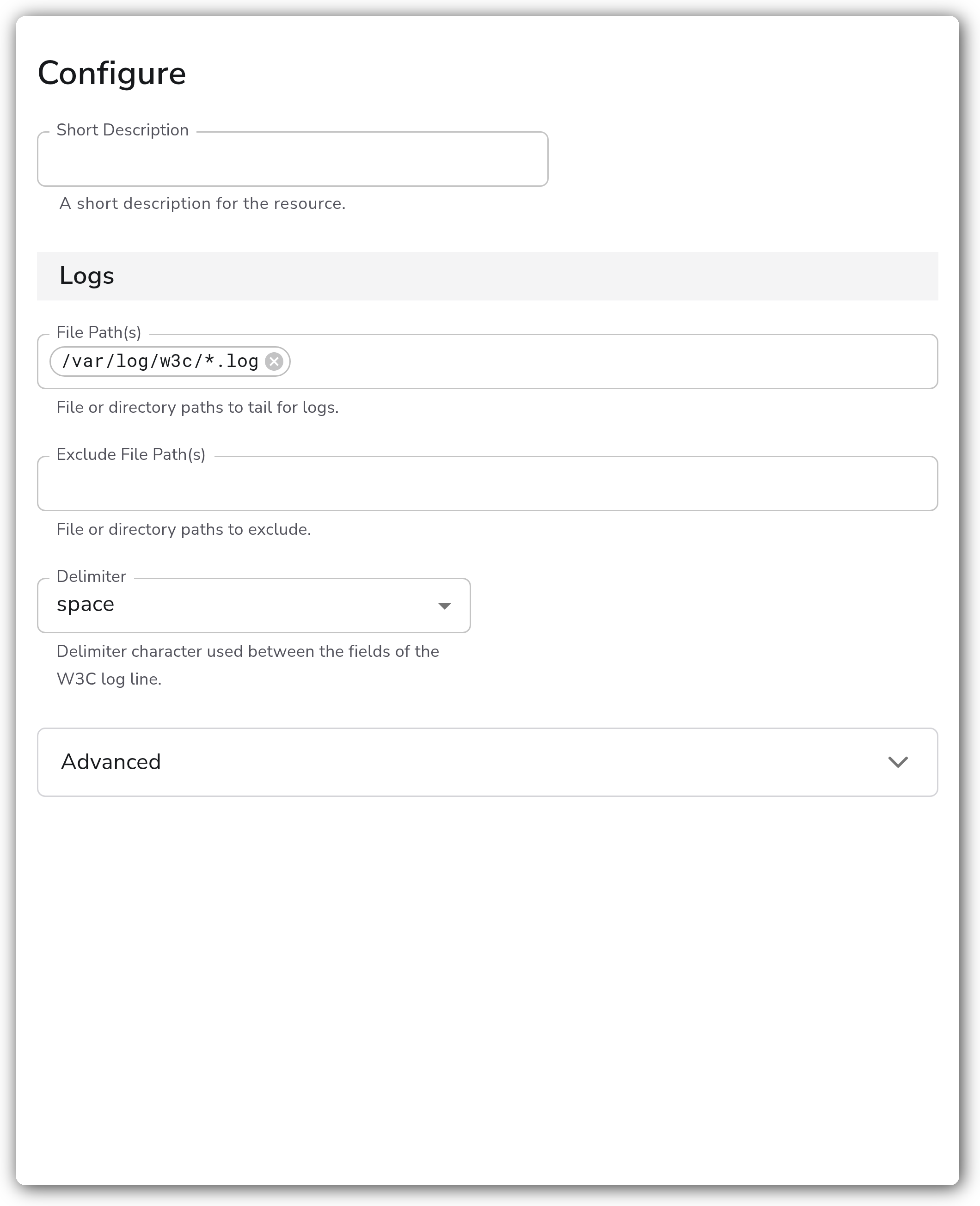
| Parameter | Type | Default | Description |
| -------------------- | ------- | ------- | ---------------------------------------------------------------------------------------------- |
| File Path(s) | Strings | `[]` | File or directory paths to tail for logs. |
| Exclude File Path(s) | Strings | `[]` | File or directory paths to exclude. |
| Delimiter | Enum | `tab` | Delimiter character used between the fields of the W3C log line. Valid values: `tab`, `space`. |
#### Advanced
| Parameter | Type | Default | Description |
| ------------------------------------ | ------- | --------- | ---------------------------------------------------------------------------------------------------------------------------------------------------------------------- |
| Encoding | Enum | `utf-8` | The encoding of the file being read. Valid values: `nop`, `utf-8`, `utf-16le`, `utf-16be`, `ascii`, `big5`. |
| Header Delimiter | Enum | `default` | Delimiter character used between fields in the W3C `#Fields` header. When set to `default`, the value of `delimiter` is used. Valid values: `default`, `tab`, `space`. |
| Include File Name Attribute | Boolean | `true` | Whether to add the file name as the attribute `log.file.name`. |
| Include File Path Attribute | Boolean | `false` | Whether to add the file path as the attribute `log.file.path`. |
| Include File Name Resolved Attribute | Boolean | `false` | Whether to add the file name after symlink resolution as the attribute `log.file.name_resolved`. |
| Include File Path Resolved Attribute | Boolean | `false` | Whether to add the file path after symlink resolution as the attribute `log.file.path_resolved`. |
| Parse To | Enum | `body` | Parse structured log fields to either `body` or `attributes`. Valid values: `body`, `attributes`. |
| Parse | Boolean | `true` | Whether to parse the log fields into structured data. When disabled, lines are kept as raw text. |
### Example Configuration
#### Standalone Source
```yaml
apiVersion: bindplane.observiq.com/v1
kind: Source
metadata:
id: w3c
name: w3c
spec:
type: w3c
parameters:
- name: file_path
value:
- '/var/log/w3c/*.log'
- name: delimiter
value: 'space'
- name: encoding
value: 'utf-8'
- name: parse_to
value: 'body'
- name: parse
value: 'true'
```
### Configuration Tips
#### Matching the delimiter to your logs
* Set `delimiter` to match how fields are separated in your log lines. Microsoft IIS W3C logs use a `space` delimiter, while many other W3C producers use `tab`.
* If the `#Fields` header uses a different separator than the data rows, set `header_delimiter` explicitly. Leave it at `default` to reuse the `delimiter` value.
#### Selecting files
* `file_path` accepts directory globs (for example, `/var/log/w3c/*.log`), so you can tail a rotating set of files with a single entry.
* Use `exclude_file_log_path` to skip files that match the include pattern but should not be read, such as archived or compressed logs.
#### Where parsed fields land
* `parse_to` controls whether the parsed W3C fields populate the log `body` or the log `attributes`. Use `attributes` if you want the individual fields available for downstream routing and processing.
### Troubleshooting
**Symptom:** Logs are read but fields are not parsed into structured data. **Solution:** Confirm the log file contains a `#Fields` header line defining the column names. The receiver relies on that header to map values. Also verify `delimiter` matches the separator used in the file, and that `parse` is enabled.
**Symptom:** No log files are picked up. **Solution:** Check that `file_path` resolves to existing files and that the collector's user has read permission. If you are using a glob, confirm it matches the file names on disk and is not excluded by `exclude_file_log_path`.
**Symptom:** Field values appear garbled or contain unexpected characters. **Solution:** Set `encoding` to match the file's actual encoding. W3C logs from Windows services are often UTF-8, but some are written as UTF-16 (`utf-16le` or `utf-16be`).
### Related Resources
* [W3C Extended Log File Format specification](https://www.w3.org/TR/WD-logfile.html)
* [Microsoft IIS W3C logging fields](https://learn.microsoft.com/en-us/windows/win32/http/w3c-logging)
* [Bindplane sources documentation](https://docs.bindplane.com/integrations/sources)
---
# Agent Instructions
This documentation is published with GitBook. GitBook is the documentation platform designed so that both humans and AI agents can read, navigate, and reason over technical content effectively. Learn more at gitbook.com.
## Querying This Documentation
If you need additional information that is not directly available in this page, you can query the documentation by asking a question.
Perform an HTTP GET request on the following URL with the `ask` and `goal` query parameters:
```
GET https://docs.bindplane.com/integrations/sources/w3c.md?ask=&goal=
```
`ask` is the immediate question: it should be specific, self-contained, and written in natural language.
`goal` is what the user is ultimately trying to achieve, the reason they need the answer. Sharing it helps GitBook give you a better, more relevant answer. A goal is most helpful when it describes the outcome the user wants rather than restating the question. For example, with `ask=how do I create an API token`, a goal like `automate deployments from our CI pipeline` lets GitBook tailor the answer to that use case.
The response will contain a direct answer to the question and relevant excerpts and sources from the documentation.
Use this mechanism when the answer is not explicitly present in the current page, you need clarification or additional context, or you want to retrieve related documentation sections.