> For the complete documentation index, see [llms.txt](https://docs.bindplane.com/llms.txt). Markdown versions of documentation pages are available by appending `.md` to page URLs; this page is available as [Markdown](https://docs.bindplane.com/integrations/sources/http-check.md).
# HTTP Check
The HTTP Check source generates metrics from synthetic checks against an HTTP or HTTPS endpoint. On each collection interval the collector sends a request to the configured target and records the response status and latency, so you can monitor endpoint availability and response codes from the collector itself.
### Supported Telemetry Types
| Platform | Metrics | Logs | Traces |
| ------------------ | ------- | ---- | ------ |
| Linux | ✓ | | |
| Windows | ✓ | | |
| macOS | ✓ | | |
| Kubernetes Cluster | ✓ | | |
| OpenShift Cluster | ✓ | | |
### Prerequisites
* Bindplane Collector `v1.40.0`+.
* A reachable HTTP or HTTPS endpoint (hostname/IP and port) for the collector to check.
* For HTTPS checks, a TLS endpoint. For mutual TLS, a client certificate and private key, plus the certificate authority used to validate the server.
### Configuration
#### General
| Parameter | Type | Default | Description |
| --------- | ------- | ------- | ----------------------------------------------------------------------------------------------------------- |
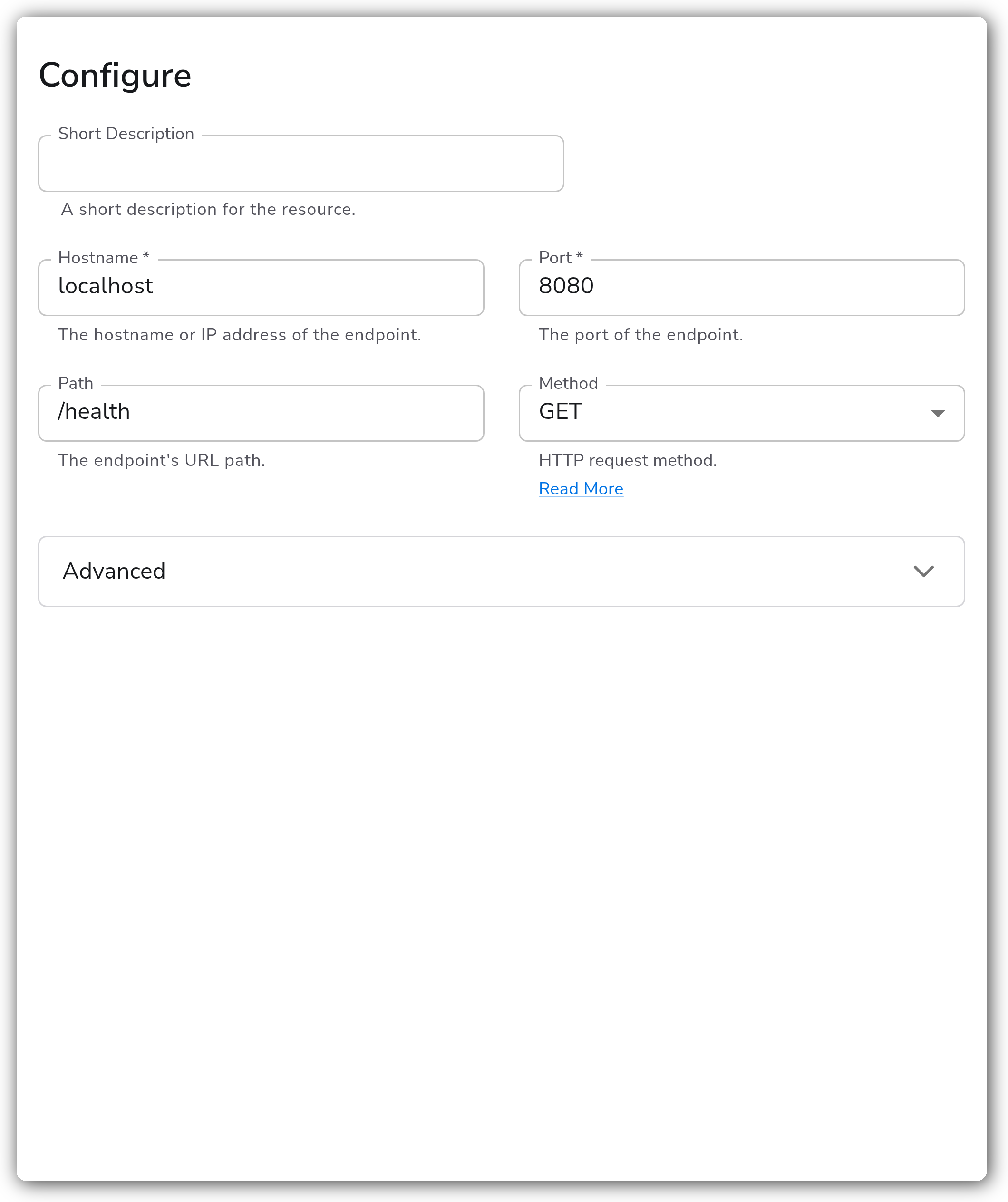
| Hostname | String | | The hostname or IP address of the endpoint. Required. |
| Port | Integer | | The port of the endpoint. Required. |
| Path | String | `""` | The endpoint's URL path. |
| Method | Enum | `GET` | HTTP request method. One of `GET`, `HEAD`, `POST`, `PUT`, `DELETE`, `CONNECT`, `OPTIONS`, `TRACE`, `PATCH`. |
#### Advanced
| Parameter | Type | Default | Description |
| ------------------- | ------- | ------- | ---------------------------------------------------------- |
| Headers | Map | `{}` | Name/Value pairs added to the HTTP request headers. |
| Collection Interval | Integer | `60` | How often (seconds) to perform the check. |
| Initial Delay | Integer | `1` | How long the source should wait (seconds) before starting. |
#### TLS
| Parameter | Type | Default | Description |
| --------------------------------- | ------- | ------- | ----------------------------------------------------------------------------------------------------------------------------------- |
| Enable TLS | Boolean | `false` | Whether or not to use TLS. When enabled, the check uses an `https` endpoint. |
| Skip TLS Certificate Verification | Boolean | `false` | Skip TLS certificate verification. Available when TLS is enabled. |
| Mutual TLS | Boolean | `false` | Whether or not to use mutual TLS (mTLS) authentication. Available when TLS is enabled. |
| TLS Certificate Authority File | String | `""` | Certificate authority used to validate TLS certificates. Available when TLS is enabled and certificate verification is not skipped. |
| TLS Client Certificate File | String | `""` | A TLS certificate used for client authentication. Available when TLS and mutual TLS are enabled. |
| TLS Client Private Key File | String | `""` | A TLS private key used for client authentication. Available when TLS and mutual TLS are enabled. |
### Response Validation
The HTTP Check receiver does not pass or fail a check based on a configurable status-code expectation. Instead, each check records the HTTP response status code and request duration as metrics, and exposes any client-side error (for example, a connection refusal, DNS failure, or TLS handshake error) as a separate error metric.
Define success and failure downstream using the recorded status code and error metrics. For example, treat `2xx` and `3xx` responses as healthy and alert on `4xx`/`5xx` responses or on the presence of an error metric. A request that completes at the transport level reports its status code regardless of value, so a `404` or `500` is a successful check that returns a non-`2xx` status, not a check error.
### Example Configuration
#### Standalone Source
For a basic check, only `hostname` and `port` are required.
```yaml
apiVersion: bindplane.observiq.com/v1
kind: Source
metadata:
id: httpcheck
name: httpcheck
spec:
type: httpcheck
parameters:
- name: hostname
value: 'localhost'
- name: port
value: '8080'
- name: path
value: '/health'
- name: method
value: 'GET'
- name: enable_tls
value: 'false'
- name: collection_interval
value: '60'
- name: initial_delay
value: '1'
```
**Advanced: HTTPS with mutual TLS, custom method and headers**
This example checks an HTTPS endpoint, authenticates with a client certificate (mutual TLS), uses a `POST` request, and sends custom request headers.
```yaml
apiVersion: bindplane.observiq.com/v1
kind: Source
metadata:
id: httpcheck
name: httpcheck
spec:
type: httpcheck
parameters:
- name: hostname
value: 'api.internal.example.com'
- name: port
value: '8443'
- name: path
value: '/v1/healthz'
- name: method
value: 'POST'
- name: headers
value:
Accept: 'application/json'
X-Health-Token: 'example-token'
- name: enable_tls
value: 'true'
- name: insecure_skip_verify
value: 'false'
- name: mutual_tls
value: 'true'
- name: ca_file
value: '/opt/observiq-otel-collector/ca.crt'
- name: cert_file
value: '/opt/observiq-otel-collector/client.crt'
- name: key_file
value: '/opt/observiq-otel-collector/client.key'
- name: collection_interval
value: '30'
- name: initial_delay
value: '5'
```
### Configuration Tips
#### Choosing a method and path
* Point `path` at a lightweight health endpoint (for example, `/health` or `/healthz`) so the check does not exercise expensive application logic on every interval.
* Use `HEAD` instead of `GET` when you only care about reachability and response status, to avoid transferring a response body.
#### TLS and mutual TLS
* Set `enable_tls` to `true` to check an HTTPS endpoint. With TLS enabled the check builds an `https` endpoint from the hostname, port, and path.
* Use `insecure_skip_verify` only for endpoints with self-signed certificates in non-production environments. Prefer setting `ca_file` to the issuing authority so the server certificate is validated.
* For mutual TLS, set `mutual_tls` to `true` and provide both `cert_file` and `key_file` for the client identity.
#### Scheduling
* Tune `collection_interval` to balance freshness against load on the target. More frequent checks detect outages faster but add request volume.
* Use `initial_delay` to stagger startup when several checks run on the same collector.
### Troubleshooting
**Symptom:** No metrics appear, or every check reports an error. **Solution:** Confirm the collector can reach the target on the configured `hostname` and `port`. A connection refusal, DNS failure, or timeout is recorded as a check error rather than a status code. Verify the path exists and the chosen `method` is allowed by the endpoint.
**Symptom:** HTTPS checks fail with a certificate or TLS handshake error. **Solution:** Ensure `enable_tls` is `true` for HTTPS targets. If the server uses a private or self-signed certificate, set `ca_file` to the issuing certificate authority. As a last resort in non-production environments, set `insecure_skip_verify` to `true` to bypass verification.
**Symptom:** A mutual TLS endpoint rejects the check. **Solution:** Set `mutual_tls` to `true` and provide a valid client `cert_file` and `key_file`. Confirm the client certificate is trusted by the server and has not expired.
### Related Resources
* [HTTP request methods (MDN)](https://developer.mozilla.org/en-US/docs/Web/HTTP/Methods)
* [Go net/http Header reference](https://pkg.go.dev/net/http#Header)
* [Bindplane sources documentation](https://docs.bindplane.com/integrations/sources/http-check)
---
# Agent Instructions
This documentation is published with GitBook. GitBook is the documentation platform designed so that both humans and AI agents can read, navigate, and reason over technical content effectively. Learn more at gitbook.com.
## Querying This Documentation
If you need additional information that is not directly available in this page, you can query the documentation by asking a question.
Perform an HTTP GET request on the following URL with the `ask` and `goal` query parameters:
```
GET https://docs.bindplane.com/integrations/sources/http-check.md?ask=&goal=
```
`ask` is the immediate question: it should be specific, self-contained, and written in natural language.
`goal` is what the user is ultimately trying to achieve, the reason they need the answer. Sharing it helps GitBook give you a better, more relevant answer. A goal is most helpful when it describes the outcome the user wants rather than restating the question. For example, with `ask=how do I create an API token`, a goal like `automate deployments from our CI pipeline` lets GitBook tailor the answer to that use case.
The response will contain a direct answer to the question and relevant excerpts and sources from the documentation.
Use this mechanism when the answer is not explicitly present in the current page, you need clarification or additional context, or you want to retrieve related documentation sections.