> For the complete documentation index, see [llms.txt](https://docs.bindplane.com/llms.txt). Markdown versions of documentation pages are available by appending `.md` to page URLs; this page is available as [Markdown](https://docs.bindplane.com/integrations/sources/google-cloud-storage-rehydration.md).
# Google Cloud Storage Rehydration
The Google Cloud Storage Rehydration source reads telemetry that was previously archived to a Google Cloud Storage bucket (for example by the [Google Cloud Storage destination](/integrations/destinations/google-cloud-storage.md)) and replays it back into a pipeline. It processes every object found within a specified UTC time range, handling both uncompressed JSON and gzip-compressed objects, then stops once the range is exhausted. This is not a continuous source.
### Supported Telemetry Types
| Platform | Metrics | Logs | Traces |
| ------------------ | ------- | ---- | ------ |
| Linux | ✓ | ✓ | ✓ |
| Windows | ✓ | ✓ | ✓ |
| macOS | ✓ | ✓ | ✓ |
| Kubernetes Cluster | ✓ | ✓ | ✓ |
### Prerequisites
* A Google Cloud Storage bucket containing OTLP objects archived in a layout this source can read (such as objects written by the Google Cloud Storage destination).
* Credentials that can authenticate to Google Cloud. The principal needs read access to the bucket's objects, and delete access if **Delete on Read** is enabled.
* The UTC start and end time of the data range you want to replay.
### Configuration
#### General
| Parameter | Type | Default | Description |
| --------------------- | ------------------ | ----------------------- | -------------------------------------------------------------------------------------------------- |
| Choose Telemetry Type | Telemetry Selector | `Logs, Metrics, Traces` | Select which types of telemetry to rehydrate. |
| Bucket Name | String | | Name of the bucket to rehydrate from. Required. |
| Folder Name | String | `""` | Restricts rehydration to objects in a specific folder within the bucket. |
| Project ID | String | `""` | The ID of the Google Cloud project the bucket belongs to. Read from credentials if not configured. |
| Starting Time | Timestamp | | The UTC start time for rehydration, in `YYYY-MM-DDTHH:MM` format. Required. |
| Ending Time | Timestamp | | The UTC end time for rehydration, in `YYYY-MM-DDTHH:MM` format. Required. |
#### Authentication
| Parameter | Type | Default | Description |
| --------------------- | ------ | ------- | -------------------------------------------------------------------------------------------------------------------------------------------------------------------- |
| Authentication Method | Enum | `auto` | Method used to authenticate to Google Cloud. One of `auto`, `json`, or `file`. `auto` uses Application Default Credentials. |
| Credentials | String | `""` | JSON value from a Google Service Account credential file. Required when `auth_type` is `json`. |
| Credentials File | String | `""` | Path to a Google Service Account credential file on the collector system. The collector's runtime user must be able to read it. Required when `auth_type` is `file`. |
#### Advanced
| Parameter | Type | Default | Description |
| -------------------- | ------- | ------------------------------------ | ---------------------------------------------------------------------------------------------------------------------------- |
| Batch Size | Integer | `30` | Number of objects to download at once. Controls the number of concurrent object downloads, which impacts performance. |
| Delete on Read | Boolean | `false` | If `true`, objects are deleted after being rehydrated. |
| Enable Checkpoint | Boolean | `true` | Enable a storage extension for checkpointing rehydration progress. |
| Checkpoint Directory | String | `${OIQ_OTEL_COLLECTOR_HOME}/storage` | Directory for storing rehydration checkpoint state, used to resume after disruptions. Applies when checkpointing is enabled. |
### Example Configuration
#### Standalone Source
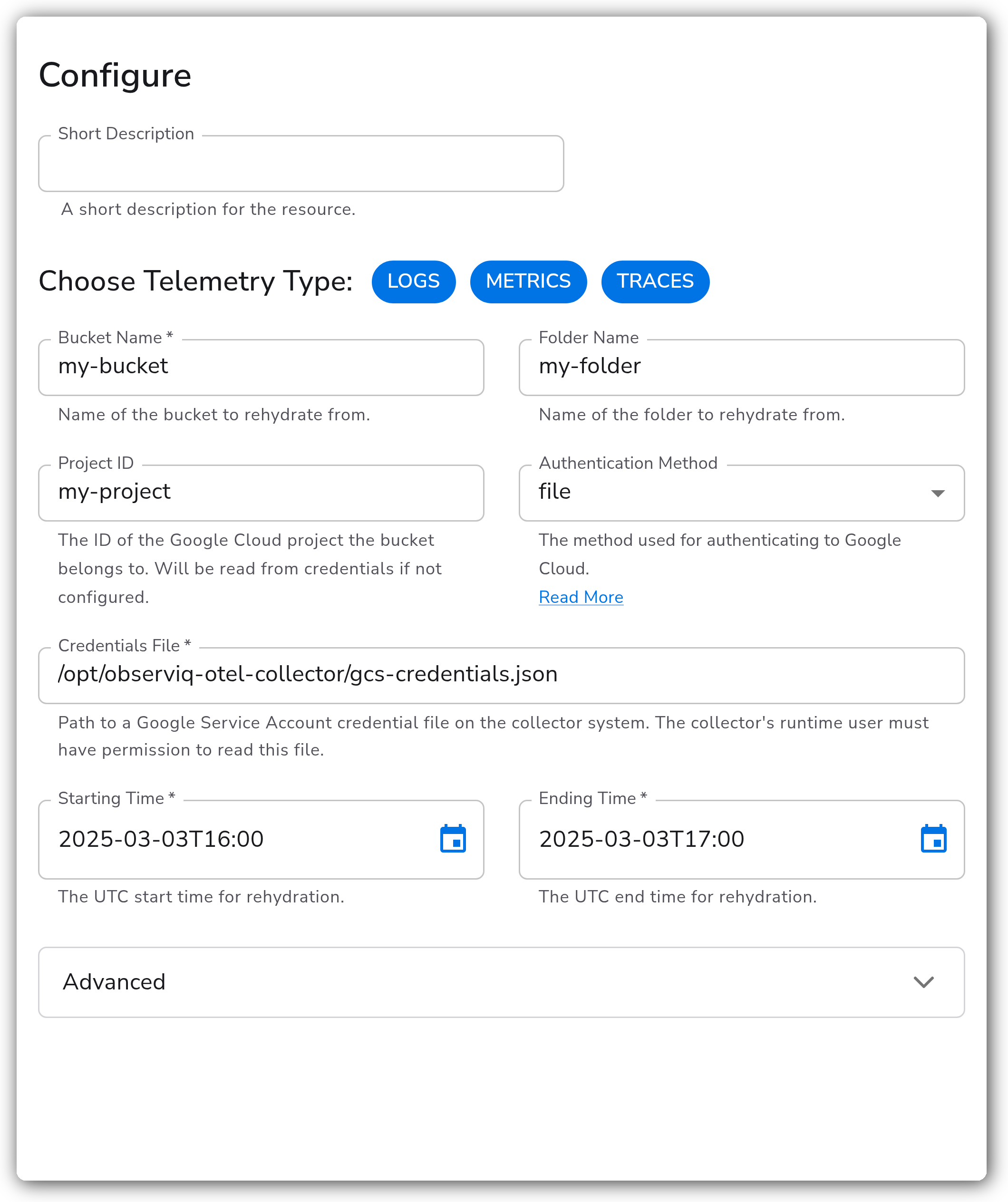
This source authenticates with a service account credential file and rehydrates objects from a folder within the bucket over a one-hour UTC window.
```yaml
apiVersion: bindplane.observiq.com/v1
kind: Source
metadata:
id: google_cloud_storage_rehydration
name: google_cloud_storage_rehydration
spec:
type: google_cloud_storage_rehydration
parameters:
- name: telemetry_types
value: ['Logs', 'Metrics', 'Traces']
- name: bucket_name
value: 'my-bucket'
- name: folder_name
value: 'my-folder'
- name: project_id
value: 'my-project'
- name: auth_type
value: 'file'
- name: credentials_file
value: '/opt/observiq-otel-collector/gcs-credentials.json'
- name: starting_time
value: '2025-03-03T16:00'
- name: ending_time
value: '2025-03-03T17:00'
- name: batch_size
value: '30'
- name: storage_enable
value: 'true'
```
### Configuration Tips
#### Authentication
* With `auth_type: auto`, the collector uses Application Default Credentials, so it picks up a service account attached to the host, GKE workload identity, or the `GOOGLE_APPLICATION_CREDENTIALS` environment variable. Use `json` or `file` to supply an explicit service account credential instead. See [Google Cloud authentication](https://cloud.google.com/docs/authentication#oauth2).
* The `credentials` parameter is stored as a sensitive value. Prefer `credentials_file` when the collector host already has a credential file you can reference by path.
#### Time range and checkpointing
* `starting_time` and `ending_time` are UTC and must use `YYYY-MM-DDTHH:MM` format. The source replays only the objects whose timestamps fall in that window, then stops.
* Leave `storage_enable` on so progress is checkpointed to `storage_directory`. If a rehydration is interrupted, it resumes from the last checkpoint rather than restarting the whole range.
#### Performance tuning
* `batch_size` controls how many objects are downloaded concurrently. Raise it to rehydrate large ranges faster when the collector has spare CPU, memory, and network bandwidth; lower it if the collector is memory-constrained or you are hitting Google Cloud Storage request limits.
* Enable `delete_on_read` only when you intend to drain the bucket. Deleted objects cannot be rehydrated again, and the principal must have delete permission on the bucket.
### Troubleshooting
**Symptom:** The source starts but no data is rehydrated. **Solution:** Confirm `starting_time` and `ending_time` bracket a range that actually contains objects, that they are in UTC `YYYY-MM-DDTHH:MM` format, and that `bucket_name` (and `folder_name`, if set) point at the archived objects. An empty or incorrect folder path is the most common cause of an empty run.
**Symptom:** Authentication or permission errors appear in the collector logs. **Solution:** Verify the credential the source is using. With `auth_type: auto`, make sure Application Default Credentials are present on the host. With `json` or `file`, confirm the service account JSON is valid and the collector's runtime user can read the `credentials_file` path. The principal must have read access to the bucket's objects, plus delete access when `delete_on_read` is enabled. See [Google Cloud authentication](https://cloud.google.com/docs/authentication#oauth2).
**Symptom:** Rehydration restarts from the beginning after a collector restart, reprocessing objects already read. **Solution:** Ensure `storage_enable` is `true` and that `storage_directory` is writable and persists across restarts (for example a mounted volume on Kubernetes). Without a durable checkpoint directory the source cannot resume from where it left off.
### Related Resources
* [Google Cloud Storage documentation](https://cloud.google.com/storage/docs)
* [Google Cloud authentication](https://cloud.google.com/docs/authentication#oauth2)
* [Google Cloud Storage destination](/integrations/destinations/google-cloud-storage.md)
---
# Agent Instructions
This documentation is published with GitBook. GitBook is the documentation platform designed so that both humans and AI agents can read, navigate, and reason over technical content effectively. Learn more at gitbook.com.
## Querying This Documentation
If you need additional information that is not directly available in this page, you can query the documentation by asking a question.
Perform an HTTP GET request on the following URL with the `ask` and `goal` query parameters:
```
GET https://docs.bindplane.com/integrations/sources/google-cloud-storage-rehydration.md?ask=&goal=
```
`ask` is the immediate question: it should be specific, self-contained, and written in natural language.
`goal` is what the user is ultimately trying to achieve, the reason they need the answer. Sharing it helps GitBook give you a better, more relevant answer. A goal is most helpful when it describes the outcome the user wants rather than restating the question. For example, with `ask=how do I create an API token`, a goal like `automate deployments from our CI pipeline` lets GitBook tailor the answer to that use case.
The response will contain a direct answer to the question and relevant excerpts and sources from the documentation.
Use this mechanism when the answer is not explicitly present in the current page, you need clarification or additional context, or you want to retrieve related documentation sections.