> For the complete documentation index, see [llms.txt](https://docs.bindplane.com/llms.txt). Markdown versions of documentation pages are available by appending `.md` to page URLs; this page is available as [Markdown](https://docs.bindplane.com/integrations/sources/tcp.md).
# TCP
The TCP source runs a TCP listener on the collector that ingests arbitrary line-delimited logs sent by network devices or applications, and optionally parses each entry as JSON or regex, handles multiline records, and terminates TLS.
### Supported Telemetry Types
| Platform | Metrics | Logs | Traces |
| ------------------ | ------- | ---- | ------ |
| Linux | | ✓ | |
| Windows | | ✓ | |
| macOS | | ✓ | |
| Kubernetes Gateway | | ✓ | |
| OpenShift Gateway | | ✓ | |
### Prerequisites
TCP is a protocol listener, so the prerequisites are network-side:
* The sending device or application must be configured to forward its logs to the collector's IP address and the listen port you configure here.
* The listen port must be reachable from the senders. Open it in any host firewall (for example `firewalld` or `ufw`) and in cloud security groups or network ACLs between the senders and the collector.
* Binding to a port below 1024 requires elevated privileges. Run the collector as root (Linux/macOS) or Administrator (Windows), grant the binary the appropriate capability, or choose a port at or above 1024.
* When running on Kubernetes or OpenShift, you must create a custom Service resource to route external traffic to the collector. See the Kubernetes [Service](/deployment/kubernetes/collector/custom-service.md) documentation.
* If TLS is enabled, the certificate and private key files (and, for mutual TLS, the CA file) must exist on the collector host at the configured paths and be readable by the collector.
### Configuration
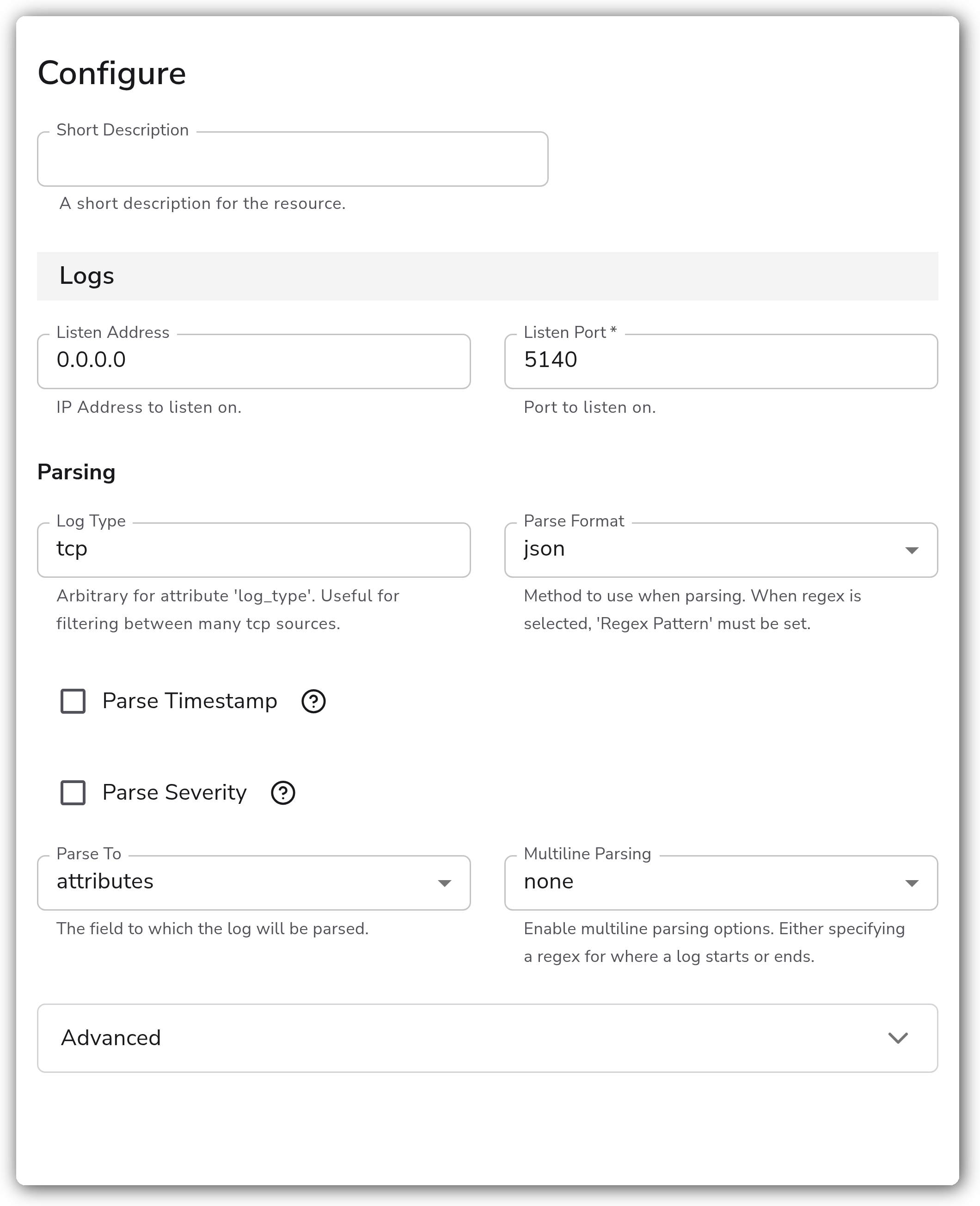
**Logs**
| Parameter | Type | Required | Default | Description |
| ----------------------- | ------------------------------------------------ | -------- | ------------------------ | ------------------------------------------------------------------------------------------------------------------------------------------------------------------------------------- |
| Listen Address | String | No | `0.0.0.0` | IP address to listen on. |
| Listen Port | Integer | Yes | *(empty)* | Port to listen on. |
| Log Type | String | No | `tcp` | Arbitrary value for the `log_type` attribute. Useful for filtering between many TCP sources. |
| Parse Format | Enum: none, json, regex | No | `none` | Method to use when parsing. When `regex` is selected, Regex Pattern must be set. |
| Regex Pattern | String | Yes | *(empty)* | The regex pattern used when parsing log entries. Shown when Parse Format is `regex`. |
| Parse To | Enum: body, attributes | No | `body` | The field to which the log will be parsed. Shown when Parse Format is not `none`. |
| Parse Timestamp | Boolean | No | `false` | Whether to parse the timestamp from the log entry. Shown when Parse Format is not `none`. |
| Timestamp Field | String | Yes | `timestamp` | The field containing the timestamp in the log entry. Shown when Parse Timestamp is enabled. |
| Timestamp Format | Enum: RFC3339, ISO8601, Epoch, Manual | No | `RFC3339` | The format of the timestamp in the log entry. Choose a common format, or specify a custom format. Shown when Parse Timestamp is enabled. |
| Epoch Layout | Enum: s, ms, us, ns, s.ms, s.us, s.ns | Yes | `s` | The layout of the epoch-based timestamp. Shown when Timestamp Format is `Epoch`. |
| Timestamp Layout | String | Yes | `%Y-%m-%dT%H:%M:%S.%f%z` | The strptime layout of the timestamp. Shown when Timestamp Format is `Manual`. |
| Timezone | Timezone | No | `UTC` | The timezone to use if Timestamp Format doesn't include a timezone. Otherwise the timezone in Timestamp Format is respected. Shown when Timestamp Format is not `RFC3339` or `Epoch`. |
| Parse Severity | Boolean | No | `false` | Whether to parse severity from the log entry. Shown when Parse Format is not `none`. |
| Severity Field | String | Yes | `severity` | The field containing the severity in the log entry. Shown when Parse Severity is enabled. |
| Multiline Parsing | Enum: none, specify line start, specify line end | No | `none` | Enable multiline parsing by specifying a regex for where a log starts or ends. |
| Multiline Start Pattern | String | Yes | *(empty)* | Regex pattern that matches the beginning of a log entry, for handling multiline logs. Shown when Multiline Parsing is `specify line start`. |
| Multiline End Pattern | String | Yes | *(empty)* | Regex pattern that matches the end of a log entry, for terminating parsing of multiline logs. Shown when Multiline Parsing is `specify line end`. |
**Advanced**
| Parameter | Type | Required | Default | Description |
| ------------------------------ | ------------------------------------------------- | -------- | --------- | -------------------------------------------------------------------------------------------------------------------------------------------------------------------------------------------- |
| Add Attributes | Boolean | No | `true` | Adds `net.*` attributes according to semantic convention. |
| Enable TLS | Boolean | No | `false` | Whether or not to use TLS. |
| TLS Certificate File | String | No | *(empty)* | Path to the TLS cert to use for TLS-required connections. Shown when Enable TLS is enabled. |
| TLS Private Key File | String | No | *(empty)* | Path to the TLS key to use for TLS-required connections. Shown when Enable TLS is enabled. |
| TLS Certificate Authority File | String | No | *(empty)* | When set, enforces mutual TLS authentication and verifies client certificates. Shown when Enable TLS is enabled. |
| Minimum TLS Version | Enum: 1.3, 1.2, 1.1, 1.0 | No | `1.2` | The minimum TLS version to support. 1.0 and 1.1 should not be considered secure. Shown when Enable TLS is enabled. |
| Encoding | Enum: nop, utf-8, utf-16le, utf-16be, ascii, big5 | No | `utf-8` | The encoding of the data being read. See the [supported encodings](https://github.com/open-telemetry/opentelemetry-collector-contrib/tree/main/receiver/tcplogreceiver#supported-encodings). |
| Max Log Size | String | No | `1MiB` | The maximum size of a log entry to read. A log entry is truncated if it is larger than this value. Protects against reading large amounts of data into memory. |
### Examples
#### Receive plain logs on a custom port
Listen on all interfaces on port 5140 and tag the records so they can be filtered downstream. No parsing is applied, so each line arrives as the log body.
```yaml
- name: listen_ip
value: "0.0.0.0"
- name: listen_port
value: 5140
- name: log_type
value: edge-firewall
```
#### Parse JSON logs and extract the timestamp
Accept JSON-encoded logs, parse them into attributes, and use the event's own timestamp field.
```yaml
- name: listen_port
value: 5140
- name: parse_format
value: json
- name: parse_to
value: attributes
- name: parse_timestamp
value: true
- name: timestamp_field
value: timestamp
- name: parse_timestamp_format
value: ISO8601
```
### Configuration Tips
* TCP delivers logs over an ordered, connection-oriented stream, so it avoids the datagram loss possible with UDP. Use the UDP source instead when senders only support UDP or when you want to avoid connection overhead.
* Set Listen Address to a specific interface IP to restrict where the listener accepts connections, or leave it `0.0.0.0` to accept on all interfaces.
* Give each TCP source a distinct Log Type value so you can filter and route between multiple TCP listeners downstream.
* Enable TLS to encrypt the stream, and set a TLS Certificate Authority File to require and verify client certificates (mutual TLS). Keep Minimum TLS Version at 1.2 or higher; 1.0 and 1.1 are not secure.
* Raise Max Log Size if upstream records are being truncated; lower it to cap collector memory use per entry.
### Troubleshooting
#### No logs arriving
Symptoms: the collector starts but no logs appear in the pipeline.
Solutions:
1. Confirm the sending device or application is configured to forward to the collector's IP and the configured Listen Port over TCP.
2. Verify the port is open end to end: host firewall, cloud security groups, and any network ACLs between the sender and collector.
3. On Kubernetes or OpenShift, confirm a custom Service routes external traffic to the collector port.
#### Permission denied binding the port
Symptoms: the collector fails to start with a bind or permission error.
Solutions:
1. Ports below 1024 require elevated privileges. Run the collector as root or Administrator, grant the binary the needed capability, or pick a port at or above 1024.
2. Confirm no other process is already bound to the same address and port.
#### TLS handshake failures
Symptoms: senders cannot connect once TLS is enabled, or report certificate errors.
Solutions:
1. Verify the certificate, private key, and (for mutual TLS) CA file paths are correct and readable by the collector.
2. Ensure the sender's TLS version is at or above the configured Minimum TLS Version.
3. When using mutual TLS, confirm the client presents a certificate signed by the configured CA.
### Standalone Source
```yaml
apiVersion: bindplane.observiq.com/v1
kind: Source
metadata:
name: tcp
spec:
type: tcp
parameters:
- name: listen_ip
value: "0.0.0.0"
- name: listen_port
value: 5140
- name: log_type
value: tcp
- name: parse_format
value: json
- name: parse_to
value: attributes
- name: enable_tls
value: false
- name: encoding
value: utf-8
- name: max_log_size
value: 1MiB
```
### Related Resources
* [TCP Log Receiver — OpenTelemetry Collector Contrib](https://github.com/open-telemetry/opentelemetry-collector-contrib/tree/main/receiver/tcplogreceiver)
* [Supported encodings](https://github.com/open-telemetry/opentelemetry-collector-contrib/tree/main/receiver/tcplogreceiver#supported-encodings)
* [Timestamp parsing — epoch layouts](https://github.com/open-telemetry/opentelemetry-collector-contrib/blob/main/pkg/stanza/docs/types/timestamp.md#parse-a-timestamp-using-an-epoch-layout)
* [ctime / strptime layout directives](https://docs.bindplane.com/how-to-guides/ctime-formatting)
* [Kubernetes custom Service](/deployment/kubernetes/collector/custom-service.md)
---
# Agent Instructions
This documentation is published with GitBook. GitBook is the documentation platform designed so that both humans and AI agents can read, navigate, and reason over technical content effectively. Learn more at gitbook.com.
## Querying This Documentation
If you need additional information that is not directly available in this page, you can query the documentation by asking a question.
Perform an HTTP GET request on the following URL with the `ask` and `goal` query parameters:
```
GET https://docs.bindplane.com/integrations/sources/tcp.md?ask=&goal=
```
`ask` is the immediate question: it should be specific, self-contained, and written in natural language.
`goal` is what the user is ultimately trying to achieve, the reason they need the answer. Sharing it helps GitBook give you a better, more relevant answer. A goal is most helpful when it describes the outcome the user wants rather than restating the question. For example, with `ask=how do I create an API token`, a goal like `automate deployments from our CI pipeline` lets GitBook tailor the answer to that use case.
The response will contain a direct answer to the question and relevant excerpts and sources from the documentation.
Use this mechanism when the answer is not explicitly present in the current page, you need clarification or additional context, or you want to retrieve related documentation sections.