> For the complete documentation index, see [llms.txt](https://docs.bindplane.com/llms.txt). Markdown versions of documentation pages are available by appending `.md` to page URLs; this page is available as [Markdown](https://docs.bindplane.com/integrations/sources/redis.md).
# Redis
The Redis source collects metrics and logs from a Redis server. Metrics are scraped from a Redis endpoint over TCP or a Unix socket using the data exposed by the Redis `INFO` command (client, command, connection, database, keyspace, memory, network, replication, and system statistics). Logs are read from the Redis server log file(s) on the collector host and optionally parsed into structured fields.
### Supported Telemetry Types
| Platform | Metrics | Logs | Traces |
| ------------------ | ------- | ---- | ------ |
| Linux | ✓ | ✓ | |
| Windows | ✓ | ✓ | |
| macOS | ✓ | ✓ | |
| Kubernetes Cluster | ✓ | ✓ | |
| OpenShift Cluster | ✓ | ✓ | |
### Prerequisites
**For metrics:**
* A reachable Redis endpoint (host and port, default `localhost:6379`) over TCP or a Unix socket.
* Network reachability from the collector host to the Redis endpoint.
* If Redis requires authentication (`requirepass` is set), a password matching the server configuration. Redis does not require a separate monitoring user for the `INFO` command, but if Redis ACLs are in use, the connecting user must have permission to run `INFO`.
* If TLS is enabled on the Redis server, the appropriate CA certificate and, for mutual TLS, a client certificate and private key.
**For logs:**
* Redis writing to a log file on the collector host (controlled by the `logfile` directive in `redis.conf`).
* The path(s) to the Redis log file(s).
* Read access for the collector to those log file(s).
See the Redis [INFO command documentation](https://redis.io/docs/latest/commands/info/) for the metrics exposed by the metrics scrape and [Redis observability](https://redis.io/tutorials/operate/redis-at-scale/observability/) for monitoring guidance.
### Configuration
**General**
| Parameter | Type | Required | Default | Description |
| --------------------- | ----------------------- | -------- | --------------------- | --------------------------- |
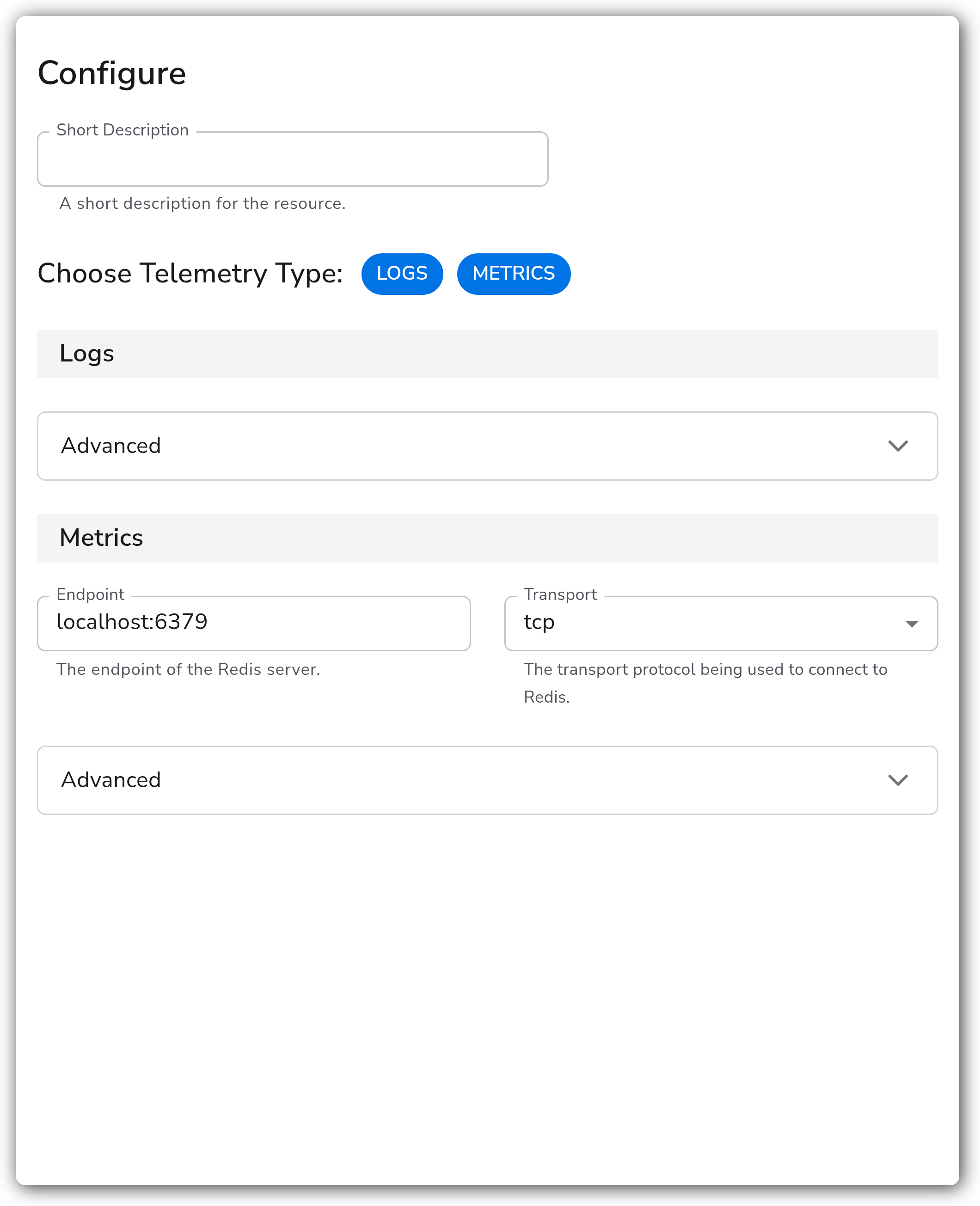
| Choose Telemetry Type | Enum: `Logs`, `Metrics` | No | `["Logs", "Metrics"]` | Telemetry types to collect. |
**Logs**
| Parameter | Type | Required | Default | Description |
| --------- | ------------------------ | -------- | ------------------------------------------------------------------------------------------------------------------------------------------------------- | -------------------------------------------------------------------------------------------------------------- |
| Log Paths | Strings | No | `/var/log/redis/redis-server.log`, `/var/log/redis_6379.log`, `/var/log/redis/redis.log`, `/var/log/redis/default.log`, `/var/log/redis/redis_6379.log` | Path to Redis log file(s). Relevant when `Choose Telemetry Type` contains `Logs`. Advanced. |
| Start At | Enum: `beginning`, `end` | No | `end` | Start reading logs from `beginning` or `end`. Relevant when `Choose Telemetry Type` contains `Logs`. Advanced. |
| Parse | Boolean | No | `true` | Parses the log fields into structured data. Relevant when `Choose Telemetry Type` contains `Logs`. Advanced. |
**Metrics**
| Parameter | Type | Required | Default | Description |
| --------- | ------------------- | -------- | ---------------- | ---------------------------------------------------------------------------------------------------------------- |
| Endpoint | String | No | `localhost:6379` | The endpoint of the Redis server. Relevant when `Choose Telemetry Type` contains `Metrics`. |
| Transport | Enum: `tcp`, `unix` | No | `tcp` | The transport protocol being used to connect to Redis. Relevant when `Choose Telemetry Type` contains `Metrics`. |
**Advanced**
| Parameter | Type | Required | Default | Description |
| ------------------- | ------- | -------- | --------- | ------------------------------------------------------------------------------------------------------------------------------------------------------------------------------------------------------------------------------ |
| Filtering | Metrics | No | See below | Enable or disable individual metrics. Most are enabled by default; see the per-category [Metric Reference](#metric-reference) below for each metric and its default. Relevant when `Choose Telemetry Type` contains `Metrics`. |
| Password | String | No | *(empty)* | The password used to access the Redis instance; must match the password specified in the `requirepass` server configuration option. Sensitive. Relevant when `Choose Telemetry Type` contains `Metrics`. |
| Collection Interval | Integer | No | `60` | How often (seconds) to scrape for metrics. Relevant when `Choose Telemetry Type` contains `Metrics`. |
**Metrics TLS Settings**
| Parameter | Type | Required | Default | Description |
| --------------------------------- | ------- | -------- | --------- | --------------------------------------------------------------------------------------------------------------------------- |
| Enable TLS | Boolean | No | `false` | Whether or not to use TLS. Relevant when `Choose Telemetry Type` contains `Metrics`. Advanced. |
| Skip TLS Certificate Verification | Boolean | No | `false` | Enable to skip TLS certificate verification. Relevant when `Enable TLS` is `true`. Advanced. |
| TLS Certificate Authority File | String | No | *(empty)* | Certificate authority used to validate TLS certificates. Relevant when `Enable TLS` is `true`. Advanced. |
| TLS Client Certificate File | String | No | *(empty)* | A TLS certificate used for client authentication, if mutual TLS is enabled. Relevant when `Enable TLS` is `true`. Advanced. |
| TLS Client Private Key File | String | No | *(empty)* | A TLS private key used for client authentication, if mutual TLS is enabled. Relevant when `Enable TLS` is `true`. Advanced. |
#### Metric Reference
The Filtering parameter toggles these metrics individually. Defaults reflect the upstream Redis Receiver (`v0.153.0`).
**Client Metrics**
| Metric | Unit | Default | Description |
| --------------------------------- | ---------- | ------- | ------------------------------------------------------------------- |
| `redis.clients.blocked` | `{client}` | Enabled | Number of clients pending on a blocking call. |
| `redis.clients.connected` | `{client}` | Enabled | Number of client connections (excluding connections from replicas). |
| `redis.clients.max_input_buffer` | `By` | Enabled | Biggest input buffer among current client connections. |
| `redis.clients.max_output_buffer` | `By` | Enabled | Longest output list among current client connections. |
**Commands Metrics**
| Metric | Unit | Default | Description |
| -------------------------- | ----------- | -------- | ------------------------------------------------- |
| `redis.cmd.calls` | `{call}` | Disabled | Total number of calls for a command. |
| `redis.cmd.usec` | `us` | Disabled | Total time for all executions of this command. |
| `redis.commands` | `{ops}/s` | Enabled | Number of commands processed per second. |
| `redis.commands.processed` | `{command}` | Enabled | Total number of commands processed by the server. |
**Connections Metrics**
| Metric | Unit | Default | Description |
| ---------------------------- | -------------- | ------- | ----------------------------------------------------------- |
| `redis.connections.received` | `{connection}` | Enabled | Total number of connections accepted by the server. |
| `redis.connections.rejected` | `{connection}` | Enabled | Number of connections rejected because of maxclients limit. |
**Database Metrics**
| Metric | Unit | Default | Description |
| ------------------ | ------- | ------- | ------------------------------------------- |
| `redis.db.avg_ttl` | `ms` | Enabled | Average keyspace keys TTL. |
| `redis.db.expires` | `{key}` | Enabled | Number of keyspace keys with an expiration. |
| `redis.db.keys` | `{key}` | Enabled | Number of keyspace keys. |
**Keys Metrics**
| Metric | Unit | Default | Description |
| ----------------------- | --------- | ------- | ----------------------------------------------------------- |
| `redis.keys.evicted` | `{key}` | Enabled | Number of evicted keys due to maxmemory limit. |
| `redis.keys.expired` | `{event}` | Enabled | Total number of key expiration events. |
| `redis.keyspace.hits` | `{hit}` | Enabled | Number of successful lookup of keys in the main dictionary. |
| `redis.keyspace.misses` | `{miss}` | Enabled | Number of failed lookup of keys in the main dictionary. |
**Memory Metrics**
| Metric | Unit | Default | Description |
| ---------------------------------- | ---- | -------- | --------------------------------------------------------------------- |
| `redis.maxmemory` | `By` | Disabled | The value of the maxmemory configuration directive. |
| `redis.memory.fragmentation_ratio` | `1` | Enabled | Ratio between used\_memory\_rss and used\_memory. |
| `redis.memory.lua` | `By` | Enabled | Number of bytes used by the Lua engine. |
| `redis.memory.peak` | `By` | Enabled | Peak memory consumed by Redis (in bytes). |
| `redis.memory.rss` | `By` | Enabled | Number of bytes that Redis allocated as seen by the operating system. |
| `redis.memory.used` | `By` | Enabled | Total number of bytes allocated by Redis using its allocator. |
**Network Metrics**
| Metric | Unit | Default | Description |
| ------------------ | ---- | ------- | ------------------------------------------------- |
| `redis.net.input` | `By` | Enabled | The total number of bytes read from the network. |
| `redis.net.output` | `By` | Enabled | The total number of bytes written to the network. |
**Replication Metrics**
| Metric | Unit | Default | Description |
| --------------------------------------------- | ----------- | -------- | ---------------------------------------------------- |
| `redis.replication.backlog_first_byte_offset` | `By` | Enabled | The master offset of the replication backlog buffer. |
| `redis.replication.offset` | `By` | Enabled | The server's current replication offset. |
| `redis.role` | `{role}` | Disabled | Redis node's role. |
| `redis.slaves.connected` | `{replica}` | Enabled | Number of connected replicas. |
**System Metrics**
| Metric | Unit | Default | Description |
| ----------------------------------- | ---------- | ------- | ---------------------------------------------------------------------- |
| `redis.cpu.time` | `s` | Enabled | System CPU consumed by the Redis server in seconds since server start. |
| `redis.latest_fork` | `us` | Enabled | Duration of the latest fork operation in microseconds. |
| `redis.rdb.changes_since_last_save` | `{change}` | Enabled | Number of changes since the last dump. |
| `redis.uptime` | `s` | Enabled | Number of seconds since Redis server start. |
### Examples
#### Metrics from a password-protected Redis instance
Scrape metrics from a Redis server that requires a password, leaving logs disabled and using a 30-second collection interval.
```yaml
apiVersion: bindplane.observiq.com/v1
kind: Source
metadata:
name: redis-metrics
spec:
type: redis
parameters:
- name: telemetry_types
value:
- Metrics
- name: endpoint
value: 10.0.0.20:6379
- name: transport
value: tcp
- name: password
value: my-redis-password
- name: collection_interval
value: 30
```
#### Logs from a Redis server log file
Collect and parse logs from a non-default Redis log path, reading only new entries.
```yaml
apiVersion: bindplane.observiq.com/v1
kind: Source
metadata:
name: redis-logs
spec:
type: redis
parameters:
- name: telemetry_types
value:
- Logs
- name: file_path
value:
- /var/log/redis/redis.log
- name: start_at
value: end
- name: parse
value: true
```
### Configuration Tips
* Set `Transport` to `unix` and point `Endpoint` at the Redis socket path when the collector runs on the same host as Redis and Redis is configured with `unixsocket`.
* The `redis.cmd.calls`, `redis.cmd.usec`, `redis.maxmemory`, `redis.replication.offset`, and `redis.role` metrics are disabled by default. Enable them through the `Filtering` control if you need per-command call counts, latency, configured max memory, or replication role and offset.
* On a primary/replica deployment, scrape each node separately so replication metrics such as `redis.slaves.connected` and `redis.replication.backlog_first_byte_offset` reflect the correct role.
### Troubleshooting
**Symptom:** Metrics are missing and the collector logs show a connection refused or timeout error.
**Solution:** Confirm the `Endpoint` host and port are correct and that the collector host can reach the Redis port. Check any firewall or security group rules between the collector and Redis.
**Symptom:** The collector reports an authentication error (`NOAUTH` or `WRONGPASS`).
**Solution:** Set the `Password` parameter to match the Redis `requirepass` value. If Redis ACLs are enabled, ensure the connecting user is permitted to run the `INFO` command.
**Symptom:** No logs are collected.
**Solution:** Verify the Redis `logfile` directive points to a real file, that the path is listed in `Log Paths`, and that the collector has read access to it. If you expect historical entries, set `Start At` to `beginning`.
### Standalone Source
```yaml
apiVersion: bindplane.observiq.com/v1
kind: Source
metadata:
name: redis
spec:
type: redis
parameters:
- name: telemetry_types
value:
- Logs
- Metrics
- name: endpoint
value: localhost:6379
- name: transport
value: tcp
- name: collection_interval
value: 60
- name: file_path
value:
- /var/log/redis/redis-server.log
- name: start_at
value: end
- name: parse
value: true
- name: enable_tls
value: false
```
### Related Resources
* [Redis INFO command documentation](https://redis.io/docs/latest/commands/info/)
* [Redis observability and monitoring](https://redis.io/tutorials/operate/redis-at-scale/observability/)
* [OpenTelemetry Redis receiver (`redisreceiver`)](https://github.com/open-telemetry/opentelemetry-collector-contrib/tree/main/receiver/redisreceiver)
---
# Agent Instructions
This documentation is published with GitBook. GitBook is the documentation platform designed so that both humans and AI agents can read, navigate, and reason over technical content effectively. Learn more at gitbook.com.
## Querying This Documentation
If you need additional information that is not directly available in this page, you can query the documentation by asking a question.
Perform an HTTP GET request on the following URL with the `ask` and `goal` query parameters:
```
GET https://docs.bindplane.com/integrations/sources/redis.md?ask=&goal=
```
`ask` is the immediate question: it should be specific, self-contained, and written in natural language.
`goal` is what the user is ultimately trying to achieve, the reason they need the answer. Sharing it helps GitBook give you a better, more relevant answer. A goal is most helpful when it describes the outcome the user wants rather than restating the question. For example, with `ask=how do I create an API token`, a goal like `automate deployments from our CI pipeline` lets GitBook tailor the answer to that use case.
The response will contain a direct answer to the question and relevant excerpts and sources from the documentation.
Use this mechanism when the answer is not explicitly present in the current page, you need clarification or additional context, or you want to retrieve related documentation sections.