> For the complete documentation index, see [llms.txt](https://docs.bindplane.com/llms.txt). Markdown versions of documentation pages are available by appending `.md` to page URLs; this page is available as [Markdown](https://docs.bindplane.com/integrations/sources/windows-event-trace-etw.md).
# Windows Event Trace (ETW)
The Windows Event Trace (ETW) source collects logs from [Event Tracing for Windows](https://learn.microsoft.com/en-us/windows/win32/etw/about-event-tracing). It creates a real-time ETW session on the host and subscribes to the providers you name (by provider name or GUID), reading their trace events as logs. ETW was built for short-lived diagnostic tracing rather than continuous monitoring, so size the session and choose providers with care.
### Supported Telemetry Types
| Platform | Metrics | Logs | Traces |
| -------- | ------- | ---- | ------ |
| Windows | | ✓ | |
### Prerequisites
* A Windows host running the Bindplane Collector.
* The collector must run with Administrative privileges. Creating and controlling an ETW session requires them.
* The provider names or GUIDs you want to subscribe to. List the providers registered on a host with `logman query providers` in an elevated PowerShell session.
For background on providers, sessions, and event levels, see Microsoft's [About Event Tracing](https://learn.microsoft.com/en-us/windows/win32/etw/about-event-tracing).
### Configuration
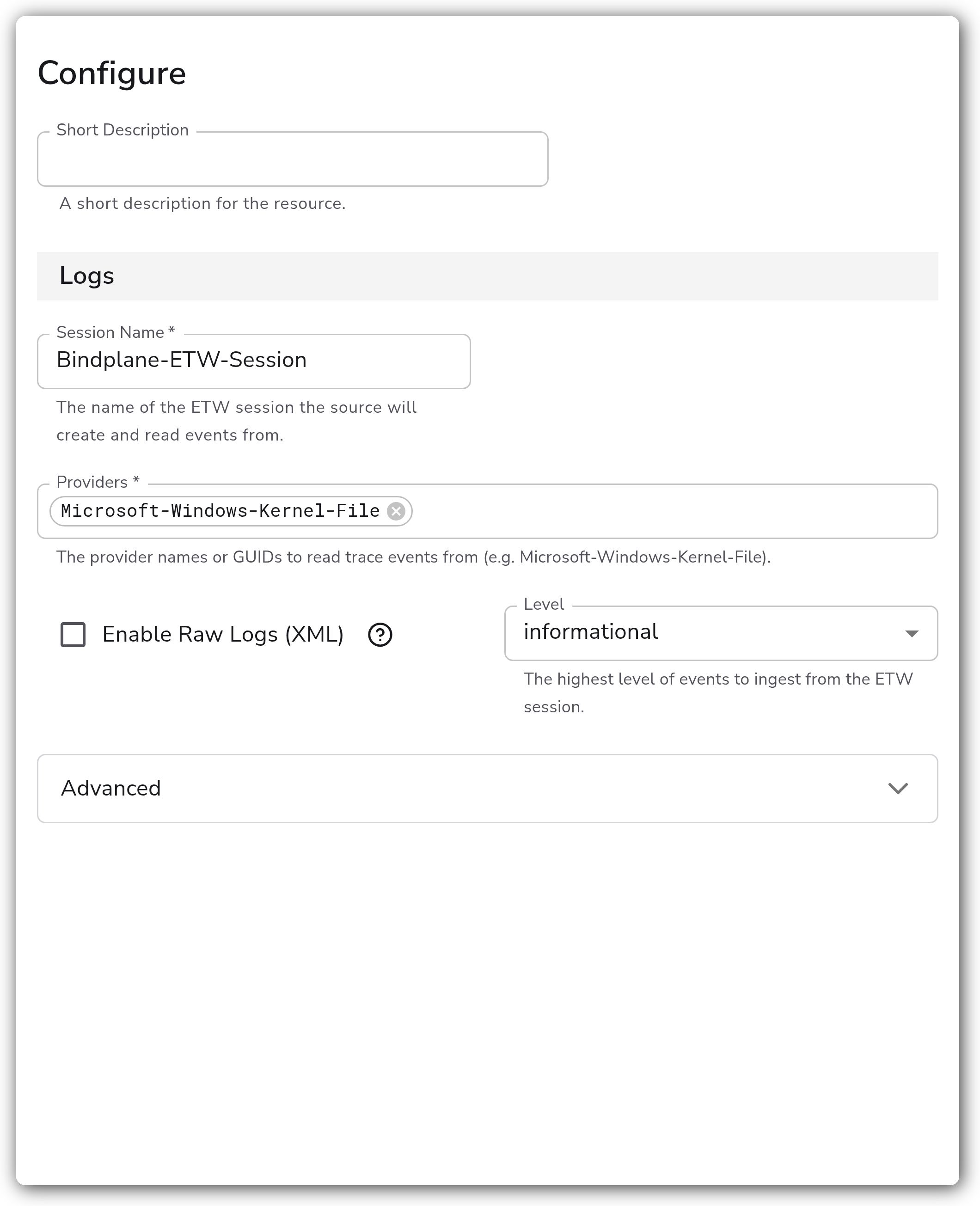
**Session and Providers**
| Parameter | Type | Required | Default | Description |
| --------------------- | ------------------------------------------------------------ | -------- | ----------------------- | ------------------------------------------------------------------------------------------------------------ |
| Session Name | String | Yes | `Bindplane-ETW-Session` | The name of the ETW session the source creates and reads events from. |
| Providers | Strings | Yes | *(empty)* | The provider names or GUIDs to read trace events from (for example `Microsoft-Windows-Kernel-File`). |
| Enable Raw Logs (XML) | Boolean | No | `false` | When enabled, the XML event is not parsed into a structure and is instead saved to the log body as a string. |
| Level | Enum: none, verbose, informational, warning, error, critical | No | `informational` | The highest level of events to ingest from the ETW session. |
**Advanced**
| Parameter | Type | Required | Default | Description |
| --------------------------- | ------- | -------- | ------- | ----------------------------------------------------------------------------------------------------------------- |
| Session Buffer Size | Integer | No | `64` | The size of the buffer in KB used to open the ETW session. |
| Require All Providers | Boolean | No | `false` | When enabled, the source only starts if every listed provider can be enabled. |
| Include Log Record Original | Boolean | No | `true` | When enabled, the original log record is included in the log body. Requires Bindplane Collector v1.96.0 or later. |
### Examples
#### Subscribe to a single kernel provider
This source creates a session named `Bindplane-ETW-Session` and subscribes to the kernel file provider, ingesting events at the `informational` level and below.
```yaml
apiVersion: bindplane.observiq.com/v1
kind: Source
metadata:
name: windows-etw-kernel-file
spec:
type: windowseventtrace
parameters:
- name: session_name
value: Bindplane-ETW-Session
- name: providers
value:
- Microsoft-Windows-Kernel-File
- name: level
value: informational
```
#### Subscribe to multiple providers and require them all
Subscribe to more than one provider and refuse to start unless every provider can be enabled, so a misnamed provider surfaces as a startup failure instead of silently missing events.
```yaml
apiVersion: bindplane.observiq.com/v1
kind: Source
metadata:
name: windows-etw-multi
spec:
type: windowseventtrace
parameters:
- name: session_name
value: Bindplane-ETW-Session
- name: providers
value:
- Microsoft-Windows-Kernel-File
- Microsoft-Windows-DNS-Client
- name: level
value: warning
- name: require_all_providers
value: true
```
### Configuration Tips
* Start with a small set of providers and a conservative Level (`informational` or `warning`), then widen scope as needed. Verbose providers can generate very high event volume.
* If events are being dropped under load, raise Session Buffer Size before adding more providers.
* Use provider names where available for readability, and fall back to GUIDs for providers that are not registered by name.
### Troubleshooting
#### The source fails to start
Symptoms: the collector logs an error creating the ETW session, or the source never produces events.
Solutions:
1. Confirm the collector runs with Administrative privileges. ETW session creation requires them.
2. Verify each provider name or GUID is correct and registered on the host with `logman query providers`.
3. If Require All Providers is enabled, a single bad provider blocks startup. Correct the provider list or disable Require All Providers to start with the providers that resolve.
#### Events are missing or dropped
Symptoms: fewer events arrive than expected, or volume drops during busy periods.
Solutions:
1. Increase Session Buffer Size. ETW drops events when the session buffers fill faster than they are read, which is common with verbose providers or under high load.
2. Reduce event volume by lowering Level or subscribing to fewer providers.
3. Check whether another tool already owns a session with the same name. Use a unique Session Name to avoid conflicts.
### Standalone Source
```yaml
apiVersion: bindplane.observiq.com/v1
kind: Source
metadata:
name: windows-event-trace-etw
spec:
type: windowseventtrace
parameters:
- name: session_name
value: Bindplane-ETW-Session
- name: providers
value:
- Microsoft-Windows-Kernel-File
- name: enable_raw
value: false
- name: level
value: informational
- name: session_buffer_size
value: 64
- name: require_all_providers
value: false
- name: include_log_record_original
value: true
```
### Related Resources
* [Windows Event Trace receiver (windowseventtracereceiver)](https://github.com/observIQ/bindplane-otel-contrib/tree/main/receiver/windowseventtracereceiver)
* [About Event Tracing — Microsoft Learn](https://learn.microsoft.com/en-us/windows/win32/etw/about-event-tracing)
---
# Agent Instructions
This documentation is published with GitBook. GitBook is the documentation platform designed so that both humans and AI agents can read, navigate, and reason over technical content effectively. Learn more at gitbook.com.
## Querying This Documentation
If you need additional information that is not directly available in this page, you can query the documentation by asking a question.
Perform an HTTP GET request on the following URL with the `ask` and `goal` query parameters:
```
GET https://docs.bindplane.com/integrations/sources/windows-event-trace-etw.md?ask=&goal=
```
`ask` is the immediate question: it should be specific, self-contained, and written in natural language.
`goal` is what the user is ultimately trying to achieve, the reason they need the answer. Sharing it helps GitBook give you a better, more relevant answer. A goal is most helpful when it describes the outcome the user wants rather than restating the question. For example, with `ask=how do I create an API token`, a goal like `automate deployments from our CI pipeline` lets GitBook tailor the answer to that use case.
The response will contain a direct answer to the question and relevant excerpts and sources from the documentation.
Use this mechanism when the answer is not explicitly present in the current page, you need clarification or additional context, or you want to retrieve related documentation sections.