> For the complete documentation index, see [llms.txt](https://docs.bindplane.com/llms.txt). Markdown versions of documentation pages are available by appending `.md` to page URLs; this page is available as [Markdown](https://docs.bindplane.com/readme.md).
# Getting Started with Bindplane
How to get up and running with Bindplane
## What is Bindplane?
Bindplane is an OpenTelemetry-native telemetry pipeline designed to collect, refine, and export metrics, logs, and traces from any source to any destination.
With Bindplane, you can reduce costs and simplify telemetry collector management at an Enterprise scale, easily managing thousands of collectors and petabytes of data in a highly available multi-node configuration.
Bindplane uses the [Bindplane Distro for OpenTelemetry (BDOT) Collector](https://github.com/observIQ/bindplane-otel-collector) to standardize telemetry management with [Open Agent Management Protocol (OpAMP)](https://opentelemetry.io/docs/specs/opamp/). You can also create custom distributions of OpenTelemetry Collector and manage them with Bindplane.
## Quickstart
You can get started with Bindplane in one of two ways:
* **Cloud**: Securely hosted and managed by Bindplane.
* **Self-hosted**: host Bindplane in your own infrastructure; available for [Enterprise](https://bindplane.com/pricing) and [Google Editions](https://bindplane.com/google).
### Get Started with Cloud
We recommend using Bindplane Cloud as the fastest and easiest way to build out your telemetry pipelines. Visit the [pricing page](https://bindplane.com/pricing) to compare our plans, which range from Free to Enterprise.
To get started, [sign up](https://app.bindplane.com/signup) for free and follow the [Access Bindplane UI](/readme/access-bindplane-ui.md) guide.
### Get Started with Self-Hosted
For self-hosted Enterprise needs, you can manage Bindplane in your own infrastructure. Bindplane can run as a lightweight web server with no dependencies.
To get started, follow the deployment guide for your desired platform:
* [Virtual Machine](/deployment/virtual-machine/bindplane/install-bindplane-server.md)
* [Docker](/deployment/docker/server/install-bindplane-in-docker-compose.md)
* [Kubernetes](/deployment/kubernetes/server/installation.md)
* [Google Marketplace](/deployment/google-marketplace.md)
If you require TLS, are using a proxy, or require authentication, check out the [Configuration](/configuration/bindplane.md) page.
## Features
* Deploy and manage the lifecycle of telemetry collectors, starting with the [BDOT Collector](https://github.com/observIQ/bindplane-otel-collector)
* Build, deploy, and manage telemetry configurations for different [Sources](/integrations/sources.md) and deploy them to your collectors
* Export metric, log, and trace data to one or many [Destinations](/integrations/destinations.md)
* Utilize flow controls to adjust the flow of your data in real-time
## Architecture
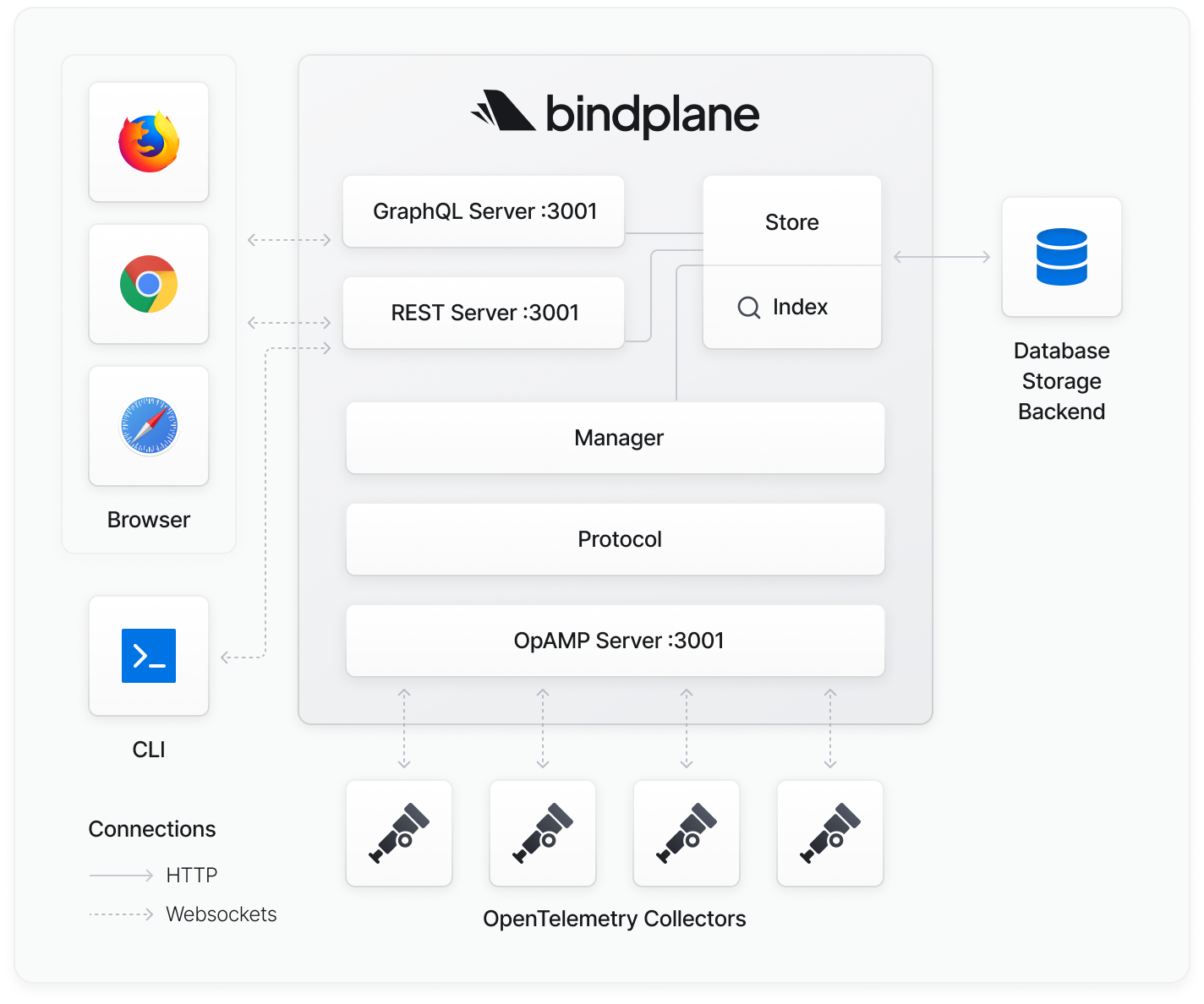
Bindplane is composed of the following components:
* GraphQL Server: provides configuration and collector details via GraphQL
* REST Server: Bindplane CLI and UI make requests to the server via REST
* WebSocket Server: Collectors connect to receive configuration updates via [OpAMP](https://github.com/open-telemetry/opamp-spec)
* Store: pluggable storage manages configuration and Collector state
* Manager: dispatches configuration changes to Collectors
---
# Agent Instructions
This documentation is published with GitBook. GitBook is the documentation platform designed so that both humans and AI agents can read, navigate, and reason over technical content effectively. Learn more at gitbook.com.
## Querying This Documentation
If you need additional information that is not directly available in this page, you can query the documentation by asking a question.
Perform an HTTP GET request on the following URL with the `ask` and `goal` query parameters:
```
GET https://docs.bindplane.com/readme.md?ask=&goal=
```
`ask` is the immediate question: it should be specific, self-contained, and written in natural language.
`goal` is what the user is ultimately trying to achieve, the reason they need the answer. Sharing it helps GitBook give you a better, more relevant answer. A goal is most helpful when it describes the outcome the user wants rather than restating the question. For example, with `ask=how do I create an API token`, a goal like `automate deployments from our CI pipeline` lets GitBook tailor the answer to that use case.
The response will contain a direct answer to the question and relevant excerpts and sources from the documentation.
Use this mechanism when the answer is not explicitly present in the current page, you need clarification or additional context, or you want to retrieve related documentation sections.