> For the complete documentation index, see [llms.txt](https://docs.bindplane.com/llms.txt). Markdown versions of documentation pages are available by appending `.md` to page URLs; this page is available as [Markdown](https://docs.bindplane.com/integrations/sources/http-log.md).
# HTTP Log
The HTTP Log source runs an HTTP listener that receives logs delivered as POST requests. Any network device or log shipper that can push logs to an HTTP endpoint (commonly called a "LogPush" destination) can deliver records to the collector. By default the request body is parsed as JSON, with an option to ingest the raw request body as unstructured text.
### Supported Telemetry Types
| Platform | Metrics | Logs | Traces |
| -------- | ------- | ---- | ------ |
| Linux | | ✓ | |
| Windows | | ✓ | |
| macOS | | ✓ | |
### Prerequisites
* A log source or shipper that can send logs to an HTTP endpoint via POST requests.
* The log source must be able to reach the collector over the network. Adjust any firewall rules to allow TCP and HTTP traffic to the configured IP address and port.
* For TLS, a TLS certificate and private key reachable on the collector host.
### Configuration
#### General
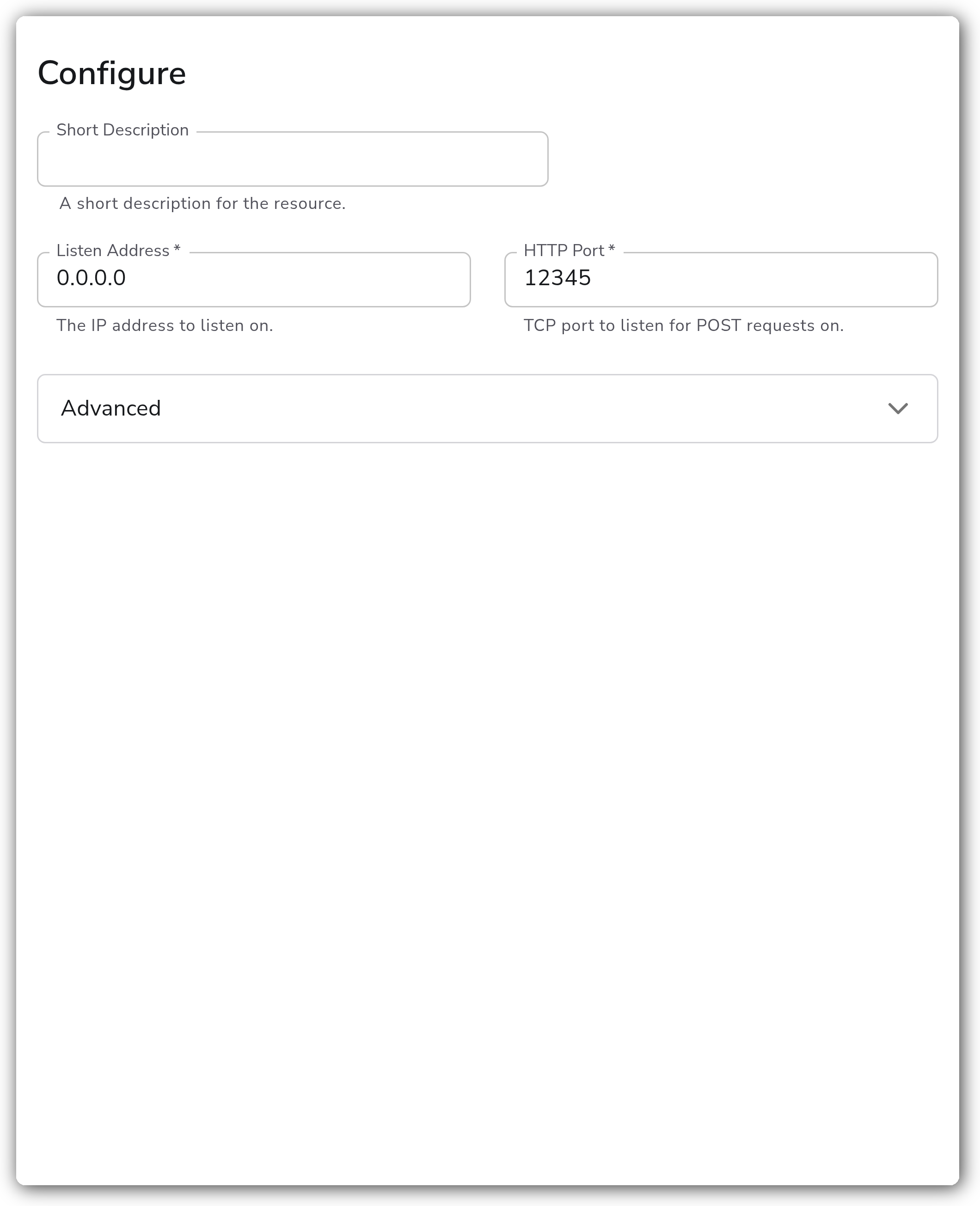
| Parameter | Type | Default | Description |
| -------------- | ------- | --------- | -------------------------------------------------- |
| Listen Address | String | `0.0.0.0` | The IP address to listen on. Required. |
| HTTP Port | Integer | | TCP port to listen for POST requests on. Required. |
#### Advanced
| Parameter | Type | Default | Description |
| ------------------ | ------- | ------- | ------------------------------------------------------------------------------------------------------------------------------------------------------------ |
| Path | String | | The path along the endpoint the receiver should listen to for logs. Useful when the log source also sends other data, such as metrics, to the same endpoint. |
| Enable TLS | Boolean | `false` | Enable TLS for the logs server. |
| Cert File Location | String | | Local path to the TLS cert file. Required when TLS is enabled. |
| Key File Location | String | | Local path to the TLS key file. Required when TLS is enabled. |
| Raw Logs | Boolean | `false` | When enabled, the request body is not parsed into a structure but saved to the log body as raw text. Available with collector v1.88.1+. |
### Request Format
By default, the request body must be JSON. The receiver parses each POST request body into one or more structured log records. A request can deliver a single JSON object or a JSON array of objects (a batch), for example:
```json
[
{
"timestamp": "2026-06-18T12:00:00Z",
"severity": "info",
"message": "user login succeeded",
"host": "edge-01",
"client_ip": "203.0.113.10"
},
{
"timestamp": "2026-06-18T12:00:01Z",
"severity": "warn",
"message": "rate limit applied",
"host": "edge-01",
"client_ip": "203.0.113.42"
}
]
```
To ingest the request body verbatim instead of parsing it as JSON, set `raw_logs` to `true`. The full body is then stored as unstructured text in the log record body.
### Example Configuration
For a basic configuration, only the `listen_address` and `http_port` parameters are needed.
#### Standalone Source
```yaml
apiVersion: bindplane.observiq.com/v1
kind: Source
metadata:
id: http
name: http
spec:
type: http
parameters:
- name: listen_address
value: '0.0.0.0'
- name: http_port
value: '12345'
```
**With TLS enabled**
```yaml
apiVersion: bindplane.observiq.com/v1
kind: Source
metadata:
id: http
name: http
spec:
type: http
parameters:
- name: listen_address
value: '0.0.0.0'
- name: http_port
value: '8443'
- name: path
value: '/logs'
- name: enable_listen_tls
value: 'true'
- name: listen_tls_cert_file
value: '/opt/observiq-otel-collector/http.crt'
- name: listen_tls_key_file
value: '/opt/observiq-otel-collector/http.key'
```
### Configuration Tips
#### Path routing
* Set `path` when the log source also delivers other data, such as metrics, to the same host and port. The receiver then accepts logs only on the configured path.
* Leave `path` empty to accept POST requests on any path.
#### Raw versus structured logs
* Leave `raw_logs` disabled (the default) when the source sends JSON. The receiver parses each request body into a structured log record.
* Enable `raw_logs` to store the request body verbatim as unstructured text. This is useful for sources that send a non-JSON or proprietary body format.
### Troubleshooting
**Symptom:** No logs arrive at the collector. **Solution:** Confirm the source can reach the collector on the configured `listen_address` and `http_port`, and that firewall rules allow inbound TCP traffic to that port. Verify the source is sending POST requests to the matching path if `path` is set.
**Symptom:** Logs arrive but are not parsed into structured fields. **Solution:** Confirm the request body is valid JSON. If the source sends a non-JSON body, enable `raw_logs` to ingest the body as raw text instead.
**Symptom:** TLS connections fail or are refused. **Solution:** Confirm `enable_listen_tls` is set and that `listen_tls_cert_file` and `listen_tls_key_file` point to valid, readable files on the collector host. Both are required when TLS is enabled.
### Related Resources
* [Bindplane sources documentation](https://docs.bindplane.com/integrations/sources)
* [Custom Service for Kubernetes collectors](https://docs.bindplane.com/deployment/kubernetes/collector/custom-service)
---
# Agent Instructions
This documentation is published with GitBook. GitBook is the documentation platform designed so that both humans and AI agents can read, navigate, and reason over technical content effectively. Learn more at gitbook.com.
## Querying This Documentation
If you need additional information that is not directly available in this page, you can query the documentation by asking a question.
Perform an HTTP GET request on the following URL with the `ask` and `goal` query parameters:
```
GET https://docs.bindplane.com/integrations/sources/http-log.md?ask=&goal=
```
`ask` is the immediate question: it should be specific, self-contained, and written in natural language.
`goal` is what the user is ultimately trying to achieve, the reason they need the answer. Sharing it helps GitBook give you a better, more relevant answer. A goal is most helpful when it describes the outcome the user wants rather than restating the question. For example, with `ask=how do I create an API token`, a goal like `automate deployments from our CI pipeline` lets GitBook tailor the answer to that use case.
The response will contain a direct answer to the question and relevant excerpts and sources from the documentation.
Use this mechanism when the answer is not explicitly present in the current page, you need clarification or additional context, or you want to retrieve related documentation sections.