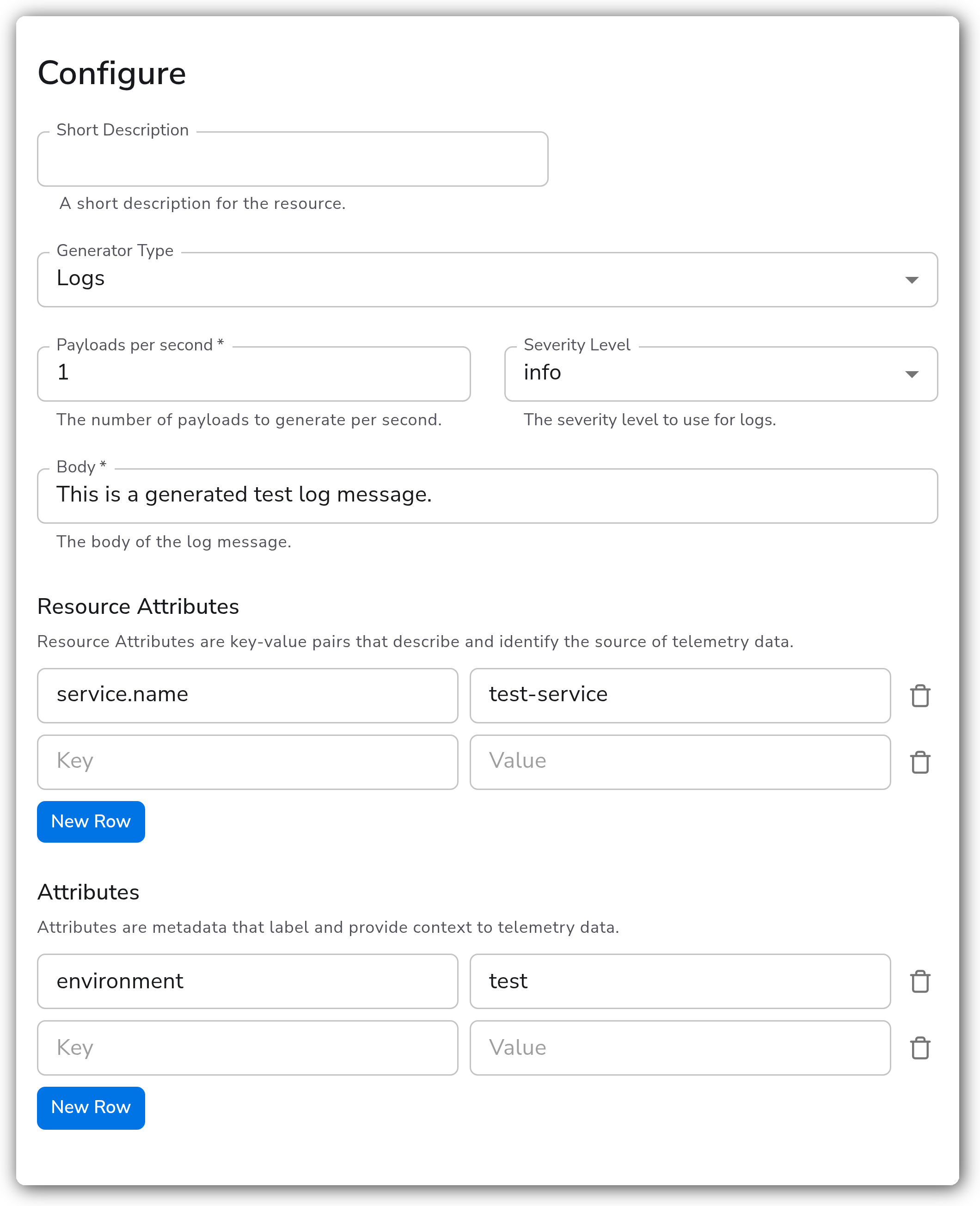
> For the complete documentation index, see [llms.txt](https://docs.bindplane.com/llms.txt). Markdown versions of documentation pages are available by appending `.md` to page URLs; this page is available as [Markdown](https://docs.bindplane.com/integrations/sources/telemetry-generator.md).
# Telemetry Generator
The Telemetry Generator source produces synthetic telemetry for testing Bindplane pipelines. It is useful for validating processor and destination configurations and for generating load without depending on a real telemetry source. The generator can emit synthetic logs, host metrics, replayed OTLP payloads (logs, metrics, or traces), or sample Windows Event Log records.
### Supported Telemetry Types
| Platform | Metrics | Logs | Traces |
| -------- | ------- | ---- | ------ |
| Linux | ✓ | ✓ | ✓ |
| Windows | ✓ | ✓ | ✓ |
| macOS | ✓ | ✓ | ✓ |
| AIX | ✓ | ✓ | ✓ |
The telemetry types actually emitted depend on the selected **Generator Type**. Logs and Windows Events produce logs, Host Metrics produces metrics, and OTLP produces whichever type is selected for the replay payload.
### Prerequisites
* A collector running a build of the Bindplane OpenTelemetry collector that includes the `telemetrygeneratorreceiver`. The Host Metrics and Windows Events generators require collector version v1.47.0 or later.
### Configuration
#### General
| Parameter | Type | Default | Description |
| ------------------- | ------- | ------- | ---------------------------------------------------------------------------------------------- |
| Generator Type | Enum | `Logs` | The kind of telemetry to generate. One of `Host Metrics`, `OTLP`, `Logs`, or `Windows Events`. |
| Payloads per second | Integer | `1` | The number of payloads to generate per second. Required. |
#### Logs Generator
These parameters apply when `generator_type` is `Logs`.
| Parameter | Type | Default | Description |
| ------------------- | ------ | ------- | ------------------------------------------------------------------------------------------------------------------------------------------------------ |
| Body | String | | The body of the generated log message. Required when the generator type is `Logs`. |
| Severity Level | Enum | `info` | The severity level to use for generated logs. One of `trace`, `debug`, `info`, `warn`, `error`, or `fatal`. Applies when the generator type is `Logs`. |
| Resource Attributes | Map | `{}` | Resource attributes (key-value pairs) that describe and identify the source of the generated logs. Applies when the generator type is `Logs`. |
| Attributes | Map | `{}` | Attributes (key-value pairs) that label and provide context to the generated logs. Applies when the generator type is `Logs`. |
#### OTLP Replay Generator
These parameters apply when `generator_type` is `OTLP`. The OTLP generator replays JSON-formatted OTLP telemetry, adjusting timestamps relative to the current time so that the most recent record is moved to now and earlier records keep the same relative offset.
| Parameter | Type | Default | Description |
| -------------- | ---- | ------- | ----------------------------------------------------------------------------------------------------------------------------------------------------------------------------------- |
| Telemetry Type | Enum | `logs` | The type of telemetry to replay. One of `logs`, `metrics`, or `traces`. Applies when the generator type is `OTLP`. |
| OTLP JSON | YAML | | The JSON-formatted OTLP payload to replay, such as output from `plog.JSONMarshaler`, `pmetric.JSONMarshaler`, or `ptrace.JSONMarshaler`. Applies when the generator type is `OTLP`. |
#### Host Metrics Generator
These parameters apply when `generator_type` is `Host Metrics`. The Host Metrics generator emits synthetic host metrics from a predefined set.
| Parameter | Type | Default | Description |
| ------------------- | ---- | ------- | -------------------------------------------------------------------------------------------------------------------------------------------------------- |
| Resource Attributes | Map | `{}` | Resource attributes (key-value pairs) that describe and identify the source of the generated metrics. Applies when the generator type is `Host Metrics`. |
#### Windows Events Generator
When `generator_type` is `Windows Events`, the source replays a sample of recorded Windows Event Log data. It has no additional configuration parameters beyond `payloads`.
### Example Configuration
#### Standalone Source
This example generates one synthetic log payload per second with an `info` severity, a static body, and a resource attribute.
```yaml
apiVersion: bindplane.observiq.com/v1
kind: Source
metadata:
id: telemetrygenerator
name: telemetrygenerator
spec:
type: telemetrygenerator
parameters:
- name: generator_type
value: 'Logs'
- name: payloads
value: '1'
- name: severity_level
value: 'info'
- name: body
value: 'This is a generated test log message.'
- name: logs_resource_attributes
value:
service.name: 'test-service'
- name: attributes
value:
environment: 'test'
```
To generate host metrics instead, set `generator_type` to `Host Metrics`:
```yaml
apiVersion: bindplane.observiq.com/v1
kind: Source
metadata:
id: telemetrygenerator
name: telemetrygenerator
spec:
type: telemetrygenerator
parameters:
- name: generator_type
value: 'Host Metrics'
- name: payloads
value: '1'
- name: metrics_resource_attributes
value:
host.name: 'test-host'
```
### Configuration Tips
#### Choosing a generator type
* Use the **Logs** generator for a steady stream of simple log records when validating log pipelines, processors, or destinations.
* Use the **Host Metrics** generator to exercise metric pipelines without running a real host metrics receiver.
* Use the **OTLP** generator to replay a captured payload of real telemetry. Paste JSON-formatted OTLP into `otlp_json`, and the generator adjusts the timestamps relative to the current time.
* Use the **Windows Events** generator to replay sample Windows Event Log data into a log pipeline.
#### Controlling load
* Raise `payloads` to increase throughput when load-testing a pipeline. The receiver generates that many payloads every second, so scale the value carefully against the capacity of your downstream destinations.
### Troubleshooting
**Symptom:** No telemetry appears downstream even though the source is configured. **Solution:** Confirm the **Generator Type** matches the pipeline you are testing. A `Logs` or `Windows Events` generator only feeds logs pipelines, `Host Metrics` only feeds metrics pipelines, and `OTLP` feeds whichever type is set in `otlp_type`.
**Symptom:** The OTLP generator produces no records. **Solution:** Verify that `otlp_json` contains valid JSON-formatted OTLP telemetry and that `otlp_type` matches the telemetry type contained in the payload (`logs`, `metrics`, or `traces`).
**Symptom:** Generated logs have no body or unexpected severity. **Solution:** The `body` parameter is required for the Logs generator. Set it explicitly, and set `severity_level` to the desired level (`info` by default).
### Related Resources
* [OTLP/JSON encoding reference](https://github.com/open-telemetry/opentelemetry-proto#otlpjson)
* [Bindplane sources documentation](https://docs.bindplane.com/integrations/sources)
---
# Agent Instructions
This documentation is published with GitBook. GitBook is the documentation platform designed so that both humans and AI agents can read, navigate, and reason over technical content effectively. Learn more at gitbook.com.
## Querying This Documentation
If you need additional information that is not directly available in this page, you can query the documentation by asking a question.
Perform an HTTP GET request on the following URL with the `ask` and `goal` query parameters:
```
GET https://docs.bindplane.com/integrations/sources/telemetry-generator.md?ask=&goal=
```
`ask` is the immediate question: it should be specific, self-contained, and written in natural language.
`goal` is what the user is ultimately trying to achieve, the reason they need the answer. Sharing it helps GitBook give you a better, more relevant answer. A goal is most helpful when it describes the outcome the user wants rather than restating the question. For example, with `ask=how do I create an API token`, a goal like `automate deployments from our CI pipeline` lets GitBook tailor the answer to that use case.
The response will contain a direct answer to the question and relevant excerpts and sources from the documentation.
Use this mechanism when the answer is not explicitly present in the current page, you need clarification or additional context, or you want to retrieve related documentation sections.