> For the complete documentation index, see [llms.txt](https://docs.bindplane.com/llms.txt). Markdown versions of documentation pages are available by appending `.md` to page URLs; this page is available as [Markdown](https://docs.bindplane.com/integrations/sources/opentelemetry-otlp.md).
# OpenTelemetry (OTLP)
The OpenTelemetry (OTLP) source receives metrics, logs, and traces sent in OpenTelemetry Protocol (OTLP) format. The collector runs an OTLP server that accepts data over gRPC (default port 4317) and HTTP (default port 4318). Any OTLP exporter, SDK, or other OpenTelemetry collector can send to it.
### Supported Telemetry Types
| Platform | Metrics | Logs | Traces |
| ------------------ | ------- | ---- | ------ |
| Linux | ✓ | ✓ | ✓ |
| Windows | ✓ | ✓ | ✓ |
| macOS | ✓ | ✓ | ✓ |
| AIX | ✓ | ✓ | ✓ |
| Kubernetes Node | ✓ | ✓ | ✓ |
| Kubernetes Gateway | ✓ | ✓ | ✓ |
| OpenShift Node | ✓ | ✓ | ✓ |
| OpenShift Gateway | ✓ | ✓ | ✓ |
### Prerequisites
This is a receive-only source, so the only requirement is a reachable listen address and open ports on the collector host.
* The collector must be able to bind the configured listen address and gRPC/HTTP ports. The defaults are `0.0.0.0:4317` (gRPC) and `0.0.0.0:4318` (HTTP).
* The gRPC port and HTTP port must be different values.
* Any firewall, security group, or Kubernetes Service in front of the collector must allow the senders to reach those ports.
* If you enable TLS, you need a server certificate and private key on the collector host. For mutual TLS you also need a certificate authority file to validate client certificates.
### Configuration
**General**
| Parameter | Type | Required | Default | Description |
| --------------------- | ----------------- | -------- | ------------------------------- | ---------------------------------------------------------------------------------------------------------------------------------------------------- |
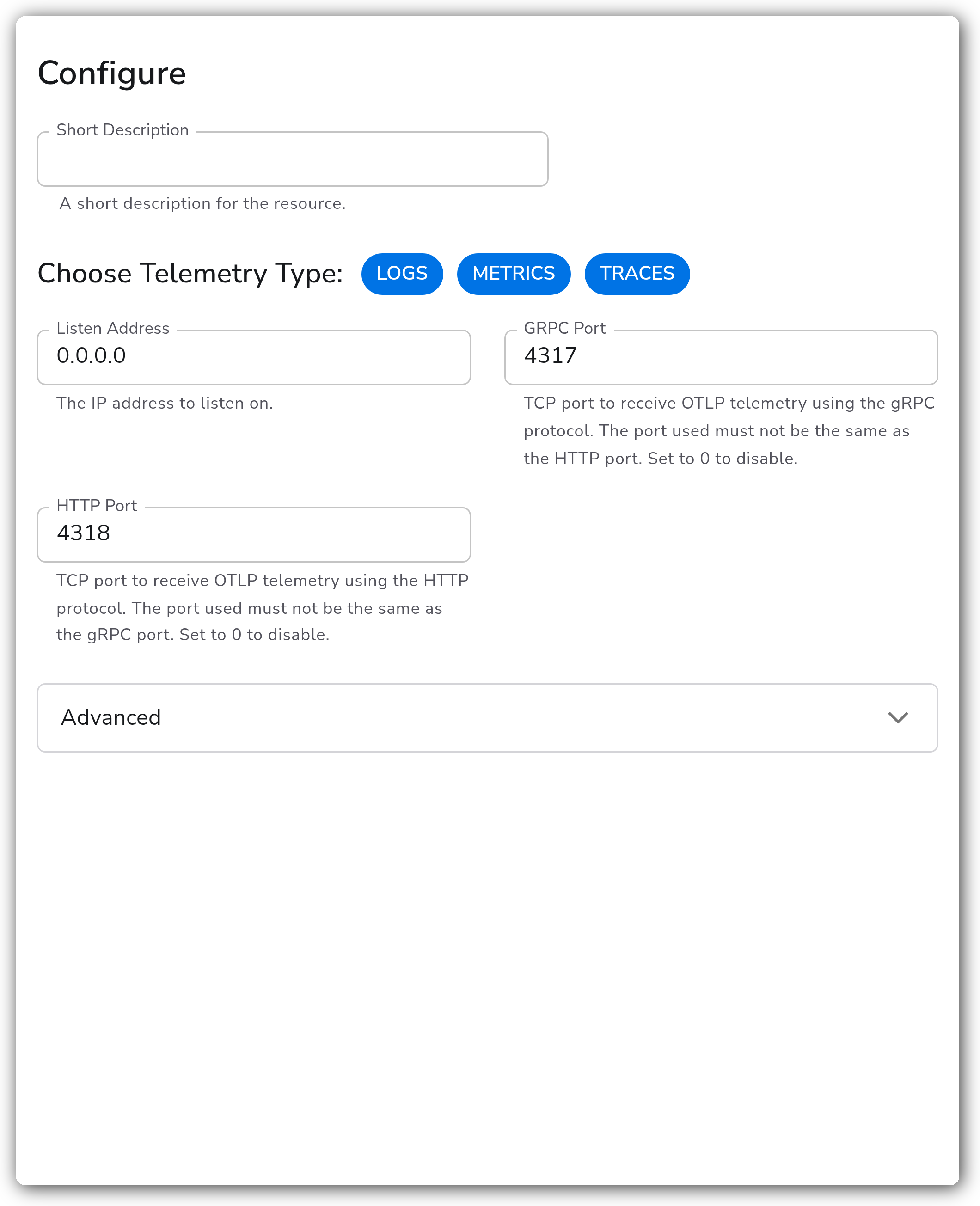
| Choose Telemetry Type | telemetrySelector | No | `["Logs", "Metrics", "Traces"]` | Which signals the source receives. Valid values are Logs, Metrics, and Traces. |
| Listen Address | string | No | `0.0.0.0` | The IP address to listen on. |
| GRPC Port | int | No | `4317` | TCP port to receive OTLP telemetry using the gRPC protocol. The port used must not be the same as the HTTP port. Set to 0 to disable. Range 0-65535. |
| HTTP Port | int | No | `4318` | TCP port to receive OTLP telemetry using the HTTP protocol. The port used must not be the same as the gRPC port. Set to 0 to disable. Range 0-65535. |
**Advanced**
| Parameter | Type | Required | Default | Description |
| -------------------- | ---- | -------- | ------- | --------------------------------------------------------------------------------------------------- |
| Maximum Message Size | int | No | `20` | Sets the maximum size (in MiB) of messages accepted by the server. Visible when GRPC Port is not 0. |
| Include Metadata | bool | No | `false` | Propagates the incoming connection's metadata to downstream consumers. |
**TLS**
| Parameter | Type | Required | Default | Description |
| ------------------------------ | ------ | -------- | --------- | ----------------------------------------------------------------------------------------------------------------------------------------------------- |
| Enable TLS | bool | No | `false` | Whether or not to use TLS. |
| Server Certificate File | string | Yes | *(empty)* | A path to the server certificate to be used for TLS. Required and visible when Enable TLS is true. |
| Server Private Key | string | Yes | *(empty)* | A path to the server private key to be used for TLS. Required and visible when Enable TLS is true. |
| Mutual TLS | bool | No | `false` | Whether or not to require client TLS authentication (mTLS). Visible when Enable TLS is true. |
| TLS Certificate Authority File | string | Yes | *(empty)* | A path to the certificate authority to use for authenticating client certificates. Required and visible when Enable TLS and Mutual TLS are both true. |
**GRPC Timeout**
| Parameter | Type | Required | Default | Description |
| ------------------------ | ---- | -------- | ------- | ---------------------------------------------------------------------------------------------------------------------------------------------------------------------- |
| Enable GRPC Timeout | bool | No | `true` | Enable to configure advanced GRPC timeout behavior. Visible when GRPC Port is not 0. |
| Max Idle Time | int | No | `60` | Maximum amount of time (seconds) after which an idle connection would be closed by sending a GoAway. Visible when GRPC Port is not 0 and Enable GRPC Timeout is true. |
| Max Connection Age | int | No | `60` | Maximum amount of time (seconds) a connection may exist before it will be closed by sending a GoAway. Visible when GRPC Port is not 0 and Enable GRPC Timeout is true. |
| Max Connection Age Grace | int | No | `300` | Additive period after Max Connection Age after which the connection will be forcibly closed. Visible when GRPC Port is not 0 and Enable GRPC Timeout is true. |
**CORS**
| Parameter | Type | Required | Default | Description |
| -------------------- | ------- | -------- | --------- | --------------------------------------------------------------------------------------------------------------------------------------------- |
| Configure CORS | bool | No | `false` | Enable Cross-Origin Resource Sharing support for HTTP requests. Visible when HTTP Port is not 0. |
| CORS Allowed Origins | strings | No | *(empty)* | A list of origins a cross-domain request can be executed from. Visible when Configure CORS is true and HTTP Port is not 0. |
| CORS Allowed Headers | strings | No | *(empty)* | The allowed headers sets what headers will be allowed in CORS requests. Visible when Configure CORS is true and HTTP Port is not 0. |
| CORS Max Age | int | No | `0` | Indicates how long (in seconds) the results of a preflight request can be cached. Visible when Configure CORS is true and HTTP Port is not 0. |
### Examples
#### Receive all three signals with defaults
The OTLP source has no required fields. With the defaults it listens on `0.0.0.0:4317` (gRPC) and `0.0.0.0:4318` (HTTP) for logs, metrics, and traces, without TLS.
```yaml
apiVersion: bindplane.observiq.com/v1
kind: Source
metadata:
name: otlp
spec:
type: otlp
parameters:
- name: telemetry_types
value:
- Logs
- Metrics
- Traces
- name: listen_address
value: 0.0.0.0
- name: grpc_port
value: 4317
- name: http_port
value: 4318
```
#### Kubernetes: DaemonSet vs. Gateway
The OTLP source works on Node (DaemonSet) and Gateway collectors. Applications in the cluster send telemetry to the collectors through their `clusterIP` Services. The source needs no extra configuration; attach it to the collector type you want to receive on.
Use these endpoints to send to the managed Node (DaemonSet) collectors:
| Protocol | Service | Endpoint |
| -------- | ------------------ | ---------------------------------------------------------------------- |
| gRPC | clusterIP | `bindplane-node-agent.bindplane-agent.svc.cluster.local:4317` |
| gRPC | headless clusterIP | `bindplane-node-agent-headless.bindplane-agent.svc.cluster.local:4317` |
| HTTP | clusterIP | `http://bindplane-node-agent.bindplane-agent.svc.cluster.local:4318` |
Use these endpoints to send to the managed Gateway collectors:
| Protocol | Service | Endpoint |
| -------- | ------------------ | ------------------------------------------------------------------------- |
| gRPC | clusterIP | `bindplane-gateway-agent.bindplane-agent.svc.cluster.local:4317` |
| gRPC | headless clusterIP | `bindplane-gateway-agent-headless.bindplane-agent.svc.cluster.local:4317` |
| HTTP | clusterIP | `http://bindplane-gateway-agent.bindplane-agent.svc.cluster.local:4318` |
A DaemonSet collector runs one pod per node, so an application sends to the collector on its own node (typically through the node-local Service). This keeps the network hop local and tags telemetry with node-level context, but it scales with the number of nodes and competes for node resources with your workloads.
A Gateway collector runs as a separate scalable Deployment that all applications send to over the cluster Service. It scales independently of cluster size and centralizes processing, at the cost of an extra network hop and no automatic node-level association. Prefer the Gateway when DaemonSet resource consumption per node is a concern or when you want centralized, independently scaled ingestion. A common pattern is both: DaemonSet collectors enrich and forward node-local data to a Gateway tier.
#### Receive over gRPC only with mutual TLS
Disable the HTTP listener by setting its port to 0, then enable TLS and mutual TLS so only clients presenting a valid certificate are accepted.
```yaml
apiVersion: bindplane.observiq.com/v1
kind: Source
metadata:
name: otlp-mtls
spec:
type: otlp
parameters:
- name: telemetry_types
value:
- Logs
- Metrics
- Traces
- name: grpc_port
value: 4317
- name: http_port
value: 0
- name: enable_tls
value: true
- name: cert_file
value: /opt/tls/server.crt
- name: key_file
value: /opt/tls/server.key
- name: mutual_tls
value: true
- name: ca_file
value: /opt/tls/ca.crt
```
### Configuration Tips
* The gRPC and HTTP ports must differ. Set a protocol's port to 0 to disable that protocol entirely (for example HTTP Port `0` for a gRPC-only receiver).
* Enabling Mutual TLS requires Enable TLS to be on, and the CA file is then required so the server can validate client certificates. Enable mTLS on both this source and the sending exporter together, or connections will be rejected.
* CORS settings only apply to the HTTP listener. They have no effect when the HTTP port is disabled.
### Troubleshooting
#### Collector fails to start or bind the port
**Symptoms:** The collector logs an "address already in use" or bind error, or no data arrives.
**Solutions:**
1. Confirm the gRPC and HTTP ports are different. Setting both to the same value is invalid.
2. Check that no other process or another OTLP source is already bound to the same listen address and port.
3. Verify the listen address is reachable. `0.0.0.0` binds all interfaces; a specific IP must exist on the host.
#### Senders cannot connect or are rejected
**Symptoms:** Exporters report connection refused, TLS handshake failures, or certificate errors.
**Solutions:**
1. Ensure firewalls, security groups, and Kubernetes Services forward the gRPC/HTTP ports to the collector.
2. When TLS is enabled, confirm the sender trusts the server certificate and is using the correct scheme (`https`/secure gRPC).
3. When Mutual TLS is enabled, confirm the sender presents a client certificate signed by the configured CA file.
#### Large payloads are dropped over gRPC
**Symptoms:** Big batches fail over gRPC while smaller ones succeed, often with a message-size error.
**Solutions:**
1. Raise Maximum Message Size (MiB) on this source to accommodate the largest expected batch.
2. Reduce batch size on the sending exporter so individual messages stay under the limit.
### Standalone Source
```yaml
apiVersion: bindplane.observiq.com/v1
kind: Source
metadata:
name: otlp
spec:
type: otlp
parameters:
- name: telemetry_types
value:
- Logs
- Metrics
- Traces
- name: listen_address
value: 0.0.0.0
- name: grpc_port
value: 4317
- name: http_port
value: 4318
- name: enable_tls
value: false
```
### Related Resources
* [OpenTelemetry Collector OTLP Receiver](https://github.com/open-telemetry/opentelemetry-collector/blob/main/receiver/otlpreceiver/README.md)
* [OpenTelemetry Protocol (OTLP) specification](https://opentelemetry.io/docs/specs/otlp/)
---
# Agent Instructions
This documentation is published with GitBook. GitBook is the documentation platform designed so that both humans and AI agents can read, navigate, and reason over technical content effectively. Learn more at gitbook.com.
## Querying This Documentation
If you need additional information that is not directly available in this page, you can query the documentation by asking a question.
Perform an HTTP GET request on the following URL with the `ask` and `goal` query parameters:
```
GET https://docs.bindplane.com/integrations/sources/opentelemetry-otlp.md?ask=&goal=
```
`ask` is the immediate question: it should be specific, self-contained, and written in natural language.
`goal` is what the user is ultimately trying to achieve, the reason they need the answer. Sharing it helps GitBook give you a better, more relevant answer. A goal is most helpful when it describes the outcome the user wants rather than restating the question. For example, with `ask=how do I create an API token`, a goal like `automate deployments from our CI pipeline` lets GitBook tailor the answer to that use case.
The response will contain a direct answer to the question and relevant excerpts and sources from the documentation.
Use this mechanism when the answer is not explicitly present in the current page, you need clarification or additional context, or you want to retrieve related documentation sections.