> For the complete documentation index, see [llms.txt](https://docs.bindplane.com/llms.txt). Markdown versions of documentation pages are available by appending `.md` to page URLs; this page is available as [Markdown](https://docs.bindplane.com/integrations/sources/azure-blob-storage.md).
# Azure Blob Storage
The Azure Blob Storage source reads telemetry stored as blobs in an [Azure Storage](https://learn.microsoft.com/en-us/azure/storage/blobs/storage-blobs-overview) account. Bindplane subscribes to an [Azure Event Hub](https://learn.microsoft.com/en-us/azure/storage/blobs/storage-blob-event-overview) that fires on `Blob Create` events, then reads each newly created blob and parses it as telemetry. Logs and traces stored in the configured containers are ingested as they arrive.
{% hint style="warning" %}
Prior to BDOT 1.99.0, the Azure Blob source always deleted blobs immediately after reading them. This could result in data loss if a blob was not successfully sent to its destination. If you notice data loss after errors, upgrade to at least BDOT 1.99.0.
{% endhint %}
### Supported Telemetry Types
| Platform | Metrics | Logs | Traces |
| ------------------ | ------- | ---- | ------ |
| Linux | ✓ | ✓ | ✓ |
| Windows | ✓ | ✓ | ✓ |
| macOS | ✓ | ✓ | ✓ |
| Kubernetes Cluster | ✓ | ✓ | ✓ |
### Prerequisites
* An Azure Storage account, with the blobs to ingest stored in [OTLP JSON format](https://github.com/open-telemetry/opentelemetry-proto#otlpjson). Blobs in any other format cannot be parsed by the receiver.
* The Azure Storage account connection string (see [Configure a connection string](https://learn.microsoft.com/en-gb/azure/storage/common/storage-configure-connection-string)).
* An Azure Event Hub that receives `Blob Create` events from the storage account, and its endpoint connection string (see [Set up the Event Hub](#set-up-the-event-hub)).
* A separate container for each telemetry type you collect (for example, `logs` and `traces`).
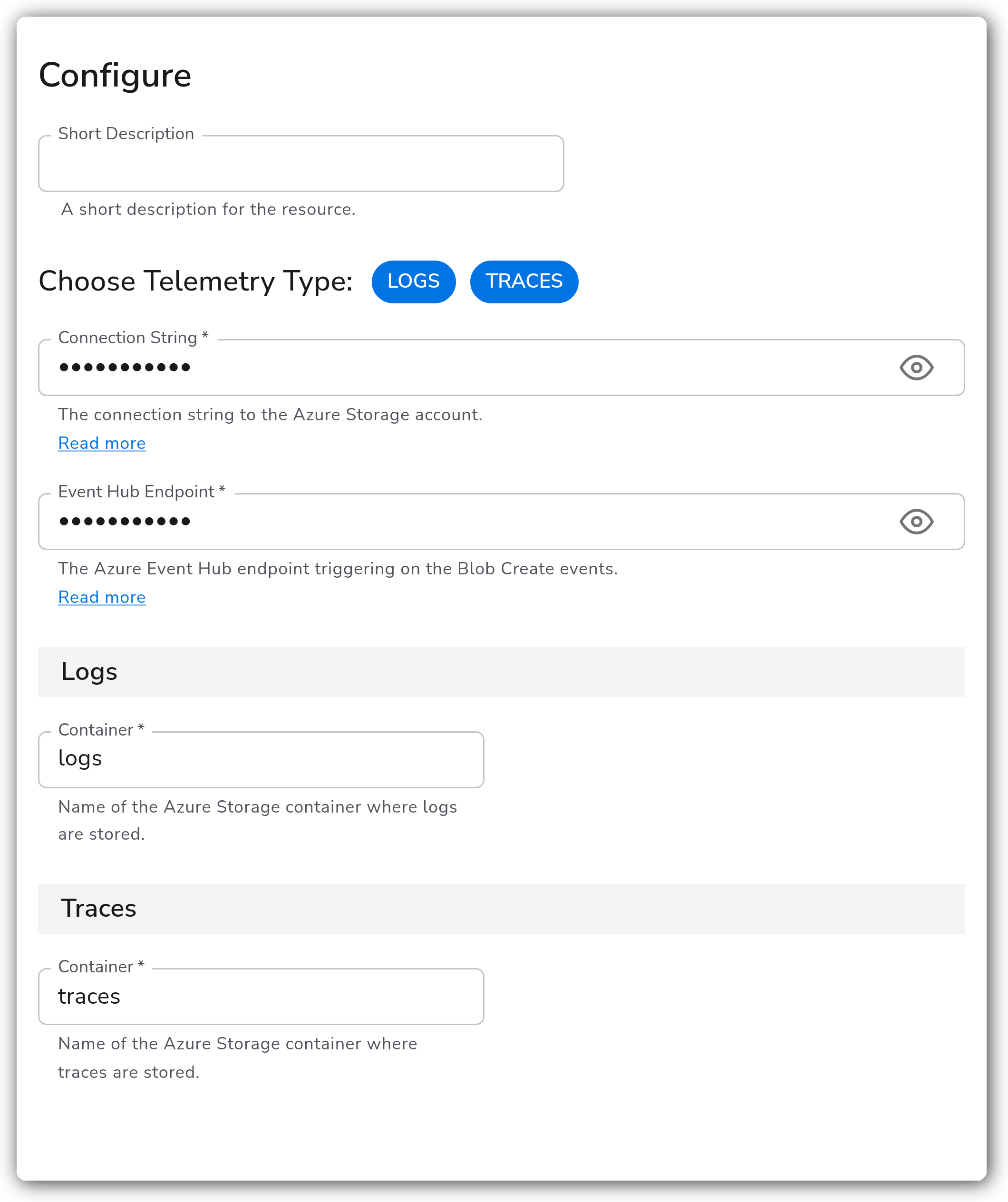
### Configuration
#### General
| Parameter | Type | Default | Description |
| --------------------- | ------------------ | -------------------- | ---------------------------------------------------------------------------------------------------------- |
| Choose Telemetry Type | Telemetry Selector | `["Logs", "Traces"]` | Which telemetry types to collect. Valid values are `Logs` and `Traces`. |
| Connection String | String | | The connection string to the Azure Storage account. Required. This value is sensitive. |
| Event Hub Endpoint | String | | The Azure Event Hub endpoint that triggers on the `Blob Create` events. Required. This value is sensitive. |
#### Logs
| Parameter | Type | Default | Description |
| --------- | ------ | ------- | ------------------------------------------------------------------------------------------------------ |
| Container | String | `logs` | Name of the Azure Storage container where logs are stored. Required when `Logs` telemetry is selected. |
#### Traces
| Parameter | Type | Default | Description |
| --------- | ------ | -------- | ---------------------------------------------------------------------------------------------------------- |
| Container | String | `traces` | Name of the Azure Storage container where traces are stored. Required when `Traces` telemetry is selected. |
### Set up the Event Hub
The source learns about new blobs through Event Hub notifications rather than polling the storage account. Create a subscription so that `Blob Create` events are delivered to an Event Hub:
1. In the Azure portal, create (or reuse) an [Event Hubs namespace](https://learn.microsoft.com/en-us/azure/event-hubs/event-hubs-create) and an Event Hub within it.
2. On the storage account, open **Events** and add an **Event Subscription** that filters for the `Microsoft.Storage.BlobCreated` event type.
3. Set the endpoint type to **Event Hubs** and point it at the Event Hub created above.
4. Create a Shared Access Policy on the Event Hub (or its namespace) and copy the connection string. This is the value you supply as `event_hub_endpoint`.
For more detail on the event schema and delivery, see the [Azure Blob Storage events documentation](https://learn.microsoft.com/en-us/azure/storage/blobs/storage-blob-event-overview).
### Example Configuration
#### Standalone Source
For a basic configuration, supply the storage account `connection_string` and the `event_hub_endpoint`. The example below uses placeholder credentials in the form Azure expects.
```yaml
apiVersion: bindplane.observiq.com/v1
kind: Source
metadata:
id: azure_blob
name: azure_blob
spec:
type: azure_blob
parameters:
- name: telemetry_types
value:
- Logs
- Traces
- name: connection_string
value: 'DefaultEndpointsProtocol=https;AccountName=accountName;AccountKey=+idLkHYcL0MUWIKYHm2j4Q==;EndpointSuffix=core.windows.net'
- name: event_hub_endpoint
value: 'Endpoint=sb://oteldata.servicebus.windows.net/;SharedAccessKeyName=otelhubbpollicy;SharedAccessKey=mPJVubIK5dJ6mLfZo1ucsdkLysLSQ6N7kddvsIcmoEs=;EntityPath=otellhub'
- name: logs_container
value: 'logs'
- name: traces_container
value: 'traces'
```
### Configuration Tips
#### Blob format
* Stored logs and traces must be in [OTLP JSON format](https://github.com/open-telemetry/opentelemetry-proto#otlpjson). The receiver cannot parse blobs written in any other format.
#### Containers and telemetry types
* Use separate containers for logs and traces, then point `logs_container` and `traces_container` at them. The defaults are `logs` and `traces`.
* Only the containers for the telemetry types you select under `telemetry_types` are read, so deselect a type if you are not storing it.
### Troubleshooting
**Symptom:** The source is configured but no telemetry arrives. **Solution:** Confirm the Event Hub subscription is delivering `Microsoft.Storage.BlobCreated` events. The source reacts to notifications, so it will not read existing blobs that were created before the subscription was in place. Verify the `event_hub_endpoint` connection string is correct and that its access policy grants listen permission.
**Symptom:** Blobs are created but fail to parse, or records are dropped. **Solution:** Ensure blobs are written in [OTLP JSON format](https://github.com/open-telemetry/opentelemetry-proto#otlpjson). Other formats cannot be parsed by the receiver.
**Symptom:** Data loss after read errors on older collector versions. **Solution:** Upgrade to at least BDOT 1.99.0. Earlier versions deleted each blob immediately after reading, before confirming it was successfully sent downstream.
### Related Resources
* [Azure Blob Storage events overview](https://learn.microsoft.com/en-us/azure/storage/blobs/storage-blob-event-overview)
* [Configure an Azure Storage connection string](https://learn.microsoft.com/en-gb/azure/storage/common/storage-configure-connection-string)
* [Azure Event Hubs documentation](https://learn.microsoft.com/en-us/azure/event-hubs/event-hubs-about)
---
# Agent Instructions
This documentation is published with GitBook. GitBook is the documentation platform designed so that both humans and AI agents can read, navigate, and reason over technical content effectively. Learn more at gitbook.com.
## Querying This Documentation
If you need additional information that is not directly available in this page, you can query the documentation by asking a question.
Perform an HTTP GET request on the following URL with the `ask` and `goal` query parameters:
```
GET https://docs.bindplane.com/integrations/sources/azure-blob-storage.md?ask=&goal=
```
`ask` is the immediate question: it should be specific, self-contained, and written in natural language.
`goal` is what the user is ultimately trying to achieve, the reason they need the answer. Sharing it helps GitBook give you a better, more relevant answer. A goal is most helpful when it describes the outcome the user wants rather than restating the question. For example, with `ask=how do I create an API token`, a goal like `automate deployments from our CI pipeline` lets GitBook tailor the answer to that use case.
The response will contain a direct answer to the question and relevant excerpts and sources from the documentation.
Use this mechanism when the answer is not explicitly present in the current page, you need clarification or additional context, or you want to retrieve related documentation sections.