> For the complete documentation index, see [llms.txt](https://docs.bindplane.com/llms.txt). Markdown versions of documentation pages are available by appending `.md` to page URLs; this page is available as [Markdown](https://docs.bindplane.com/integrations/sources/kubernetes-prometheus-node.md).
# Kubernetes Prometheus Node
Scrapes Prometheus metrics from pods running on the same Kubernetes node as the collector. The source uses the OpenTelemetry Prometheus receiver with Kubernetes pod service discovery (`role: pod`), filtered by `spec.nodeName=$KUBE_NODE_NAME` so each collector only collects from local pods. This is built for a DaemonSet deployment: every node runs a collector, and node-scoped scraping prevents duplicate metrics across the fleet. Pod selection and metric paths are driven by `prometheus.io/*` pod annotations through relabel configs.
### Supported Telemetry Types
| Platform | Metrics | Logs | Traces |
| --------------- | ------- | ---- | ------ |
| Kubernetes Node | ✓ | | |
| OpenShift Node | ✓ | | |
### Prerequisites
* The collector must run as a DaemonSet so an instance is present on every node. Each collector scrapes only pods scheduled to its own node (`spec.nodeName=$KUBE_NODE_NAME`), so coverage depends on the DaemonSet running cluster-wide.
* The `KUBE_NODE_NAME` environment variable must be available to the collector container, populated from the pod's `spec.nodeName` via the downward API. The Bindplane Kubernetes collector manifests set this for you.
* Scrape targets must be reachable from the collector on the pod network. Each target pod must expose a Prometheus-compatible metrics endpoint and be annotated so service discovery can find it (at minimum `prometheus.io/scrape: "true"` when the default relabel config is used).
* For the HTTPS scraper, the target's TLS certificate must be verifiable by the collector, or TLS verification must be skipped. Mount any CA or client key pair into the collector container.
For details on Kubernetes pod annotations and the downward API, see the [Kubernetes documentation](https://kubernetes.io/docs/concepts/workloads/pods/downward-api/).
### Configuration
**General**
| Parameter | Type | Required | Default | Description |
| --------------- | ------------------- | -------- | ---------------------- | ------------------------------------------------------------------------------------------------------------------------------------------------------------------------------------------------------------------------------------ |
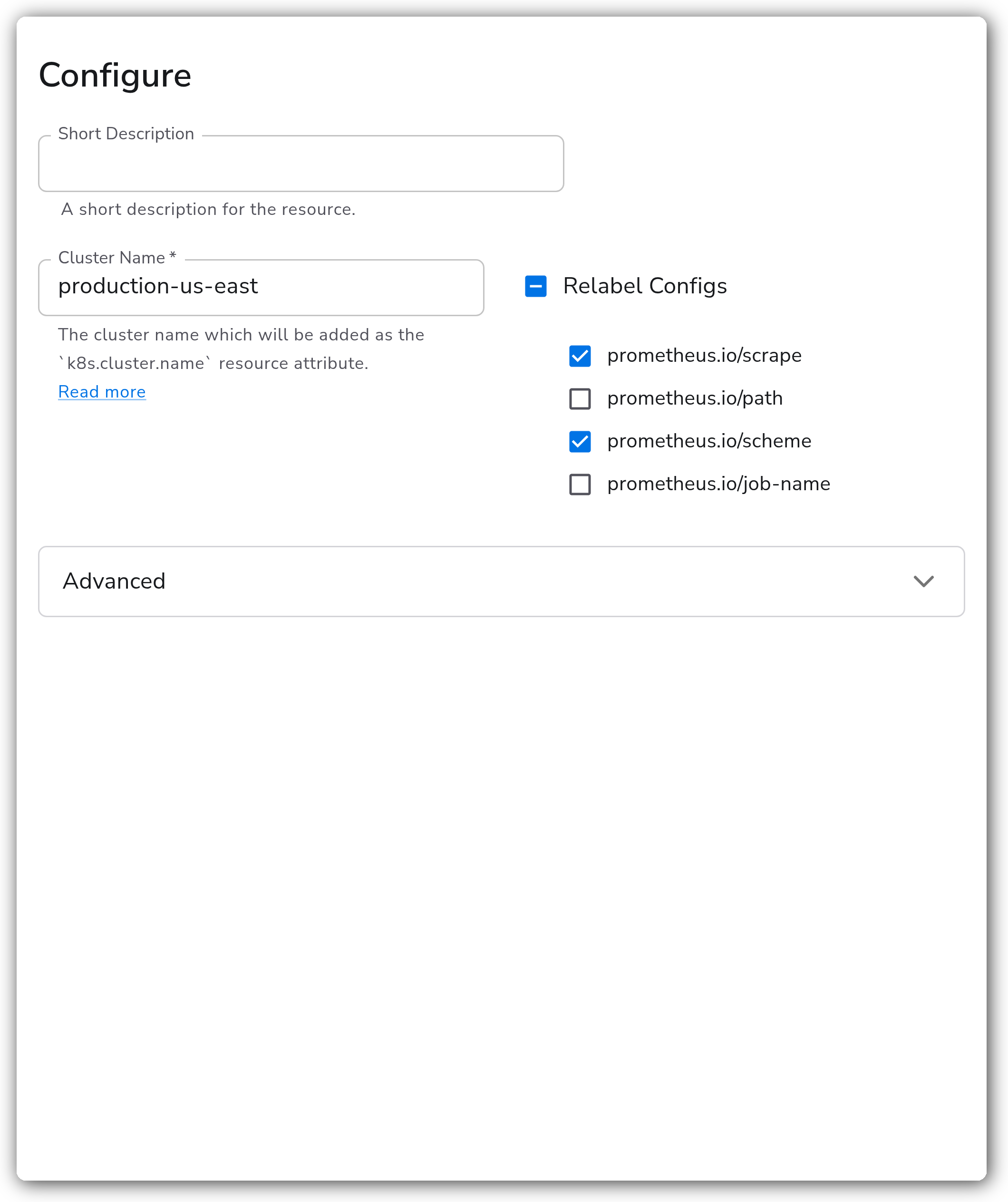
| Cluster Name | String | Yes | *(empty)* | The cluster name, added as the `k8s.cluster.name` resource attribute. You can use a placeholder value if you intend to set the real name later with a Resource Detection or Add Fields processor. |
| Relabel Configs | Enum (multi-select) | No | `prometheus.io/scrape` | Which `prometheus.io/*` pod annotations are honored during service discovery. See [Relabel Configs](#relabel-configs). Valid values: `prometheus.io/scrape`, `prometheus.io/path`, `prometheus.io/scheme`, `prometheus.io/job-name`. |
**Advanced**
| Parameter | Type | Required | Default | Description |
| --------------------------------- | ------- | -------- | --------- | -------------------------------------------------------------------------------------------------------------------- |
| Collection Interval | Integer | No | `60` | How often, in seconds, to scrape for metrics. |
| Scrapers | Enum | No | `http` | Which scrapers to enable. One of `http`, `https`, or `http+https`. The HTTPS scraper applies the TLS settings below. |
| Skip TLS Certificate Verification | Boolean | No | `false` | Skip TLS certificate verification when the HTTPS scraper is enabled. |
| TLS Certificate Authority File | String | No | *(empty)* | Path to a certificate authority used to validate TLS certificates when the HTTPS scraper is enabled. |
| TLS Client Certificate File | String | No | *(empty)* | Path to a TLS certificate for client authentication when the HTTPS scraper is enabled. |
| TLS Client Private Key File | String | No | *(empty)* | Path to a TLS private key for client authentication when the HTTPS scraper is enabled. |
#### Relabel Configs
Relabel configs control how discovered pods are scraped, based on `prometheus.io/*` pod annotations.
**prometheus.io/scrape**
When enabled, only pods with the `prometheus.io/scrape: "true"` annotation are scraped. This option is enabled by default to prevent the receiver from scraping every pod on the node.
**prometheus.io/path**
The default metrics path is `/metrics`. Enable this option to override the path per pod with the `prometheus.io/path` annotation.
**prometheus.io/scheme**
When enabled, the HTTP scraper only scrapes pods annotated `prometheus.io/scheme: "http"`, and the HTTPS scraper only scrapes pods annotated `prometheus.io/scheme: "https"`. Recommended when both scrapers are enabled.
**prometheus.io/job-name**
When enabled, the scrape job (and the resulting `service.name` resource attribute) is set from the pod's `prometheus.io/job-name` annotation, instead of the default `kubernetes-pod-http` or `kubernetes-pod-https`.
#### Transport Layer Security
To use a TLS certificate authority or client key pair with the HTTPS scraper, mount the files into the collector container with a `volumeMount`, then reference their in-container paths in the TLS parameters above. See the Kubernetes guide for [mounting secrets into a pod](https://kubernetes.io/docs/concepts/configuration/secret/#using-secrets-as-files-from-a-pod).
### Examples
#### Annotate a workload for scraping
Pods are discovered by their `prometheus.io/*` annotations. Set the annotations on the pod template (`spec.template.metadata.annotations`), not on the Deployment's own `metadata.annotations`. Updating pod annotations triggers a rollout of the pods.
```yaml
apiVersion: apps/v1
kind: Deployment
metadata:
name: nginx
spec:
replicas: 2
selector:
matchLabels:
app: nginx
template:
metadata:
labels:
app: nginx
annotations:
prometheus.io/scrape: 'true'
prometheus.io/path: /metrics
prometheus.io/scheme: http
prometheus.io/job-name: nginx
spec:
containers:
- name: nginx
image: nginx:latest
```
With the source's default relabel config (`prometheus.io/scrape`), only the `prometheus.io/scrape: 'true'` annotation is required. Enable the matching relabel configs to also honor `prometheus.io/path`, `prometheus.io/scheme`, and `prometheus.io/job-name`.
### Configuration Tips
* `Cluster Name` is required and becomes `k8s.cluster.name`. If the value is not known at config time, set a placeholder and overwrite it downstream with a Resource Detection or Add Fields processor.
* When running both the HTTP and HTTPS scrapers (`http+https`), enable the `prometheus.io/scheme` relabel config so each scraper only targets pods declaring the matching scheme.
* The source scrapes only pods on the collector's own node by design. Run it as a DaemonSet for full cluster coverage; a single Deployment replica will only see pods on one node.
### Troubleshooting
#### No metrics from annotated pods
Symptoms: pods expose a metrics endpoint and carry `prometheus.io/scrape: "true"`, but no metrics arrive.
Solutions:
1. Confirm the collector is running as a DaemonSet and that a collector pod is scheduled on the same node as the target pod. The source ignores pods on other nodes.
2. Verify `KUBE_NODE_NAME` is set in the collector container (from `spec.nodeName` via the downward API). Without it, the node selector filters out every pod.
3. If you enabled the `prometheus.io/path` or `prometheus.io/scheme` relabel configs, confirm the target pods carry the corresponding annotations.
#### HTTPS scrape fails with a TLS error
Symptoms: the HTTPS scraper logs certificate verification or handshake errors.
Solutions:
1. Mount the CA into the collector container and set `TLS Certificate Authority File` to its in-container path, or enable `Skip TLS Certificate Verification` for testing.
2. If the target requires mutual TLS, set both `TLS Client Certificate File` and `TLS Client Private Key File`.
#### Duplicate metrics across the cluster
Symptoms: the same pod's metrics appear multiple times.
Solutions:
1. Ensure the source runs as a DaemonSet, not as a multi-replica Deployment. Node-scoped scraping relies on one collector per node so each target is scraped exactly once.
### Standalone Source
```yaml
apiVersion: bindplane.observiq.com/v1
kind: Source
metadata:
name: kubernetes-prometheus-node
spec:
type: k8s_prometheus_node
parameters:
- name: cluster_name
value: production-us-east
- name: relabel_configs
value:
- prometheus.io/scrape
- prometheus.io/scheme
- name: collection_interval
value: 60
- name: scrapers
value: http
- name: insecure_skip_verify
value: false
- name: ca_file
value: ""
- name: cert_file
value: ""
- name: key_file
value: ""
```
### Related Resources
* [Prometheus Receiver — OpenTelemetry Collector Contrib](https://github.com/open-telemetry/opentelemetry-collector-contrib/blob/main/receiver/prometheusreceiver/README.md)
* [Kubernetes downward API](https://kubernetes.io/docs/concepts/workloads/pods/downward-api/)
* [Kubernetes semantic conventions — OpenTelemetry](https://opentelemetry.io/docs/specs/semconv/resource/k8s/)
---
# Agent Instructions
This documentation is published with GitBook. GitBook is the documentation platform designed so that both humans and AI agents can read, navigate, and reason over technical content effectively. Learn more at gitbook.com.
## Querying This Documentation
If you need additional information that is not directly available in this page, you can query the documentation by asking a question.
Perform an HTTP GET request on the following URL with the `ask` and `goal` query parameters:
```
GET https://docs.bindplane.com/integrations/sources/kubernetes-prometheus-node.md?ask=&goal=
```
`ask` is the immediate question: it should be specific, self-contained, and written in natural language.
`goal` is what the user is ultimately trying to achieve, the reason they need the answer. Sharing it helps GitBook give you a better, more relevant answer. A goal is most helpful when it describes the outcome the user wants rather than restating the question. For example, with `ask=how do I create an API token`, a goal like `automate deployments from our CI pipeline` lets GitBook tailor the answer to that use case.
The response will contain a direct answer to the question and relevant excerpts and sources from the documentation.
Use this mechanism when the answer is not explicitly present in the current page, you need clarification or additional context, or you want to retrieve related documentation sections.