> For the complete documentation index, see [llms.txt](https://docs.bindplane.com/llms.txt). Markdown versions of documentation pages are available by appending `.md` to page URLs; this page is available as [Markdown](https://docs.bindplane.com/integrations/processors/add-fields.md).
# Add Fields
The Add Fields processor sets attributes, resource fields, and log record body fields on telemetry in a pipeline. Each field can be inserted only when absent, updated only when present, or upserted (inserted or updated). An optional OTTL condition limits the processor to matching records. It operates on logs, metrics, and traces, though body fields apply to logs only.
### Supported Telemetry Types
| Platform | Metrics | Logs | Traces |
| ----------------------- | ------- | ---- | ------ |
| Linux | ✓ | ✓ | ✓ |
| Windows | ✓ | ✓ | ✓ |
| macOS | ✓ | ✓ | ✓ |
| AIX | ✓ | ✓ | ✓ |
| Kubernetes Node | ✓ | ✓ | ✓ |
| Kubernetes Cluster | ✓ | ✓ | ✓ |
| Kubernetes Gateway | ✓ | ✓ | ✓ |
| OpenShift Node | ✓ | ✓ | ✓ |
| OpenShift Cluster | ✓ | ✓ | ✓ |
| OpenShift Gateway | ✓ | ✓ | ✓ |
| Google SecOps Pipelines | ✓ | ✓ | ✓ |
### Configuration
**When to apply**
| Parameter | Type | Required | Default | Description |
| --------------------- | ------------------ | -------- | --------------------- | --------------------------------------------------------------------------------------------------------------------------- |
| Choose Telemetry Type | Telemetry Selector | Yes | Logs, Metrics, Traces | The signals this instance runs on. Fields are only applied to the selected telemetry types. |
| Condition | OTTL Condition | No | *(empty)* | An OTTL condition that must evaluate to true for a field to be applied. When empty, the processor applies to all telemetry. |
**Fields**
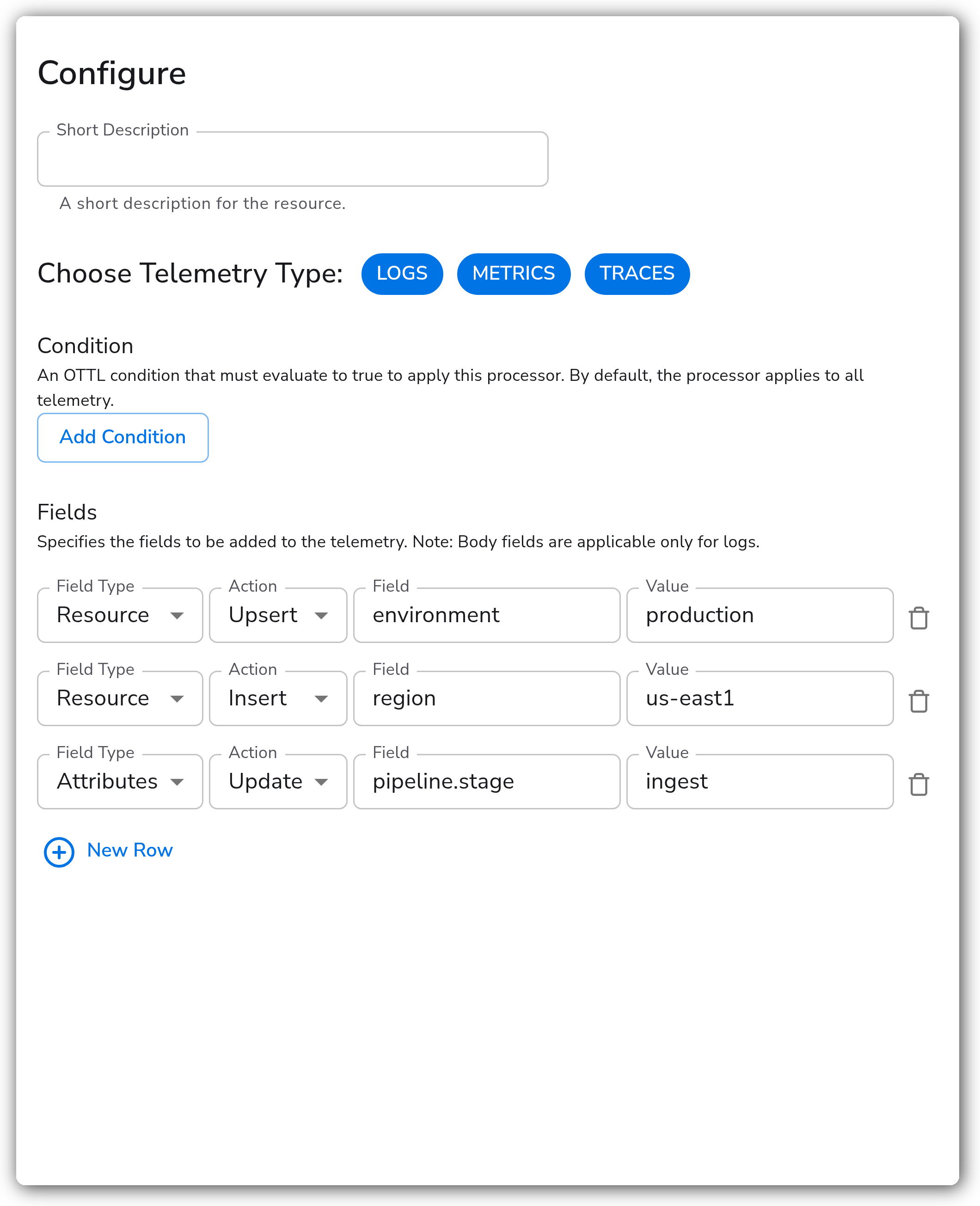
The Fields parameter is a repeatable list. Each row adds or modifies one field.
| Parameter | Type | Required | Default | Description |
| ---------- | -------------------------------- | -------- | ---------- | ---------------------------------------------------------------------------------------------------------------------------------------------------- |
| Field Type | Enum: Attributes, Resource, Body | Yes | Attributes | The context the field is written to. **Body is logs-only**; Body rows are ignored for metrics and traces. |
| Action | Enum: Insert, Update, Upsert | Yes | Upsert | `Insert` adds the field only if it does not already exist. `Update` changes the value only if the field already exists. `Upsert` inserts or updates. |
| Key | String | Yes | — | The field name to add or modify. Use bracket notation for nested keys (for example `attributes["k8s.pod.name"]`). |
| Value | String | Yes | — | The value associated with the key. |
### Examples
#### Tag metrics with environment and region
Append static resource fields so metrics can be filtered by where they originated. This Fields list has three rows, covering Resource/Upsert, Resource/Insert, and Attributes/Update:
```yaml
- type: add_fields_v2
parameters:
- name: telemetry_types
value:
- Metrics
- name: fields
value:
- field_type: resource
action: upsert
field: environment
value: production
- field_type: resource
action: insert
field: region
value: us-east1
- field_type: attributes
action: update
field: pipeline.stage
value: ingest
```
#### Add a resource field to error logs only
This example uses an OTTL condition so the field is added only to logs whose body `level` is `error`. Given a log body like:
```json
{
"level": "error",
"message": "failed to authenticate user: test",
"timestamp": "2023-07-05T13:40:17.549-0400"
}
```
Configure the condition and a single field:
```yaml
- type: add_fields_v2
parameters:
- name: telemetry_types
value:
- Logs
- name: condition
value: body["level"] == "error"
- name: fields
value:
- field_type: attributes
action: upsert
field: application_name
value: auth-service
```
Internally the processor renders an OTTL `set` statement against the transform processor, for example `set(attributes["application_name"], "auth-service") where body["level"] == "error"`.
### Configuration Tips
* Action semantics matter: `Insert` will not overwrite an existing value, `Update` will not create a missing field, and `Upsert` always writes. Pick the one that matches whether the field may already be present.
* Body fields are applied only to logs. If a Body row is configured while Metrics or Traces is selected, that row is silently skipped for those signals.
* One instance can target multiple signals at once, but the Fields list is shared across them. Use separate instances when logs need body fields that metrics and traces should not receive.
### Troubleshooting
#### A field is not being added
Symptoms: telemetry passes through unchanged after the processor runs.
Solutions:
1. Check the Action. `Insert` is skipped when the key already exists, and `Update` is skipped when the key is absent. Switch to `Upsert` to write unconditionally.
2. Confirm the Condition evaluates to true for the records you expect. An over-specific condition (or a quoting mistake, such as `== error` instead of `== "error"`) drops every record.
#### A body field never appears on metrics or traces
Symptoms: a Body-type row works for logs but has no effect on metrics or traces.
Solutions:
1. Body fields apply to logs only. Use Attributes or Resource for metrics and traces, or split the configuration into separate instances per signal.
### Standalone Processor
```yaml
apiVersion: bindplane.observiq.com/v1
kind: Processor
metadata:
name: add-fields
spec:
type: add_fields_v2
parameters:
- name: telemetry_types
value:
- Logs
- Metrics
- Traces
- name: condition
value: ""
- name: fields
value:
- field_type: resource
action: upsert
field: environment
value: production
- field_type: resource
action: insert
field: region
value: us-east1
- field_type: attributes
action: update
field: pipeline.stage
value: ingest
```
### Related Resources
* [Transform Processor — OpenTelemetry Collector Contrib](https://github.com/open-telemetry/opentelemetry-collector-contrib/blob/main/processor/transformprocessor/README.md)
* [Delete Fields](/integrations/processors/delete-fields.md)
* [Rename Fields](/integrations/processors/rename-fields.md)
---
# Agent Instructions
This documentation is published with GitBook. GitBook is the documentation platform designed so that both humans and AI agents can read, navigate, and reason over technical content effectively. Learn more at gitbook.com.
## Querying This Documentation
If you need additional information that is not directly available in this page, you can query the documentation by asking a question.
Perform an HTTP GET request on the following URL with the `ask` and `goal` query parameters:
```
GET https://docs.bindplane.com/integrations/processors/add-fields.md?ask=&goal=
```
`ask` is the immediate question: it should be specific, self-contained, and written in natural language.
`goal` is what the user is ultimately trying to achieve, the reason they need the answer. Sharing it helps GitBook give you a better, more relevant answer. A goal is most helpful when it describes the outcome the user wants rather than restating the question. For example, with `ask=how do I create an API token`, a goal like `automate deployments from our CI pipeline` lets GitBook tailor the answer to that use case.
The response will contain a direct answer to the question and relevant excerpts and sources from the documentation.
Use this mechanism when the answer is not explicitly present in the current page, you need clarification or additional context, or you want to retrieve related documentation sections.