> For the complete documentation index, see [llms.txt](https://docs.bindplane.com/llms.txt). Markdown versions of documentation pages are available by appending `.md` to page URLs; this page is available as [Markdown](https://docs.bindplane.com/integrations/processors/delete-fields.md).
# Delete Fields
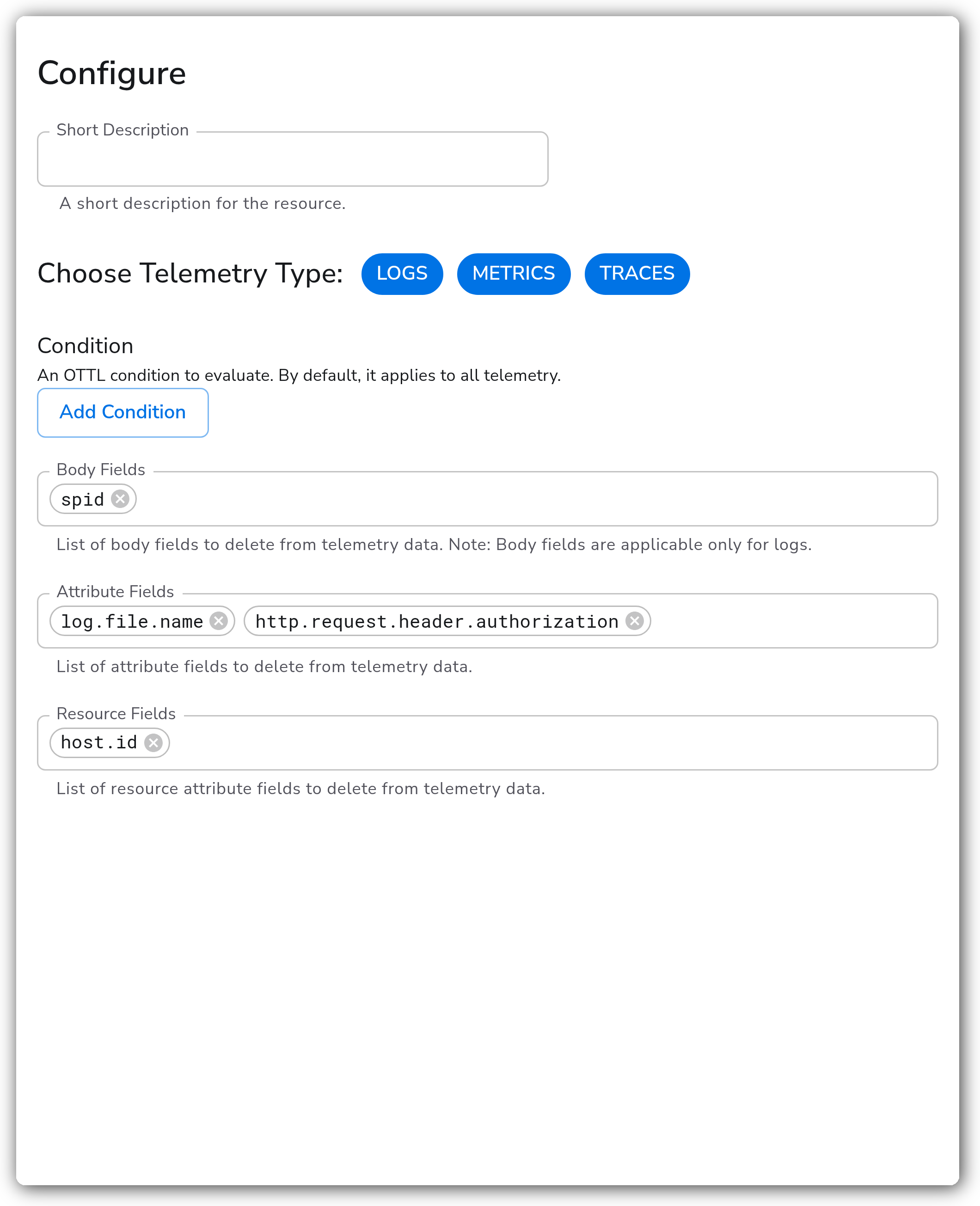
The Delete Fields processor removes attributes, resource attributes, and (for logs) body fields from telemetry in the pipeline. It operates on logs, metrics, and traces. An optional OTTL condition restricts deletion to records that match; by default it applies to all telemetry of the selected types.
### Supported Telemetry Types
| Platform | Metrics | Logs | Traces |
| ----------------------- | ------- | ---- | ------ |
| Linux | ✓ | ✓ | ✓ |
| Windows | ✓ | ✓ | ✓ |
| macOS | ✓ | ✓ | ✓ |
| AIX | ✓ | ✓ | ✓ |
| Kubernetes Node | ✓ | ✓ | ✓ |
| Kubernetes Cluster | ✓ | ✓ | ✓ |
| Kubernetes Gateway | ✓ | ✓ | ✓ |
| OpenShift Node | ✓ | ✓ | ✓ |
| OpenShift Cluster | ✓ | ✓ | ✓ |
| OpenShift Gateway | ✓ | ✓ | ✓ |
| Google SecOps Pipelines | ✓ | ✓ | ✓ |
### Configuration
**General**
| Parameter | Type | Required | Default | Description |
| --------------------- | ------------------ | -------- | ----------------------- | ----------------------------------------------------------------------------------------------------------------------- |
| Choose Telemetry Type | Telemetry Selector | No | `Logs, Metrics, Traces` | The telemetry types this processor acts on. |
| Condition | OTTL Condition | No | *(empty)* | An OTTL condition to evaluate. Fields are deleted only from records that match. By default it applies to all telemetry. |
**Fields to delete**
| Parameter | Type | Required | Default | Description |
| ---------------- | ---------- | -------- | --------- | ------------------------------------------------------------------------------------------- |
| Body Fields | OTTL Field | No | *(empty)* | List of body fields to delete. Body fields apply to logs only; shown when Logs is selected. |
| Attribute Fields | OTTL Field | No | *(empty)* | List of attribute fields to delete. Applies to logs, metrics, and traces. |
| Resource Fields | OTTL Field | No | *(empty)* | List of resource attribute fields to delete. Applies to logs, metrics, and traces. |
Each field list is a repeatable row input. Add a row per field to delete. Use bracket notation for nested keys (for example `data["region"]`).
### Examples
#### Remove a body field, an attribute, and a resource attribute from logs
This configuration deletes the `spid` body field, the `log.file.name` attribute, and the `host.id` resource attribute from every log record.
```yaml
apiVersion: bindplane.observiq.com/v1
kind: Processor
metadata:
name: delete-fields
spec:
type: delete_fields_v2
parameters:
- name: telemetry_types
value:
- Logs
- name: body_keys
value:
- spid
- name: attributes
value:
- log.file.name
- name: resource_attributes
value:
- host.id
```
#### Delete fields only from records that match a condition
This configuration deletes the `http.request.header.authorization` and `http.request.header.cookie` attributes from spans, but only where the service name is `checkout`. The underlying transform statement is `delete_key(attributes, "http.request.header.authorization") where resource.attributes["service.name"] == "checkout"`.
```yaml
apiVersion: bindplane.observiq.com/v1
kind: Processor
metadata:
name: delete-fields
spec:
type: delete_fields_v2
parameters:
- name: telemetry_types
value:
- Traces
- name: condition
value: resource.attributes["service.name"] == "checkout"
- name: attributes
value:
- http.request.header.authorization
- http.request.header.cookie
```
### Configuration Tips
* Deleting metric attributes can be unsound. Removing an attribute may leave multiple data points with the same attribute set, causing data point collisions. Delete metric attributes only when you are sure the remaining attributes keep each series unique.
* Body fields apply to logs only. The Body Fields list is hidden unless Logs is one of the selected telemetry types, and it is ignored for metrics and traces.
* The processor uses the OTTL `delete_key` function, which targets one key at a time. Each field you list runs as a separate statement, so adding many fields per instance adds per-record work. To remove a whole family of keys by pattern, use the Transform (OTTL) processor with `delete_matching_keys` instead of listing each key here.
* Each enabled signal type renders its own transform processor, so a single instance selecting all three signals deploys three transform blocks to the collector.
### Troubleshooting
#### Fields are not being removed
Symptoms: the target field is still present after the processor runs.
Solutions:
1. Confirm the field is listed under the correct group. Attributes, resource attributes, and body fields are distinct namespaces; a resource attribute listed under Attribute Fields will not match.
2. If a Condition is set, verify it evaluates true for the affected records. An overly narrow condition skips deletion.
3. Check the field name and nesting. Use bracket notation (for example `metadata["host"]`) for nested keys.
#### Body fields are ignored
Symptoms: a body field listed in the processor is never deleted.
Solution: Body fields apply to logs only. Ensure Logs is selected under Choose Telemetry Type. The Body Fields list has no effect on metrics or traces.
#### Metric series collapsed or counts look wrong after deletion
Symptoms: metric data points merge or values change unexpectedly after removing an attribute.
Solution: Deleting a metric attribute can make previously distinct series identical, causing data point collisions. Restore the attribute or delete a different one that is not part of the series identity.
### Standalone Processor
```yaml
apiVersion: bindplane.observiq.com/v1
kind: Processor
metadata:
name: delete-fields
spec:
type: delete_fields_v2
parameters:
- name: telemetry_types
value:
- Logs
- Metrics
- Traces
- name: condition
value: ""
- name: body_keys
value:
- spid
- name: attributes
value:
- log.file.name
- http.request.header.authorization
- name: resource_attributes
value:
- host.id
```
### Related Resources
* [Transform Processor — OpenTelemetry Collector Contrib](https://github.com/open-telemetry/opentelemetry-collector-contrib/blob/main/processor/transformprocessor/README.md)
* [`delete_key` and `delete_matching_keys` — OTTL function reference](https://github.com/open-telemetry/opentelemetry-collector-contrib/blob/main/pkg/ottl/ottlfuncs/README.md)
---
# Agent Instructions
This documentation is published with GitBook. GitBook is the documentation platform designed so that both humans and AI agents can read, navigate, and reason over technical content effectively. Learn more at gitbook.com.
## Querying This Documentation
If you need additional information that is not directly available in this page, you can query the documentation by asking a question.
Perform an HTTP GET request on the following URL with the `ask` and `goal` query parameters:
```
GET https://docs.bindplane.com/integrations/processors/delete-fields.md?ask=&goal=
```
`ask` is the immediate question: it should be specific, self-contained, and written in natural language.
`goal` is what the user is ultimately trying to achieve, the reason they need the answer. Sharing it helps GitBook give you a better, more relevant answer. A goal is most helpful when it describes the outcome the user wants rather than restating the question. For example, with `ask=how do I create an API token`, a goal like `automate deployments from our CI pipeline` lets GitBook tailor the answer to that use case.
The response will contain a direct answer to the question and relevant excerpts and sources from the documentation.
Use this mechanism when the answer is not explicitly present in the current page, you need clarification or additional context, or you want to retrieve related documentation sections.