> For the complete documentation index, see [llms.txt](https://docs.bindplane.com/llms.txt). Markdown versions of documentation pages are available by appending `.md` to page URLs; this page is available as [Markdown](https://docs.bindplane.com/integrations/processors/marshal.md).
# Marshal
The Marshal processor collects the fields you select from a log record (body, log fields, attributes, and resource attributes), moves them onto the body, and serializes the result into a single JSON or key-value string. It runs on logs only.
The input body must not already be a string. It needs to be a map (one or more fields) so the processor has fields to select and marshal.
### Supported Telemetry Types
| Platform | Metrics | Logs | Traces |
| ----------------------- | ------- | ---- | ------ |
| Linux | | ✓ | |
| Windows | | ✓ | |
| macOS | | ✓ | |
| AIX | | ✓ | |
| Kubernetes Node | | ✓ | |
| Kubernetes Cluster | | ✓ | |
| Kubernetes Gateway | | ✓ | |
| OpenShift Node | | ✓ | |
| OpenShift Cluster | | ✓ | |
| OpenShift Gateway | | ✓ | |
| Google SecOps Pipelines | | ✓ | |
### Configuration
**Format**
| Parameter | Type | Required | Default | Description |
| --------- | -------------------- | -------- | ------- | --------------------------------------------------------------------------------------------------------------------------------------------------------------------------------------------------- |
| Format | Enum: JSON, KV, None | No | None | The format the assembled body is serialized into. JSON produces a JSON string, KV produces a key-value string, None leaves the body as a map (fields are still moved onto it, just not serialized). |
**Body fields**
| Parameter | Type | Required | Default | Description |
| ---------------------- | ---------------------- | -------- | --------- | -------------------------------------------------------------------------------------------- |
| Body | Enum: Include, Exclude | No | Exclude | Whether the field list below is an include list or an exclude list for existing body fields. |
| Body Fields to Exclude | OTTL Fields | No | *(empty)* | Body fields to drop. Shown when Body is Exclude. Empty keeps all body fields. |
| Body Fields to Include | OTTL Fields | No | *(empty)* | Body fields to keep. Shown when Body is Include. Empty keeps no body fields. |
**Log fields**
| Parameter | Type | Required | Default | Description |
| --------------------- | ---------------------- | -------- | --------- | -------------------------------------------------------------------------------------------------------------------------------------------------------------------------------------------------- |
| Log | Enum: Include, Exclude | No | Include | Whether the field list below is an include list or an exclude list for the standard log fields (`time`, `observed_time`, `severity_number`, `severity_text`, `trace_id.string`, `span_id.string`). |
| Log Fields to Exclude | OTTL Fields | No | *(empty)* | Log fields to drop. Shown when Log is Exclude. |
| Log Fields to Include | OTTL Fields | No | *(empty)* | Log fields to keep. Shown when Log is Include. |
**Attribute fields**
| Parameter | Type | Required | Default | Description |
| ---------------------------- | ---------------------- | -------- | --------- | ------------------------------------------------------------------------------------------ |
| Attributes | Enum: Include, Exclude | No | Exclude | Whether the field list below is an include list or an exclude list for log attributes. |
| Attributes Fields to Exclude | OTTL Fields | No | *(empty)* | Attribute fields to drop. Shown when Attributes is Exclude. Empty includes all attributes. |
| Attributes Fields to Include | OTTL Fields | No | *(empty)* | Attribute fields to keep. Shown when Attributes is Include. |
**Resource fields**
| Parameter | Type | Required | Default | Description |
| -------------------------- | ---------------------- | -------- | --------- | ------------------------------------------------------------------------------------------------ |
| Resource | Enum: Include, Exclude | No | Exclude | Whether the field list below is an include list or an exclude list for resource attributes. |
| Resource Fields to Exclude | OTTL Fields | No | *(empty)* | Resource fields to drop. Shown when Resource is Exclude. Empty includes all resource attributes. |
| Resource Fields to Include | OTTL Fields | No | *(empty)* | Resource fields to keep. Shown when Resource is Include. |
**Flatten**
| Parameter | Type | Required | Default | Description |
| -------------- | ------- | -------- | ------- | ----------------------------------------------------------------------------------------------------------------------------------- |
| Flatten Fields | Boolean | No | false | Flatten all fields to the top level of the body after they are moved there. Recommended when using KV format, which has no nesting. |
**Advanced**
| Parameter | Type | Required | Default | Description |
| ------------------------ | ---------- | -------- | ---------- | ---------------------------------------------------------------------------------------------------------------------------------------------------------------------- |
| Log Field | OTTL Field | No | `bp.log` | The body field that log fields are moved into. Use bracket notation for nested fields (e.g. `parent["child"]`). Leave empty to move log fields directly onto the body. |
| Attributes Field | OTTL Field | No | `bp.attrs` | The body field that attributes are moved into. Use bracket notation for nested fields. Leave empty to move attributes directly onto the body. |
| Resource Field | OTTL Field | No | `bp.res` | The body field that resource attributes are moved into. Use bracket notation for nested fields. Leave empty to move resource attributes directly onto the body. |
| Key Value Delimiter | String | Yes | `=` | The delimiter between a key and its value in KV format. Shown when Format is KV. Escape sequences such as `\t` (tab) and `\040` (space) are interpreted. |
| Key Value Pair Delimiter | String | Yes | (space) | The delimiter between key-value pairs in KV format. Shown when Format is KV. Escape sequences such as `\t` (tab) and `\040` (space) are interpreted. |
| Sort By Keys | Boolean | No | false | Sort keys before marshaling. Use only when a deterministic key order is required, since it adds work per record. Shown when Format is KV. |
### Examples
#### Serialize a log record to a JSON string
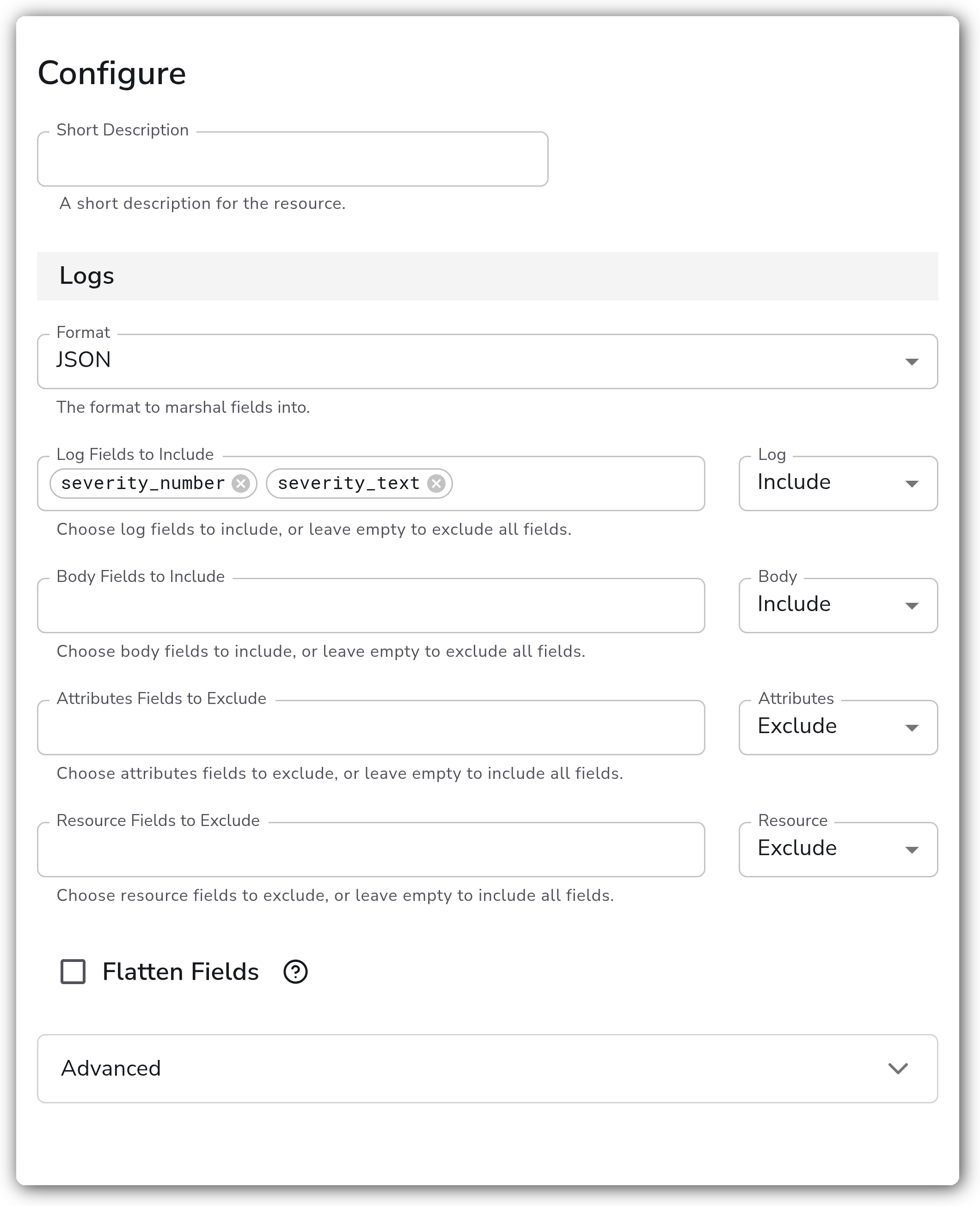
Take the body, the standard log fields, attributes, and resource attributes, move them all onto the body under their respective fields, and serialize the whole thing into a JSON string. This is useful for a downstream destination that ingests a single JSON line per log.
This config includes all body fields, keeps the `severity_number` and `severity_text` log fields, and includes all attributes and resource attributes (each nested under its default `bp.*` field). The result is a JSON string on the body:
```yaml
apiVersion: bindplane.observiq.com/v1
kind: Processor
metadata:
name: marshal-json
spec:
type: marshal
parameters:
- name: format
value: JSON
- name: body_selection
value: Include
- name: body_fields_to_include
value: []
- name: log_selection
value: Include
- name: log_fields_to_include
value:
- severity_number
- severity_text
- name: attribute_selection
value: Exclude
- name: attribute_fields_to_exclude
value: []
- name: resource_selection
value: Exclude
- name: resource_fields_to_exclude
value: []
- name: flatten
value: false
```
#### Produce a flattened key-value string
For systems that expect a flat `key=value` line, set Format to KV and enable Flatten Fields so the nested `bp.log`, `bp.attrs`, and `bp.res` fields collapse to the top level. The result looks like:
`name=test bp.log.severity_number=5 bp.attrs.host=node-1 bp.res.field1=val1 bp.res.field2=val2`
```yaml
apiVersion: bindplane.observiq.com/v1
kind: Processor
metadata:
name: marshal-kv
spec:
type: marshal
parameters:
- name: format
value: KV
- name: log_selection
value: Include
- name: log_fields_to_include
value:
- severity_number
- name: attribute_selection
value: Exclude
- name: attribute_fields_to_exclude
value:
- host
- name: resource_selection
value: Include
- name: resource_fields_to_include
value:
- field1
- field2
- name: flatten
value: true
- name: kv_delimiter
value: "="
- name: kv_pair_delimiter
value: " "
- name: sort_by_keys
value: false
```
### Configuration Tips
* Include vs. Exclude works per source. Each of Body, Log, Attributes, and Resource has its own selection mode. An empty exclude list keeps everything from that source, while an empty include list keeps nothing (except the always-present standard log fields).
* For KV format, enable Flatten Fields. KV strings have no nesting, so without flattening the nested `bp.log`, `bp.attrs`, and `bp.res` fields are rendered with dotted key paths rather than as separate flat keys.
* Sort By Keys adds per-record work. Leave it off unless a downstream consumer requires deterministic key ordering.
* Rename or collapse the destination fields in the Advanced section. Set Log Field, Attributes Field, or Resource Field to a different path to rename the group, or leave one empty to merge that group directly onto the body instead of nesting it.
### Troubleshooting
#### The body is unchanged or the processor produces nothing useful
Symptoms: the output body is still a raw string, or the marshaled output is empty.
Solutions:
1. Confirm the input body is a map, not a string. Marshal selects and moves fields, so it needs a body with one or more fields to work on. Parse a string body upstream (for example with a JSON or KV parser) before Marshal.
2. Check the selection modes. An empty include list keeps nothing from that source, so if Body, Attributes, or Resource is set to Include with an empty list, those fields are dropped.
#### The serialized output is harder to read than expected
Symptoms: KV output has dotted keys like `bp.attrs.host=...` instead of flat keys, or JSON nesting is unexpected.
Solutions:
1. Enable Flatten Fields to collapse the nested `bp.*` groups to the top level. This is the recommended setting for KV format.
2. To remove the `bp.*` prefixes entirely, clear Log Field, Attributes Field, and Resource Field in the Advanced section so each group merges directly onto the body.
#### KV pairs are concatenated incorrectly
Symptoms: key-value pairs run together or use the wrong separator.
Solutions:
1. Check Key Value Delimiter and Key Value Pair Delimiter in the Advanced section. The defaults are `=` between key and value and a single space between pairs.
2. If a downstream parser needs a stable field order, enable Sort By Keys so keys are emitted in a deterministic order.
### Standalone Processor
```yaml
apiVersion: bindplane.observiq.com/v1
kind: Processor
metadata:
name: marshal
spec:
type: marshal
parameters:
- name: format
value: JSON
- name: body_selection
value: Include
- name: body_fields_to_include
value: []
- name: log_selection
value: Include
- name: log_fields_to_include
value:
- severity_number
- severity_text
- name: attribute_selection
value: Exclude
- name: attribute_fields_to_exclude
value: []
- name: resource_selection
value: Exclude
- name: resource_fields_to_exclude
value: []
- name: flatten
value: false
- name: log_field
value: bp.log
- name: attribute_field
value: bp.attrs
- name: resource_field
value: bp.res
- name: kv_delimiter
value: "="
- name: kv_pair_delimiter
value: " "
- name: sort_by_keys
value: false
```
### Related Resources
* [Transform Processor — OpenTelemetry Collector Contrib](https://github.com/open-telemetry/opentelemetry-collector-contrib/blob/main/processor/transformprocessor/README.md)
* [ToKeyValueString — OTTL function reference](https://github.com/open-telemetry/opentelemetry-collector-contrib/blob/main/pkg/ottl/ottlfuncs/README.md#tokeyvaluestring)
---
# Agent Instructions
This documentation is published with GitBook. GitBook is the documentation platform designed so that both humans and AI agents can read, navigate, and reason over technical content effectively. Learn more at gitbook.com.
## Querying This Documentation
If you need additional information that is not directly available in this page, you can query the documentation by asking a question.
Perform an HTTP GET request on the following URL with the `ask` and `goal` query parameters:
```
GET https://docs.bindplane.com/integrations/processors/marshal.md?ask=&goal=
```
`ask` is the immediate question: it should be specific, self-contained, and written in natural language.
`goal` is what the user is ultimately trying to achieve, the reason they need the answer. Sharing it helps GitBook give you a better, more relevant answer. A goal is most helpful when it describes the outcome the user wants rather than restating the question. For example, with `ask=how do I create an API token`, a goal like `automate deployments from our CI pipeline` lets GitBook tailor the answer to that use case.
The response will contain a direct answer to the question and relevant excerpts and sources from the documentation.
Use this mechanism when the answer is not explicitly present in the current page, you need clarification or additional context, or you want to retrieve related documentation sections.