> For the complete documentation index, see [llms.txt](https://docs.bindplane.com/llms.txt). Markdown versions of documentation pages are available by appending `.md` to page URLs; this page is available as [Markdown](https://docs.bindplane.com/integrations/processors/count-telemetry.md).
# Count Telemetry
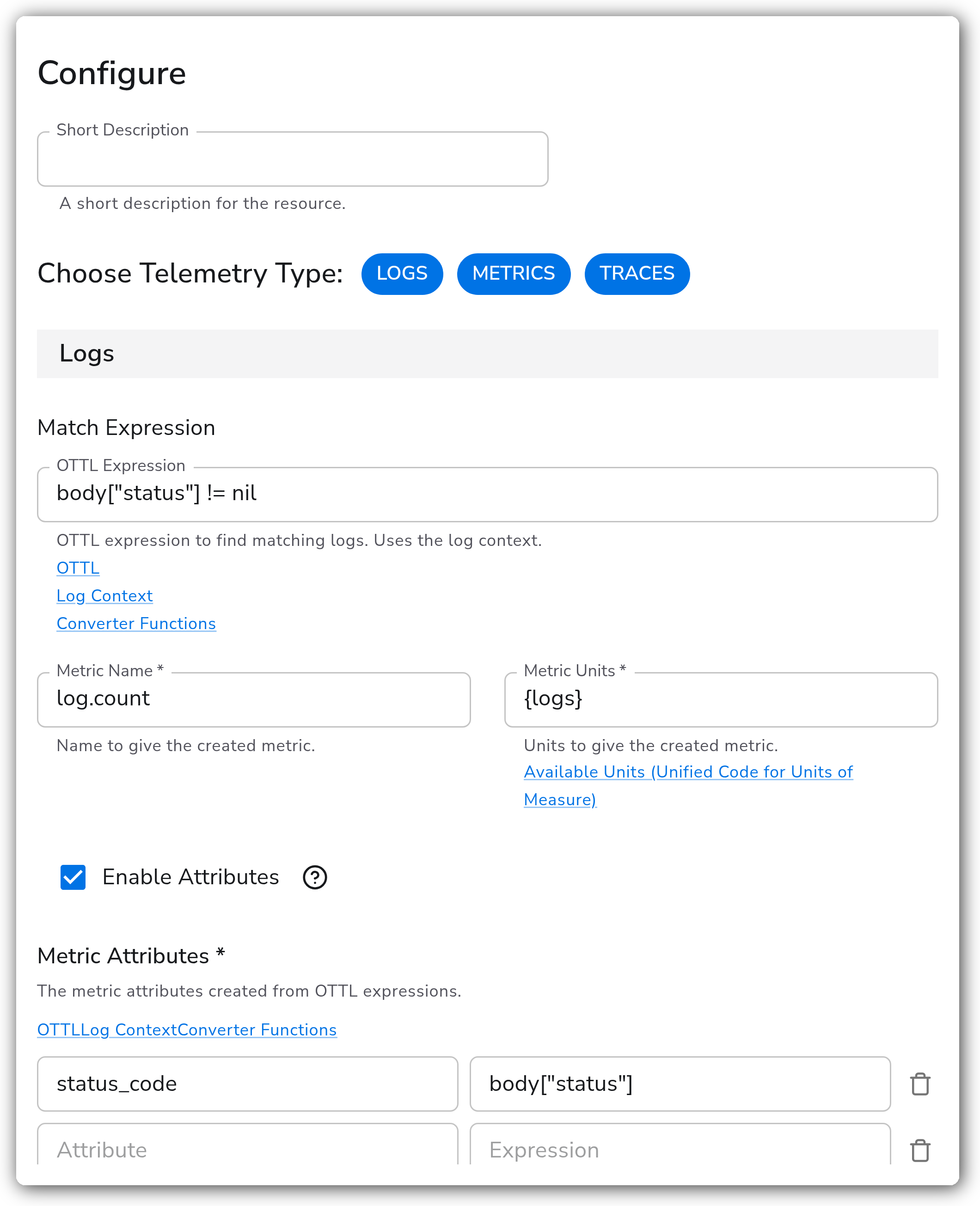
Counts the logs, metric data points, or trace spans matching an OTTL condition over a fixed interval and emits the result as a new metric. The created metric's name and units are configurable, and fields from the matched telemetry can be carried onto the metric as attributes. A common use is converting high-volume logs into a low-cardinality count metric so the original logs can be dropped while the signal is retained.
{% hint style="warning" %}
**Not available in v2 configurations**
This processor cannot be added to a v2 configuration, which is the default for all new configurations. Use the [Count](/integrations/connectors/count.md) connector instead. Existing v1 configurations keep working.
{% endhint %}
### Supported Telemetry Types
| Platform | Metrics | Logs | Traces |
| ------------------ | ------- | ---- | ------ |
| Linux | ✓ | ✓ | ✓ |
| Windows | ✓ | ✓ | ✓ |
| macOS | ✓ | ✓ | ✓ |
| Kubernetes Node | ✓ | ✓ | ✓ |
| Kubernetes Cluster | ✓ | ✓ | ✓ |
| Kubernetes Gateway | ✓ | ✓ | ✓ |
| OpenShift Node | ✓ | ✓ | ✓ |
| OpenShift Cluster | ✓ | ✓ | ✓ |
| OpenShift Gateway | ✓ | ✓ | ✓ |
A single instance can count more than one signal at once. Choose Telemetry Type selects which signals are active, and each selected signal is configured independently below.
### Configuration
**General**
| Parameter | Type | Required | Default | Description |
| --------------------- | ------------------ | -------- | --------------------- | -------------------------------------------------------------------------------------------------------------------------------------- |
| Choose Telemetry Type | Telemetry Selector | No | Logs, Metrics, Traces | Which signals this instance counts. Each selected signal exposes its own match expression, metric name, units, and attribute settings. |
**Logs**
Shown when Choose Telemetry Type includes Logs.
| Parameter | Type | Required | Default | Description |
| ----------------- | -------------- | -------- | ----------- | ------------------------------------------------------------------------------------------------------------------------- |
| Match Expression | OTTL Condition | No | *(empty)* | OTTL expression to find matching logs. Uses the log context. Empty counts all logs. |
| Metric Name | String | Yes | `log.count` | Name to give the created metric. |
| Metric Units | String | Yes | `{logs}` | Units to give the created metric. See [UCUM](https://ucum.org/ucum#section-Alphabetic-Index-By-Name) for available units. |
| Enable Attributes | Boolean | No | `false` | Enable to add attributes to the created metric. |
| Metric Attributes | Map | Yes \* | *(empty)* | Attributes built from OTTL expressions, keyed by attribute name. Shown when Enable Attributes is on. |
\* Required only when Enable Attributes is on.
**Metrics**
Shown when Choose Telemetry Type includes Metrics.
| Parameter | Type | Required | Default | Description |
| ----------------- | -------------- | -------- | ----------------- | ------------------------------------------------------------------------------------------------------------------------- |
| Match Expression | OTTL Condition | No | *(empty)* | OTTL expression to find matching metric data points. Uses the datapoint context. Empty counts all data points. |
| Metric Name | String | Yes | `datapoint.count` | Name to give the created metric. |
| Metric Units | String | Yes | `{datapoints}` | Units to give the created metric. See [UCUM](https://ucum.org/ucum#section-Alphabetic-Index-By-Name) for available units. |
| Enable Attributes | Boolean | No | `false` | Enable to add attributes to the created metric. |
| Metric Attributes | Map | Yes \* | *(empty)* | Attributes built from OTTL expressions, keyed by attribute name. Shown when Enable Attributes is on. |
\* Required only when Enable Attributes is on.
**Traces**
Shown when Choose Telemetry Type includes Traces.
| Parameter | Type | Required | Default | Description |
| ----------------- | -------------- | -------- | ------------ | ------------------------------------------------------------------------------------------------------------------------- |
| Match Expression | OTTL Condition | No | *(empty)* | OTTL expression to find matching trace spans. Uses the span context. Empty counts all spans. |
| Metric Name | String | Yes | `span.count` | Name to give the created metric. |
| Metric Units | String | Yes | `{spans}` | Units to give the created metric. See [UCUM](https://ucum.org/ucum#section-Alphabetic-Index-By-Name) for available units. |
| Enable Attributes | Boolean | No | `false` | Enable to add attributes to the created metric. |
| Metric Attributes | Map | Yes \* | *(empty)* | Attributes built from OTTL expressions, keyed by attribute name. Shown when Enable Attributes is on. |
\* Required only when Enable Attributes is on.
**Advanced**
| Parameter | Type | Required | Default | Description |
| --------- | ------- | -------- | ------- | ----------------------------------------------------------------------------------------------------------- |
| Interval | Integer | No | `60` | Interval, in seconds, to count telemetry over. Each interval emits one data point per unique attribute set. |
### Examples
#### Count HTTP requests by status code (logs)
Counts HTTP server access logs and breaks the count out by status code, so 500s stay visible after the underlying logs are dropped. The logs are JSON with a `status` field in the body.
The match expression excludes any log without a status code, and the status code is carried onto the count metric as an attribute named `status_code`:
```yaml
apiVersion: bindplane.observiq.com/v1
kind: Processor
metadata:
name: count-http-by-status
spec:
type: count_telemetry
parameters:
- name: telemetry_types
value:
- Logs
- name: log_match
value: body["status"] != nil
- name: log_metric_name
value: http.request.count
- name: log_metric_units
value: "{requests}"
- name: log_enable_attributes
value: true
- name: log_attributes
value:
status_code: body["status"]
method: body["method"]
```
#### Count error spans by service (traces)
Counts only spans with an error status, broken out by service name, emitting a metric every 30 seconds:
```yaml
apiVersion: bindplane.observiq.com/v1
kind: Processor
metadata:
name: count-error-spans
spec:
type: count_telemetry
parameters:
- name: telemetry_types
value:
- Traces
- name: span_match
value: status.code == STATUS_CODE_ERROR
- name: span_metric_name
value: span.error.count
- name: span_metric_units
value: "{spans}"
- name: span_enable_attributes
value: true
- name: span_attributes
value:
service: resource.attributes["service.name"]
- name: interval
value: 30
```
#### Count data points above a threshold (metrics)
Counts metric data points whose value exceeds a threshold, useful for tracking how often a gauge breaches a limit:
```yaml
apiVersion: bindplane.observiq.com/v1
kind: Processor
metadata:
name: count-high-datapoints
spec:
type: count_telemetry
parameters:
- name: telemetry_types
value:
- Metrics
- name: datapoint_match
value: value_double > 90.0
- name: datapoint_metric_name
value: datapoint.threshold.count
- name: datapoint_metric_units
value: "{datapoints}"
```
### Configuration Tips
* Leaving a Match Expression empty counts every record of that signal. Add a condition to count only the subset you care about.
* The Interval (under Advanced) controls how often a count is emitted and the window each count accumulates over. A longer interval emits fewer, coarser data points and holds the counted series in memory until the window closes; a shorter interval emits more frequently at finer resolution but puts more data points on the metrics pipeline. Pick it against the time resolution you need versus the metric volume the pipeline can tolerate.
* Each unique combination of metric attribute values produces its own counted series. Building attributes from high-cardinality fields (request IDs, raw URLs, user IDs) multiplies the emitted series and can drive up metric storage cost. Prefer low-cardinality keys like status code, method, or service name.
* The created count metric appears on the metrics pipeline. When counting logs or traces, make sure your configuration routes those new metrics to a metrics destination.
* This processor converts telemetry into counts but does not drop the original telemetry. Pair it with a filter or sampling processor downstream if the goal is to reduce volume.
### Troubleshooting
#### No count metric is produced
Symptoms: the expected count metric never appears at the destination.
Solutions:
1. Confirm the signal is selected in Choose Telemetry Type and that records of that signal actually flow through the pipeline.
2. Verify the Match Expression evaluates true for at least some records. An expression that never matches yields no count.
3. Confirm the metrics output is routed to a metrics destination, especially when counting logs or traces.
#### The count is lower or higher than expected
Symptoms: the emitted count does not match the observed telemetry volume.
Solutions:
1. Check the Match Expression. A condition that is too narrow undercounts; an empty expression counts everything.
2. Remember each data point covers one Interval (default 60 seconds). Compare counts over matching time windows.
#### Counts arrive late or only at interval boundaries
Symptoms: count metrics appear in steps at interval boundaries rather than continuously.
Solution: this is inherent to interval aggregation. A count is emitted only when its Interval closes, so a 60-second interval can delay a data point by up to 60 seconds. Lower the Interval to emit more frequently at finer resolution, accepting more data points on the metrics pipeline.
#### Too many metric series
Symptoms: the count metric explodes into many series and increases cost.
Solutions:
1. Review the Metric Attributes expressions and remove high-cardinality fields.
2. Disable Enable Attributes to emit a single aggregate count per signal.
### Standalone Processor
```yaml
apiVersion: bindplane.observiq.com/v1
kind: Processor
metadata:
name: count-telemetry
spec:
type: count_telemetry
parameters:
- name: telemetry_types
value:
- Logs
- Metrics
- Traces
- name: log_match
value: body["status"] != nil
- name: log_metric_name
value: log.count
- name: log_metric_units
value: "{logs}"
- name: log_enable_attributes
value: true
- name: log_attributes
value:
status_code: body["status"]
- name: datapoint_match
value: ""
- name: datapoint_metric_name
value: datapoint.count
- name: datapoint_metric_units
value: "{datapoints}"
- name: span_match
value: status.code == STATUS_CODE_ERROR
- name: span_metric_name
value: span.count
- name: span_metric_units
value: "{spans}"
- name: interval
value: 60
```
### Related Resources
* [Count Connector — OpenTelemetry Collector Contrib](https://github.com/open-telemetry/opentelemetry-collector-contrib/tree/main/connector/countconnector)
* [OTTL — OpenTelemetry Transformation Language](https://github.com/open-telemetry/opentelemetry-collector-contrib/tree/main/pkg/ottl#readme)
### Bindplane Resources
* [Filter by Condition](/integrations/processors/filter-by-condition.md)
---
# Agent Instructions
This documentation is published with GitBook. GitBook is the documentation platform designed so that both humans and AI agents can read, navigate, and reason over technical content effectively. Learn more at gitbook.com.
## Querying This Documentation
If you need additional information that is not directly available in this page, you can query the documentation by asking a question.
Perform an HTTP GET request on the following URL with the `ask` and `goal` query parameters:
```
GET https://docs.bindplane.com/integrations/processors/count-telemetry.md?ask=&goal=
```
`ask` is the immediate question: it should be specific, self-contained, and written in natural language.
`goal` is what the user is ultimately trying to achieve, the reason they need the answer. Sharing it helps GitBook give you a better, more relevant answer. A goal is most helpful when it describes the outcome the user wants rather than restating the question. For example, with `ask=how do I create an API token`, a goal like `automate deployments from our CI pipeline` lets GitBook tailor the answer to that use case.
The response will contain a direct answer to the question and relevant excerpts and sources from the documentation.
Use this mechanism when the answer is not explicitly present in the current page, you need clarification or additional context, or you want to retrieve related documentation sections.