> For the complete documentation index, see [llms.txt](https://docs.bindplane.com/llms.txt). Markdown versions of documentation pages are available by appending `.md` to page URLs; this page is available as [Markdown](https://docs.bindplane.com/integrations/processors/google-secops-standardization.md).
# Google SecOps Standardization
Tags logs with the metadata Google SecOps (Chronicle) needs to parse and route them: the log type that selects the SecOps parser, an optional namespace identifying the data domain, and optional ingestion labels. Use it ahead of the [Google SecOps (Chronicle)](/integrations/destinations/google-secops-chronicle.md) destination.
{% hint style="warning" %}
Sending the namespace and ingestion label fields to Google SecOps requires Bindplane collector 1.64.0 or newer. On older collectors these fields are still added to the telemetry but SecOps will not parse them. The log type is unaffected.
{% endhint %}
### Supported Telemetry Types
| Platform | Metrics | Logs | Traces |
| ------------------ | ------- | ---- | ------ |
| Linux | | ✓ | |
| Windows | | ✓ | |
| macOS | | ✓ | |
| AIX | | ✓ | |
| Kubernetes Node | | ✓ | |
| Kubernetes Cluster | | ✓ | |
| Kubernetes Gateway | | ✓ | |
| OpenShift Node | | ✓ | |
| OpenShift Cluster | | ✓ | |
| OpenShift Gateway | | ✓ | |
This processor operates on logs only.
### Configuration
#### Basic Configuration
**Telemetry type**
| Parameter | Type | Required | Default | Description |
| --------------------- | ------------------ | -------- | ------- | -------------------------------------------------------------------- |
| Choose Telemetry Type | Telemetry Selector | Yes | Logs | The signal this processor runs on. Logs is the only supported value. |
**SecOps fields**
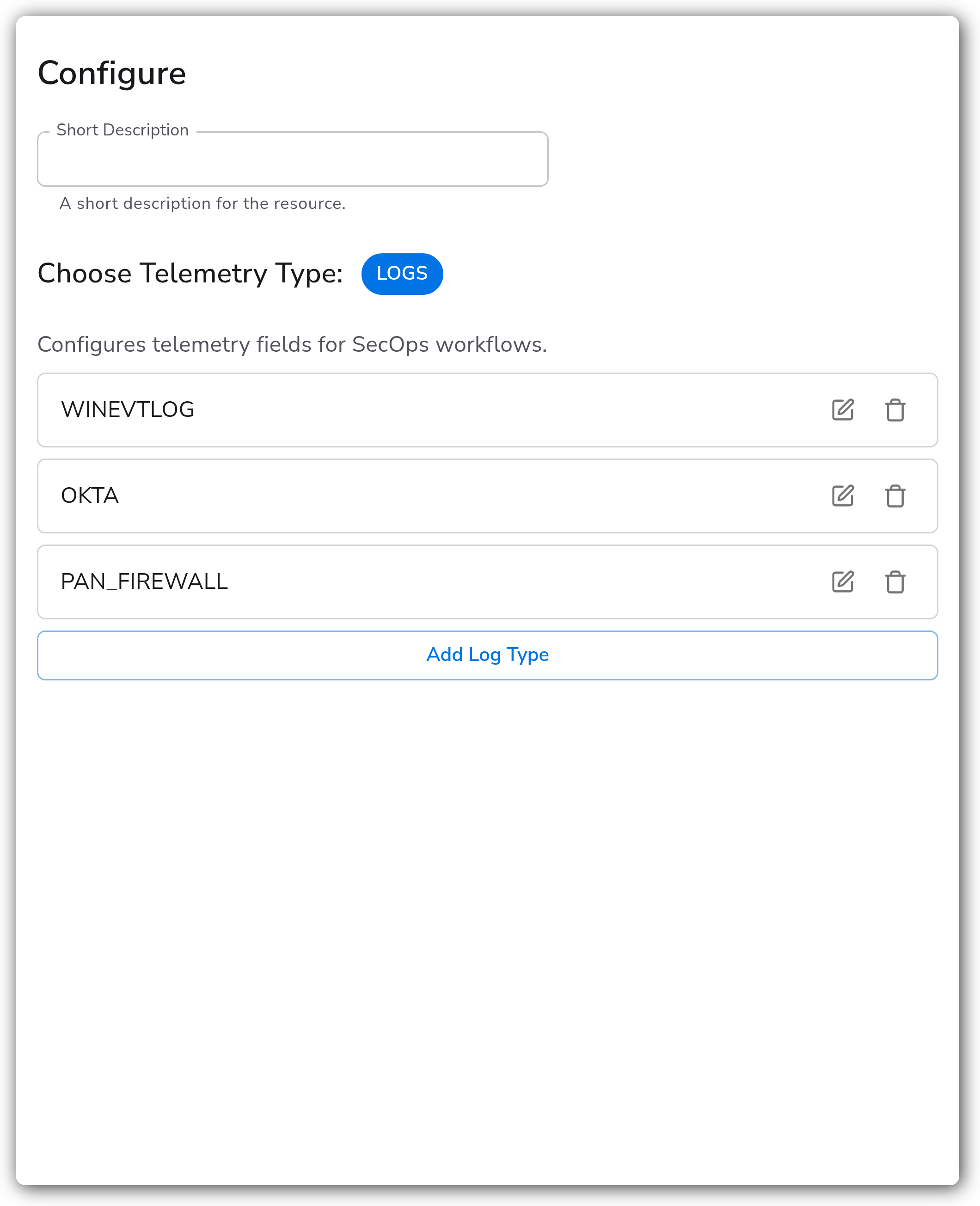
`Configures telemetry fields for SecOps workflows` is a repeatable list. Each row tags the matching logs with a log type, an optional namespace, and optional ingestion labels. Add a row per log type you ship through this pipeline.
| Parameter | Type | Required | Default | Description |
| ---------------- | --------------- | -------- | --------- | ------------------------------------------------------------------------------------------------------------------------------------------------------------------------------------------------------------------------------------------------------------------ |
| Condition | OTTL Condition | No | `true` | Apply this row only to logs that match. Leave as `true` to tag every log. |
| Log Type | String | Yes | — | The Google SecOps log type (ingestion label), for example `WINEVTLOG` or `OKTA`. Selects the SecOps parser for the record. See [Supported log types and default parsers](https://cloud.google.com/chronicle/docs/ingestion/parser-list/supported-default-parsers). |
| Namespace | String | No | *(empty)* | The environment namespace identifying the data domain the logs came from. Written only when non-empty. |
| Ingestion Labels | Key-Value Pairs | No | *(empty)* | Arbitrary key-value labels attached to the logs sent to Chronicle. |
Each row writes to the `chronicle_log_type`, `chronicle_namespace`, and `chronicle_ingestion_label[""]` log attributes, which the Google SecOps destination forwards to Chronicle.
### Examples
#### Route Windows, Okta, and firewall logs to different parsers
One processor instance can tag several log streams. Each row carries its own condition, so a single instance routes multiple log types to their correct SecOps parsers. The standalone YAML below applies this example.
### Configuration Tips
* A row with no condition (or `true`) tags every log it sees. When you mix targeted rows with a catch-all row, order the catch-all last and scope it, or it will overwrite the log type set by earlier rows.
* The Log Type value must be a parser name Google SecOps recognizes. An unknown log type still attaches, but Chronicle will not parse the record. Check it against the supported parser list.
* Namespace is written only when you set it, so leaving it empty does not clear an existing value with an empty string.
### Troubleshooting
#### Logs reach SecOps but are not parsed
Symptoms: records ingest into Chronicle but stay raw, with no Unified Data Model fields populated.
Solutions:
1. Confirm the Log Type matches a name on the [supported parsers list](https://cloud.google.com/chronicle/docs/ingestion/parser-list/supported-default-parsers) exactly, including case.
2. Verify the row's Condition actually matches the records. A condition that never evaluates true leaves the log type unset.
#### Namespace or ingestion labels are missing in SecOps
Symptoms: the log type parses correctly but the namespace and ingestion labels do not appear in Chronicle.
Solutions:
1. Upgrade the Bindplane collector to 1.64.0 or newer. Older collectors add these fields to the telemetry but do not send them in a form SecOps parses.
2. Confirm the namespace is non-empty. An empty namespace is intentionally skipped and never written.
#### One log type overwrites another
Symptoms: logs that should carry different log types all end up with the same one.
Solutions:
1. Scope each row with a Condition that selects only its log stream. Two rows whose conditions both match the same record apply in order, and the last write wins.
2. Move any catch-all row (condition `true`) to the bottom of the list.
### Standalone Processor
```yaml
apiVersion: bindplane.observiq.com/v1
kind: Processor
metadata:
name: google-secops-standardization
spec:
type: google_secops_standardization
parameters:
- name: telemetry_types
value:
- Logs
- name: secops_field
value:
- condition: attributes["source"] == "windows"
logType: WINEVTLOG
namespace: security
- condition: attributes["source"] == "okta"
logType: OKTA
namespace: identity
ingestionLabels:
team: secops
- condition: "true"
logType: PAN_FIREWALL
namespace: network
```
### Related Resources
* [Supported log types and default parsers — Google SecOps](https://cloud.google.com/chronicle/docs/ingestion/parser-list/supported-default-parsers)
* [Ingestion methods and data types — Google SecOps](https://cloud.google.com/chronicle/docs/ingestion/data-types)
### Bindplane Resources
* [Google SecOps (Chronicle) destination](/integrations/destinations/google-secops-chronicle.md)
---
# Agent Instructions
This documentation is published with GitBook. GitBook is the documentation platform designed so that both humans and AI agents can read, navigate, and reason over technical content effectively. Learn more at gitbook.com.
## Querying This Documentation
If you need additional information that is not directly available in this page, you can query the documentation by asking a question.
Perform an HTTP GET request on the following URL with the `ask` and `goal` query parameters:
```
GET https://docs.bindplane.com/integrations/processors/google-secops-standardization.md?ask=&goal=
```
`ask` is the immediate question: it should be specific, self-contained, and written in natural language.
`goal` is what the user is ultimately trying to achieve, the reason they need the answer. Sharing it helps GitBook give you a better, more relevant answer. A goal is most helpful when it describes the outcome the user wants rather than restating the question. For example, with `ask=how do I create an API token`, a goal like `automate deployments from our CI pipeline` lets GitBook tailor the answer to that use case.
The response will contain a direct answer to the question and relevant excerpts and sources from the documentation.
Use this mechanism when the answer is not explicitly present in the current page, you need clarification or additional context, or you want to retrieve related documentation sections.