
Timeout (in seconds) to wait for response headers when sending logs.
Increase this value in high-latency environment if timeout awaiting response headers errors are occurring.
Requires Bindplane OTel Collector v1.103.0 or later.
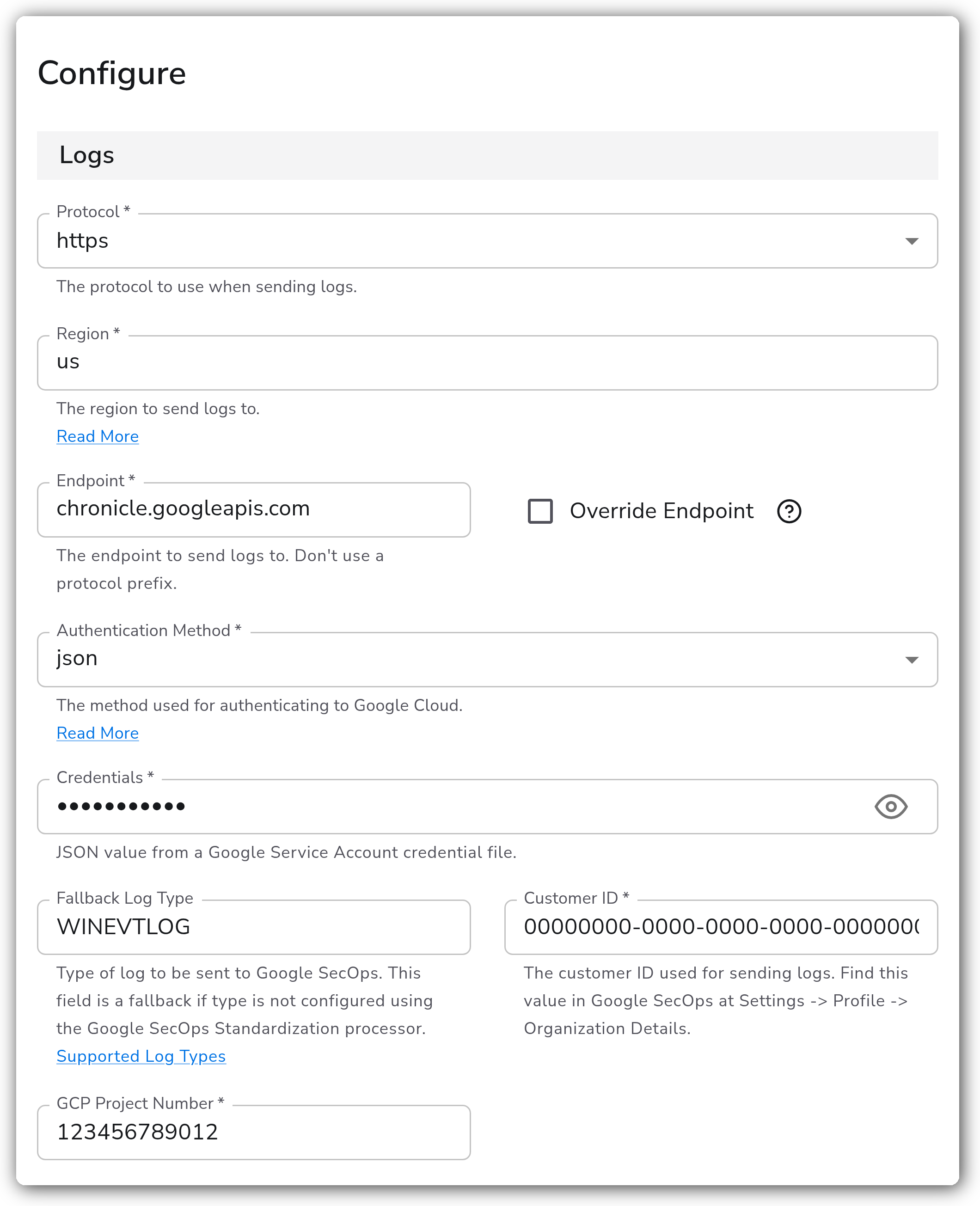
| | API Version | Enum | `v1alpha` | Available when `protocol` is `https`. The API version to use. One of `v1`, `v1alpha`, `v1beta`. Requires Bindplane OTel Collector v1.95.0 or later. | | Metrics Interval | Duration | `5m` | The interval at which to send collector metrics to GCP. Requires Bindplane OTel Collector v1.99.0 or later. | | Override Default Batch Limits | Boolean | `false` | Enable to configure limits on log batch creation requests. Requires Bindplane OTel Collector v1.67.0 or later. | | Batch Request Size Limit | Integer | `4000000` | Available when `enable_batch_limit` is enabled. Maximum size of a log batch creation request in bytes. Requests that exceed this limit are split. | | Log Errored Payloads | Boolean | `false` | Available when `protocol` is `https`. When enabled, the collector logs payloads that SecOps rejects for ingestion. Requires Bindplane OTel Collector v1.79.0 or later. This can cause collector logs to grow rapidly. | | Drop Raw Copy | Boolean | `true` | When enabled, the raw copy of the log stored in `log.record.original` is dropped. | #### Retry on Failure | Parameter | Type | Default | Description | | ----------------------- | ------- | ------- | ------------------------------------------------------------------------------------------------------------- | | Enable Retry on Failure | Boolean | `true` | Attempt to resend logs that have failed to be transmitted to the destination. | | Initial Interval | Integer | `5` | Available when retry is enabled. Time, in seconds, to wait after the first failure before retrying. | | Max Interval | Integer | `30` | Available when retry is enabled. The upper bound, in seconds, on backoff. | | Max Elapsed Time | Integer | `300` | Available when retry is enabled. The maximum time, in seconds, spent trying to send a batch before giving up. | #### Sending Queue | Parameter | Type | Default | Description | | ------------------------- | --------- | -------------------------------- | ----------------------------------------------------------------------------------------------------------------------------------------------------------------------- | | Enable Sending Queue | Boolean | `true` | Buffer logs temporarily before sending to help ensure data is not lost during a temporary network outage. | | Number of Consumers | Integer | `40` | Available when the sending queue is enabled. Number of consumers that dequeue batches. | | Queue Size | Integer | `5000` | Available when the sending queue is enabled. Maximum number of batches kept in memory before dropping. | | Enable Persistent Queuing | Boolean | `true` | Available when the sending queue is enabled. Buffer telemetry data to disk before sending to help ensure data is not lost during network outages or collector restarts. | | Persistent Queue Storage | Extension | file\_storage\_persistent\_queue | Available when the sending and persistent queues are enabled. The storage to use for the persistent queue. | ### Example Configuration #### Standalone Destination ```yaml apiVersion: bindplane.observiq.com/v1 kind: Destination metadata: id: chronicle name: chronicle spec: type: chronicle parameters: - name: protocol value: 'https' - name: api_version value: 'v1' - name: region value: 'us' - name: https_endpoint value: 'chronicle.googleapis.com' - name: auth_type value: 'json' - name: credentials value: '{ "type": "service_account", "project_id": "my-project", ... }' - name: customer_id value: '00000000-0000-0000-0000-000000000000' - name: project value: '123456789012' - name: log_type value: 'WINEVTLOG' - name: ingestion_labels value: env: prod team: blue - name: rbac_enabled_labels value: - team ``` ### Configuration Tips #### Choosing a protocol * `gRPC` uses the legacy ingestion API and the malachite endpoints (`malachiteingestion-pa.googleapis.com` by default, plus [regional endpoints](https://cloud.google.com/chronicle/docs/reference/ingestion-api#regional_endpoints)). * `https` uses the Chronicle API and requires the **GCP Project Number** in addition to the **Customer ID**. See [Configuring the HTTPS Chronicle API protocol](https://docs.bindplane.com/how-to-guides/google-secops/google-secops-configuring-the-https-dataplane-api-protocol). * Some region-specific endpoints are not enabled for all SecOps tenants. If ingestion returns a 403, try a multi-region endpoint instead. #### Log type handling * Google SecOps uses the `log_type` ingestion label to select the SecOps parser applied to logs. Set it explicitly with the [Google SecOps Standardization processor](/integrations/processors/google-secops-standardization.md) for best results. * Bindplane automatically maps the `log_type` label for some sources (for example, Windows Events to `WINEVTLOG` and SQL Server to `MICROSOFT_SQL`). An explicitly set `log_type` takes precedence over automatic mapping. * `log_type` (the **Fallback Log Type** parameter) is used only when the type was not set by the processor and could not be mapped automatically. For collector v1.63.0 or older, the Fallback Log Type is required. #### Supported sources * Google SecOps expects raw, unstructured logs. Use raw-log sources such as Windows Events (with Advanced -> Raw Logs enabled), Microsoft SQL Server, Common Event Format, CSV, File, HTTP, TCP, or UDP. #### Batch size limits * The default batch request size limit is 4,000,000 bytes (4 MB). Requests that exceed the limit are recursively split before sending. Do not raise `batch_request_size_limit` above the SecOps backend limit, or oversized requests will be rejected and dropped. Adjust only with guidance from your Google SecOps or Bindplane representative. #### Data RBAC ingestion labels * Google SecOps can restrict which users see ingested data based on ingestion labels, but only labels marked as RBAC-eligible at ingestion time are considered. In the destination's Advanced section, check Data RBAC next to each ingestion label that should be eligible. Bindplane sends those labels with `rbac_enabled=true` and every other label with `rbac_enabled=false`. Matching is by label key, so a label with the same key added by the Google SecOps Standardization processor is also marked eligible. This applies to the https protocol only; the legacy gRPC API has no per-label RBAC flag. Existing destinations are unaffected: all labels stay non-RBAC until you check them. ### Troubleshooting **Symptom:** Ingestion returns a 403 error for a configured region. **Solution:** Confirm your service account is provisioned for that region. Some region-specific endpoints are not enabled for all SecOps tenants. Try a multi-region endpoint instead. **Symptom:** Logs are ingested but the wrong SecOps parser is applied, or logs are not parsed. **Solution:** Set the `log_type` ingestion label with the [Google SecOps Standardization processor](/integrations/processors/google-secops-standardization.md), or set the **Fallback Log Type** parameter. An explicitly set `log_type` takes precedence over automatic mapping. **Symptom:** Logs are dropped intermittently when using the HTTPS protocol. **Solution:** Upgrade to Bindplane OTel Collector v1.94.2 or later. Earlier versions may silently drop logs when the SecOps HTTPS endpoint returns transient errors (429, 502, 504). See [Resolve Intermittent Ingestion Drop for Google SecOps HTTPS Endpoints](https://docs.bindplane.com/how-to-guides/google-secops/resolve-intermittent-ingestion-drop-for-google-secops-https-endpoints). ### Related Resources * [Google SecOps documentation](https://cloud.google.com/chronicle/docs) * [Google SecOps ingestion API authentication](https://cloud.google.com/chronicle/docs/reference/ingestion-api#getting_api_authentication_credentials) * [Google SecOps supported log types](https://cloud.google.com/chronicle/docs/ingestion/parser-list/supported-default-parsers) * [Configuring the HTTPS Chronicle API protocol](https://docs.bindplane.com/how-to-guides/google-secops/google-secops-configuring-the-https-dataplane-api-protocol) * [Google SecOps Standardization processor](/integrations/processors/google-secops-standardization.md) --- # Agent Instructions This documentation is published with GitBook. GitBook is the documentation platform designed so that both humans and AI agents can read, navigate, and reason over technical content effectively. Learn more at gitbook.com. ## Querying This Documentation If you need additional information that is not directly available in this page, you can query the documentation by asking a question. Perform an HTTP GET request on the following URL with the `ask` and `goal` query parameters: ``` GET https://docs.bindplane.com/integrations/destinations/google-secops-chronicle.md?ask=