> For the complete documentation index, see [llms.txt](https://docs.bindplane.com/llms.txt). Markdown versions of documentation pages are available by appending `.md` to page URLs; this page is available as [Markdown](https://docs.bindplane.com/integrations/destinations/prometheus-remote-write.md).
# Prometheus Remote Write
The Prometheus Remote Write destination exports metrics from a Bindplane pipeline to any Prometheus `remote_write` compatible backend, such as Prometheus, Cortex, Mimir, or Thanos. It uses the OpenTelemetry `prometheusremotewriteexporter`, which sends metrics over HTTP or HTTPS using snappy compression. Only metrics are supported.
### Supported Telemetry Types
| Platform | Metrics | Logs | Traces |
| ------------------ | ------- | ---- | ------ |
| Linux | ✓ | | |
| Windows | ✓ | | |
| macOS | ✓ | | |
| Kubernetes Node | ✓ | | |
| Kubernetes Cluster | ✓ | | |
| Kubernetes Gateway | ✓ | | |
| OpenShift Node | ✓ | | |
| OpenShift Cluster | ✓ | | |
| OpenShift Gateway | ✓ | | |
### Prerequisites
You need a reachable `remote_write` compatible endpoint and any authentication or TLS material it requires.
* A `remote_write` compatible receiver (Prometheus, Cortex, Mimir, Thanos, or a vendor backend) reachable from the collector, with its hostname or IP, port, and API path (for example `api/v1/metrics`).
* Any authentication the endpoint expects. For token or basic-auth backends, supply the credential as an HTTP header (see Additional HTTP Headers below).
* For TLS endpoints, the certificate authority needed to validate the server certificate, and a client certificate and key if the endpoint requires mutual TLS.
See the [Prometheus Remote-Write specification](https://prometheus.io/docs/specs/prw/remote_write_spec/) for protocol details.
### Configuration
**Endpoint**
| Parameter | Type | Required | Default | Description |
| --------- | ------- | -------- | --------- | ---------------------------------------------------------------- |
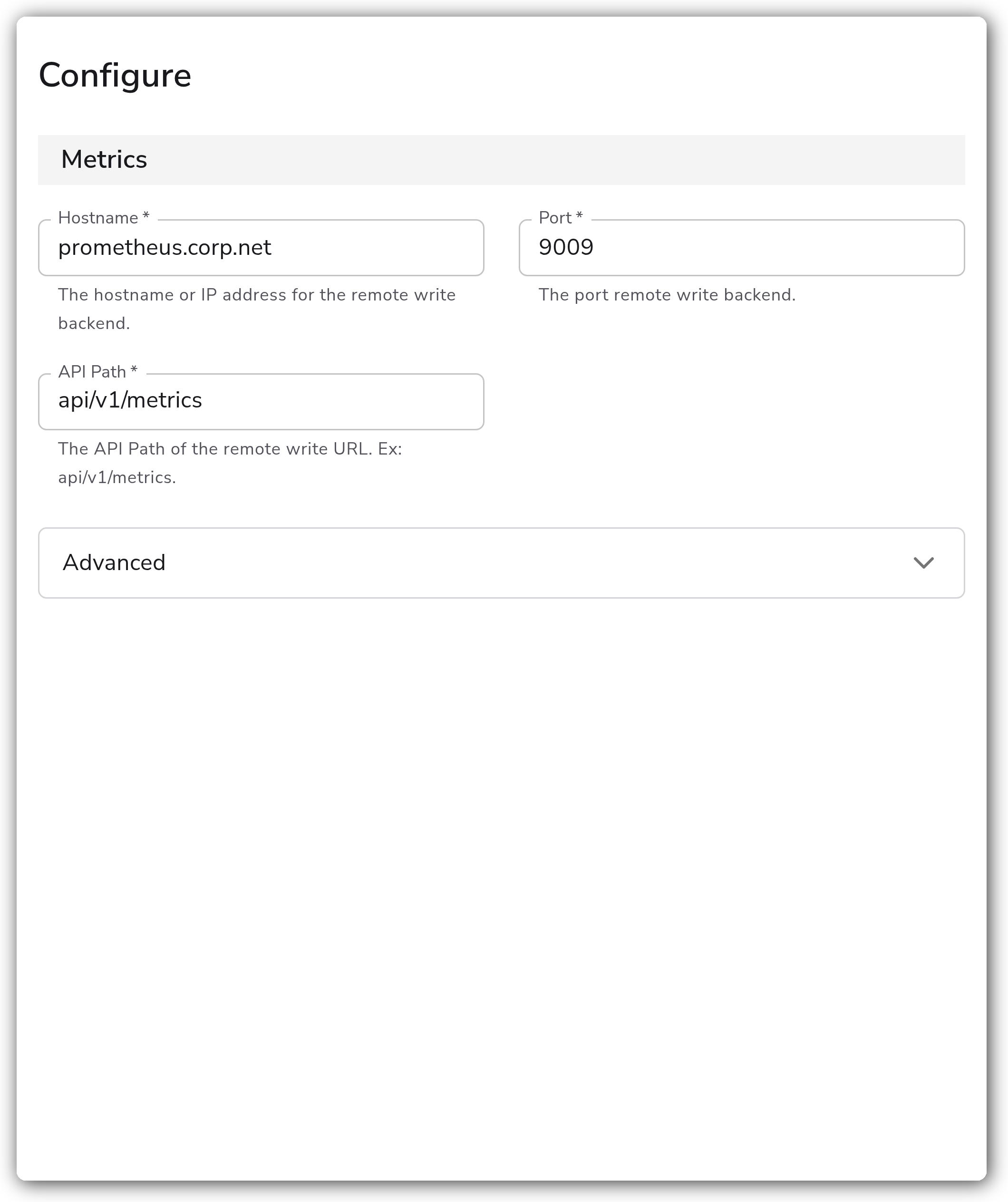
| Hostname | String | Yes | *(empty)* | The hostname or IP address for the remote write backend. |
| Port | Integer | Yes | `9009` | The port for the remote write backend. Valid range 1 to 65535. |
| API Path | String | Yes | *(empty)* | The API path of the remote write URL. Example: `api/v1/metrics`. |
**Advanced**
| Parameter | Type | Required | Default | Description |
| ------------------------------------------------ | ----------------------------------------------------------------- | -------- | ------------------------- | ---------------------------------------------------------------------------------------------------------------------------------------------------------------------------------- |
| Write Message Protocol | Enum: `prometheus.WriteRequest`, `io.prometheus.write.v2.Request` | Yes | `prometheus.WriteRequest` | Which Prometheus Remote Write protocol to use. |
| Add Unit and Type Suffixes | Boolean | No | `false` | When set, adds unit and type suffixes to metric names. |
| Namespace | String | No | *(empty)* | Prefix to attach to each metric name. |
| Convert Resource Attributes to Metric Attributes | Boolean | No | `false` | When enabled, converts all resource attributes to metric attributes. |
| Additional HTTP Headers | Map | No | *(empty)* | Additional headers to attach to each HTTP request. The following headers cannot be changed: `Content-Encoding`, `Content-Type`, `X-Prometheus-Remote-Write-Version`, `User-Agent`. |
| External Labels | Map | No | *(empty)* | Label names and values to be attached as metric attributes. |
**TLS**
| Parameter | Type | Required | Default | Description |
| ----------------------------------- | ------- | -------- | --------- | ------------------------------------------------------------------------------------------------------------------------------ |
| Enable TLS | Boolean | No | `false` | Whether or not to use TLS. When enabled, the endpoint uses `https`. |
| Strict TLS Certificate Verification | Boolean | No | `false` | Enable to require TLS certificate verification. Relevant when Enable TLS is `true`. |
| TLS Certificate Authority File | String | No | *(empty)* | Certificate authority used to validate TLS certificates. Relevant when Strict TLS Certificate Verification is `true`. |
| Mutual TLS Authentication | Boolean | No | `false` | Enable to require TLS mutual authentication. Relevant when Strict TLS Certificate Verification is `true`. |
| TLS Client Certificate File | String | Yes | *(empty)* | A TLS certificate used for client authentication, if mutual TLS is enabled. Relevant when Mutual TLS Authentication is `true`. |
| TLS Client Private Key File | String | Yes | *(empty)* | A TLS private key used for client authentication, if mutual TLS is enabled. Relevant when Mutual TLS Authentication is `true`. |
**Write Ahead Log**
| Parameter | Type | Required | Default | Description |
| ------------------ | ------- | -------- | --------------- | ------------------------------------------------------------------------------------------------------------------------ |
| Write Ahead Log | Boolean | No | `true` | Whether or not to enable a Write Ahead Log for the exporter. The WAL buffers metrics to disk before sending. |
| Storage Directory | String | Yes | `prometheus_rw` | Name of the directory the WAL is stored in. Must be unique to this destination. Relevant when Write Ahead Log is `true`. |
| Buffer Size | Integer | No | `300` | Number of objects to store in the Write Ahead Log before truncating. Relevant when Write Ahead Log is `true`. |
| Truncate Frequency | Integer | No | `60` | How often, in seconds, the Write Ahead Log should be truncated. Relevant when Write Ahead Log is `true`. |
**Retry on Failure**
| Parameter | Type | Required | Default | Description |
| ----------------------- | ------- | -------- | ------- | --------------------------------------------------------------------------------------------------------------------------------------------------------------- |
| Enable Retry on Failure | Boolean | No | `true` | Attempt to resend telemetry data that has failed to be transmitted to the destination. |
| Initial interval | Integer | No | `5` | Time (in seconds) to wait after the first failure before retrying. Relevant when Enable Retry on Failure is `true`. |
| Max interval | Integer | No | `30` | The upper bound (in seconds) on backoff. Relevant when Enable Retry on Failure is `true`. |
| Max elapsed time | Integer | No | `300` | The maximum amount of time (in seconds) spent trying to send a batch, used to avoid a never-ending retry loop. Relevant when Enable Retry on Failure is `true`. |
### Examples
#### Send metrics to a Prometheus remote\_write endpoint over HTTP
This destination sends metrics to a backend listening on `prometheus.corp.net:9009` at the path `api/v1/metrics`, with a tenant identifier attached as an HTTP header.
```yaml
apiVersion: bindplane.observiq.com/v1
kind: Destination
metadata:
name: prometheus-remote-write
spec:
type: prometheus_remote_write
parameters:
- name: hostname
value: prometheus.corp.net
- name: port
value: 9009
- name: path
value: api/v1/metrics
- name: headers
value:
X-Scope-OrgID: tenant-a
```
### Configuration Tips
* The endpoint scheme is derived from Enable TLS: `http` when disabled, `https` when enabled. Set Enable TLS to match the backend's listener rather than encoding a scheme into the hostname.
* The Write Ahead Log buffers metrics to disk and survives collector restarts. Give each Prometheus Remote Write destination a unique Storage Directory so their WALs do not collide.
* Use External Labels to attach static label values (for example `cluster` or `region`) to every series, and Namespace to prefix metric names for multi-source backends.
### Troubleshooting
#### Metrics are rejected with an authentication or permission error
Symptoms: the backend returns 401 or 403 and no series appear.
Solutions:
1. Confirm the credential the backend expects and supply it through Additional HTTP Headers (for example an `Authorization` or `X-Scope-OrgID` header).
2. Verify the hostname, port, and API path resolve to the receiver's remote write endpoint.
#### Connection fails or the TLS handshake is rejected
Symptoms: the collector logs connection-refused or certificate-verification errors.
Solutions:
1. If the backend uses HTTPS, enable TLS so the endpoint uses the `https` scheme.
2. For privately signed certificates, set Strict TLS Certificate Verification and provide the TLS Certificate Authority File. If the backend requires client certificates, enable Mutual TLS Authentication and provide the client certificate and key.
#### Metrics are dropped under load or after restarts
Symptoms: gaps in the backend during failures or collector restarts.
Solutions:
1. Keep Write Ahead Log enabled so pending metrics are buffered to disk and resent.
2. Keep Enable Retry on Failure enabled and tune the retry intervals for the backend's behavior.
### Standalone Destination
```yaml
apiVersion: bindplane.observiq.com/v1
kind: Destination
metadata:
name: prometheus-remote-write
spec:
type: prometheus_remote_write
parameters:
- name: hostname
value: prometheus.corp.net
- name: port
value: 9009
- name: path
value: api/v1/metrics
- name: prw_protocol
value: prometheus.WriteRequest
- name: wal_storage_path
value: prometheus_rw
```
### Related Resources
* [Prometheus Remote Write Exporter (prometheusremotewriteexporter)](https://github.com/open-telemetry/opentelemetry-collector-contrib/blob/main/exporter/prometheusremotewriteexporter/README.md)
* [Prometheus Remote-Write specification](https://prometheus.io/docs/specs/prw/remote_write_spec/)
---
# Agent Instructions
This documentation is published with GitBook. GitBook is the documentation platform designed so that both humans and AI agents can read, navigate, and reason over technical content effectively. Learn more at gitbook.com.
## Querying This Documentation
If you need additional information that is not directly available in this page, you can query the documentation by asking a question.
Perform an HTTP GET request on the following URL with the `ask` and `goal` query parameters:
```
GET https://docs.bindplane.com/integrations/destinations/prometheus-remote-write.md?ask=&goal=
```
`ask` is the immediate question: it should be specific, self-contained, and written in natural language.
`goal` is what the user is ultimately trying to achieve, the reason they need the answer. Sharing it helps GitBook give you a better, more relevant answer. A goal is most helpful when it describes the outcome the user wants rather than restating the question. For example, with `ask=how do I create an API token`, a goal like `automate deployments from our CI pipeline` lets GitBook tailor the answer to that use case.
The response will contain a direct answer to the question and relevant excerpts and sources from the documentation.
Use this mechanism when the answer is not explicitly present in the current page, you need clarification or additional context, or you want to retrieve related documentation sections.