> For the complete documentation index, see [llms.txt](https://docs.bindplane.com/llms.txt). Markdown versions of documentation pages are available by appending `.md` to page URLs; this page is available as [Markdown](https://docs.bindplane.com/integrations/destinations/coralogix.md).
# Coralogix
The Coralogix destination sends logs, metrics, and traces to [Coralogix](https://coralogix.com/docs/), a full-stack observability platform. Telemetry is tagged with an application name and subsystem name and routed to the ingress endpoint for your account region.
### Supported Telemetry Types
| Platform | Metrics | Logs | Traces |
| ------------------ | ------- | ---- | ------ |
| Linux | ✓ | ✓ | ✓ |
| Windows | ✓ | ✓ | ✓ |
| macOS | ✓ | ✓ | ✓ |
| Kubernetes Node | ✓ | ✓ | ✓ |
| Kubernetes Cluster | ✓ | ✓ | ✓ |
| Kubernetes Gateway | ✓ | ✓ | ✓ |
| OpenShift Node | ✓ | ✓ | ✓ |
| OpenShift Cluster | ✓ | ✓ | ✓ |
| OpenShift Gateway | ✓ | ✓ | ✓ |
### Prerequisites
* A Coralogix account and its [API private key](https://coralogix.com/docs/private-key/). This key is sensitive and authorizes ingestion.
* The Coralogix [region](https://coralogix.com/docs/coralogix-domain/) your account is provisioned in (for example, `EUROPE1`, `USA1`, `APAC1`). Bindplane derives the correct ingress domain from the region.
* For a private or self-hosted Coralogix deployment, the custom ingress domain to send to.
* Network egress from the collector to the Coralogix ingress endpoint on TCP 443.
### Configuration
#### General
| Parameter | Type | Default | Description |
| --------------------- | ------------------ | ------------------------------- | ---------------------------------------------------------------------------------------------------------------------------------------------------------------------------------- |
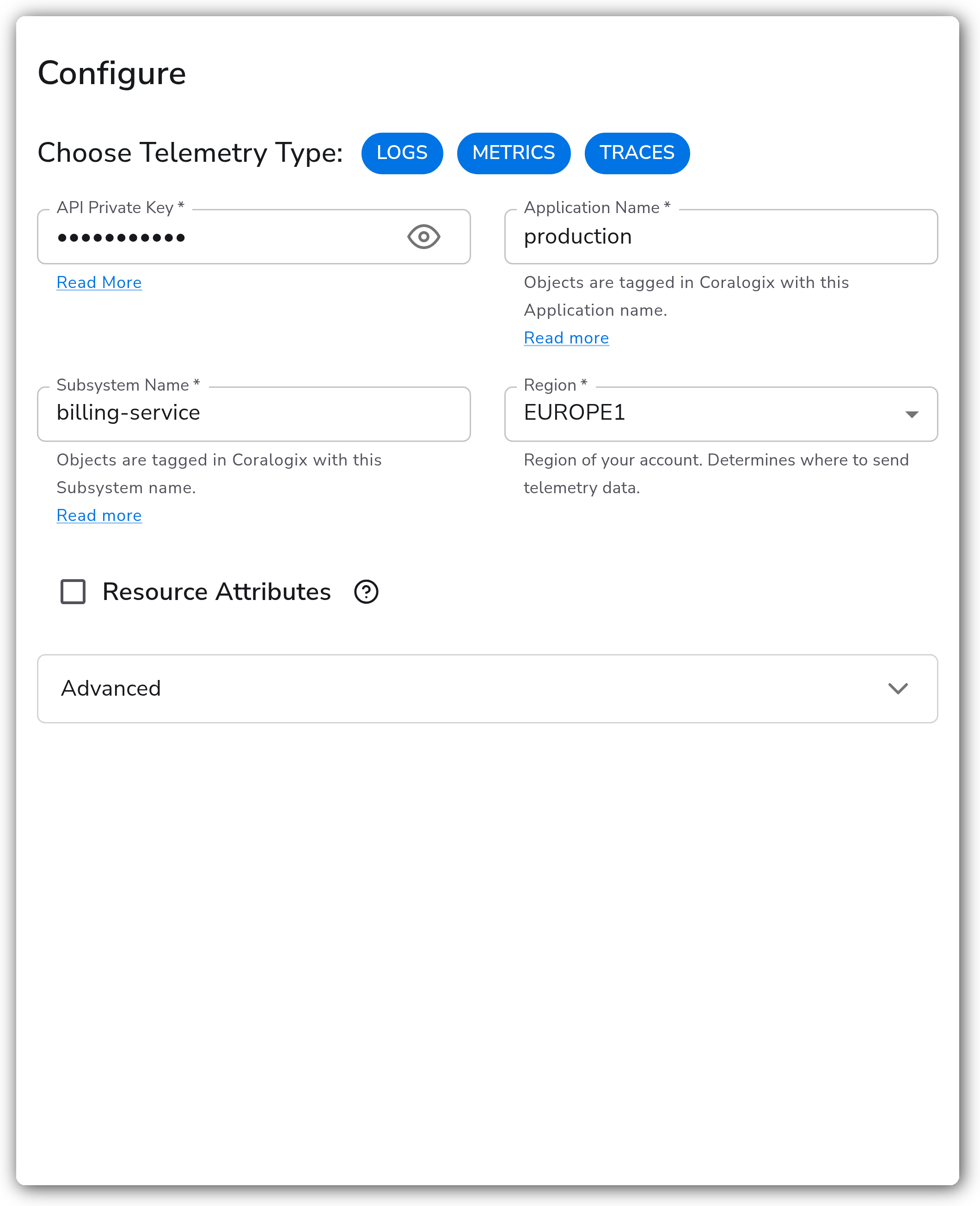
| Choose Telemetry Type | Telemetry Selector | `["Logs", "Metrics", "Traces"]` | Which telemetry types to send to Coralogix. Valid values: `Logs`, `Metrics`, `Traces`. |
| API Private Key | String | | API Private Key used to authenticate with Coralogix. **Required.** Sensitive value. See [finding your private key](https://coralogix.com/docs/private-key/). |
| Application Name | String | | Objects sent to Coralogix are tagged with this Application name. **Required.** See [application and subsystem names](https://coralogix.com/docs/application-and-subsystem-names/). |
| Subsystem Name | String | | Objects sent to Coralogix are tagged with this Subsystem name. **Required.** See [application and subsystem names](https://coralogix.com/docs/application-and-subsystem-names/). |
| Region | Enum | `EUROPE1` | Region of your account. Determines where telemetry is sent. **Required.**1 |
| Custom Domain | String | | Custom ingress domain to send telemetry to. **Required** when `region` is `Custom Domain`. |
1. *Valid values: `USA1`, `USA2`, `APAC1`, `APAC2`, `APAC3`, `EUROPE1`, `EUROPE2`, the `(AWS PrivateLink)` variant of each, and `Custom Domain`.*
#### Resource Attributes
| Parameter | Type | Default | Description |
| ------------------------------------ | ------- | ------- | ---------------------------------------------------------------------------------------------------------------------------------------------------------- |
| Resource Attributes | Boolean | `false` | When enabled, resource attributes set the Coralogix AppName and SubSystem. When disabled, the `application_name` and `subsystem_name` parameters are used. |
| Application Name Resource Attributes | Strings | `[]` | Ordered list of resource attributes used for the Coralogix AppName. Applies when `resource_attributes` is enabled. |
| SubSystem Resource Attributes | Strings | `[]` | Ordered list of resource attributes used for the Coralogix SubSystem. Applies when `resource_attributes` is enabled. |
#### Advanced
| Parameter | Type | Default | Description |
| ----------------- | ------- | ------- | --------------------------------------------------------------------------------- |
| Timeout (seconds) | Integer | `5` | Timeout (in seconds) for every attempt to send data to the backend. |
| Compression | Enum | `gzip` | Compression algorithm to use when sending data. Valid values: `none`, `gzip`. |
| Drop Raw Copy | Boolean | `true` | When enabled, the raw copy of the log stored in `log.record.original` is dropped. |
#### Retry on Failure
| Parameter | Type | Default | Description |
| ----------------------- | ------- | ------- | ------------------------------------------------------------------------------------------------------- |
| Enable Retry on Failure | Boolean | `true` | Attempt to resend telemetry data that failed to transmit to the destination. |
| Initial interval | Integer | `5` | Time (in seconds) to wait after the first failure before retrying. Applies when retry is enabled. |
| Max interval | Integer | `30` | The upper bound (in seconds) on backoff. Applies when retry is enabled. |
| Max elapsed time | Integer | `300` | Maximum time (in seconds) spent trying to send a batch before giving up. Applies when retry is enabled. |
#### Sending Queue
| Parameter | Type | Default | Description |
| ------------------------- | --------- | ------------ | --------------------------------------------------------------------------------------------------------------------------------------------------- |
| Enable Sending Queue | Boolean | `true` | Buffer telemetry data temporarily before sending to avoid loss during a temporary network outage. |
| Number of Consumers | Integer | `10` | Number of consumers that dequeue batches. Applies when the sending queue is enabled. |
| Queue Size | Integer | `5000` | Maximum number of batches kept in memory before dropping. Applies when the sending queue is enabled. |
| Enable Persistent Queuing | Boolean | `true` | Buffer telemetry data to disk before sending to avoid loss during network outages or collector restarts. Applies when the sending queue is enabled. |
| Persistent Queue Storage | Extension | file storage | Storage to use for the persistent queue. Applies when the sending and persistent queues are enabled. |
### Example Configuration
#### Standalone Destination
```yaml
apiVersion: bindplane.observiq.com/v1
kind: Destination
metadata:
id: coralogix
name: coralogix
spec:
type: coralogix
parameters:
- name: telemetry_types
value: ['Logs', 'Metrics', 'Traces']
- name: private_key
value: 'cxtp_REDACTED'
- name: application_name
value: 'production'
- name: subsystem_name
value: 'billing-service'
- name: region
value: 'EUROPE1'
```
### Configuration Tips
#### Application and subsystem names
* `application_name` and `subsystem_name` drive how telemetry is grouped and filtered in Coralogix. Use a stable application name per environment (for example, `production`) and a subsystem name per service.
* To set these dynamically from telemetry, enable `resource_attributes` and list the attributes in `application_name_attributes` and `subsystem_name_attributes`. The first matching attribute wins. When `resource_attributes` is disabled, the static `application_name` and `subsystem_name` parameters are used instead.
#### Region and custom domains
* Bindplane derives the ingress domain from the selected `region`, so you do not set an endpoint directly. Pick the region that matches where your Coralogix account is provisioned.
* For a private or self-hosted deployment, set `region` to `Custom Domain` and provide the ingress domain in `domain`. The `(AWS PrivateLink)` region variants route to the corresponding PrivateLink endpoints.
#### Reliability
* Leave `retry_on_failure_enabled` and `sending_queue_enabled` on for production. Enable `persistent_queue_enabled` so buffered telemetry survives collector restarts.
### Troubleshooting
**Symptom:** Telemetry is rejected or authentication fails. **Solution:** Confirm `private_key` is the Coralogix API private key for the selected `region`. A key is scoped to a single Coralogix account and region; using a key from one region against another region's endpoint fails. See [Send Your Private Key](https://coralogix.com/docs/private-key/).
**Symptom:** Data arrives but is grouped under the wrong application or subsystem. **Solution:** Check whether `resource_attributes` is enabled. When it is, the AppName and SubSystem come from `application_name_attributes` / `subsystem_name_attributes` on the records, not from the static `application_name` / `subsystem_name` fields. Disable `resource_attributes` to force the static values.
**Symptom:** No data reaches a `Custom Domain` deployment. **Solution:** Verify the `domain` value is the correct Coralogix ingress domain and that the collector can reach it on TCP 443. For standard regions, confirm the selected `region` matches your account.
### Related Resources
* [Coralogix documentation](https://coralogix.com/docs/)
* [Send your private key](https://coralogix.com/docs/private-key/)
* [Application and subsystem names](https://coralogix.com/docs/application-and-subsystem-names/)
* [Coralogix domain and regions](https://coralogix.com/docs/coralogix-domain/)
---
# Agent Instructions
This documentation is published with GitBook. GitBook is the documentation platform designed so that both humans and AI agents can read, navigate, and reason over technical content effectively. Learn more at gitbook.com.
## Querying This Documentation
If you need additional information that is not directly available in this page, you can query the documentation by asking a question.
Perform an HTTP GET request on the following URL with the `ask` and `goal` query parameters:
```
GET https://docs.bindplane.com/integrations/destinations/coralogix.md?ask=&goal=
```
`ask` is the immediate question: it should be specific, self-contained, and written in natural language.
`goal` is what the user is ultimately trying to achieve, the reason they need the answer. Sharing it helps GitBook give you a better, more relevant answer. A goal is most helpful when it describes the outcome the user wants rather than restating the question. For example, with `ask=how do I create an API token`, a goal like `automate deployments from our CI pipeline` lets GitBook tailor the answer to that use case.
The response will contain a direct answer to the question and relevant excerpts and sources from the documentation.
Use this mechanism when the answer is not explicitly present in the current page, you need clarification or additional context, or you want to retrieve related documentation sections.