> For the complete documentation index, see [llms.txt](https://docs.bindplane.com/llms.txt). Markdown versions of documentation pages are available by appending `.md` to page URLs; this page is available as [Markdown](https://docs.bindplane.com/integrations/destinations/file.md).
# File
The File destination writes telemetry from a Bindplane pipeline to a file on the local filesystem of the collector host. It exports metrics, logs, and traces. Output is written in JSON or Protobuf, with optional zstd compression, size- and age-based file rotation, and the ability to split records across separate files keyed by a resource attribute.
### Supported Telemetry Types
| Platform | Metrics | Logs | Traces |
| ------------------ | ------- | ---- | ------ |
| Linux | ✓ | ✓ | ✓ |
| Windows | ✓ | ✓ | ✓ |
| macOS | ✓ | ✓ | ✓ |
| AIX | ✓ | ✓ | ✓ |
| Kubernetes Node | ✓ | ✓ | ✓ |
| Kubernetes Cluster | ✓ | ✓ | ✓ |
| Kubernetes Gateway | ✓ | ✓ | ✓ |
| OpenShift Node | ✓ | ✓ | ✓ |
| OpenShift Cluster | ✓ | ✓ | ✓ |
| OpenShift Gateway | ✓ | ✓ | ✓ |
### Prerequisites
This destination requires a writable path on the collector host:
* A file path the collector process can write to (for example `/var/log/telemetry.json`).
* Sufficient disk space for the telemetry volume, plus headroom for rotated backups when rotation is enabled.
* Write and execute permissions on the parent directory for the user the collector runs as. Enable **Create Directory** if the directory does not already exist.
The official OpenTelemetry Collector Contrib container ships with a read-only root filesystem, so in containerized deployments mount a writable volume at the target path. In Kubernetes, back the path with a persistent volume so data survives pod restarts.
### Configuration
**General**
| Parameter | Type | Required | Default | Description |
| --------------------- | ------------------ | -------- | --------------------- | ------------------------------------------------ |
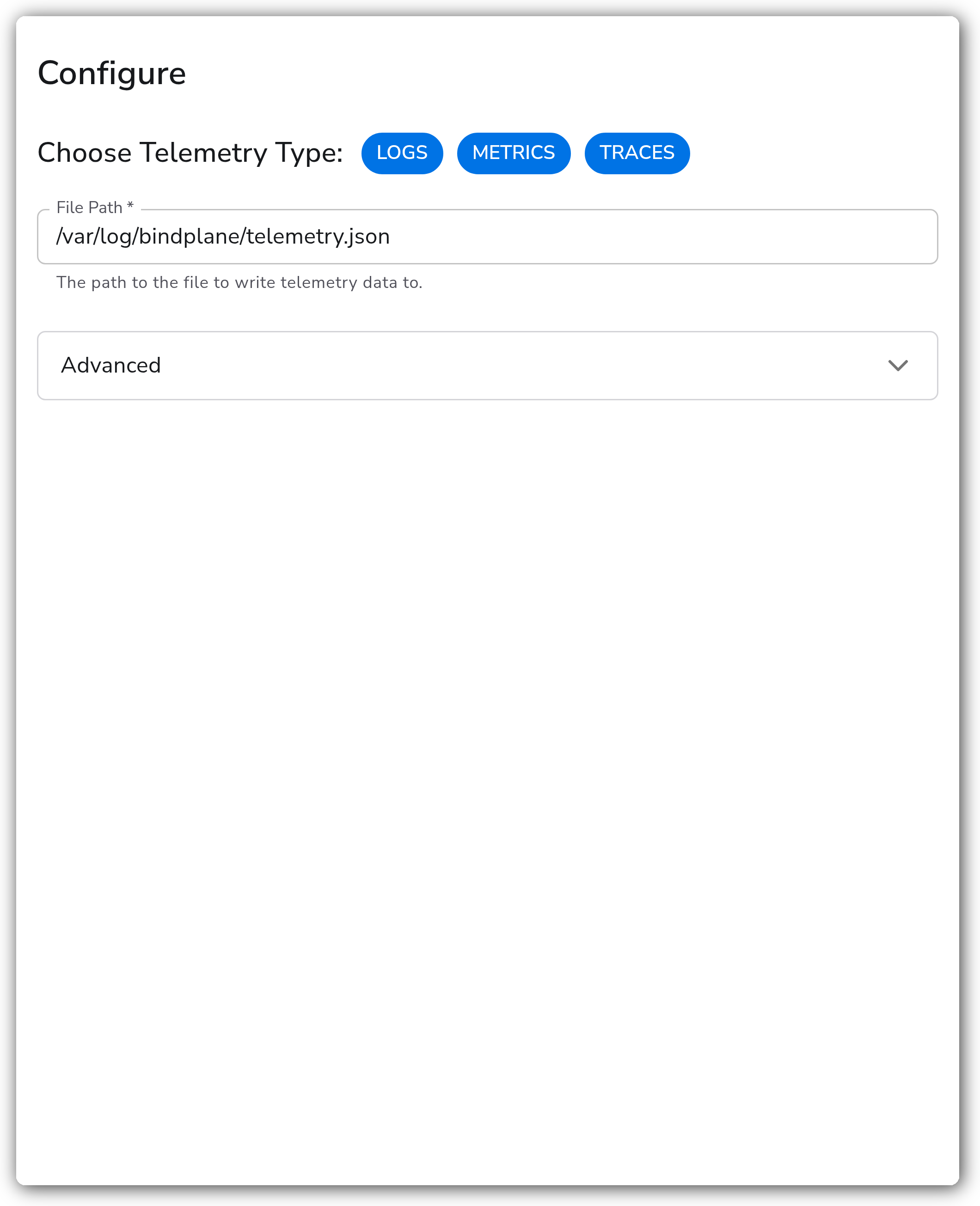
| Choose Telemetry Type | Telemetry Selector | No | Logs, Metrics, Traces | The signals this destination exports. |
| File Path | String | Yes | *(empty)* | The path to the file to write telemetry data to. |
**Advanced**
| Parameter | Type | Required | Default | Description |
| ------------------ | ----------------- | -------- | --------------------------- | -------------------------------------------------------------------------------------------------------------------------------------------------------------------------------------------------------------------------------------------------------------- |
| Drop Raw Copy | Boolean | No | `true` | When enabled, the raw copy of the log stored in `log.record.original` is dropped before export. |
| Format | Enum: json, proto | No | `json` | The format used for telemetry written to the file. |
| Encoding Extension | Extension | No | `None (use Format setting)` | Use an encoding extension to control the output format, overriding **Format**. `json_log_encoding` exports the log body as JSON, `text_encoding` exports the log body as plain text. Applies to Logs only. Shown when **Choose Telemetry Type** includes Logs. |
| Compression | Enum: none, zstd | No | `none` | The compression algorithm to use when exporting telemetry. |
**Advanced - File Rotation**
| Parameter | Type | Required | Default | Description |
| ----------------------------- | ------- | -------- | ------- | ----------------------------------------------------------------------- |
| Rotation - Max File Size (MB) | Integer | No | `100` | Maximum file size in megabytes before rotation. Disabled if set to `0`. |
| Rotation - Max Days | Integer | No | `0` | Maximum number of days to retain files. Disabled if set to `0`. |
| Rotation - Max Backups | Integer | No | `100` | Maximum number of old files to retain. Disabled if set to `0`. |
| Rotation - Use Local Time | Boolean | No | `false` | Use local time instead of UTC for rotation timestamps. |
**Advanced - Flush and Write**
| Parameter | Type | Required | Default | Description |
| ----------------------------- | ------- | -------- | ------- | --------------------------------------------------------------------------- |
| Flush Interval (seconds) | Integer | No | `1` | Time interval in seconds between flushes. Ignored when rotation is enabled. |
| Append Mode | Boolean | No | `false` | Append to the file instead of truncating it. |
| Create Directory | Boolean | No | `false` | Create the directory if it does not exist. |
| Directory Permissions (Octal) | String | No | `0755` | Permissions for created directories in octal format. |
**Advanced - Group by Resource Attribute**
| Parameter | Type | Required | Default | Description |
| --------------------------- | ------- | -------- | --------------------------- | ------------------------------------------------------------------------------------------------------------- |
| Group by Resource Attribute | Boolean | No | `false` | Write to separate files based on a resource attribute value. |
| Resource Attribute Name | String | No | `fileexporter.path_segment` | The resource attribute name to use for grouping. Shown when **Group by Resource Attribute** is enabled. |
| Group by - Max Open Files | Integer | No | `100` | Maximum number of open file descriptors when grouping. Shown when **Group by Resource Attribute** is enabled. |
### Examples
#### JSON logs with size-based rotation
Write logs to `/var/log/bindplane/telemetry.json` in JSON, rotating at 50 MB and keeping 10 backups. The directory is created if it does not exist.
```yaml
apiVersion: bindplane.observiq.com/v1
kind: Destination
metadata:
name: file-rotated
spec:
type: file
parameters:
- name: telemetry_types
value:
- Logs
- name: path
value: /var/log/bindplane/telemetry.json
- name: format
value: json
- name: rotation_max_megabytes
value: 50
- name: rotation_max_backups
value: 10
- name: create_directory
value: true
```
#### Compressed Protobuf grouped by resource attribute
Write all three signals to files split by the `service.name` resource attribute, using Protobuf with zstd compression.
```yaml
apiVersion: bindplane.observiq.com/v1
kind: Destination
metadata:
name: file-grouped
spec:
type: file
parameters:
- name: telemetry_types
value:
- Logs
- Metrics
- Traces
- name: path
value: /var/log/bindplane/telemetry
- name: format
value: proto
- name: compression
value: zstd
- name: group_by_enabled
value: true
- name: group_by_resource_attribute
value: service.name
- name: create_directory
value: true
```
### Configuration Tips
* Use absolute paths (for example `/var/log/telemetry.json`) so output does not depend on the collector's working directory.
* Enable rotation on long-running collectors to bound disk usage. **Flush Interval** is ignored while rotation is enabled, so the file is flushed on each rotation cycle instead.
* JSON is human-readable and easy to inspect. Protobuf produces smaller files but requires a decoder to read; pair it with zstd compression when disk footprint matters.
* When grouping by resource attribute, keep the attribute's cardinality below **Group by - Max Open Files**, or raise the limit, to avoid file-descriptor churn.
#### Combining with other destinations in a pipeline
A pipeline can fan out to more than one destination at once. The File destination is commonly added alongside a primary backend (an observability platform, an object store, or a TSDB) to keep a local copy of the raw stream for debugging, audit, or replay. Each destination receives the full output of the pipeline independently, so adding File does not alter what the other destinations receive.
When pairing File with a remote destination, leave **Drop Raw Copy** enabled (the default) unless a downstream consumer of the file needs the original record in `log.record.original`. To keep the local copy lightweight relative to a richer remote export, give the File destination its own processor stack on the pipeline so file-only trimming does not affect the remote backend.
### Troubleshooting
#### Permission denied when writing or creating the directory
Symptoms: the collector logs `permission denied` for the file path or its parent directory.
Solutions:
1. Confirm the user the collector runs as has write and execute permission on the target directory.
2. If **Create Directory** is enabled, confirm the parent directory is writable and that **Directory Permissions** (octal) are valid, for example `0755`.
3. On SELinux or AppArmor hosts, confirm the policy allows the collector to write to that path.
#### Files grow without rotating
Symptoms: the output file grows unbounded despite rotation settings.
Solutions:
1. Confirm **Rotation - Max File Size (MB)** is greater than `0`; a value of `0` disables size-based rotation.
2. Confirm there is free disk space, since rotation can fail when the volume is full.
3. Confirm the directory holding rotated backups is writable.
#### Telemetry missing from the file
Symptoms: some records never appear in the output.
Solutions:
1. Confirm the source is producing the selected signal and that the pipeline reaches this destination.
2. With **Group by Resource Attribute** enabled, confirm the attribute exists on every record; records lacking it are written using the default path segment.
3. With high-cardinality grouping, confirm **Group by - Max Open Files** is not being exceeded.
### Standalone Destination
```yaml
apiVersion: bindplane.observiq.com/v1
kind: Destination
metadata:
name: file
spec:
type: file
parameters:
- name: telemetry_types
value:
- Logs
- Metrics
- Traces
- name: path
value: /var/log/bindplane/telemetry.json
```
### Related Resources
* [File Exporter (fileexporter) reference](https://github.com/open-telemetry/opentelemetry-collector-contrib/blob/main/exporter/fileexporter/README.md)
---
# Agent Instructions
This documentation is published with GitBook. GitBook is the documentation platform designed so that both humans and AI agents can read, navigate, and reason over technical content effectively. Learn more at gitbook.com.
## Querying This Documentation
If you need additional information that is not directly available in this page, you can query the documentation by asking a question.
Perform an HTTP GET request on the following URL with the `ask` and `goal` query parameters:
```
GET https://docs.bindplane.com/integrations/destinations/file.md?ask=&goal=
```
`ask` is the immediate question: it should be specific, self-contained, and written in natural language.
`goal` is what the user is ultimately trying to achieve, the reason they need the answer. Sharing it helps GitBook give you a better, more relevant answer. A goal is most helpful when it describes the outcome the user wants rather than restating the question. For example, with `ask=how do I create an API token`, a goal like `automate deployments from our CI pipeline` lets GitBook tailor the answer to that use case.
The response will contain a direct answer to the question and relevant excerpts and sources from the documentation.
Use this mechanism when the answer is not explicitly present in the current page, you need clarification or additional context, or you want to retrieve related documentation sections.