> For the complete documentation index, see [llms.txt](https://docs.bindplane.com/llms.txt). Markdown versions of documentation pages are available by appending `.md` to page URLs; this page is available as [Markdown](https://docs.bindplane.com/integrations/destinations/opentelemetry-otlp.md).
# OpenTelemetry (OTLP)
The OpenTelemetry (OTLP) destination exports logs, metrics, and traces from a Bindplane pipeline to any backend that accepts the OpenTelemetry Protocol (OTLP). It works with any OTLP receiver, including another OpenTelemetry Collector, an OTLP gateway, or a vendor backend that exposes an OTLP ingest endpoint. Choose between OTLP/gRPC and OTLP/HTTP transport, and configure TLS, compression, batching, retry, and queuing as needed.
### Supported Telemetry Types
| Platform | Metrics | Logs | Traces |
| ------------------ | ------- | ---- | ------ |
| Linux | ✓ | ✓ | ✓ |
| Windows | ✓ | ✓ | ✓ |
| macOS | ✓ | ✓ | ✓ |
| Kubernetes Node | ✓ | ✓ | ✓ |
| Kubernetes Cluster | ✓ | ✓ | ✓ |
| Kubernetes Gateway | ✓ | ✓ | ✓ |
| OpenShift Node | ✓ | ✓ | ✓ |
| OpenShift Cluster | ✓ | ✓ | ✓ |
| OpenShift Gateway | ✓ | ✓ | ✓ |
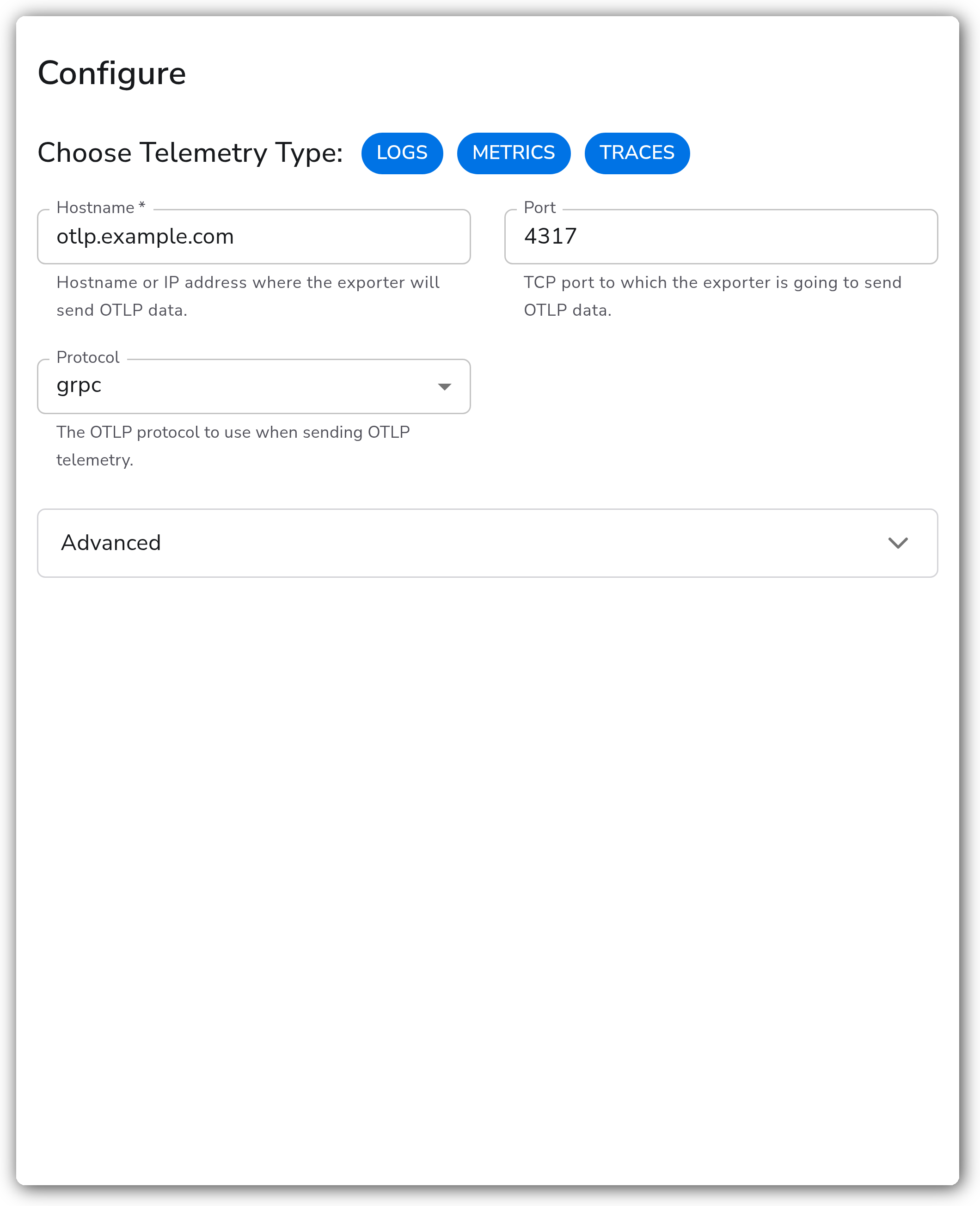
Use Choose Telemetry Type to select which signals this destination exports.
### Prerequisites
* A reachable OTLP endpoint. This is the hostname or IP address and port of the OTLP receiver you are sending to. The default port is `4317` for OTLP/gRPC and `4318` for OTLP/HTTP.
* The transport the endpoint accepts: OTLP over gRPC or OTLP over HTTP.
* Any authentication the endpoint requires, supplied as request headers (for example an `Authorization` or API-key header).
* Any TLS material the endpoint requires: a CA certificate to validate the server, and, for mutual TLS, a client certificate and private key.
This destination is a generic OTLP exporter and does not require a specific vendor account. Consult the documentation for your OTLP backend for the exact endpoint, port, headers, and TLS requirements.
### Configuration
**Connection**
| Parameter | Type | Required | Default | Description |
| --------------------- | -------------------- | -------- | --------------------- | ------------------------------------------------------------------------------------------------------ |
| Choose Telemetry Type | Telemetry Selector | No | Logs, Metrics, Traces | Select which types of telemetry to export. |
| Hostname | String | Yes | *(empty)* | Hostname or IP address where the exporter will send OTLP data. |
| Port | Integer | No | `4317` | TCP port to which the exporter sends OTLP data. Shown when Protocol is `grpc`. Valid range 1 to 65535. |
| Port | Integer | No | `4318` | TCP port to which the exporter sends OTLP data. Shown when Protocol is `http`. Valid range 1 to 65535. |
| Protocol | Enum: `grpc`, `http` | No | `grpc` | The OTLP protocol to use when sending OTLP telemetry. |
| Path Prefix | String | No | *(empty)* | Optional path prefix added to the HTTP endpoint.1 Shown when Protocol is `http`. |
1. *Telemetry is sent to `/v1/metrics`, `/v1/logs`, and `/v1/traces` by default; a prefix of `/myapp` sends metrics to `/myapp/v1/metrics`.*
**Advanced**
| Parameter | Type | Required | Default | Description |
| ------------------ | --------------------------------------------------------- | -------- | --------- | --------------------------------------------------------------------------------------------------------------------------------- |
| Additional Headers | Map | No | *(empty)* | Additional headers to attach to each request. Use for authentication tokens or API keys. |
| Compression | Enum: `none`, `gzip`, `deflate`, `snappy`, `zlib`, `zstd` | No | `gzip` | Compression algorithm to use when sending data. Shown when Protocol is `http`. |
| Compression | Enum: `none`, `gzip`, `snappy`, `zstd` | No | `gzip` | Compression algorithm to use when sending data. Ensure the server supports the selected algorithm. Shown when Protocol is `grpc`. |
| Timeout | Integer | Yes | `30` | Timeout, in seconds, for sending batches to the destination. |
**Advanced — gRPC Load Balancing**
| Parameter | Type | Required | Default | Description |
| -------------------------- | --------------------------------- | -------- | ------------- | ------------------------------------------------------------------------------------------------------------------ |
| Enable gRPC Load Balancing | Boolean | No | `false` | Use native gRPC client-side load balancing with DNS name resolution. Shown when Protocol is `grpc`. |
| Load Balancing Policy | Enum: `round_robin`, `pick_first` | No | `round_robin` | Load balancing policy to use when sending to multiple OTLP endpoints. Shown when Enable gRPC Load Balancing is on. |
**Advanced — TLS**
| Parameter | Type | Required | Default | Description |
| --------------------------------- | ------- | -------- | --------- | ----------------------------------------------------------------------------------------------------------------------------------------- |
| Enable TLS | Boolean | No | `false` | Whether to use TLS. |
| Skip TLS Certificate Verification | Boolean | No | `false` | Skip verification of the server's certificate. Shown when Enable TLS is on. |
| TLS Certificate Authority File | String | No | *(empty)* | Optional certificate authority file used to validate the server's certificate. Shown when Enable TLS is on. |
| Server Name Override | String | No | *(empty)* | Optional virtual hostname indicating the name of the server requested by the client. Generally not required. Shown when Enable TLS is on. |
| Mutual TLS | Boolean | No | `false` | Whether to use client TLS authentication (mTLS). Shown when Enable TLS is on. |
| TLS Client Certificate File | String | Yes | *(empty)* | Path to the client certificate used for mutual TLS. Required when Enable TLS and Mutual TLS are both on. |
| TLS Client Private Key | String | Yes | *(empty)* | Path to the client private key used for mutual TLS. Required when Enable TLS and Mutual TLS are both on. |
**Advanced — Processing**
| Parameter | Type | Required | Default | Description |
| ------------- | ------- | -------- | ------- | --------------------------------------------------------------------------------- |
| Drop Raw Copy | Boolean | No | `true` | When enabled, the raw copy of the log stored in `log.record.original` is dropped. |
**Advanced — Batching**
| Parameter | Type | Required | Default | Description |
| ------------------- | -------- | -------- | ------- | -------------------------------------------------------------------------------------------------------------------------------------------- |
| Enable Batching | Boolean | No | `true` | Batch telemetry data before sending to the destination. |
| Send Batch Size | Integer | Yes | `8192` | Number of spans, metric data points, or log records after which a batch is sent regardless of the timeout. Shown when Enable Batching is on. |
| Send Batch Max Size | Integer | Yes | `0` | Upper limit of the batch size. `0` means no upper limit. Must be greater than or equal to Send Batch Size. Shown when Enable Batching is on. |
| Timeout | Duration | Yes | `200ms` | Time after which a batch is sent regardless of size. Example: `2s`. Shown when Enable Batching is on. |
**Advanced — Retry on Failure**
| Parameter | Type | Required | Default | Description |
| ----------------------- | ------- | -------- | ------- | ------------------------------------------------------------------------------------------------------------------ |
| Enable Retry on Failure | Boolean | No | `true` | Attempt to resend telemetry that failed to transmit. |
| Initial interval | Integer | No | `5` | Time, in seconds, to wait after the first failure before retrying. Shown when Enable Retry on Failure is on. |
| Max interval | Integer | No | `30` | Upper bound, in seconds, on backoff. Shown when Enable Retry on Failure is on. |
| Max elapsed time | Integer | No | `300` | Maximum time, in seconds, spent trying to send a batch before giving up. Shown when Enable Retry on Failure is on. |
**Advanced — Sending Queue**
| Parameter | Type | Required | Default | Description |
| ------------------------- | --------- | -------- | ---------------------- | ---------------------------------------------------------------------------------------------------------------------------------------------------- |
| Enable Sending Queue | Boolean | No | `true` | Buffer telemetry temporarily before sending to help avoid data loss during a temporary network outage. |
| Number of Consumers | Integer | No | `10` | Number of consumers that dequeue batches. Shown when Enable Sending Queue is on. |
| Queue Size | Integer | No | `5000` | Maximum number of batches kept in memory before dropping. Shown when Enable Sending Queue is on. |
| Enable Persistent Queuing | Boolean | No | `true` | Buffer telemetry to disk before sending to help avoid data loss during network outages or collector restarts. Shown when Enable Sending Queue is on. |
| Persistent Queue Storage | Extension | Yes | File storage extension | Storage to use for the persistent queue. Shown when Enable Sending Queue and Enable Persistent Queuing are both on. |
### Examples
#### Export all signals to an OTLP gateway over gRPC with TLS
This destination sends logs, metrics, and traces to an OTLP receiver at `otlp.example.com:4317` over gRPC. TLS is enabled and validated against a CA file, and an authentication token is supplied as a request header.
```yaml
apiVersion: bindplane.observiq.com/v1
kind: Destination
metadata:
name: opentelemetry-otlp
spec:
type: otlp_grpc
parameters:
- name: telemetry_types
value:
- Logs
- Metrics
- Traces
- name: hostname
value: otlp.example.com
- name: protocol
value: grpc
- name: grpc_port
value: 4317
- name: grpc_compression
value: gzip
- name: headers
value:
Authorization: "Bearer ${OTLP_TOKEN}"
- name: enable_tls
value: true
- name: ca_file
value: /opt/tls/ca.crt
- name: timeout
value: 30
```
### Configuration Tips
* **gRPC vs HTTP.** OTLP/gRPC (Protocol `grpc`, default port `4317`) is usually the most efficient choice and is the right default when the backend supports it. Choose OTLP/HTTP (Protocol `http`, default port `4318`) when the path to the backend only allows HTTP, for example through a proxy or load balancer that does not pass gRPC, or when the backend exposes only an OTLP/HTTP ingest endpoint. The two protocols use different ports and a different set of compression algorithms, so confirm which transport your endpoint accepts before selecting one.
* **HTTP path prefix.** With OTLP/HTTP, telemetry is sent to `/v1/metrics`, `/v1/logs`, and `/v1/traces`. If the backend serves OTLP under a different base path, set Path Prefix so the signal paths are prefixed accordingly (for example `/myapp` yields `/myapp/v1/metrics`).
* **Compression and the receiver.** Compression defaults to `gzip`. The OTLP/gRPC and OTLP/HTTP transports support different algorithm sets, and the receiving server must support the algorithm you pick. Set Compression to `none` if the backend does not support compression.
* **Persistence.** Keep the sending queue and persistent queuing enabled so buffered telemetry survives a temporary network outage or a collector restart rather than being dropped.
### Troubleshooting
#### Authentication or permission errors from the backend
Symptoms: the backend rejects requests with an authentication or authorization error.
Solutions:
1. Confirm the required auth header is set under Additional Headers with the exact name and value the backend expects (for example `Authorization: Bearer `).
2. Verify the token or API key is still valid and has permission to ingest the signals you are exporting.
#### Connection refused or wrong endpoint
Symptoms: the exporter cannot reach the destination, or requests fail with connection or 404 errors.
Solutions:
1. Confirm Hostname and Port match the OTLP receiver. Use port `4317` for gRPC and `4318` for HTTP unless the backend documents otherwise.
2. Confirm Protocol matches what the endpoint accepts. A gRPC client cannot talk to an HTTP-only endpoint and vice versa.
3. For OTLP/HTTP, verify Path Prefix if the backend serves OTLP under a non-default base path.
#### TLS handshake failures
Symptoms: the connection fails during the TLS handshake or with a certificate validation error.
Solutions:
1. With Enable TLS on, provide a CA file that can validate the server's certificate, or correct the Server Name Override if the certificate's name differs from the hostname.
2. For mutual TLS, confirm the client certificate and private key paths are correct and readable by the collector.
3. Skip TLS Certificate Verification can confirm a certificate problem during testing, but leave it off in production.
#### Throttling or dropped data
Symptoms: the backend returns throttling responses, or telemetry is dropped under load.
Solutions:
1. Keep Enable Retry on Failure on so transient failures and throttling responses are retried with backoff.
2. Keep the sending queue and persistent queuing enabled; increase Queue Size if data is dropped during sustained outages.
3. Tune batching (Send Batch Size, Timeout) to match the backend's ingest limits.
### Standalone Destination
```yaml
apiVersion: bindplane.observiq.com/v1
kind: Destination
metadata:
name: opentelemetry-otlp
spec:
type: otlp_grpc
parameters:
- name: telemetry_types
value:
- Logs
- Metrics
- Traces
- name: hostname
value: otlp.example.com
- name: protocol
value: grpc
- name: grpc_port
value: 4317
- name: timeout
value: 30
```
### Related Resources
* [OTLP gRPC Exporter (otlpexporter) — OpenTelemetry Collector](https://github.com/open-telemetry/opentelemetry-collector/blob/main/exporter/otlpexporter/README.md)
* [OTLP HTTP Exporter (otlphttpexporter) — OpenTelemetry Collector](https://github.com/open-telemetry/opentelemetry-collector/blob/main/exporter/otlphttpexporter/README.md)
---
# Agent Instructions
This documentation is published with GitBook. GitBook is the documentation platform designed so that both humans and AI agents can read, navigate, and reason over technical content effectively. Learn more at gitbook.com.
## Querying This Documentation
If you need additional information that is not directly available in this page, you can query the documentation by asking a question.
Perform an HTTP GET request on the following URL with the `ask` and `goal` query parameters:
```
GET https://docs.bindplane.com/integrations/destinations/opentelemetry-otlp.md?ask=&goal=
```
`ask` is the immediate question: it should be specific, self-contained, and written in natural language.
`goal` is what the user is ultimately trying to achieve, the reason they need the answer. Sharing it helps GitBook give you a better, more relevant answer. A goal is most helpful when it describes the outcome the user wants rather than restating the question. For example, with `ask=how do I create an API token`, a goal like `automate deployments from our CI pipeline` lets GitBook tailor the answer to that use case.
The response will contain a direct answer to the question and relevant excerpts and sources from the documentation.
Use this mechanism when the answer is not explicitly present in the current page, you need clarification or additional context, or you want to retrieve related documentation sections.