> For the complete documentation index, see [llms.txt](https://docs.bindplane.com/llms.txt). Markdown versions of documentation pages are available by appending `.md` to page URLs; this page is available as [Markdown](https://docs.bindplane.com/integrations/destinations/grafana-tempo.md).
# Grafana Tempo
The Grafana Tempo destination exports traces from a Bindplane pipeline to a Grafana Tempo backend using the OpenTelemetry Protocol (OTLP). Traces are sent to Tempo's OTLP receiver over either gRPC or HTTP. This destination exports traces only.
### Supported Telemetry Types
| Platform | Metrics | Logs | Traces |
| ------------------ | ------- | ---- | ------ |
| Linux | | | ✓ |
| Windows | | | ✓ |
| macOS | | | ✓ |
| Kubernetes Node | | | ✓ |
| Kubernetes Cluster | | | ✓ |
| Kubernetes Gateway | | | ✓ |
| OpenShift Node | | | ✓ |
| OpenShift Cluster | | | ✓ |
| OpenShift Gateway | | | ✓ |
### Prerequisites
You need a reachable Grafana Tempo OTLP endpoint and any authentication it requires.
* A running Grafana Tempo instance with its OTLP receiver enabled, reachable from the Bindplane collector over the network.
* The hostname or IP address of the Tempo instance and the OTLP port. Tempo's OTLP receiver defaults to `4317` for gRPC and `4318` for HTTP.
* Any authentication the endpoint enforces. This destination supports HTTP basic authentication (username and password). If Tempo sits behind an auth-enforcing gateway, supply the credentials or token there as basic-auth values or additional headers.
* TLS material if the endpoint uses TLS: the CA certificate to validate the server, plus a client certificate and key for mutual TLS.
Tempo ingests OTLP through its distributor's receiver block. See the Grafana Tempo [distributor / receivers configuration](https://grafana.com/docs/tempo/latest/configuration/#distributor) for enabling and binding the OTLP receiver.
### Configuration
**Telemetry and endpoint**
| Parameter | Type | Required | Default | Description |
| -------------- | ------------------ | -------- | --------- | ------------------------------------------------------------------------------- |
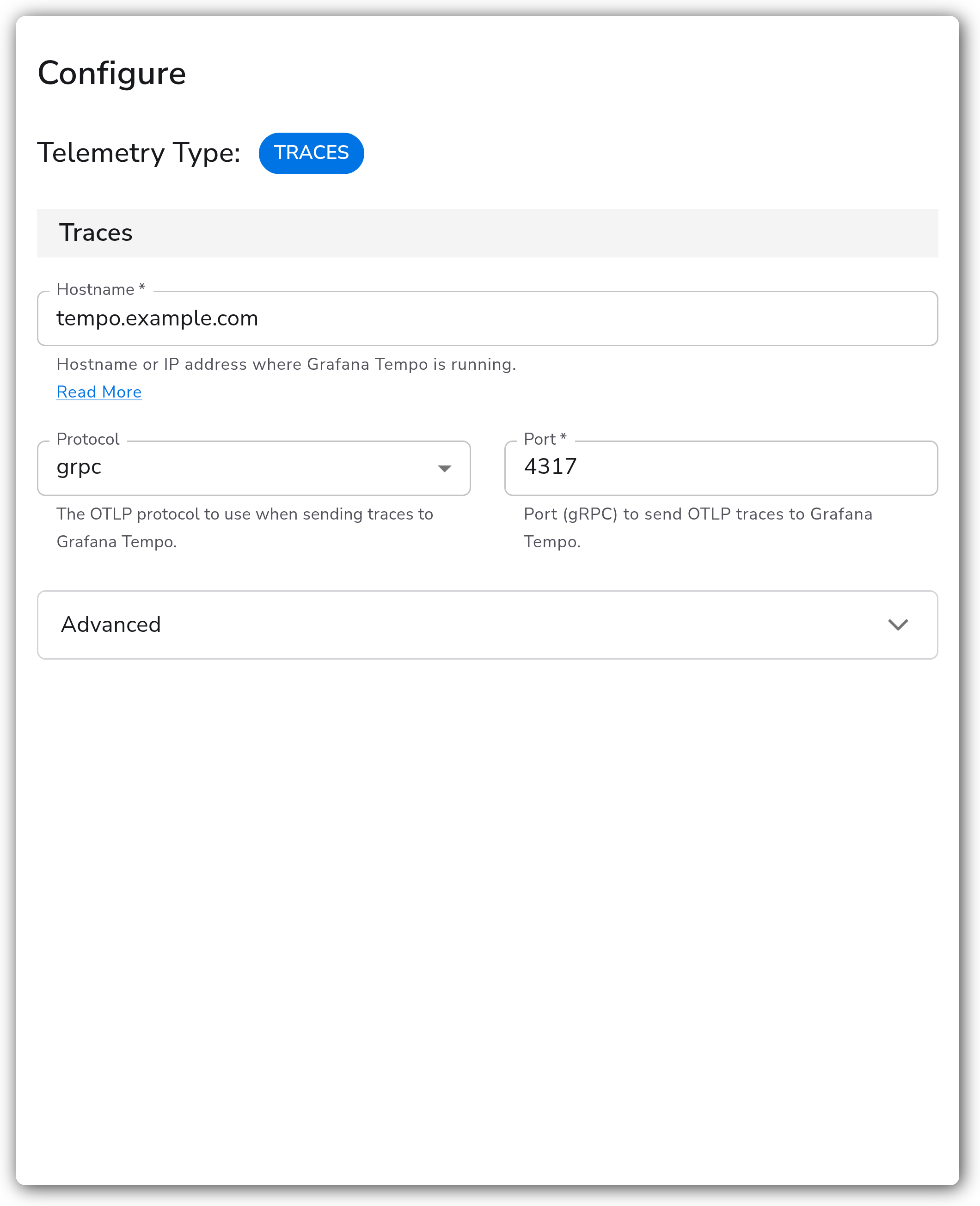
| Telemetry Type | Telemetry Selector | No | Traces | Types of telemetry to export. Only Traces is valid for this destination. |
| Hostname | String | Yes | *(empty)* | Hostname or IP address where Grafana Tempo is running. |
| Protocol | Enum: grpc, http | No | grpc | The OTLP protocol to use when sending traces to Grafana Tempo. |
| Port | Integer | Yes | 4317 | gRPC port to send OTLP traces to. Shown when Protocol is `grpc`. Range 1–65535. |
| Port | Integer | Yes | 4318 | HTTP port to send OTLP traces to. Shown when Protocol is `http`. Range 1–65535. |
**Authentication (Advanced)**
| Parameter | Type | Required | Default | Description |
| -------------- | ------- | -------- | --------- | ----------------------------------------------------------------------------------- |
| Use Basic Auth | Boolean | No | false | Enable HTTP basic authentication for the Grafana Tempo endpoint. |
| Username | String | Yes | *(empty)* | Username for basic authentication. Shown when Use Basic Auth is enabled. |
| Password | String | Yes | *(empty)* | Password for basic authentication. Sensitive. Shown when Use Basic Auth is enabled. |
**Compression and headers (Advanced)**
| Parameter | Type | Required | Default | Description |
| ------------------ | --------------------------------------------- | -------- | --------- | ---------------------------------------------------------------------------------------------------------------------------------------------------------- |
| Compression | Enum: none, gzip, snappy, zstd | No | gzip | Compression algorithm to use over gRPC. Tempo must support the selected algorithm. Shown when Protocol is `grpc`. |
| Compression | Enum: none, gzip, deflate, snappy, zlib, zstd | No | gzip | Compression algorithm to use over HTTP. Shown when Protocol is `http`. |
| Additional Headers | Map | No | *(empty)* | Additional HTTP headers to attach to each request. |
| HTTP Path Prefix | String | No | *(empty)* | Optional path prefix added to the HTTP endpoint. Traces are sent to `/v1/traces` by default; this value prefixes that path. Shown when Protocol is `http`. |
**TLS (Advanced)**
| Parameter | Type | Required | Default | Description |
| --------------------------------- | ------- | -------- | --------- | --------------------------------------------------------------------------------------------------------------------------------------------------- |
| Enable TLS | Boolean | No | false | Configure TLS settings for secure communication with Grafana Tempo. |
| Skip TLS Certificate Verification | Boolean | No | false | Skip TLS certificate verification. Not recommended for production. Shown when Enable TLS is enabled. |
| TLS Certificate Authority File | String | No | *(empty)* | Certificate authority used to validate the server's TLS certificate. Shown when Enable TLS is enabled and Skip TLS Certificate Verification is off. |
| Mutual TLS | Boolean | No | false | Enable mutual TLS authentication with client certificates. Shown when Enable TLS is enabled. |
| TLS Client Certificate File | String | No | *(empty)* | TLS certificate file used for client authentication. Shown when Mutual TLS is enabled. |
| TLS Client Private Key File | String | No | *(empty)* | TLS private key file used for client authentication. Shown when Mutual TLS is enabled. |
**Timeout, retry, and queuing (Advanced)**
| Parameter | Type | Required | Default | Description |
| ------------------------- | --------- | -------- | -------------------------------- | -------------------------------------------------------------------------------------------------------------------------------------- |
| Timeout | Integer | Yes | 30 | Timeout, in seconds, for sending batches to Grafana Tempo. |
| Enable Retry on Failure | Boolean | No | true | Attempt to resend telemetry that fails to transmit. |
| Initial Interval | Integer | No | 5 | Time, in seconds, to wait after the first failure before retrying. Shown when Enable Retry on Failure is on. |
| Max Interval | Integer | No | 30 | Maximum time, in seconds, to wait between retries. Shown when Enable Retry on Failure is on. |
| Max Elapsed Time | Integer | No | 300 | Maximum time, in seconds, to keep retrying. Shown when Enable Retry on Failure is on. |
| Enable Sending Queue | Boolean | No | true | Buffer telemetry in memory before sending so data is not lost during network outages or collector restarts. |
| Number of Consumers | Integer | No | 10 | Number of consumers used to pull events from the sending queue. Shown when Enable Sending Queue is on. |
| Queue Size | Integer | No | 5000 | Number of spans the queue can store. Shown when Enable Sending Queue is on. |
| Enable Persistent Queuing | Boolean | No | true | Buffer telemetry to disk before sending so data survives network outages or collector restarts. Shown when Enable Sending Queue is on. |
| Persistent Queue Storage | Extension | Yes | file\_storage\_persistent\_queue | Storage extension used for the persistent queue. Shown when Enable Sending Queue and Enable Persistent Queuing are on. |
### Examples
Send traces to a Grafana Tempo instance over gRPC on the default port, with TLS and basic authentication enabled. The persistent sending queue is left on so spans survive collector restarts.
```yaml
apiVersion: bindplane.observiq.com/v1
kind: Destination
metadata:
name: grafana-tempo
spec:
type: grafana_tempo_otlp
parameters:
- name: telemetry_types
value:
- Traces
- name: hostname
value: tempo.example.com
- name: protocol
value: grpc
- name: grpc_port
value: 4317
- name: grpc_compression
value: gzip
- name: use_basic_auth
value: true
- name: basic_auth_username
value: tempo-user
- name: basic_auth_password
value: REPLACE_WITH_PASSWORD
- name: enable_tls
value: true
- name: insecure_skip_verify
value: false
- name: ca_file
value: /etc/ssl/certs/ca.crt
```
### Configuration Tips
* Use gRPC for most deployments. It carries lower overhead than HTTP. Switch to HTTP when a proxy or firewall only forwards HTTP traffic, and set HTTP Path Prefix if Tempo is fronted by a gateway that mounts the OTLP receiver under a sub-path.
* Match the compression algorithm to what the Tempo server accepts. gRPC offers `none`, `gzip`, `snappy`, and `zstd`; HTTP adds `deflate` and `zlib`. `zstd` gives the best ratio at higher CPU cost; `snappy` is cheaper for high-throughput pipelines.
* Keep the sending queue and persistent queuing enabled for trace pipelines that cannot tolerate loss. The persistent queue buffers spans to disk so they survive collector restarts and Tempo outages. Confirm the storage directory has space and write permission.
### Troubleshooting
**Connection refused or timeouts**
Symptoms: traces are not delivered; connection-refused or timeout errors appear in collector logs.
Solutions:
1. Confirm the hostname and port are correct and the Tempo OTLP receiver is bound to a reachable interface, not just `localhost`.
2. Confirm the port matches the protocol (`4317` for gRPC, `4318` for HTTP) and that firewall rules permit it.
**TLS certificate errors**
Symptoms: "certificate verify failed" or "bad certificate" errors in logs.
Solutions:
1. Verify the CA file path exists, is readable, and validates the server certificate for the hostname in use.
2. For mutual TLS, confirm the client certificate and key are present and match the CA Tempo trusts. Skip TLS Certificate Verification can isolate a trust issue in testing but should stay off in production.
**Authentication failures**
Symptoms: "401 Unauthorized" or authentication errors in logs.
Solutions:
1. Verify the basic-auth username and password, and confirm Tempo (or its fronting gateway) requires basic auth on the OTLP receiver.
2. Send credentials only over TLS, and check for special characters that need quoting in YAML.
**Dropped traces under load**
Symptoms: the sending queue stays full and spans are dropped.
Solutions:
1. Confirm the Tempo instance can absorb the trace volume and check for network bandwidth limits.
2. Increase Queue Size and Number of Consumers, and keep Persistent Queuing enabled so spans buffer to disk during backpressure.
### Standalone Destination
```yaml
apiVersion: bindplane.observiq.com/v1
kind: Destination
metadata:
name: grafana-tempo
spec:
type: grafana_tempo_otlp
parameters:
- name: telemetry_types
value:
- Traces
- name: hostname
value: tempo.example.com
- name: protocol
value: grpc
- name: grpc_port
value: 4317
- name: timeout
value: 30
```
### Related Resources
* [OTLP gRPC exporter (otlpexporter) — OpenTelemetry reference](https://github.com/open-telemetry/opentelemetry-collector/tree/main/exporter/otlpexporter)
* [OTLP HTTP exporter (otlphttpexporter) — OpenTelemetry reference](https://github.com/open-telemetry/opentelemetry-collector/tree/main/exporter/otlphttpexporter)
* [Grafana Tempo distributor / receivers configuration](https://grafana.com/docs/tempo/latest/configuration/#distributor)
---
# Agent Instructions
This documentation is published with GitBook. GitBook is the documentation platform designed so that both humans and AI agents can read, navigate, and reason over technical content effectively. Learn more at gitbook.com.
## Querying This Documentation
If you need additional information that is not directly available in this page, you can query the documentation by asking a question.
Perform an HTTP GET request on the following URL with the `ask` and `goal` query parameters:
```
GET https://docs.bindplane.com/integrations/destinations/grafana-tempo.md?ask=&goal=
```
`ask` is the immediate question: it should be specific, self-contained, and written in natural language.
`goal` is what the user is ultimately trying to achieve, the reason they need the answer. Sharing it helps GitBook give you a better, more relevant answer. A goal is most helpful when it describes the outcome the user wants rather than restating the question. For example, with `ask=how do I create an API token`, a goal like `automate deployments from our CI pipeline` lets GitBook tailor the answer to that use case.
The response will contain a direct answer to the question and relevant excerpts and sources from the documentation.
Use this mechanism when the answer is not explicitly present in the current page, you need clarification or additional context, or you want to retrieve related documentation sections.