> For the complete documentation index, see [llms.txt](https://docs.bindplane.com/llms.txt). Markdown versions of documentation pages are available by appending `.md` to page URLs; this page is available as [Markdown](https://docs.bindplane.com/integrations/destinations/google-secops-chronicle-forwarder.md).
# Google SecOps (Chronicle) Forwarder
The Google SecOps (Chronicle) Forwarder destination sends logs to a [Google Security Operations (SecOps) Forwarder](https://cloud.google.com/chronicle/docs/install) running in your environment. Bindplane delivers each log either over Syslog (TCP or UDP, with optional TLS) or by writing to a file the forwarder watches. The forwarder then relays the data to Google SecOps (formerly Chronicle).
### Supported Telemetry Types
| Platform | Metrics | Logs | Traces |
| ------------------ | ------- | ---- | ------ |
| Linux | | ✓ | |
| Windows | | ✓ | |
| macOS | | ✓ | |
| Kubernetes Node | | ✓ | |
| Kubernetes Cluster | | ✓ | |
| Kubernetes Gateway | | ✓ | |
| OpenShift Node | | ✓ | |
| OpenShift Cluster | | ✓ | |
| OpenShift Gateway | | ✓ | |
### Prerequisites
* A running [Google SecOps Forwarder](https://cloud.google.com/chronicle/docs/install) reachable from the collector.
* For **Syslog** export: the forwarder's Syslog endpoint (host and port) and transport protocol (TCP or UDP).
* For **File** export: a file path the forwarder is configured to read, writable by the collector.
* If TLS is enabled for Syslog: the certificate, private key, and certificate authority files required by the forwarder.
* The `google-destinations` feature is enabled in your Bindplane installation.
### Configuration
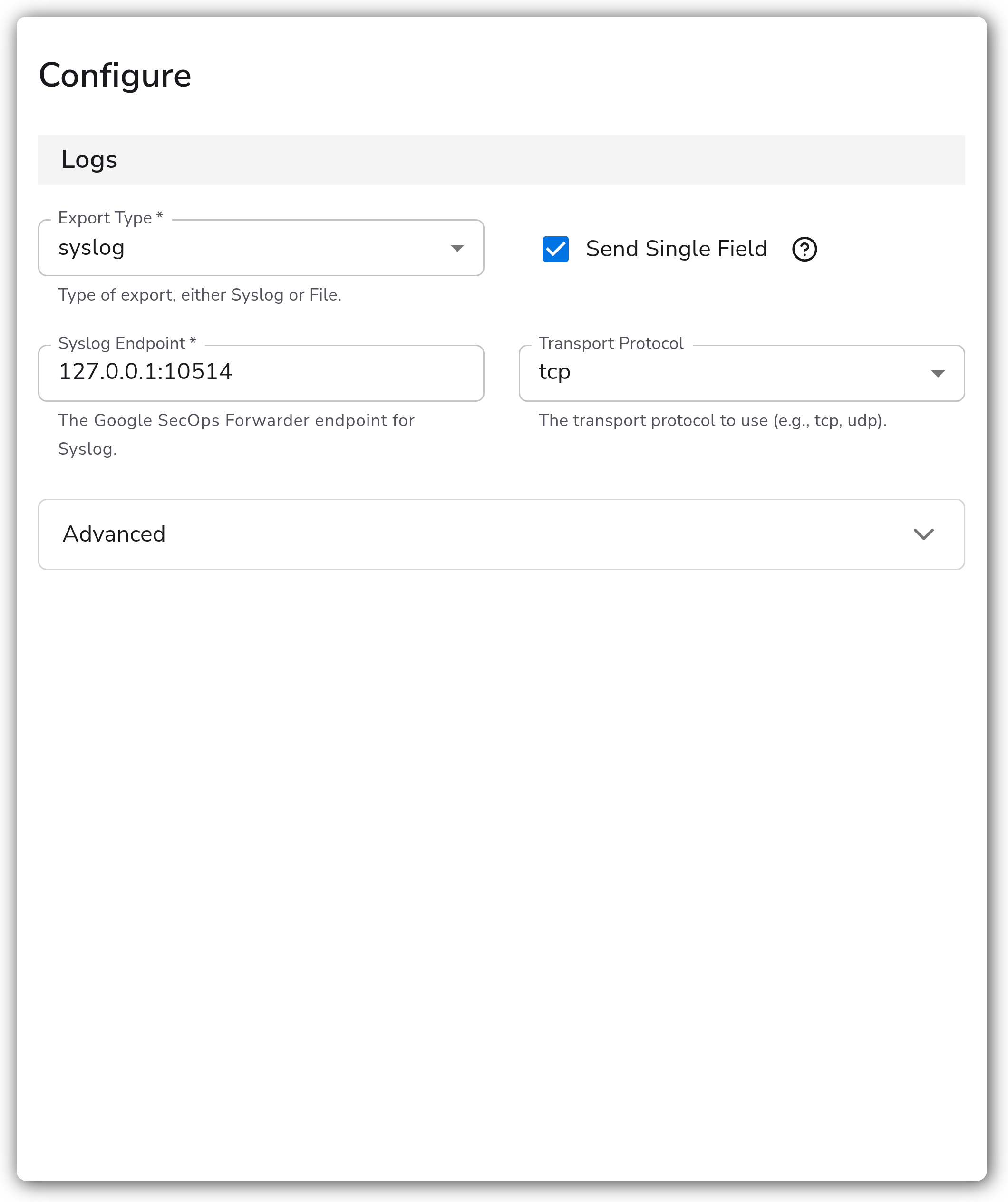
#### Logs
| Parameter | Type | Default | Description |
| ----------------- | ---------- | -------- | ---------------------------------------------------------------------------------------------------------------------------------------------------------- |
| Export Type | Enum | `syslog` | Required. Method of export, either `syslog` or `file`. |
| Send Single Field | Boolean | `true` | Send a single field from the log instead of the entire log record. |
| Field to Send | Enum | `Body` | Required when `send_single_field` is `true`. The telemetry field to send: `Attributes` or `Body`. |
| Attributes Field | OTTL Field | | The attributes field to send. Relevant when `raw_base` is `Attributes`. Use bracket notation for nested fields. An empty value sends all attribute fields. |
| Body Field | OTTL Field | | The body field to send. Relevant when `raw_base` is `Body`. Use bracket notation for nested fields. An empty value sends all body fields. |
#### Syslog
These parameters are relevant when `export_type` is `syslog`.
| Parameter | Type | Default | Description |
| ------------------ | ------ | ----------------- | ---------------------------------------------------------- |
| Syslog Endpoint | String | `127.0.0.1:10514` | Required. The Google SecOps Forwarder endpoint for Syslog. |
| Transport Protocol | Enum | `tcp` | The transport protocol to use, `tcp` or `udp`. |
#### File
This parameter is relevant when `export_type` is `file`.
| Parameter | Type | Default | Description |
| --------- | ------ | ------- | ------------------------------------------------ |
| File Path | String | | Required. The path to the file for storing logs. |
#### Advanced
`syslog_timeout` is relevant when `export_type` is `syslog`.
| Parameter | Type | Default | Description |
| -------------- | -------- | ------- | --------------------------------------------------------------------------------- |
| Syslog Timeout | Duration | `5s` | The timeout for the Syslog dial connection. |
| Drop Raw Copy | Boolean | `true` | When enabled, the raw copy of the log stored in `log.record.original` is dropped. |
#### TLS
These parameters are relevant when `export_type` is `syslog`. `insecure_skip_verify`, `cert_file`, `key_file`, and `ca_file` are relevant when `enable_tls` is `true`.
| Parameter | Type | Default | Description |
| --------------------------------- | ------- | ------- | ----------------------------------------------------------- |
| Enable TLS | Boolean | `false` | Whether or not to use TLS for the Syslog connection. |
| Skip TLS Certificate Verification | Boolean | `false` | Enable to skip TLS certificate verification. |
| TLS Certificate File | String | | Path to the x509 PEM certificate (required for Mutual TLS). |
| TLS Private Key File | String | | Path to the x509 PEM private key (required for Mutual TLS). |
| TLS Certificate Authority File | String | | Path to the x509 PEM certificate authority file. |
#### Retry and Queuing
This destination supports [retry on failure](/configuration/bindplane-otel-collector/retry-on-failure.md), the [sending queue](/configuration/bindplane-otel-collector/sending-queue.md), and the [persistent queue](/configuration/bindplane-otel-collector/persistent-queue.md).
| Parameter | Type | Default | Description |
| ------------------------- | --------- | ------- | --------------------------------------------------------------------------------------------------- |
| Enable Retry on Failure | Boolean | `true` | Attempt to resend logs that have failed to be transmitted to the destination. |
| Initial Interval | Integer | `5` | Time (in seconds) to wait after the first failure before retrying. |
| Max Interval | Integer | `30` | The upper bound (in seconds) on backoff. |
| Max Elapsed Time | Integer | `300` | The maximum amount of time (in seconds) spent trying to send a batch, to avoid an endless loop. |
| Enable Sending Queue | Boolean | `true` | Buffer logs temporarily before sending to help ensure data is not lost during a brief outage. |
| Number of Consumers | Integer | `10` | Number of consumers that dequeue batches. |
| Queue Size | Integer | `5000` | Maximum number of batches kept in memory before dropping. |
| Enable Persistent Queuing | Boolean | `true` | Buffer telemetry data to disk so it is not lost on network outages or collector restarts. |
| Persistent Queue Storage | Extension | | Required. The storage to use for the persistent queue. Relevant when persistent queuing is enabled. |
### Example Configuration
#### Standalone Destination
Syslog export:
```yaml
apiVersion: bindplane.observiq.com/v1
kind: Destination
metadata:
id: chronicleforwarder
name: chronicleforwarder
spec:
type: chronicleforwarder
parameters:
- name: export_type
value: 'syslog'
- name: send_single_field
value: 'true'
- name: raw_base
value: 'Body'
- name: syslog_endpoint
value: '127.0.0.1:10514'
- name: syslog_transport
value: 'tcp'
- name: enable_tls
value: 'false'
```
File export:
```yaml
apiVersion: bindplane.observiq.com/v1
kind: Destination
metadata:
id: chronicleforwarder
name: chronicleforwarder
spec:
type: chronicleforwarder
parameters:
- name: export_type
value: 'file'
- name: send_single_field
value: 'true'
- name: raw_base
value: 'Body'
- name: file_path
value: '/var/log/secops/forwarder.log'
```
### Configuration Tips
#### Choosing a transport
* Use **Syslog** export when the forwarder ingests over a Syslog listener. Set `syslog_endpoint` to the forwarder's host and port (default `127.0.0.1:10514`) and pick `tcp` or `udp` to match the forwarder's listener. TCP is recommended for reliable delivery.
* Use **File** export when the forwarder reads logs from a file. Set `file_path` to a location the collector can write and the forwarder is configured to read. This suits environments where the forwarder and collector share a host or volume.
#### Selecting the field to send
* Leave `send_single_field` enabled and set `raw_base` to `Body` (with an empty `raw_body`) to forward the full log body, which is the common choice when the forwarder expects the original raw log line.
* Set `raw_base` to `Attributes` and populate `raw_attributes` (bracket notation for nested fields) when the raw log was parsed into an attribute upstream and you want only that field forwarded.
* Disable `send_single_field` to send the entire serialized log record instead of a single field.
#### TLS for Syslog
* Enable `enable_tls` only for Syslog export. For Mutual TLS, provide `cert_file` and `key_file`; supply `ca_file` to validate the forwarder's certificate.
* Avoid `insecure_skip_verify` in production. It disables certificate verification and is intended only for testing against self-signed certificates.
### Troubleshooting
**Symptom:** No logs reach Google SecOps and the collector logs Syslog connection errors. **Solution:** Confirm `syslog_endpoint` matches the forwarder's listener host and port, and that `syslog_transport` matches the protocol the forwarder accepts. Verify the collector can reach the endpoint and that no firewall blocks the port. Increase `syslog_timeout` if the dial is timing out on a slow network.
**Symptom:** Logs arrive but the content is not what the forwarder expects (truncated or wrong field). **Solution:** Review `send_single_field`, `raw_base`, and the matching `raw_body` or `raw_attributes` field. To forward the original raw log line, keep `raw_base` set to `Body` with an empty body field. Note that `drop_raw_copy` removes `log.record.original`; disable it if you need that field preserved.
**Symptom:** TLS handshake failures when Syslog TLS is enabled. **Solution:** Verify the certificate chain. Provide the correct `ca_file` for the forwarder's certificate, and for Mutual TLS supply matching `cert_file` and `key_file`. As a test only, `insecure_skip_verify` can confirm whether the failure is certificate validation, but do not leave it enabled in production.
### Related Resources
* [Google SecOps documentation](https://cloud.google.com/chronicle/docs)
* [Install and configure a Google SecOps Forwarder](https://cloud.google.com/chronicle/docs/install)
* [Retry on Failure settings](/configuration/bindplane-otel-collector/retry-on-failure.md)
* [Sending Queue settings](/configuration/bindplane-otel-collector/sending-queue.md)
* [Persistent Queue settings](/configuration/bindplane-otel-collector/persistent-queue.md)
---
# Agent Instructions
This documentation is published with GitBook. GitBook is the documentation platform designed so that both humans and AI agents can read, navigate, and reason over technical content effectively. Learn more at gitbook.com.
## Querying This Documentation
If you need additional information that is not directly available in this page, you can query the documentation by asking a question.
Perform an HTTP GET request on the following URL with the `ask` and `goal` query parameters:
```
GET https://docs.bindplane.com/integrations/destinations/google-secops-chronicle-forwarder.md?ask=&goal=
```
`ask` is the immediate question: it should be specific, self-contained, and written in natural language.
`goal` is what the user is ultimately trying to achieve, the reason they need the answer. Sharing it helps GitBook give you a better, more relevant answer. A goal is most helpful when it describes the outcome the user wants rather than restating the question. For example, with `ask=how do I create an API token`, a goal like `automate deployments from our CI pipeline` lets GitBook tailor the answer to that use case.
The response will contain a direct answer to the question and relevant excerpts and sources from the documentation.
Use this mechanism when the answer is not explicitly present in the current page, you need clarification or additional context, or you want to retrieve related documentation sections.