> For the complete documentation index, see [llms.txt](https://docs.bindplane.com/llms.txt). Markdown versions of documentation pages are available by appending `.md` to page URLs; this page is available as [Markdown](https://docs.bindplane.com/integrations/destinations/new-relic.md).
# New Relic
The New Relic destination sends logs, metrics, and traces to [New Relic](https://docs.newrelic.com/) using the OpenTelemetry Protocol (OTLP). Telemetry is delivered to a region-specific OTLP endpoint and authenticated with a New Relic license key.
### Supported Telemetry Types
| Platform | Metrics | Logs | Traces |
| ------------------ | ------- | ---- | ------ |
| Linux | ✓ | ✓ | ✓ |
| Windows | ✓ | ✓ | ✓ |
| macOS | ✓ | ✓ | ✓ |
| Kubernetes Node | ✓ | ✓ | ✓ |
| Kubernetes Cluster | ✓ | ✓ | ✓ |
| Kubernetes Gateway | ✓ | ✓ | ✓ |
| OpenShift Node | ✓ | ✓ | ✓ |
| OpenShift Cluster | ✓ | ✓ | ✓ |
| OpenShift Gateway | ✓ | ✓ | ✓ |
### Prerequisites
* A New Relic account and an [ingest license key](https://docs.newrelic.com/docs/apis/intro-apis/new-relic-api-keys/#license-key).
* The OTLP endpoint for the region where your account is based (US, EU, or FedRAMP). See [New Relic OTLP endpoints](https://docs.newrelic.com/docs/opentelemetry/best-practices/opentelemetry-otlp/#endpoint).
* Outbound network access from the collector to the chosen OTLP endpoint on TCP port `443`.
### Configuration
#### General
| Parameter | Type | Default | Description |
| --------------------- | ------------------ | ----------------------------- | ---------------------------------------------------------------------------------------------------------------------------------------------------------------------------------------------------------------------------------------------------------------------------- |
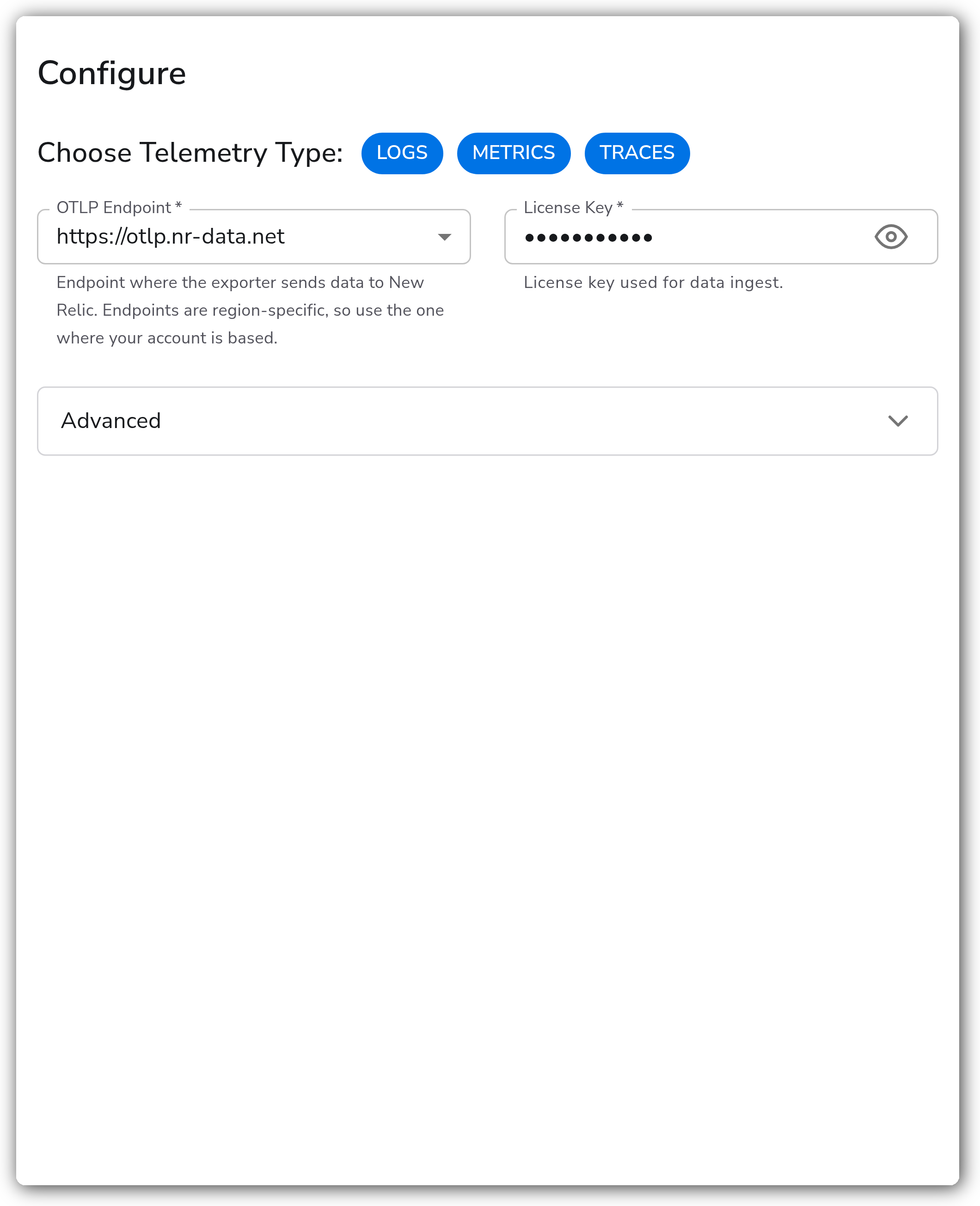
| Choose Telemetry Type | Telemetry Selector | `["Logs","Metrics","Traces"]` | Select which types of telemetry to export. Valid values: `Logs`, `Metrics`, `Traces`. |
| OTLP Endpoint | Enum | `https://otlp.nr-data.net` | **Required.** Endpoint where the exporter sends data to New Relic. Endpoints are region-specific, so use the one where your account is based. Valid values: `https://otlp.nr-data.net` (US), `https://otlp.eu01.nr-data.net` (EU), `https://gov-otlp.nr-data.net` (FedRAMP). |
| License Key | String | | **Required.** Sensitive. License key used for data ingest. |
#### Advanced
| Parameter | Type | Default | Description |
| ------------- | ------- | ------- | ------------------------------------------------------------------------------------------------------- |
| Compression | Enum | `gzip` | Compression algorithm to use when sending data to New Relic. Valid values: `none`, `gzip`. |
| Drop Raw Copy | Boolean | `true` | When enabled, the raw copy of the log stored in `log.record.original` is dropped. Applies to logs only. |
#### Retry on Failure
| Parameter | Type | Default | Description |
| ----------------------- | ------- | ------- | -------------------------------------------------------------------------------------------------------------------------------------------------------- |
| Enable Retry on Failure | Boolean | `true` | Attempt to resend telemetry data that has failed to be transmitted to the destination. |
| Initial interval | Integer | `5` | Time (in seconds) to wait after the first failure before retrying. Applies when retry on failure is enabled. |
| Max interval | Integer | `30` | The upper bound (in seconds) on backoff. Applies when retry on failure is enabled. |
| Max elapsed time | Integer | `300` | The maximum amount of time (in seconds) spent trying to send a batch, used to avoid a never-ending retry loop. Applies when retry on failure is enabled. |
#### Sending Queue
| Parameter | Type | Default | Description |
| ------------------------- | --------- | ------------------------------- | --------------------------------------------------------------------------------------------------------------------------------------------------------------------------------------------------------------------------------- |
| Enable Sending Queue | Boolean | `true` | Buffer telemetry data temporarily before sending to help ensure telemetry data is not lost during a temporary network outage. |
| Number of Consumers | Integer | `10` | Number of consumers that dequeue batches. Applies when the sending queue is enabled. |
| Queue Size | Integer | `5000` | Maximum number of batches kept in memory before dropping. Applies when the sending queue is enabled. |
| Enable Persistent Queuing | Boolean | `true` | Buffer telemetry data to disk before sending to help ensure data is not lost during network outages or collector restarts. Applies when the sending queue is enabled. |
| Persistent Queue Storage | Extension | `file_storage_persistent_queue` | The storage to use for the persistent queue. Required when both the sending queue and persistent queuing are enabled. See [Persistent Queue](https://docs.bindplane.com/configuration/bindplane-otel-collector/persistent-queue). |
### Example Configuration
#### Standalone Destination
```yaml
apiVersion: bindplane.observiq.com/v1
kind: Destination
metadata:
id: newrelic_otlp
name: newrelic_otlp
spec:
type: newrelic_otlp
parameters:
- name: telemetry_types
value:
- Logs
- Metrics
- Traces
- name: endpoint
value: 'https://otlp.nr-data.net'
- name: license_key
value: 'YOUR_NEW_RELIC_LICENSE_KEY'
- name: compression
value: 'gzip'
```
### Configuration Tips
#### Choosing the right region endpoint
* The `endpoint` must match the region your New Relic account is based in. Use `https://otlp.nr-data.net` for US accounts, `https://otlp.eu01.nr-data.net` for EU accounts, and `https://gov-otlp.nr-data.net` for FedRAMP accounts.
* Sending data to the wrong region endpoint causes ingest to be rejected even with a valid license key.
#### License key
* The `license_key` is sensitive and is sent as the `api-key` header on every OTLP request. Use a New Relic ingest license key, not a user or browser key.
#### Reducing log volume
* Leave `drop_raw_copy` enabled to drop the raw `log.record.original` attribute and reduce the volume of log data billed by New Relic. Disable it only when you need the original record preserved downstream.
### Troubleshooting
**Symptom:** Data is rejected or does not appear in New Relic despite a valid configuration. **Solution:** Confirm the `endpoint` matches your account region (US, EU, or FedRAMP). A license key is region-bound, so data sent to the wrong endpoint is rejected.
**Symptom:** Telemetry is intermittently dropped during network instability. **Solution:** Ensure `retry_on_failure_enabled` and `sending_queue_enabled` are on. For durability across collector restarts, enable `persistent_queue_enabled` and configure a persistent queue storage extension.
**Symptom:** Authentication failures or `403`-style ingest errors. **Solution:** Verify the `license_key` is a New Relic ingest license key and that outbound access to the OTLP endpoint on TCP port `443` is permitted by your network.
### Related Resources
* [New Relic OpenTelemetry quick start](https://docs.newrelic.com/docs/opentelemetry/get-started/opentelemetry-set-up-your-app/)
* [New Relic OTLP endpoint configuration](https://docs.newrelic.com/docs/opentelemetry/best-practices/opentelemetry-otlp/)
* [New Relic license key](https://docs.newrelic.com/docs/apis/intro-apis/new-relic-api-keys/#license-key)
* [Persistent Queue](https://docs.bindplane.com/configuration/bindplane-otel-collector/persistent-queue)
---
# Agent Instructions
This documentation is published with GitBook. GitBook is the documentation platform designed so that both humans and AI agents can read, navigate, and reason over technical content effectively. Learn more at gitbook.com.
## Querying This Documentation
If you need additional information that is not directly available in this page, you can query the documentation by asking a question.
Perform an HTTP GET request on the following URL with the `ask` and `goal` query parameters:
```
GET https://docs.bindplane.com/integrations/destinations/new-relic.md?ask=&goal=
```
`ask` is the immediate question: it should be specific, self-contained, and written in natural language.
`goal` is what the user is ultimately trying to achieve, the reason they need the answer. Sharing it helps GitBook give you a better, more relevant answer. A goal is most helpful when it describes the outcome the user wants rather than restating the question. For example, with `ask=how do I create an API token`, a goal like `automate deployments from our CI pipeline` lets GitBook tailor the answer to that use case.
The response will contain a direct answer to the question and relevant excerpts and sources from the documentation.
Use this mechanism when the answer is not explicitly present in the current page, you need clarification or additional context, or you want to retrieve related documentation sections.