> For the complete documentation index, see [llms.txt](https://docs.bindplane.com/llms.txt). Markdown versions of documentation pages are available by appending `.md` to page URLs; this page is available as [Markdown](https://docs.bindplane.com/integrations/destinations/bindplane-gateway.md).
# Bindplane Gateway
The Bindplane Gateway destination forwards metrics, logs, and traces over OTLP from a Bindplane collector to a Bindplane Gateway collector. It supports both OTLP/gRPC and OTLP/HTTP, with optional TLS, compression, batching, retry, and a sending queue. When paired with a [Bindplane Gateway source](/integrations/sources/bindplane-gateway.md) in the receiving configuration, telemetry routed through this destination is not double counted in the Summary view.
### Supported Telemetry Types
| Platform | Metrics | Logs | Traces |
| ------------------ | ------- | ---- | ------ |
| Linux | ✓ | ✓ | ✓ |
| Windows | ✓ | ✓ | ✓ |
| macOS | ✓ | ✓ | ✓ |
| AIX | ✓ | ✓ | ✓ |
| Kubernetes Node | ✓ | ✓ | ✓ |
| Kubernetes Cluster | ✓ | ✓ | ✓ |
| Kubernetes Gateway | ✓ | ✓ | ✓ |
| OpenShift Node | ✓ | ✓ | ✓ |
| OpenShift Cluster | ✓ | ✓ | ✓ |
| OpenShift Gateway | ✓ | ✓ | ✓ |
### Prerequisites
* A reachable Bindplane Gateway source endpoint. Stand up a collector configuration that uses the [Bindplane Gateway source](/integrations/sources/bindplane-gateway.md) and note the hostname or IP address and the OTLP port it listens on (gRPC `4317` or HTTP `4318` by default).
* Network connectivity from the sending agent to that endpoint on the chosen port.
* If the gateway requires TLS, the certificate authority file used to validate the server certificate, and, for mutual TLS, a client certificate and private key.
### Configuration
**Connection**
| Parameter | Type | Required | Default | Description |
| ----------- | ---------------- | -------- | --------- | ------------------------------------------------------------------------------------------------------------------------------------------------------------ |
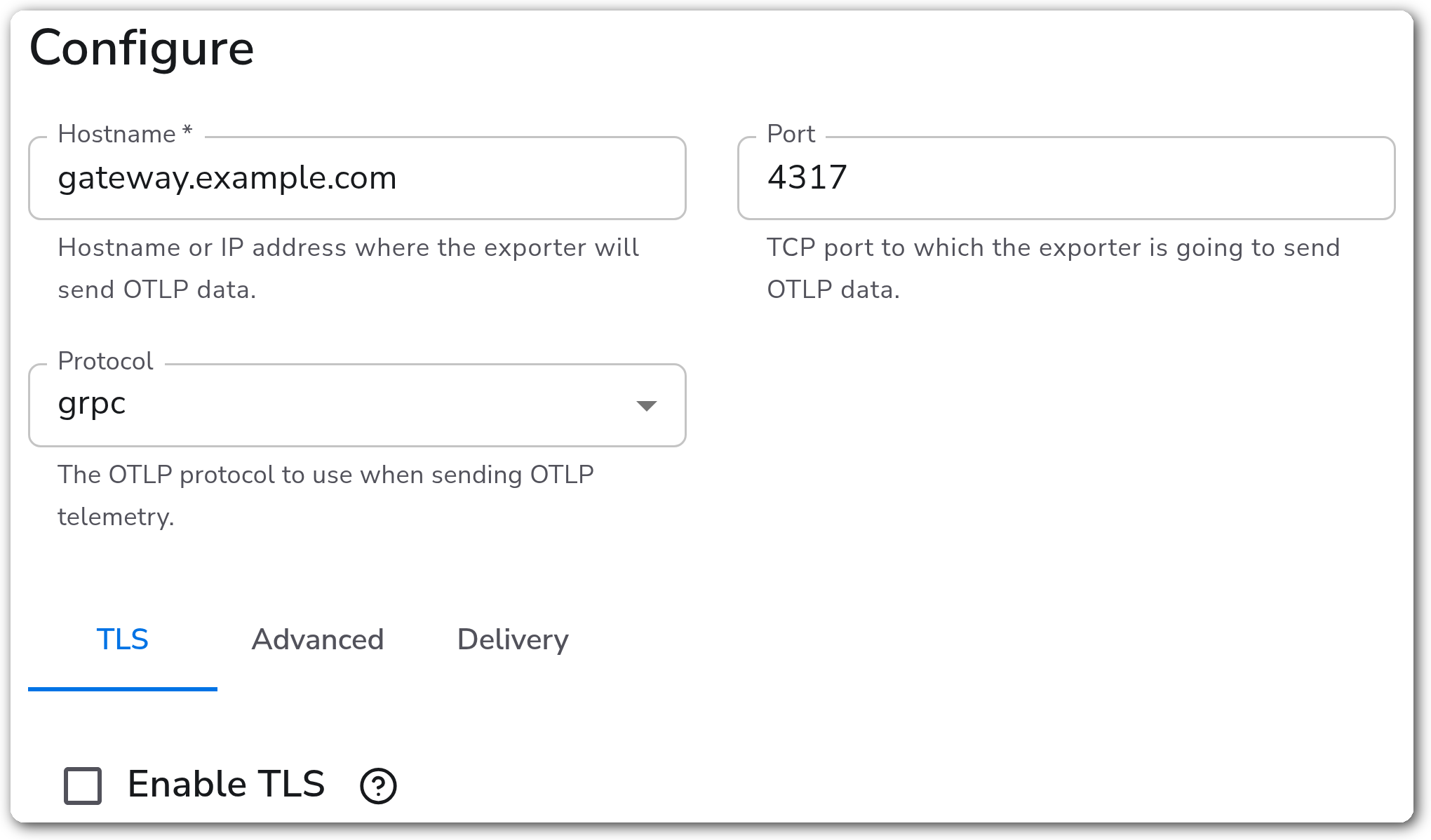
| Hostname | String | Yes | *(empty)* | Hostname or IP address where the exporter will send OTLP data. |
| Protocol | Enum: grpc, http | No | grpc | The OTLP protocol to use when sending OTLP telemetry. |
| Port | Integer | No | 4317 | TCP port to which the exporter sends OTLP data. Shown when Protocol is `grpc`. Valid range 1–65535. |
| Port | Integer | No | 4318 | TCP port to which the exporter sends OTLP data. Shown when Protocol is `http`. Valid range 1–65535. |
| Path Prefix | String | No | *(empty)* | Optional path prefix added to the HTTP endpoint. Telemetry is sent to `/v1/metrics`, `/v1/logs`, and `/v1/traces` by default. Shown when Protocol is `http`. |
**Advanced**
| Parameter | Type | Required | Default | Description |
| ------------------ | --------------------------------------------- | -------- | --------- | ------------------------------------------------------------------------------------------------------------------------------ |
| Additional Headers | Map | No | *(empty)* | Additional headers to attach to each request. |
| Compression | Enum: none, gzip, deflate, snappy, zlib, zstd | No | gzip | Compression algorithm to use when sending data. The server must support the selected algorithm. Shown when Protocol is `http`. |
| Compression | Enum: none, gzip, snappy, zstd | No | gzip | Compression algorithm to use when sending data. Shown when Protocol is `grpc`. |
| Timeout | Integer | Yes | 30 | Timeout in seconds for sending batches to the destination. |
**gRPC Load Balancing**
| Parameter | Type | Required | Default | Description |
| -------------------------- | ------------------------------- | -------- | ------------ | ------------------------------------------------------------------------------------------------------------------------- |
| Enable gRPC Load Balancing | Boolean | No | false | Use native gRPC client-side load balancing with DNS name resolution. Shown when Protocol is `grpc`. |
| Load Balancing Policy | Enum: round\_robin, pick\_first | No | round\_robin | Load balancing policy to use when sending data to multiple Bindplane Gateways. Shown when gRPC Load Balancing is enabled. |
**TLS**
| Parameter | Type | Required | Default | Description |
| --------------------------------- | ------- | -------- | --------- | ------------------------------------------------------------------------------------------------------------------------------------------------------------ |
| Enable TLS | Boolean | No | false | Whether or not to use TLS. |
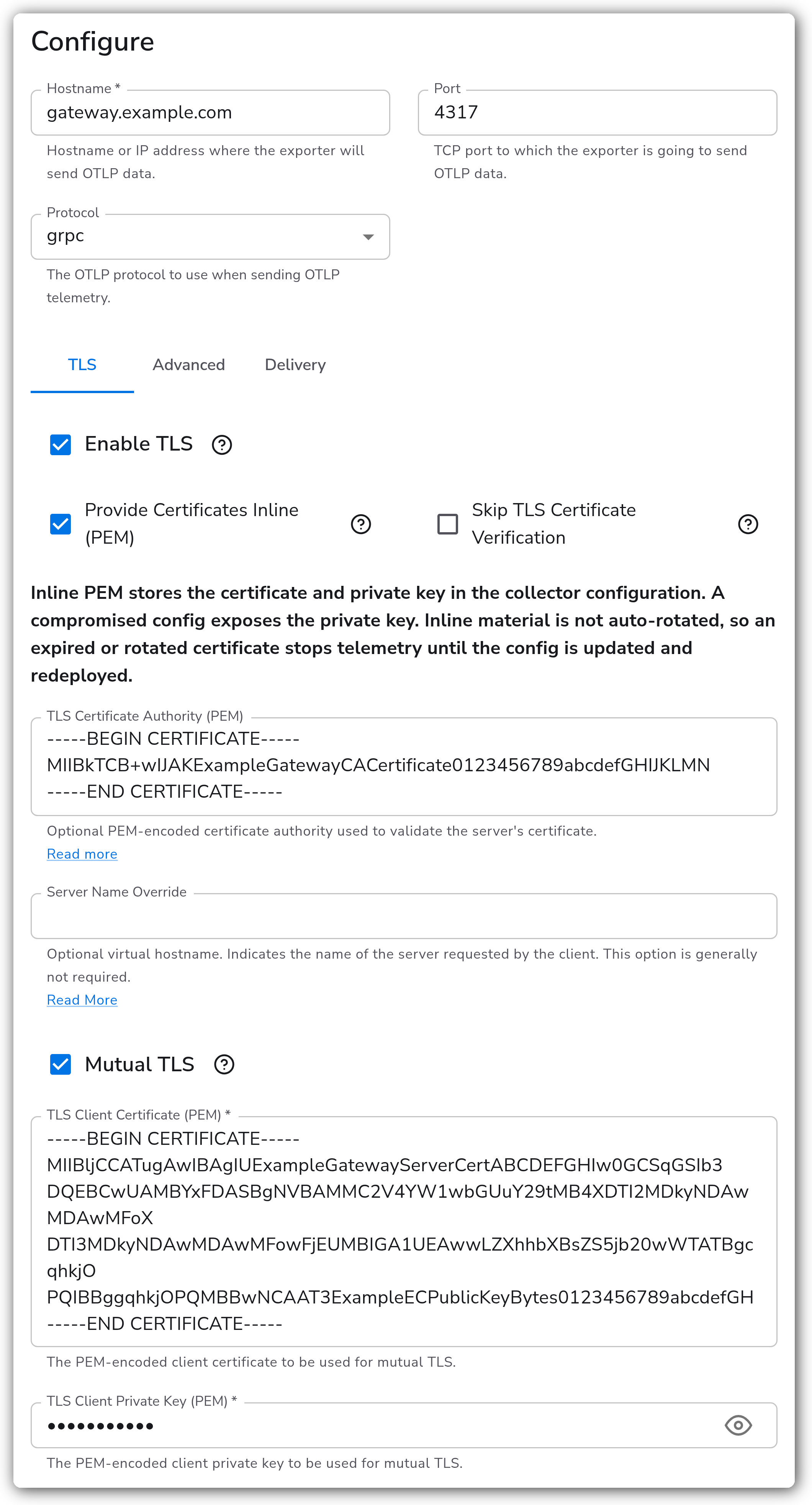
| Provide Certificates Inline (PEM) | Boolean | No | false | Provide certificates and keys as inline PEM contents instead of file paths. Shown when TLS is enabled. See [Inline PEM TLS](#inline-pem-tls). |
| Skip TLS Certificate Verification | Boolean | No | false | Skip verification of the server's certificate. Shown when TLS is enabled. |
| TLS Certificate Authority File | String | No | *(empty)* | Optional certificate authority file used to validate the server's certificate. Shown when TLS is enabled and Provide Certificates Inline (PEM) is off. |
| TLS Certificate Authority (PEM) | String | No | *(empty)* | Optional PEM-encoded certificate authority used to validate the server's certificate. Shown when TLS is enabled and Provide Certificates Inline (PEM) is on. |
| Server Name Override | String | No | *(empty)* | Optional virtual hostname indicating the name of the server requested by the client. Generally not required. Shown when TLS is enabled. |
| Mutual TLS | Boolean | No | false | Whether or not to use client TLS authentication (mTLS). Shown when TLS is enabled. |
| TLS Client Certificate File | String | Yes | *(empty)* | Path to the client certificate used for mutual TLS. Shown when TLS and Mutual TLS are enabled and Provide Certificates Inline (PEM) is off. |
| TLS Client Certificate (PEM) | String | Yes | *(empty)* | PEM-encoded client certificate used for mutual TLS. Shown when TLS and Mutual TLS are enabled and Provide Certificates Inline (PEM) is on. |
| TLS Client Private Key | String | Yes | *(empty)* | Path to the client private key used for mutual TLS. Shown when TLS and Mutual TLS are enabled and Provide Certificates Inline (PEM) is off. |
| TLS Client Private Key (PEM) | String | Yes | *(empty)* | PEM-encoded client private key used for mutual TLS. Shown when TLS and Mutual TLS are enabled and Provide Certificates Inline (PEM) is on. |
**Inline PEM TLS**
When Provide Certificates Inline (PEM) is enabled, you supply the certificate authority, client certificate, and client key as PEM text in the configuration instead of file paths. This helps in environments where you cannot place certificate files on the collector, since Bindplane delivers the configuration but not files.
Inline PEM stores the private key in the collector configuration. A compromised config exposes the key. Inline material is not auto-rotated, so an expired or rotated certificate stops telemetry until the config is updated and redeployed. File-based certificates reload on change; inline PEM does not.
**Logs**
| Parameter | Type | Required | Default | Description |
| ------------- | ------- | -------- | ------- | --------------------------------------------------------------------------------- |
| Drop Raw Copy | Boolean | No | true | When enabled, the raw copy of the log stored in `log.record.original` is dropped. |
**Batching**
| Parameter | Type | Required | Default | Description |
| ------------------- | -------- | -------- | ------- | ------------------------------------------------------------------------------------------------------------------------------------------ |
| Enable Batching | Boolean | No | true | Batch telemetry data before sending to the destination. |
| Send Batch Size | Integer | Yes | 8192 | Number of spans, metric data points, or log records after which a batch is sent regardless of timeout. Shown when Batching is enabled. |
| Send Batch Max Size | Integer | Yes | 0 | Upper limit of the batch size. `0` means no upper limit. Must be greater than or equal to Send Batch Size. Shown when Batching is enabled. |
| Timeout | Duration | Yes | 200ms | Time after which a batch is sent regardless of size, for example `2s`. Shown when Batching is enabled. |
**Retry on Failure**
| Parameter | Type | Required | Default | Description |
| ----------------------- | ------- | -------- | ------- | --------------------------------------------------------------------------------------------------------------------------------- |
| Enable Retry on Failure | Boolean | No | true | Attempt to resend telemetry data that failed to transmit. |
| Initial interval | Integer | No | 5 | Time in seconds to wait after the first failure before retrying. Shown when Retry on Failure is enabled. |
| Max interval | Integer | No | 30 | Upper bound in seconds on backoff. Shown when Retry on Failure is enabled. |
| Max elapsed time | Integer | No | 300 | Maximum time in seconds spent trying to send a batch, to avoid a never-ending retry loop. Shown when Retry on Failure is enabled. |
**Sending Queue**
| Parameter | Type | Required | Default | Description |
| ------------------------- | --------- | -------- | ------------------------------- | ------------------------------------------------------------------------------------------------------------------------------------------------------------------------------------------ |
| Enable Sending Queue | Boolean | No | true | Buffer telemetry data temporarily before sending to help avoid loss during a temporary network outage. |
| Number of Consumers | Integer | No | 10 | Number of consumers that dequeue batches. Shown when Sending Queue is enabled. |
| Queue Size | Integer | No | 5000 | Maximum number of batches kept in memory before dropping. Shown when Sending Queue is enabled. |
| Enable Persistent Queuing | Boolean | No | true | Buffer telemetry data to disk to help avoid loss during network outages or collector restarts. Shown when Sending Queue is enabled. |
| Persistent Queue Storage | Extension | Yes | `file_storage_persistent_queue` | Storage to use for the persistent queue. Shown when Sending Queue and Persistent Queuing are enabled. See [Persistent Queue](/configuration/bindplane-otel-collector/persistent-queue.md). |
### Examples
Send telemetry over OTLP/gRPC to a Bindplane Gateway listening at `gateway.internal:4317`, with batching and the sending queue left at their defaults.
```yaml
apiVersion: bindplane.observiq.com/v1
kind: Destination
metadata:
name: bindplane-gateway
spec:
type: bindplane_gateway
parameters:
- name: hostname
value: gateway.internal
- name: protocol
value: grpc
- name: grpc_port
value: 4317
- name: enable_tls
value: false
```
To send over OTLP/HTTP with TLS enabled and a custom path prefix:
```yaml
apiVersion: bindplane.observiq.com/v1
kind: Destination
metadata:
name: bindplane-gateway-https
spec:
type: bindplane_gateway
parameters:
- name: hostname
value: gateway.example.com
- name: protocol
value: http
- name: http_port
value: 4318
- name: http_path_prefix
value: /ingest
- name: enable_tls
value: true
- name: ca_file
value: /opt/tls/ca.crt
```
To send with mutual TLS using inline PEM instead of certificate files:
```yaml
apiVersion: bindplane.observiq.com/v1
kind: Destination
metadata:
name: bindplane-gateway-inline-pem
spec:
type: bindplane_gateway
parameters:
- name: hostname
value: gateway.example.com
- name: protocol
value: grpc
- name: grpc_port
value: 4317
- name: enable_tls
value: true
- name: tls_use_pem
value: true
- name: ca_pem
value: |
-----BEGIN CERTIFICATE-----
MIIB...
-----END CERTIFICATE-----
- name: mutual_tls
value: true
- name: cert_pem
value: |
-----BEGIN CERTIFICATE-----
MIIB...
-----END CERTIFICATE-----
- name: key_pem
value: |
-----BEGIN PRIVATE KEY-----
MIGH...
-----END PRIVATE KEY-----
```
### Configuration Tips
* Pair this destination with a [Bindplane Gateway source](/integrations/sources/bindplane-gateway.md) in the receiving configuration so telemetry routed through the gateway is not double counted in the Summary view.
* When fanning out to multiple gateway replicas behind a single DNS name, enable gRPC Load Balancing so the client distributes connections across the resolved addresses instead of pinning to one.
* Keep the sending queue and persistent queuing enabled (the defaults) so telemetry buffers to disk and survives collector restarts or short network outages rather than being dropped.
### Troubleshooting
#### Connection refused or timeouts
Symptoms: the exporter cannot reach the gateway, or batches time out.
Solutions:
1. Confirm the Hostname and Port match the OTLP endpoint exposed by the Bindplane Gateway source (gRPC `4317` or HTTP `4318` by default).
2. Verify network and firewall rules allow the agent to reach that host and port.
#### TLS handshake or certificate errors
Symptoms: the connection fails with certificate validation errors after enabling TLS.
Solutions:
1. Provide a TLS Certificate Authority File that can validate the gateway's server certificate.
2. For mutual TLS, confirm the client TLS Client Certificate File and TLS Client Private Key paths are correct and readable by the collector.
3. Use Server Name Override only when the certificate's name does not match the connection hostname.
#### Dropped telemetry under load
Symptoms: data is lost during spikes or outages.
Solutions:
1. Keep Enable Sending Queue and Enable Persistent Queuing on so data buffers rather than drops.
2. Increase Queue Size if in-memory batches are being dropped before they can be sent.
### Standalone Destination
```yaml
apiVersion: bindplane.observiq.com/v1
kind: Destination
metadata:
name: bindplane-gateway
spec:
type: bindplane_gateway
parameters:
- name: hostname
value: gateway.internal
- name: protocol
value: grpc
- name: grpc_port
value: 4317
- name: timeout
value: 30
- name: enable_tls
value: false
```
### Related Resources
* [OTLP gRPC Exporter (`otlpexporter`)](https://github.com/open-telemetry/opentelemetry-collector/blob/main/exporter/otlpexporter/README.md)
* [OTLP HTTP Exporter (`otlphttpexporter`)](https://github.com/open-telemetry/opentelemetry-collector/blob/main/exporter/otlphttpexporter/README.md)
* [Bindplane Gateway source](/integrations/sources/bindplane-gateway.md)
---
# Agent Instructions
This documentation is published with GitBook. GitBook is the documentation platform designed so that both humans and AI agents can read, navigate, and reason over technical content effectively. Learn more at gitbook.com.
## Querying This Documentation
If you need additional information that is not directly available in this page, you can query the documentation by asking a question.
Perform an HTTP GET request on the following URL with the `ask` and `goal` query parameters:
```
GET https://docs.bindplane.com/integrations/destinations/bindplane-gateway.md?ask=&goal=
```
`ask` is the immediate question: it should be specific, self-contained, and written in natural language.
`goal` is what the user is ultimately trying to achieve, the reason they need the answer. Sharing it helps GitBook give you a better, more relevant answer. A goal is most helpful when it describes the outcome the user wants rather than restating the question. For example, with `ask=how do I create an API token`, a goal like `automate deployments from our CI pipeline` lets GitBook tailor the answer to that use case.
The response will contain a direct answer to the question and relevant excerpts and sources from the documentation.
Use this mechanism when the answer is not explicitly present in the current page, you need clarification or additional context, or you want to retrieve related documentation sections.