> For the complete documentation index, see [llms.txt](https://docs.bindplane.com/llms.txt). Markdown versions of documentation pages are available by appending `.md` to page URLs; this page is available as [Markdown](https://docs.bindplane.com/integrations/processors/split.md).
# Split
Splits a string field into a list of values using a delimiter, then writes the resulting list into a target attribute, body, or resource field. Operates on logs or metrics.
### Supported Telemetry Types
| Platform | Metrics | Logs | Traces |
| ----------------------- | ------- | ---- | ------ |
| Linux | ✓ | ✓ | |
| Windows | ✓ | ✓ | |
| macOS | ✓ | ✓ | |
| AIX | ✓ | ✓ | |
| Kubernetes Node | ✓ | ✓ | |
| Kubernetes Cluster | ✓ | ✓ | |
| Kubernetes Gateway | ✓ | ✓ | |
| OpenShift Node | ✓ | ✓ | |
| OpenShift Cluster | ✓ | ✓ | |
| OpenShift Gateway | ✓ | ✓ | |
| Google SecOps Pipelines | ✓ | ✓ | |
Choose Telemetry Type picks one signal per processor instance. Add another instance to handle the other signal.
### Configuration
**When to apply**
| Parameter | Type | Required | Default | Description |
| --------------------- | ------------------ | -------- | --------- | ----------------------------------------------------------------------------------------------------------------------------------------------------------------- |
| Choose Telemetry Type | Telemetry Selector | Yes | Logs | The signal this instance runs on: Logs or Metrics (one at a time). |
| Condition | OTTL Condition | No | *(empty)* | An OTTL condition that must evaluate to true for the processor to apply. Leave empty to apply to all telemetry. |
| Delimiter | String | Yes | *(empty)* | The delimiter to split the string upon. Common delimiters are a comma (`,`) or a newline. Escape sequences such as `\t` (tab) and `\040` (space) are interpreted. |
**Source field**
| Parameter | Type | Required | Default | Description |
| ---------------- | ---------------------- | -------- | ---------- | ------------------------------------------------------------------------------------------------------------------------------------ |
| Split From | Enum: Attributes, Body | Yes | Attributes | The telemetry field to read and split. |
| Attributes Field | OTTL Field | No | *(empty)* | The attributes field to split. Use bracket notation for nested fields. Shown when Split From is `Attributes`. |
| Body Field | OTTL Field | No | *(empty)* | The body field to split. Use bracket notation for nested fields. Leave empty to split the raw body. Shown when Split From is `Body`. |
**Target field**
| Parameter | Type | Required | Default | Description |
| ---------------- | -------------------------------- | -------- | ---------- | --------------------------------------------------------------------------------------------------------------------------------------------------------------------------- |
| Split To | Enum: Attributes, Body, Resource | Yes | Attributes | The telemetry field that receives the split list. |
| Attributes Field | OTTL Field | No | *(empty)* | The attributes field to write the split value into. Use bracket notation for nested fields. Shown when Split To is `Attributes`. |
| Body Field | OTTL Field | No | *(empty)* | The body field to write the split value into. Use bracket notation for nested fields. Leave empty to write to the raw body. Shown when Split To is `Body`. |
| Resource Field | OTTL Field | No | *(empty)* | The resource field to write the split value into. Use bracket notation for nested fields. An empty value overwrites all resource fields. Shown when Split To is `Resource`. |
### Examples
#### Split a comma-delimited body into an attribute
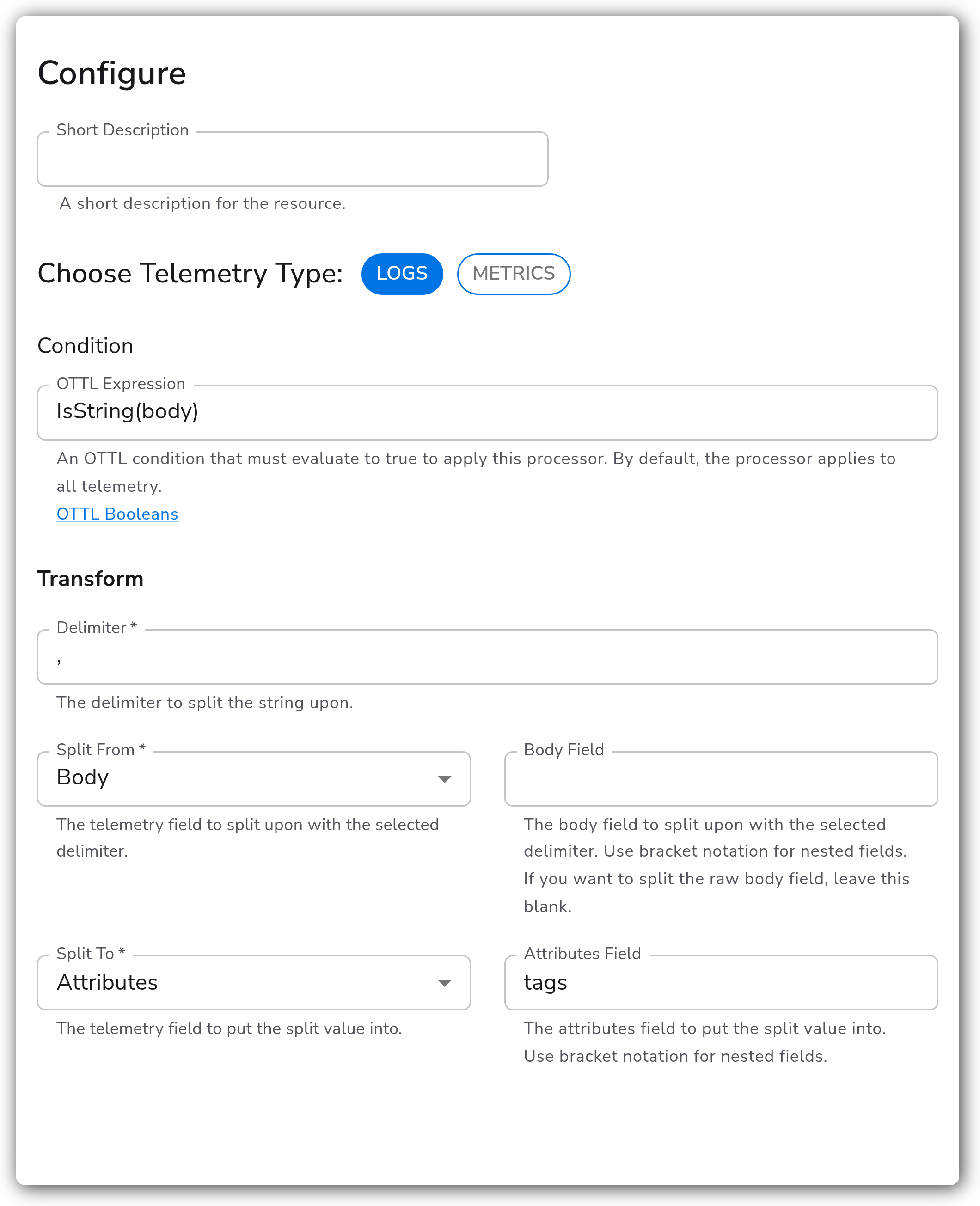
A log body holds a comma-delimited string such as `web,prod,us-east-1`. This splits it on commas and writes the resulting list into a new attribute named `tags`.
```yaml
apiVersion: bindplane.observiq.com/v1
kind: Processor
metadata:
name: split
spec:
type: split
parameters:
- name: telemetry_types
value:
- Logs
- name: condition
value: IsString(body)
- name: delimiter
value: ","
- name: from_base
value: Body
- name: from_body
value: ""
- name: to_base
value: Attributes
- name: to_attributes
value: tags
```
The processor renders to an OTTL `set(attributes["tags"], Split(body, ","))` statement on the transformprocessor.
### Configuration Tips
* The Condition guard runs per record. Use a guard such as `IsString(body)` so the `Split` function is only applied to string values, avoiding errors on records where the source field is missing or not a string.
* Writing to a Resource target with an empty Resource Field overwrites all resource attributes. Set an explicit field name unless that is intended.
* A single instance handles one signal. Add a second Split instance for the other telemetry type.
### Troubleshooting
#### The target field is unchanged
Symptoms: after the processor runs, the target field is missing or still holds the original string.
Solutions:
1. Confirm the Condition evaluates to true for the records you expect, and that the source field is a string.
2. Verify the Split From field path is correct, using bracket notation for nested fields.
#### The delimiter does not match
Symptoms: the result is a single-element list containing the whole original string.
Solutions:
1. Check the Delimiter value exactly matches the separator in the data, including whitespace.
2. The delimiter is treated as a literal string, not a regular expression.
### Standalone Processor
```yaml
apiVersion: bindplane.observiq.com/v1
kind: Processor
metadata:
name: split
spec:
type: split
parameters:
- name: telemetry_types
value:
- Logs
- name: condition
value: IsString(body)
- name: delimiter
value: ","
- name: from_base
value: Body
- name: to_base
value: Attributes
- name: to_attributes
value: tags
```
### Related Resources
* [Split — OTTL function reference](https://github.com/open-telemetry/opentelemetry-collector-contrib/blob/main/pkg/ottl/ottlfuncs/README.md#split)
* [Transform Processor](https://github.com/open-telemetry/opentelemetry-collector-contrib/blob/main/processor/transformprocessor/README.md)
---
# Agent Instructions
This documentation is published with GitBook. GitBook is the documentation platform designed so that both humans and AI agents can read, navigate, and reason over technical content effectively. Learn more at gitbook.com.
## Querying This Documentation
If you need additional information that is not directly available in this page, you can query the documentation by asking a question.
Perform an HTTP GET request on the following URL with the `ask` and `goal` query parameters:
```
GET https://docs.bindplane.com/integrations/processors/split.md?ask=&goal=
```
`ask` is the immediate question: it should be specific, self-contained, and written in natural language.
`goal` is what the user is ultimately trying to achieve, the reason they need the answer. Sharing it helps GitBook give you a better, more relevant answer. A goal is most helpful when it describes the outcome the user wants rather than restating the question. For example, with `ask=how do I create an API token`, a goal like `automate deployments from our CI pipeline` lets GitBook tailor the answer to that use case.
The response will contain a direct answer to the question and relevant excerpts and sources from the documentation.
Use this mechanism when the answer is not explicitly present in the current page, you need clarification or additional context, or you want to retrieve related documentation sections.