> For the complete documentation index, see [llms.txt](https://docs.bindplane.com/llms.txt). Markdown versions of documentation pages are available by appending `.md` to page URLs; this page is available as [Markdown](https://docs.bindplane.com/integrations/processors/lookup-fields.md).
# Lookup Fields
Enriches telemetry by matching the value of a field against an external lookup source. For each record, the processor reads the chosen field, looks it up in a CSV file, a Redis server, or an HTTP API, and on a match adds the other fields from the matching record to the same context (Attributes, Body, or Resource).
### Supported Telemetry Types
| Platform | Metrics | Logs | Traces |
| ------------------ | ------- | ---- | ------ |
| Linux | ✓ | ✓ | ✓ |
| Windows | ✓ | ✓ | ✓ |
| macOS | ✓ | ✓ | ✓ |
| Kubernetes Node | ✓ | ✓ | ✓ |
| Kubernetes Cluster | ✓ | ✓ | ✓ |
| Kubernetes Gateway | ✓ | ✓ | ✓ |
| OpenShift Node | ✓ | ✓ | ✓ |
| OpenShift Cluster | ✓ | ✓ | ✓ |
| OpenShift Gateway | ✓ | ✓ | ✓ |
Select one or more signals; the same lookup configuration enriches every selected signal.
### Configuration
#### Basic Configuration
**Selection**
| Parameter | Type | Required | Default | Description |
| --------------------- | ------------------ | -------- | ---------- | ------------------------------------------------------------------------------------------------------------------------------------------------------------------------------------------------- |
| Choose Telemetry Type | Telemetry Selector | Yes | Logs | The signals this instance runs on. Select Logs, Metrics, and/or Traces. |
| Context | Enum | No | Attributes | Where the source field is read from, and where matching fields are added. One of Attributes, Body, or Resource. |
| Field | OTTL Field | Yes | — | The field to look up in the selected context. A lookup runs when this field's name and value match a record in the source. Enter the field name (e.g. `host.name` or `ip`), not a full OTTL path. |
**Lookup**
| Parameter | Type | Required | Default | Description |
| --------------- | ------ | -------- | --------- | ------------------------------------------------------------------------------------------------------------------------------------------------------------------------------------------------------------ |
| Source Type | Enum | Yes | CSV | The data source used for lookups. One of CSV (a file), Redis (a Redis server), or API (an HTTP endpoint). |
| CSV File Path | String | Yes \* | — | Path to the CSV file containing lookup values. The file must be accessible on the collector host and include the `.csv` extension. Applies when Source Type is CSV. |
| Reload Interval | String | No | *(empty)* | How often the CSV file is re-checked for changes (e.g. `60s`, `5m`). An unchanged file is skipped without re-reading it. Empty uses the processor default of 60s. Advanced; applies when Source Type is CSV. |
\* CSV File Path is required when Source Type is CSV.
#### Redis
These parameters apply when Source Type is Redis.
| Parameter | Type | Required | Default | Description |
| -------------- | ------- | -------- | --------- | --------------------------------------------------------------- |
| Redis Host | String | Yes | localhost | Hostname or IP address of the Redis server. |
| Redis Port | Integer | Yes | 6379 | TCP port of the Redis server (1–65535). |
| Redis Username | String | No | *(empty)* | Username for Redis authentication. |
| Redis Password | String | No | *(empty)* | Password for Redis authentication. Stored as a sensitive value. |
| Redis Database | Integer | No | 0 | The Redis database number. |
| Key Prefix | String | No | *(empty)* | Prefix prepended to lookup keys, joined with a colon (`:`). |
**Redis Advanced**
These parameters apply when Source Type is Redis.
| Parameter | Type | Required | Default | Description |
| -------------------- | ------- | -------- | --------- | -------------------------------------------------------------------------------------------------------- |
| Enable TLS | Boolean | No | false | Enable TLS for Redis connections. |
| Redis Dial Timeout | String | No | *(empty)* | Bounds the initial TCP/TLS dial to Redis (e.g. `2s`, `500ms`). Empty uses the processor default of `2s`. |
| Redis Lookup Timeout | String | No | *(empty)* | Bounds each Redis lookup call (e.g. `5s`, `1s`). Empty uses the processor default of `5s`. |
#### API
These parameters apply when Source Type is API. On each lookup the field value is substituted into the URL, the endpoint is queried, and fields from the JSON response are added to the context.
A `5xx`, `408`, or `429` response is retried with exponential backoff; other `4xx` responses are treated as deterministic and are not retried. The processor reads at most 1 MiB of each response body (a fixed, non-configurable cap).
| Parameter | Type | Required | Default | Description |
| ---------------- | ------ | -------- | --------- | ---------------------------------------------------------------------------------------------------------------------------------------------------------------------- |
| API URL | String | Yes | — | URL to query for lookups. The tokens `$fieldValue`, `${fieldValue}`, `$key`, or `${key}` are replaced with the URL-encoded lookup key. |
| HTTP Method | Enum | No | GET | The HTTP method used for lookup requests. One of GET or POST. |
| Request Headers | Map | No | *(empty)* | Headers to send with each lookup request, such as an authorization token. |
| Response Mapping | Map | No | *(empty)* | Maps output field names to dotted JSON paths in the response (e.g. `host` → `data.hostname`). When empty, the top-level response object is flattened into the context. |
**API Advanced**
These parameters apply when Source Type is API.
| Parameter | Type | Required | Default | Description |
| ------------------- | ------- | -------- | --------- | ------------------------------------------------------------------------------------------------------------------------------------ |
| Request Timeout | String | No | *(empty)* | Per-request HTTP timeout for a single attempt (e.g. `10s`). Empty uses the processor default of `10s`. |
| Lookup Timeout | String | No | *(empty)* | Overall bound for one lookup including all retries and backoff (e.g. `5s`). Empty uses the processor default of `5s`. |
| Max Retries | Integer | No | 3 | Total attempts (initial request plus retries) for transient failures. Non-retryable statuses (400, 401, 403, 404) abort immediately. |
| Initial Retry Delay | String | No | *(empty)* | Backoff before the first retry (e.g. `100ms`). Empty uses the processor default of `100ms`. |
| Retry Multiplier | Integer | No | 2 | Multiplier applied to the backoff between retries. |
#### Caching
These parameters apply when Source Type is Redis or API. A CSV file is already held in memory, so it is looked up directly and the cache does not apply.
| Parameter | Type | Required | Default | Description |
| ----------------- | ------- | -------- | ------------ | ------------------------------------------------------------------------------------------------------------------------------------------------------------- |
| Enable Cache | Boolean | No | true | Cache lookup results locally to reduce external calls. |
| Cache TTL | String | No | 5m | How long cached entries remain valid (e.g. `5m`, `1h`). |
| Cache Max Entries | Integer | No | 100000 | Maximum entries held by the in-memory cache. On overflow, expired entries are evicted first, then arbitrary entries. Ignored when a storage extension is set. |
| Persist Cache | Boolean | No | false | Back the cache with a storage extension so cached results survive collector restarts. When off, the cache is in-memory and discarded on restart. |
| Storage Extension | Enum | Yes † | File Storage | The storage extension that backs the cache. Applies when Persist Cache is on. |
† Storage Extension is required when Persist Cache is on.
### Examples
#### Enrich metrics from a CSV by host name
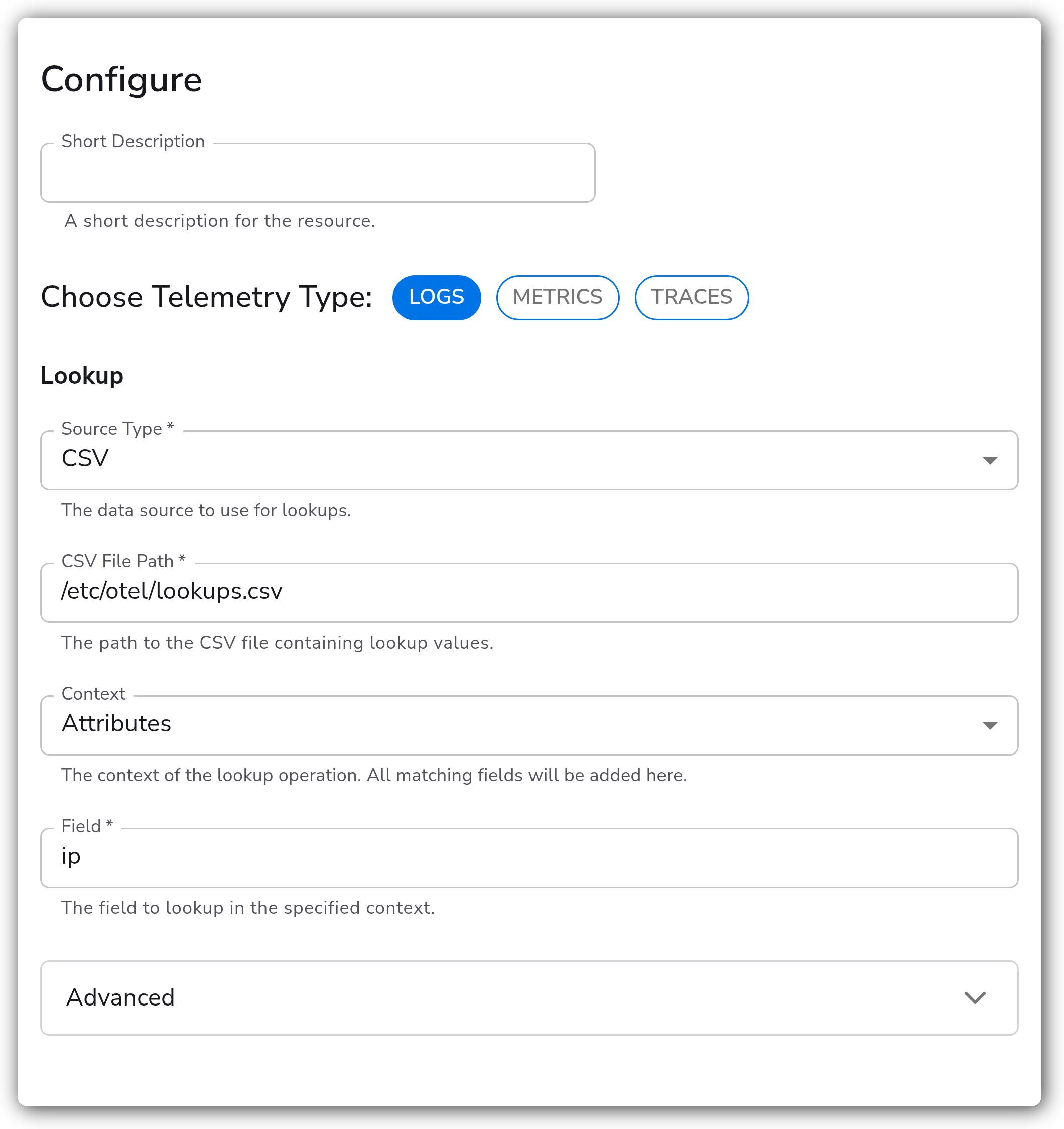
This instance looks up the `host.name` resource value of incoming metrics against a CSV file. When a row's `host.name` matches, the other columns from that row (here `region` and `env`) are added to the same context. For example, a metric with `host.name` of `MacBook-Pro-4.local` gains `region=us-east` and `env=prod`.
Example CSV:
```csv
host.name,region,env
MacBook-Pro-4.local,us-east,prod
MacBook-Pro-3.local,us-west,dev
MacBook-Pro-2.local,us-central,dev
MacBook-Pro-1.local,us-central,prod
```
#### Look up from Redis with a persistent cache
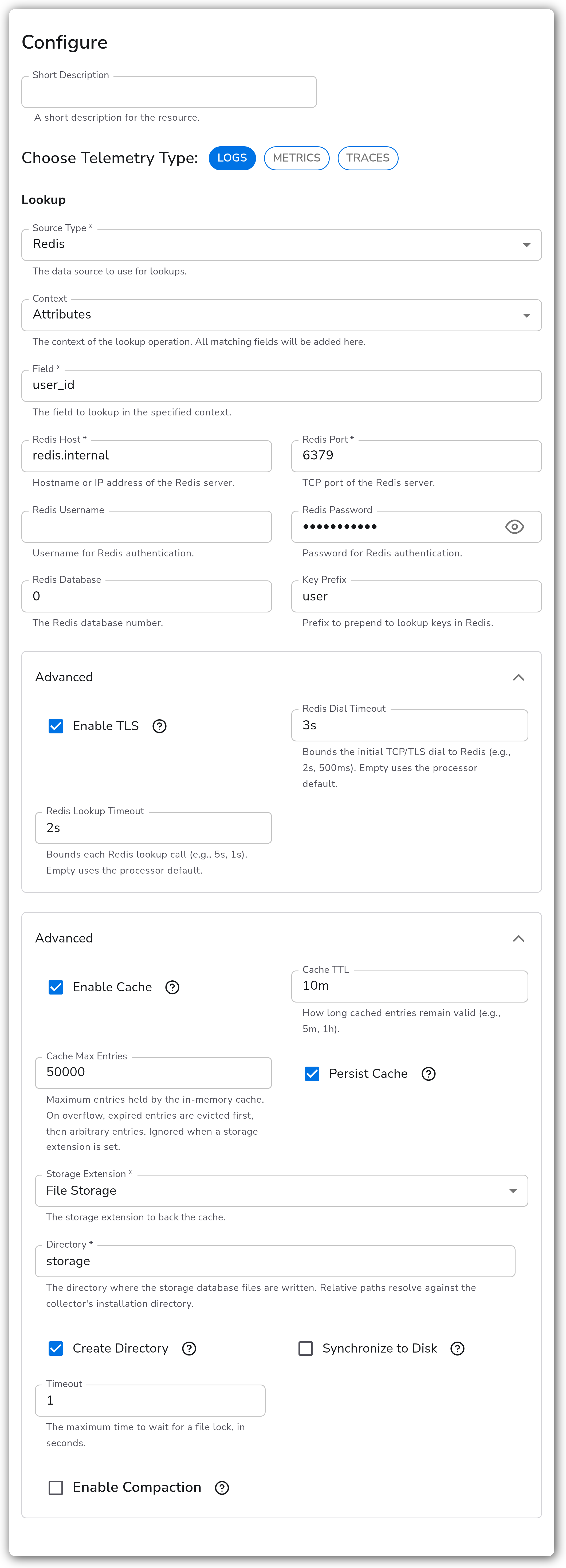
This instance sets Source Type to Redis and looks up the `user_id` attribute for incoming logs. With Key Prefix `user`, a log whose `user_id` is `web-01` reads the Redis key `user:web-01`, and the returned fields (such as `region` and `env`) are added to the log attributes. The advanced parameters are exercised here: TLS is on with a Redis Dial Timeout of `3s` and a Redis Lookup Timeout of `2s`; the cache holds up to 50,000 entries for `10m`; and Persist Cache is on with a File Storage extension, so cached lookups survive a collector restart.
The processor first tries `HGETALL` against the key. If that returns nothing, it falls back to `GET` and parses the value as a JSON object of strings. Store lookup data as either a Redis hash or a JSON string:
```
# Redis hash
HSET user:web-01 region us-east env prod
# JSON string
SET user:web-01 '{"region":"us-east","env":"prod"}'
```
#### Look up from an HTTP API
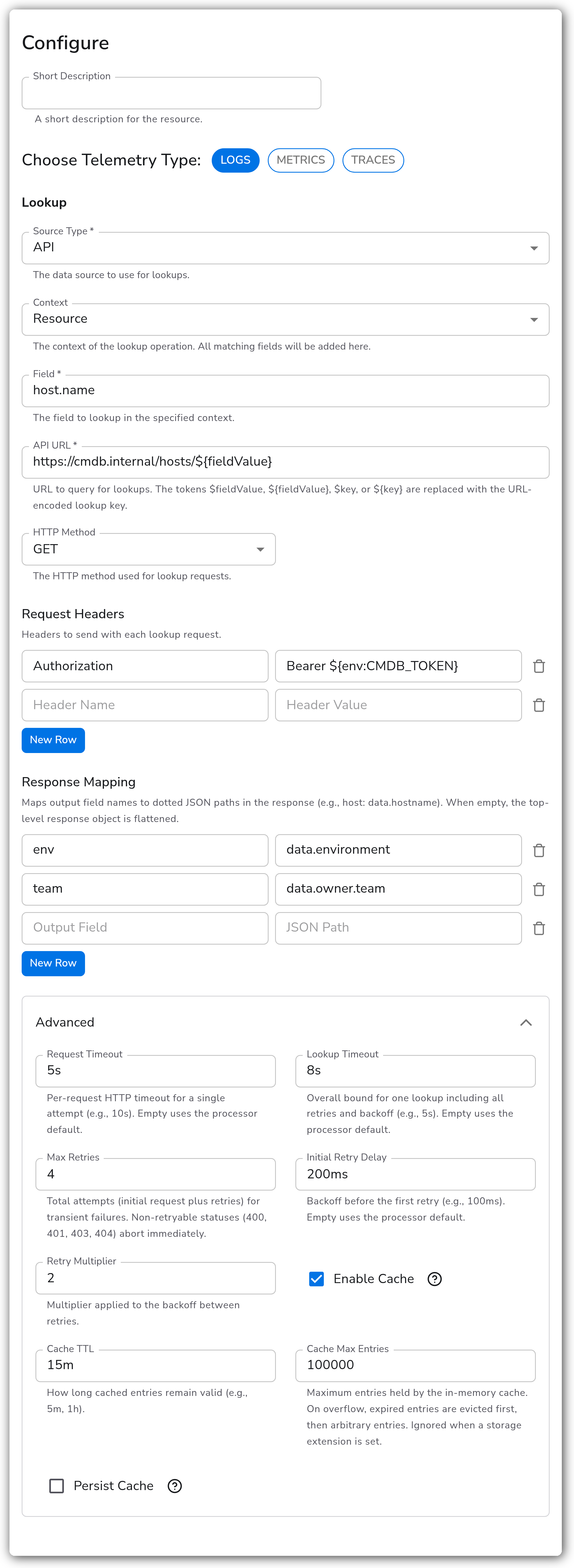
This instance sets Source Type to API and enriches incoming logs from a CMDB endpoint. The `host.name` resource value is substituted into the URL `https://cmdb.internal/hosts/${fieldValue}`, an `Authorization` header carries a bearer token, and Response Mapping pulls `team` from `data.owner.team` and `env` from `data.environment` in the JSON response. Max Retries is `4` with an Initial Retry Delay of `200ms`, and lookup results are cached for `15m`.
### Configuration Tips
* Enter Field as a plain field name (e.g. `host.name`), not an OTTL path expression. The processor reads and writes it within the selected Context.
* For a CSV source, the processor re-checks the file on the Reload Interval and re-reads it only when it has changed, so you can update lookup data without restarting the collector.
* For Redis, set Key Prefix to namespace your lookup keys; it is joined to the field value with a colon.
* For an API source, keep secrets out of the config by referencing an environment variable in a header (e.g. `Bearer ${env:CMDB_TOKEN}`).
* The cache applies to Redis and API only. To keep cached lookups across restarts, turn on Persist Cache and choose a [File Storage](/integrations/extensions/file-storage.md) or [Redis Storage](/integrations/extensions/redis-storage.md) extension.
### Troubleshooting
#### Fields are not added after a lookup
Symptoms: matching records exist in the source, but no new fields appear on the telemetry.
Solutions:
1. Confirm the Context is the one that actually holds the source field, and that Field is a plain name (not an OTTL path).
2. For CSV, verify the file path is correct and readable on the collector host and that a header matches the Field name. For Redis, confirm the key (Key Prefix plus the field value) exists. For API, confirm the URL resolves and the Response Mapping paths match the JSON the endpoint returns.
#### Lookup results don't show in Live Preview
Symptoms: enrichment isn't visible when previewing the configuration.
Solutions: Lookup results depend on an external file, server, or API and won't appear in Live Preview. Roll out the configuration, then use "View Recent Telemetry" on the collector page or inspect a downstream processor node to verify.
#### The collector fails to start with a Redis source
Symptoms: the collector exits at startup instead of failing on the first lookup.
Solutions: On startup the processor sends a `PING` to Redis within the dial timeout. Confirm Redis Host, Redis Port, and credentials are correct and the server is reachable. Adjust Redis Dial Timeout if the network is slow.
#### API lookups are slow or time out
Symptoms: the pipeline stalls, or lookups fail under load.
Solutions: Bound each call with Request Timeout and cap the whole lookup (including retries) with Lookup Timeout, so a slow endpoint can't exceed Request Timeout × Max Retries. Keep the cache on to avoid repeated calls for the same key.
### Standalone Processor
```yaml
apiVersion: bindplane.observiq.com/v1
kind: Processor
metadata:
name: lookup-fields
spec:
type: lookup_fields
parameters:
- name: telemetry
value:
- Logs
- name: source_type
value: Redis
- name: context
value: Attributes
- name: field
value: user_id
- name: redis_host
value: localhost
- name: redis_port
value: 6379
- name: redis_key_prefix
value: user
- name: cache_enabled
value: true
- name: cache_ttl
value: 10m
- name: cache_max_entries
value: 50000
- name: redis_dial_timeout
value: 2s
- name: redis_lookup_timeout
value: 5s
```
### Related Resources
* [Redis HGETALL command](https://redis.io/docs/latest/commands/hgetall/)
* [Redis GET command](https://redis.io/docs/latest/commands/get/)
### Bindplane Resources
These processors enrich and reshape telemetry alongside Lookup Fields. Chain them to parse, normalize, and add context to your data:
* [Add Fields](/integrations/processors/add-fields.md)
* [Parse JSON](/integrations/processors/parse-json.md)
* [Parse CSV](/integrations/processors/parse-csv.md)
* [Geo IP](/integrations/processors/geoip.md)
* [File Storage](/integrations/extensions/file-storage.md)
* [Redis Storage](/integrations/extensions/redis-storage.md)
---
# Agent Instructions
This documentation is published with GitBook. GitBook is the documentation platform designed so that both humans and AI agents can read, navigate, and reason over technical content effectively. Learn more at gitbook.com.
## Querying This Documentation
If you need additional information that is not directly available in this page, you can query the documentation by asking a question.
Perform an HTTP GET request on the following URL with the `ask` and `goal` query parameters:
```
GET https://docs.bindplane.com/integrations/processors/lookup-fields.md?ask=&goal=
```
`ask` is the immediate question: it should be specific, self-contained, and written in natural language.
`goal` is what the user is ultimately trying to achieve, the reason they need the answer. Sharing it helps GitBook give you a better, more relevant answer. A goal is most helpful when it describes the outcome the user wants rather than restating the question. For example, with `ask=how do I create an API token`, a goal like `automate deployments from our CI pipeline` lets GitBook tailor the answer to that use case.
The response will contain a direct answer to the question and relevant excerpts and sources from the documentation.
Use this mechanism when the answer is not explicitly present in the current page, you need clarification or additional context, or you want to retrieve related documentation sections.