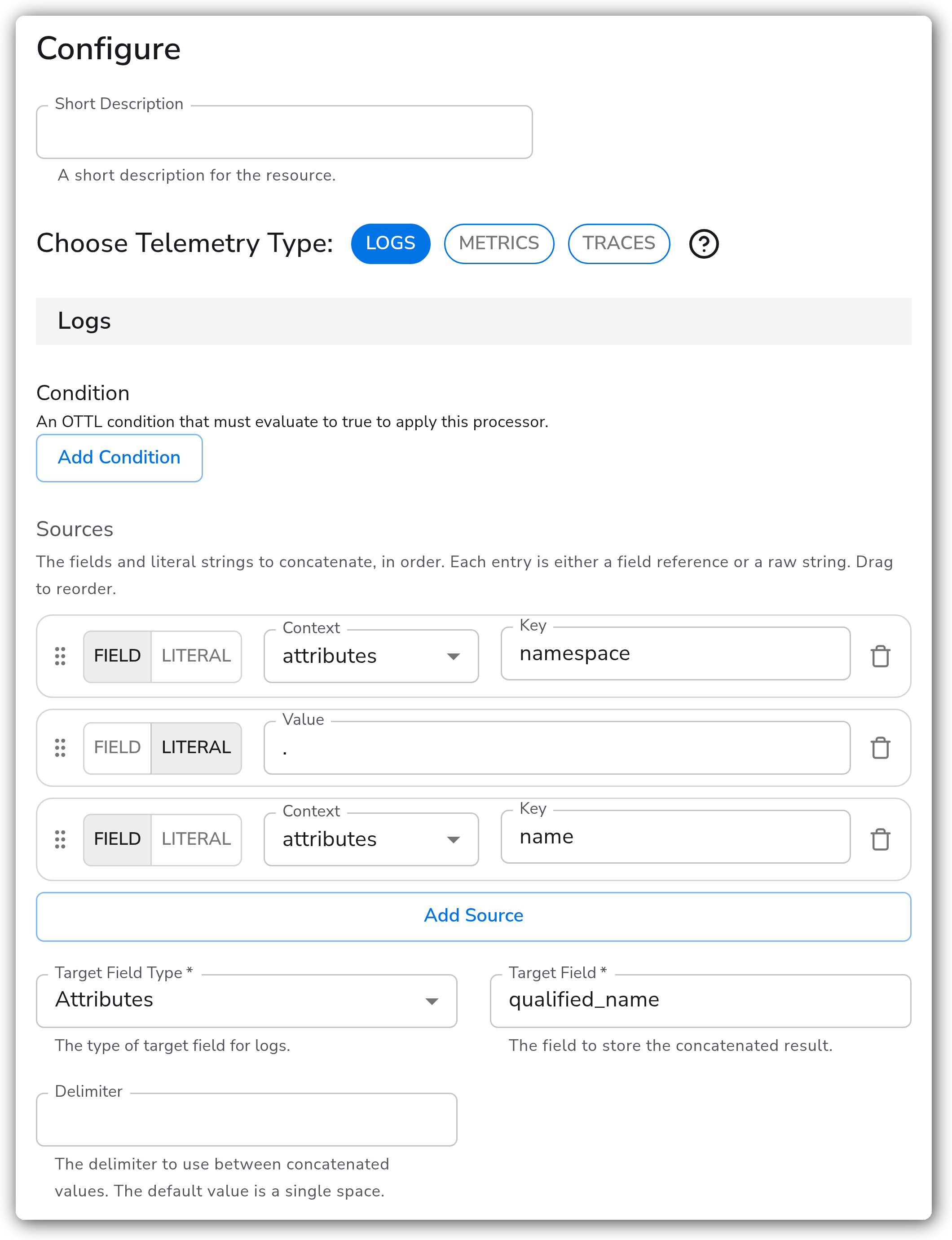
> For the complete documentation index, see [llms.txt](https://docs.bindplane.com/llms.txt). Markdown versions of documentation pages are available by appending `.md` to page URLs; this page is available as [Markdown](https://docs.bindplane.com/integrations/processors/concat.md).
# Concat
The Concat processor joins fields and literal strings into a single target field. Entries are combined in the order you list them, and field entries are skipped at runtime when the referenced field is absent.
### Supported Telemetry Types
| Platform | Metrics | Logs | Traces |
| ------------------ | ------- | ---- | ------ |
| Linux | ✓ | ✓ | ✓ |
| Windows | ✓ | ✓ | ✓ |
| macOS | ✓ | ✓ | ✓ |
| AIX | ✓ | ✓ | ✓ |
| Kubernetes Node | ✓ | ✓ | ✓ |
| Kubernetes Cluster | ✓ | ✓ | ✓ |
| Kubernetes Gateway | ✓ | ✓ | ✓ |
| OpenShift Node | ✓ | ✓ | ✓ |
| OpenShift Cluster | ✓ | ✓ | ✓ |
| OpenShift Gateway | ✓ | ✓ | ✓ |
A Concat instance applies to one telemetry type, chosen in **Choose Telemetry Type**. Add a second instance to concatenate on another signal.
### Configuration
#### Basic Configuration
The core of the processor is the **Sources** list and the **Target Field** that receives the joined result.
| Parameter | Type | Required | Default | Description |
| --------------------- | ------------------ | -------------------------------------- | -------------- | ---------------------------------------------------------------------------------------------------------------------------------------------------------------- |
| Choose Telemetry Type | Telemetry Selector | Yes | `Logs` | The single signal (Logs, Metrics, or Traces) this instance applies to. |
| Condition | OTTL Condition | No | (empty) | An OTTL condition that must be true for the processor to run. Empty applies it to every record of the selected signal. |
| Sources | Source rows | Yes | — | The ordered list of entries to concatenate. At least one entry is required. Each entry is either a **Field** or a **Literal** (see below). Drag to reorder. |
| Target Field Type | Enum | Yes | `Attributes` | Where the result is written: `Attributes` or `Body`. Logs only; Metrics and Traces always write to attributes. |
| Target Field | OTTL Field | Yes (`Attributes`) / optional (`Body`) | (empty) | The field that receives the concatenated result. With `Body` and an empty value, the whole body is replaced. |
| Delimiter | String | No | (single space) | The string inserted between concatenated values. Set it empty to join with no separator. Escape sequences such as `\t` (tab) and `\040` (space) are interpreted. |
#### Source Entries
Each row in the Sources list is one of two kinds:
| Entry type | Fields | Behavior |
| ---------- | -------------------------------------------------- | ----------------------------------------------------------------------------------------- |
| Field | Context (`body` / `attributes` / `resource`) + Key | The field's value is included; the entry is skipped at runtime when that field is absent. |
| Literal | Value | A raw string, inserted exactly as written. Always present. |
#### Source Contexts by Signal
| Signal | Available field contexts |
| ------- | -------------------------------- |
| Logs | `body`, `attributes`, `resource` |
| Metrics | `attributes`, `resource` |
| Traces | `attributes`, `resource` |
`body` is offered for Logs only. Metrics and Traces have no body, and they always write the result to attributes (no Target Field Type choice).
### Examples
#### Mixing fields and a literal separator
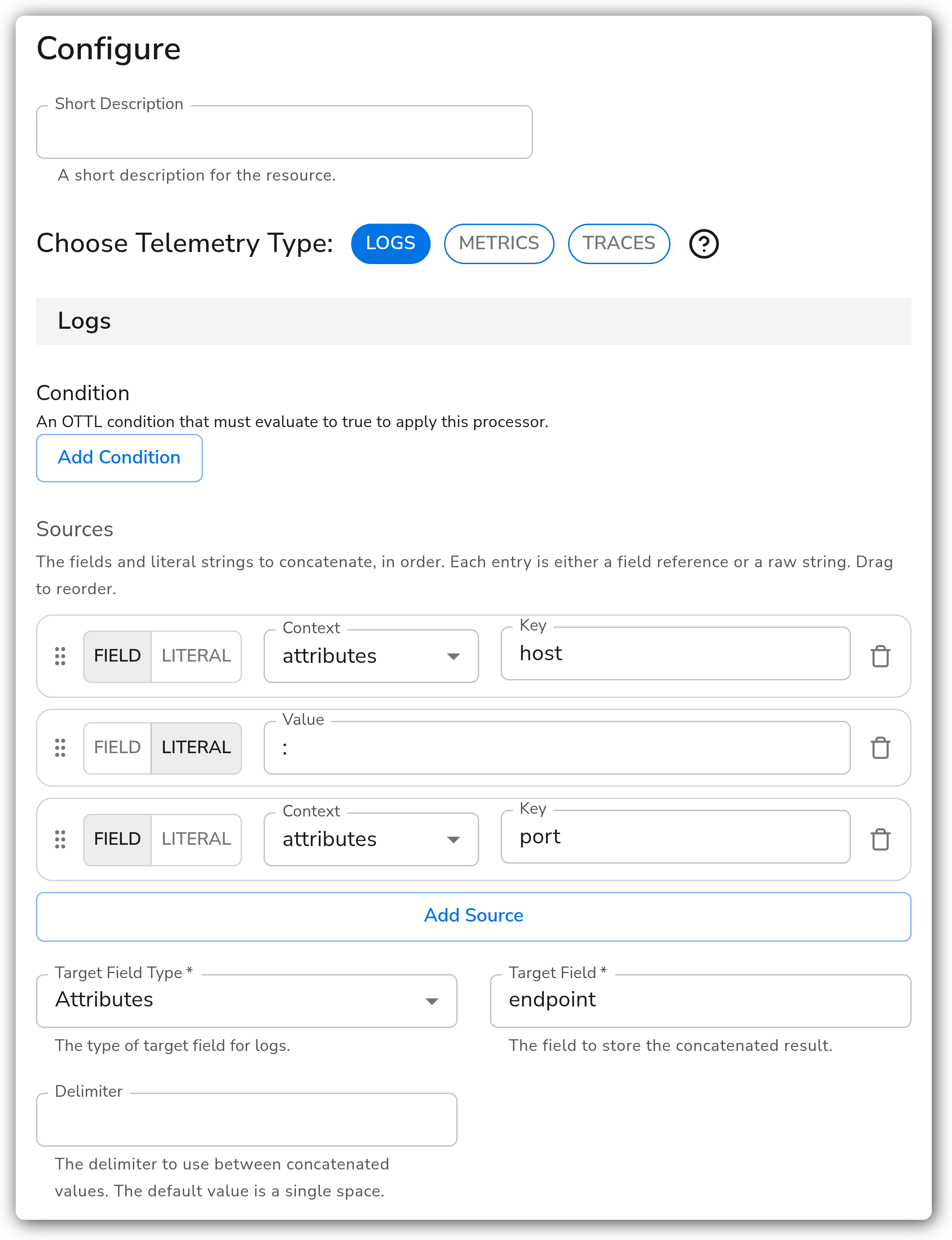
Build `attributes["endpoint"]` from `attributes["host"]`, a literal `:`, and `attributes["port"]`, with the delimiter set empty so the literal is the only separator. The result is `host:port`, written only when the referenced fields are present.
### Configuration Tips
#### Fields vs. literals
* Field entries are nil-guarded: if the field is missing on a record, that entry drops out and the rest still concatenate. Literals are always emitted.
* Use the **Delimiter** for a separator that repeats between every entry; use a **Literal** entry for a one-off separator in a specific spot, and set the Delimiter empty to avoid doubling it up.
### Troubleshooting
#### The target field isn't being written
**Symptoms:** Records pass through and the target field is empty or unchanged.
**Solutions:**
1. Confirm at least one Field entry actually resolves on the record. If every field entry is absent, only literals are written.
2. Check the Field entry contexts and keys against the real record shape (`attributes` vs `resource`, exact key).
3. If a Condition is set, confirm it evaluates true for the records you expect to transform.
### Standalone Processor
```yaml
apiVersion: bindplane.observiq.com/v1
kind: Processor
metadata:
name: concat-host-and-port
spec:
type: concat_v2
parameters:
- name: telemetry_types
value: Logs
- name: log_concat_sources
value:
- type: field
context: attributes
key: host
- type: literal
value: ":"
- type: field
context: attributes
key: port
- name: log_target_field_type
value: Attributes
- name: log_target_field
value: endpoint
- name: log_delimiter
value: ""
```
### What Changed in This Version
This replaces the original Concat processor, which is now deprecated. Existing configurations keep using the deprecated processor until you migrate.
* **Mixed field and literal sources.** Each source entry is now either a field reference or a raw literal string, in one ordered list, instead of a single shared source type.
* **Per-entry context.** Each field entry chooses its own context (`body` / `attributes` / `resource`), rather than all sources sharing one.
* **Reorderable.** Entries can be dragged to set concatenation order.
### Related Resources
* [OTTL `Concat` function](https://github.com/open-telemetry/opentelemetry-collector-contrib/blob/main/pkg/ottl/ottlfuncs/README.md#concat)
### Bindplane Resources
* [Coalesce processor](/integrations/processors/coalesce.md)
---
# Agent Instructions
This documentation is published with GitBook. GitBook is the documentation platform designed so that both humans and AI agents can read, navigate, and reason over technical content effectively. Learn more at gitbook.com.
## Querying This Documentation
If you need additional information that is not directly available in this page, you can query the documentation by asking a question.
Perform an HTTP GET request on the following URL with the `ask` and `goal` query parameters:
```
GET https://docs.bindplane.com/integrations/processors/concat.md?ask=&goal=
```
`ask` is the immediate question: it should be specific, self-contained, and written in natural language.
`goal` is what the user is ultimately trying to achieve, the reason they need the answer. Sharing it helps GitBook give you a better, more relevant answer. A goal is most helpful when it describes the outcome the user wants rather than restating the question. For example, with `ask=how do I create an API token`, a goal like `automate deployments from our CI pipeline` lets GitBook tailor the answer to that use case.
The response will contain a direct answer to the question and relevant excerpts and sources from the documentation.
Use this mechanism when the answer is not explicitly present in the current page, you need clarification or additional context, or you want to retrieve related documentation sections.