> For the complete documentation index, see [llms.txt](https://docs.bindplane.com/llms.txt). Markdown versions of documentation pages are available by appending `.md` to page URLs; this page is available as [Markdown](https://docs.bindplane.com/integrations/processors/rewrite-timestamp.md).
# Rewrite Timestamp
The Rewrite Timestamp processor reformats a log's timestamp and writes it to an attribute or back into the body. It can also parse a timestamp string out of a field first (with timezone and locale) and rewrite it in place.
### Supported Telemetry Types
| Platform | Metrics | Logs | Traces |
| ------------------ | ------- | ---- | ------ |
| Linux | | ✓ | |
| Windows | | ✓ | |
| macOS | | ✓ | |
| AIX | | ✓ | |
| Kubernetes Node | | ✓ | |
| Kubernetes Cluster | | ✓ | |
| Kubernetes Gateway | | ✓ | |
| OpenShift Node | | ✓ | |
| OpenShift Cluster | | ✓ | |
| OpenShift Gateway | | ✓ | |
Rewrite Timestamp is logs-only. The use case is reshaping a timestamp that lives in the log itself, the body or an attribute. Setting a record's canonical timestamp from a field is the job of [Parse Timestamp](/integrations/processors/parse-timestamp.md), which also covers metrics and traces.
### Configuration
#### Basic Configuration
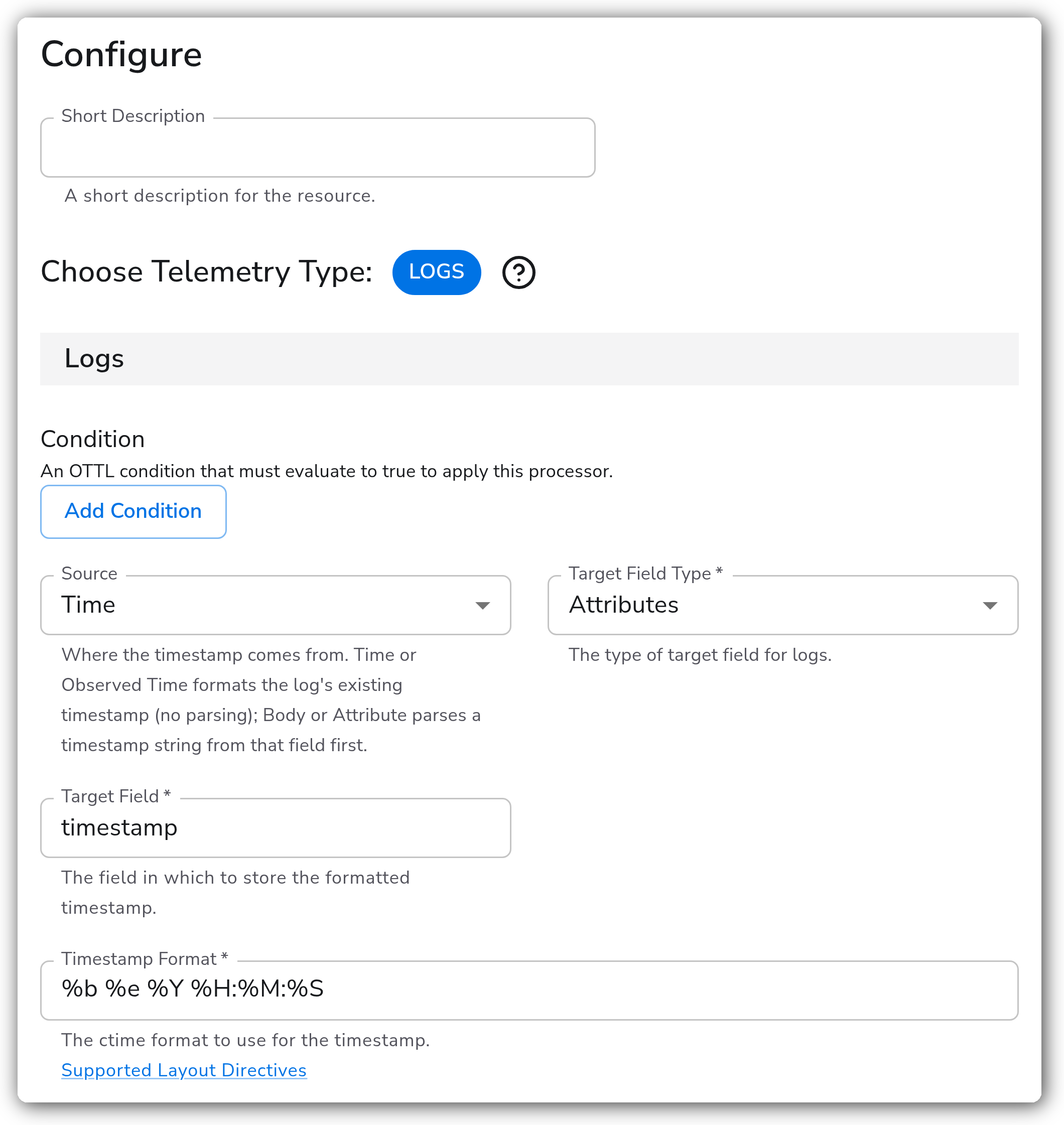
The simplest setup takes the log's existing timestamp and writes a formatted copy into an attribute, no parsing involved.
| Parameter | Type | Required | Default | Description |
| --------------------- | ------------------ | -------- | ------------------- | --------------------------------------------------------------------------------------------------------------------------------------------------------------------------------- |
| Choose Telemetry Type | Telemetry Selector | Yes | `Logs` | Fixed to Logs for this processor. |
| Source | Enum | No | `Time` | Where the timestamp comes from. `Time` and `Observed Time` format the log's existing timestamp directly; `Body` and `Attribute` parse a timestamp string out of that field first. |
| Target Field Type | Enum | Yes | `Attributes` | Where the formatted timestamp is written: `Attributes` or `Body`. |
| Target Field | OTTL Field | Yes | (empty) | The field to write the formatted timestamp into. |
| Timestamp Format | String | Yes | `%b %e %Y %H:%M:%S` | The strptime format to write the timestamp in. |
#### Source
The **Source** choice decides whether the processor parses anything:
* **Time** — format the log record's existing timestamp. No parsing.
* **Observed Time** — format the log's `observed_time` (when the collector saw it). No parsing.
* **Body** — parse a timestamp out of the body, then format it.
* **Attribute** — parse a timestamp out of an attribute, then format it.
#### Parsing the Source
These parameters appear only when Source is `Body` or `Attribute`, because only those paths parse a string.
| Parameter | Type | Required | Default | Description |
| ------------- | ---------- | -------- | ------- | ---------------------------------------------------------------------------------------------------------------------------------------------------------------------- |
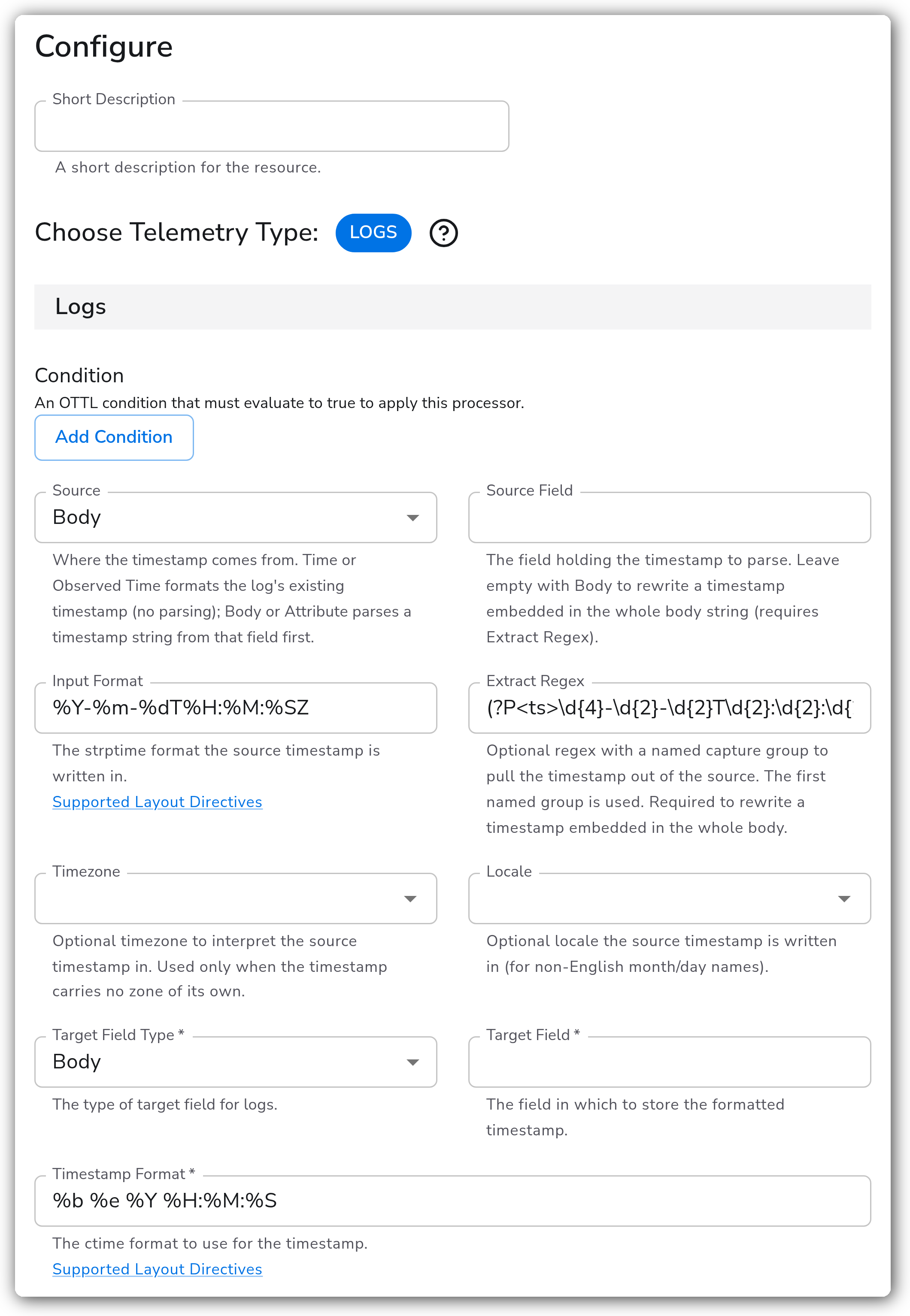
| Source Field | OTTL Field | No | (empty) | The field holding the timestamp to parse. Leave empty with `Body` to rewrite a timestamp embedded in the whole body string (requires Extract Regex). |
| Input Format | String | No | (empty) | The strptime format the source timestamp is written in. |
| Extract Regex | String | No | (empty) | A regex with a named capture group to pull the timestamp out of the source. The first named group is used. Required to rewrite a timestamp embedded in the whole body. |
| Timezone | Timezone | No | (empty) | The timezone to interpret the source timestamp in, used only when the timestamp carries no zone of its own. |
| Locale | Locale | No | (empty) | The locale the source timestamp is written in, for non-English month and day names. |
#### Condition
| Parameter | Type | Required | Default | Description |
| --------- | -------------- | -------- | ------- | -------------------------------------------------------------------------------------------- |
| Condition | OTTL Condition | No | (empty) | An OTTL condition that must be true for the processor to run. Empty applies it to every log. |
### Examples
#### Rewriting a timestamp embedded in the body, in place
The body `2024-10-11T22:14:15Z request completed` becomes `Oct 11 2024 22:14:15 request completed`. With `Body` selected, an empty Source Field, and an Extract Regex, the processor extracts the matched timestamp, reparses it, reformats it, and splices the result back over the original substring, all in one step. This is the one-stop replacement for the old extract → parse → rewrite → concat pipeline.
#### Parsing an attribute and writing the result to another attribute
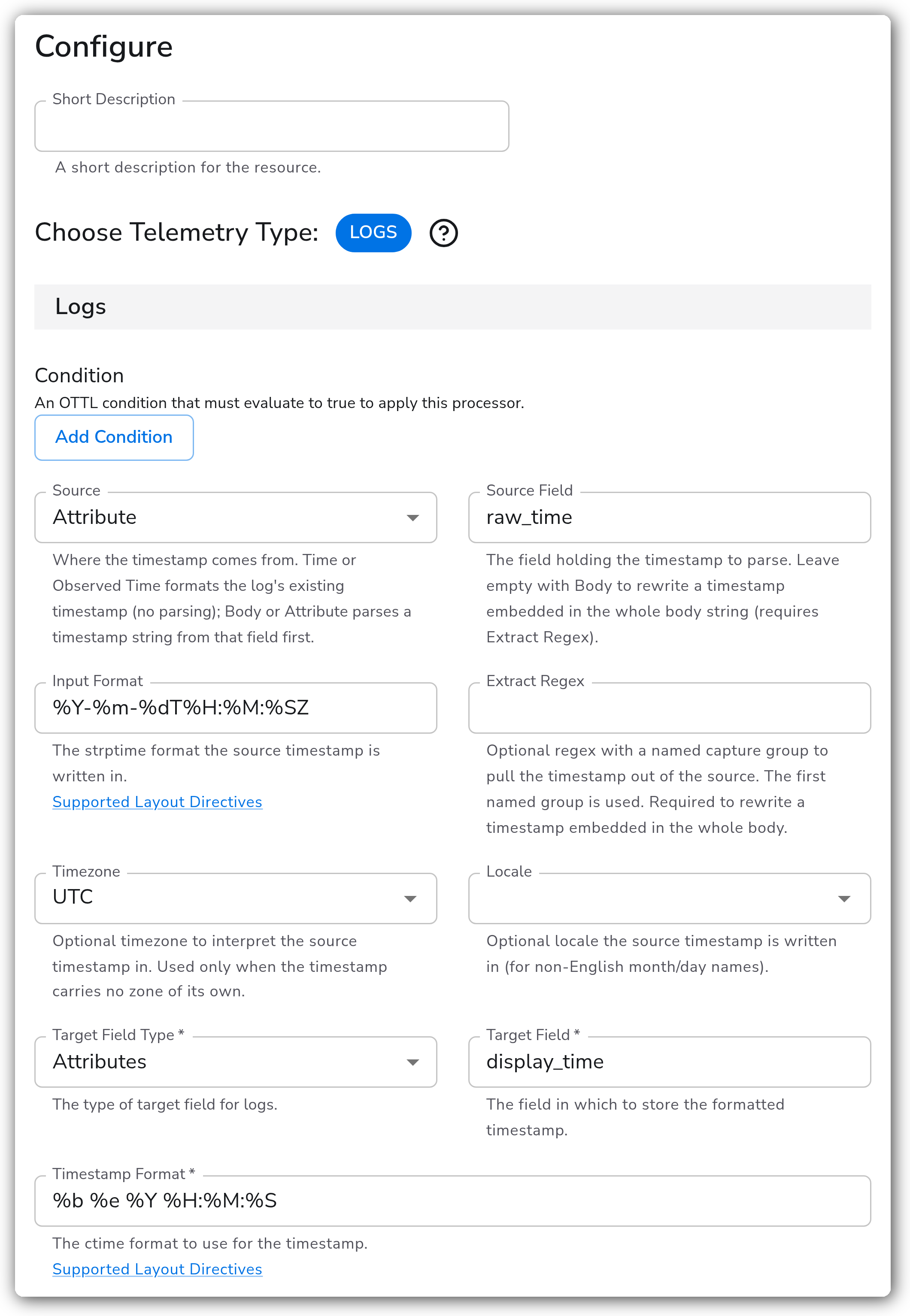
Reads `raw_time`, parses it with the given format, and writes a reformatted copy to `display_time`, leaving the original field intact.
### Configuration Tips
#### Picking a Source
* Use `Time` or `Observed Time` when the record's timestamp is already correct and you just want a formatted string copy of it elsewhere. These never parse, so Input Format, Extract Regex, Timezone, and Locale don't apply.
* Use `Body` or `Attribute` when the timestamp you care about is text inside the log that needs to be parsed first.
#### Rewriting inside the body
* To rewrite a timestamp embedded in a raw body string, select `Body`, leave Source Field empty, and provide an Extract Regex with a named group. The regex both finds the substring to replace and identifies the value to reformat.
#### Timezone is a fallback
* Timezone is applied only when the source timestamp has no zone of its own. A value that already ends in `Z` or `+02:00` keeps that zone.
### Troubleshooting
#### The body or attribute is unchanged
**Symptoms:** The log passes through with its original timestamp text intact.
**Solutions:**
1. Confirm the Extract Regex matches the source and has a named capture group. A non-match is a safe no-op, so nothing is rewritten.
2. Check that Input Format matches the source value directive by directive. A format mismatch fails the parse and skips the rewrite.
3. For whole-body rewrites, confirm the body is a string and Source Field is empty.
#### The rewritten time is in the wrong zone
**Symptoms:** The timestamp reformats but the hour is off.
**Solutions:**
1. If the source timestamp has no zone, set Timezone to the zone the data was produced in.
2. If it already carries a zone, leave Timezone empty, it is ignored when a zone is present.
### Standalone Processor
```yaml
apiVersion: bindplane.observiq.com/v1
kind: Processor
metadata:
name: rewrite-body-timestamp
spec:
type: rewrite_timestamp_v2
parameters:
- name: telemetry_types
value: Logs
- name: log_source_field_type
value: Body
- name: log_source_field
value: ""
- name: log_input_format
value: '%Y-%m-%dT%H:%M:%SZ'
- name: log_extract_regex
value: '(?P\d{4}-\d{2}-\d{2}T\d{2}:\d{2}:\d{2}Z)'
- name: log_target_field_type
value: Body
- name: log_target_field
value: ""
- name: log_timestamp_format
value: '%b %e %Y %H:%M:%S'
```
### Migrating From the Previous Rewrite Timestamp
This processor replaces the earlier **Rewrite Timestamp**, which is now deprecated. The previous version only reformatted the record's existing timestamp, so reshaping a timestamp inside the body took a four-processor chain: Parse with Regex → Parse Timestamp → Rewrite Timestamp → Concat. This version collapses that into one processor via the `Body` / `Attribute` sources and the in-place body rewrite.
Mapping an existing config:
* The old timestamp-into-attribute behavior is the new `Time` source with a `Target Field Type` of `Attributes`, identical output.
* A chain that extracted, parsed, and reinserted a body timestamp becomes a single processor with Source `Body`, an Extract Regex, an Input Format, and Target Field Type `Body`.
* Metrics and Traces support was dropped. The previous version accepted them, but rewriting a timestamp into the telemetry itself is a logs concern; for metrics and traces, set the record timestamp with Parse Timestamp instead.
### Related Resources
* [OTTL `FormatTime` function](https://github.com/open-telemetry/opentelemetry-collector-contrib/blob/main/pkg/ottl/ottlfuncs/README.md#formattime)
* [OTTL `Time` function](https://github.com/open-telemetry/opentelemetry-collector-contrib/blob/main/pkg/ottl/ottlfuncs/README.md#time)
* [OTTL `ExtractPatterns` function](https://github.com/open-telemetry/opentelemetry-collector-contrib/blob/main/pkg/ottl/ottlfuncs/README.md#extractpatterns)
* [OTTL `replace_pattern` function](https://github.com/open-telemetry/opentelemetry-collector-contrib/blob/main/pkg/ottl/ottlfuncs/README.md#replace_pattern)
### Bindplane Resources
* [ctime / strptime Layout Directives](/how-to-guides/data-collection-and-processing/ctime-formatting.md)
* [Parse Timestamp processor](/integrations/processors/parse-timestamp.md)
---
# Agent Instructions
This documentation is published with GitBook. GitBook is the documentation platform designed so that both humans and AI agents can read, navigate, and reason over technical content effectively. Learn more at gitbook.com.
## Querying This Documentation
If you need additional information that is not directly available in this page, you can query the documentation by asking a question.
Perform an HTTP GET request on the following URL with the `ask` and `goal` query parameters:
```
GET https://docs.bindplane.com/integrations/processors/rewrite-timestamp.md?ask=&goal=
```
`ask` is the immediate question: it should be specific, self-contained, and written in natural language.
`goal` is what the user is ultimately trying to achieve, the reason they need the answer. Sharing it helps GitBook give you a better, more relevant answer. A goal is most helpful when it describes the outcome the user wants rather than restating the question. For example, with `ask=how do I create an API token`, a goal like `automate deployments from our CI pipeline` lets GitBook tailor the answer to that use case.
The response will contain a direct answer to the question and relevant excerpts and sources from the documentation.
Use this mechanism when the answer is not explicitly present in the current page, you need clarification or additional context, or you want to retrieve related documentation sections.