> For the complete documentation index, see [llms.txt](https://docs.bindplane.com/llms.txt). Markdown versions of documentation pages are available by appending `.md` to page URLs; this page is available as [Markdown](https://docs.bindplane.com/integrations/processors/parse-timestamp.md).
# Parse Timestamp
The Parse Timestamp processor reads a timestamp from a field and sets it as the record's own timestamp. It supports automatic format detection, strptime layouts, epoch values, timezone and locale, and pulling a timestamp out of a longer field with a regex.
### Supported Telemetry Types
| Platform | Metrics | Logs | Traces |
| ----------------------- | ------- | ---- | ------ |
| Linux | ✓ | ✓ | ✓ |
| Windows | ✓ | ✓ | ✓ |
| macOS | ✓ | ✓ | ✓ |
| AIX | ✓ | ✓ | ✓ |
| Kubernetes Node | ✓ | ✓ | ✓ |
| Kubernetes Cluster | ✓ | ✓ | ✓ |
| Kubernetes Gateway | ✓ | ✓ | ✓ |
| OpenShift Node | ✓ | ✓ | ✓ |
| OpenShift Cluster | ✓ | ✓ | ✓ |
| OpenShift Gateway | ✓ | ✓ | ✓ |
| Google SecOps Pipelines | ✓ | ✓ | ✓ |
The processor runs only on the signals you select in **Choose Telemetry Type**. Each selected signal is configured independently in its own section.
### Configuration
#### Basic Configuration
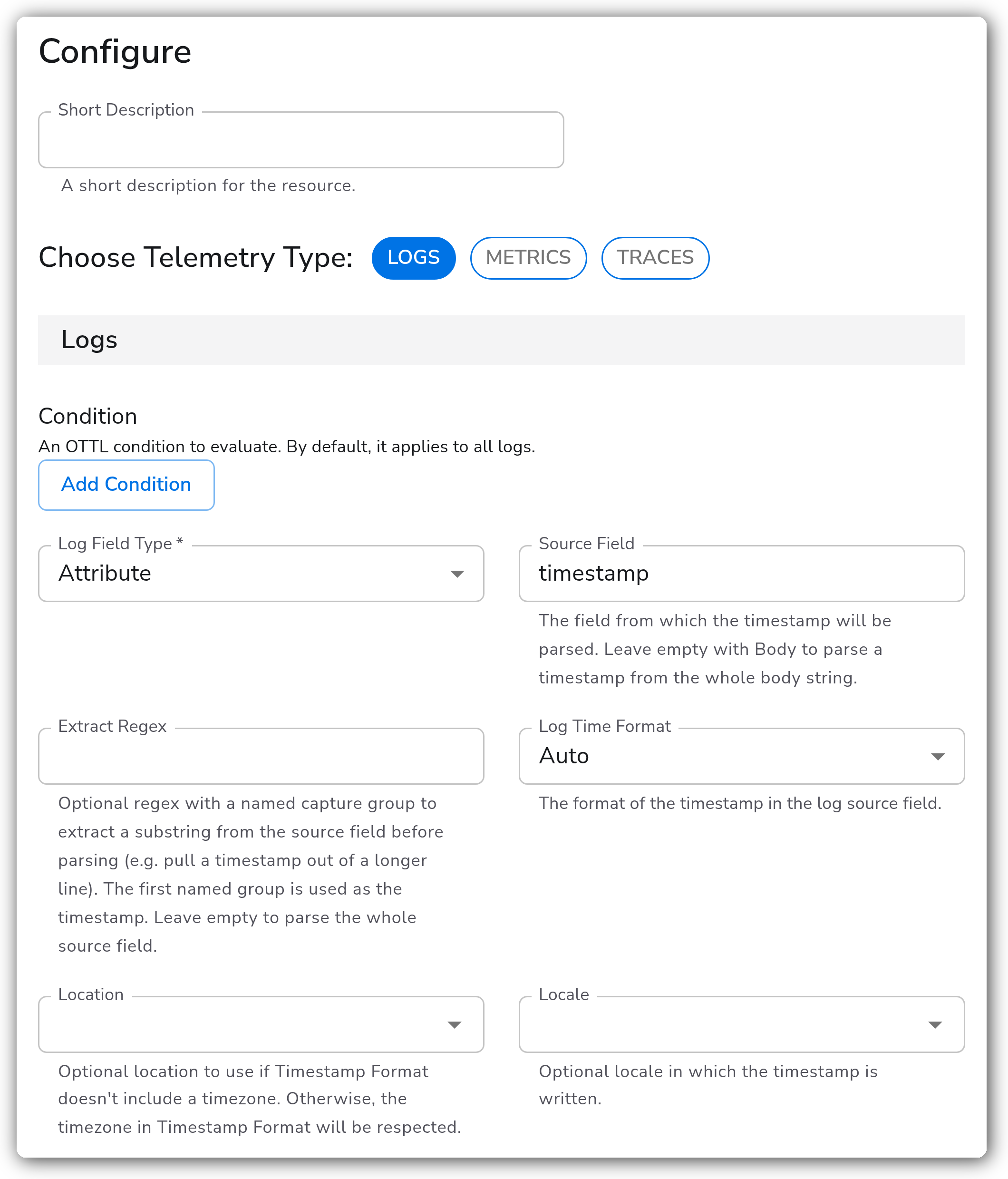
The simplest setup points the processor at a field that already holds a clean timestamp and lets format detection do the rest.
| Parameter | Type | Required | Default | Description |
| --------------------- | ------------------ | -------- | ----------- | --------------------------------------------------------------------------------------------------------------------------------------------- |
| Choose Telemetry Type | Telemetry Selector | No | `Logs` | The signals (Logs, Metrics, Traces) this processor applies to. Defaults to Logs. |
| Log Field Type | Enum | Yes | `Attribute` | Where the source timestamp lives: `Resource`, `Attribute`, or `Body`. |
| Source Field | OTTL Field | No | (empty) | The field the timestamp is read from. Leave empty with `Body` to parse a timestamp from the whole body string. |
| Log Time Format | Enum | No | `Auto` | How the source timestamp is formatted: `Auto`, `RFC3339`, `ISO8601`, `Epoch`, or `Manual`. `Auto` detects RFC3339, ISO8601, and epoch values. |
`Body` is offered for the Logs context only. Metrics and traces have no body, so their Field Type is limited to `Resource` and `Attribute`.
#### Extracting From a Longer Field
When the source field holds more than just a timestamp (a raw syslog line, an unparsed message), use a regex to pull the timestamp out before parsing.
| Parameter | Type | Required | Default | Description |
| ------------- | ------ | -------- | ------- | --------------------------------------------------------------------------------------------------------------------------------------------- |
| Extract Regex | String | No | (empty) | A regular expression with a named capture group. The first named group is used as the timestamp. Leave empty to parse the whole source field. |
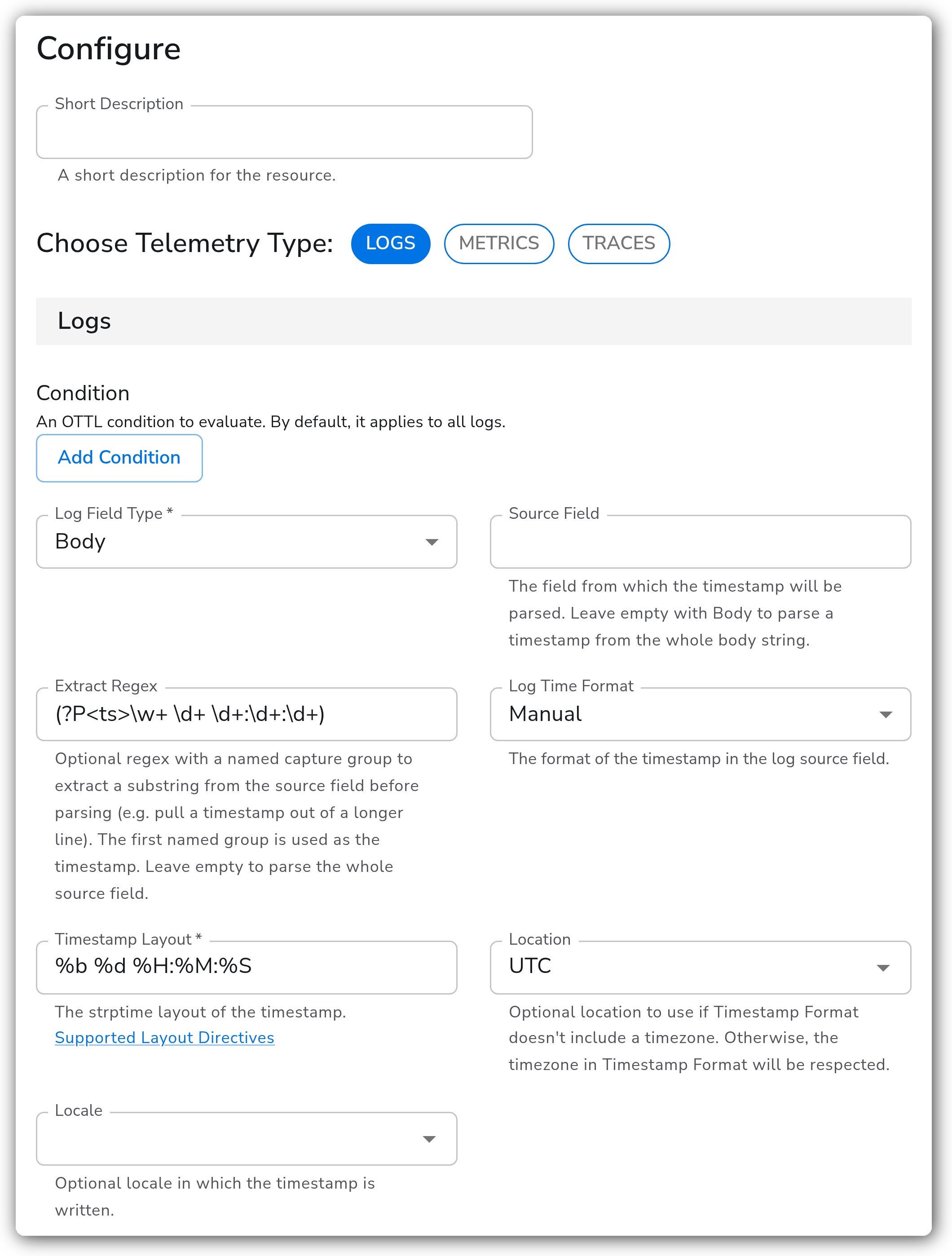
For example, `(?P\w+ \d+ \d+:\d+:\d+)` pulls `Oct 11 22:14:15` out of a longer log line, and only that substring is parsed.
#### Timestamp Format
| Parameter | Type | Required | Default | Description |
| ---------------- | ------ | ---------------------------------- | ------------------------ | ----------------------------------------------------------------------------------------------------------------------- |
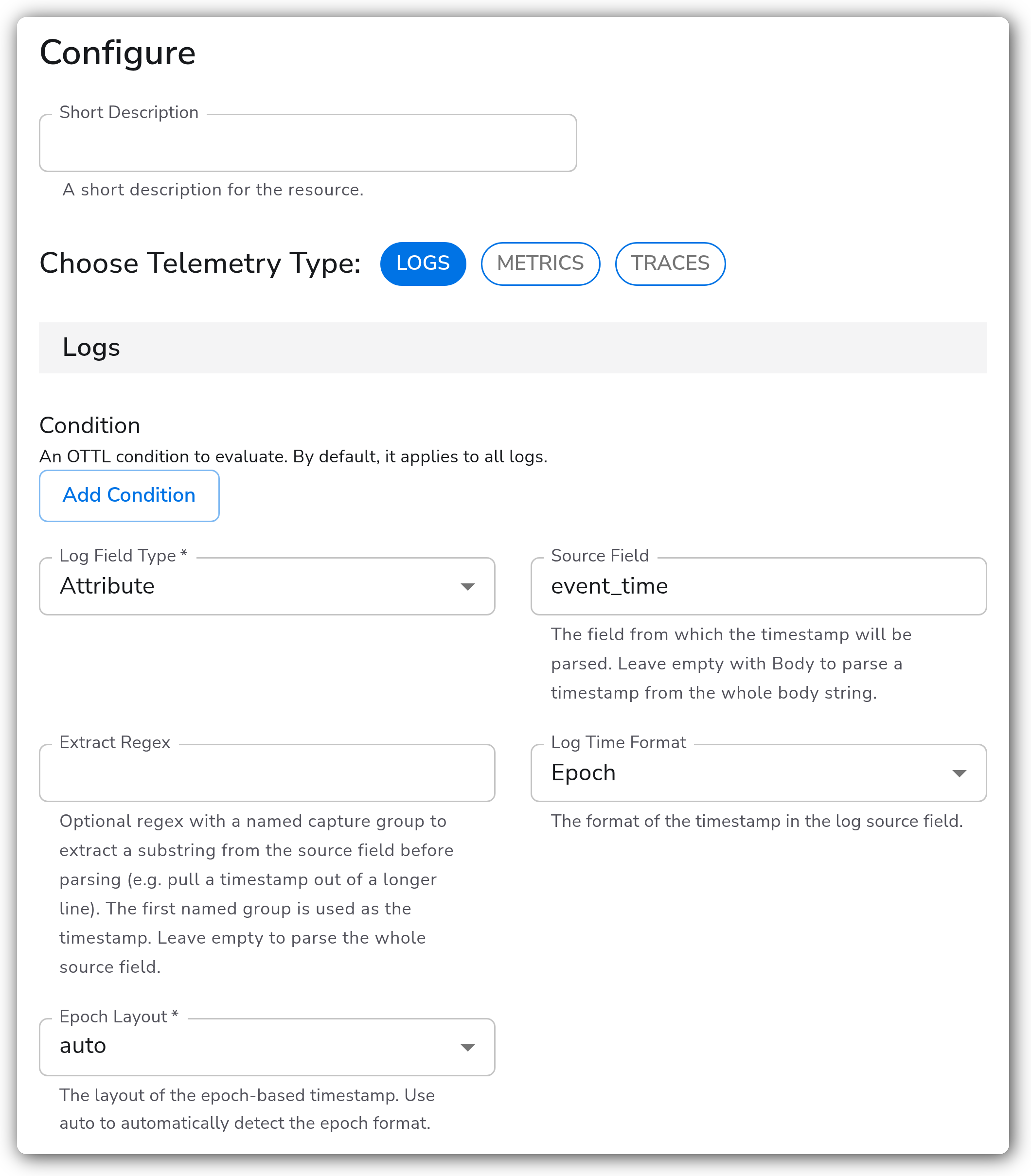
| Epoch Layout | Enum | Yes (when Time Format is `Epoch`) | `auto` | Granularity of an epoch value: `auto`, `s`, `ms`, `us`, `ns`, `s.ms`, `s.us`, `s.ns`. `auto` detects it from the value. |
| Timestamp Layout | String | Yes (when Time Format is `Manual`) | `%Y-%m-%dT%H:%M:%S.%f%z` | The strptime layout the timestamp is written in. |
#### Timezone and Locale
These apply when the Time Format is `Auto`, `ISO8601`, or `Manual`. They are hidden for `RFC3339` and `Epoch`, which carry their own zone or are absolute.
| Parameter | Type | Required | Default | Description |
| --------- | -------- | -------- | ------- | -------------------------------------------------------------------------------------------------------------------------------------------------------------- |
| Location | Timezone | No | (empty) | The timezone to interpret the timestamp in, used only when the timestamp carries no zone of its own. If the timestamp already includes a zone, that zone wins. |
| Locale | Locale | No | (empty) | The locale the timestamp is written in, for non-English month and day names (for example `fr-FR`). |
#### Condition
| Parameter | Type | Required | Default | Description |
| --------- | -------------- | -------- | ------- | ---------------------------------------------------------------------------------------------------------------------- |
| Condition | OTTL Condition | No | (empty) | An OTTL condition that must be true for the processor to run. Empty applies it to every record of the selected signal. |
#### Metrics and Traces
Metrics and Traces expose the same parameters as Logs (Source Field, Extract Regex, Time Format, Epoch Layout, Timestamp Layout, Location, Locale, Condition), scoped to their own section. Two differences:
* Field Type is limited to `Resource` and `Attribute` (no `Body`).
* Source Field is required.
### Examples
#### Pulling a timestamp out of a raw log body
The body is an unparsed syslog line. The named-group regex extracts the `Oct 11 22:14:15` portion, and the Manual layout parses it as the record's timestamp.
#### Parsing an epoch field with auto-detected granularity
`Epoch` with `auto` reads a numeric timestamp and detects whether it is seconds, milliseconds, microseconds, or nanoseconds from its magnitude, so the same configuration handles sources that disagree on precision.
### Configuration Tips
#### Choosing a format
* Start with `Auto`. It covers RFC3339, ISO8601, and epoch values, which is most of what you will see.
* Reach for `Manual` only when the timestamp is in a fixed, non-standard layout, and write that layout with strptime directives.
#### Location vs. an embedded zone
* `Location` is a fallback, not an override. It is applied only when the parsed timestamp has no zone of its own. A timestamp that already ends in `Z` or `+02:00` keeps that zone regardless of `Location`.
#### Extract Regex
* The capture group must be named (`(?P…)`); the first named group is the timestamp. A regex with no named group is ignored and the whole field is parsed.
### Troubleshooting
#### The record timestamp isn't changing
**Symptoms:** Records pass through unchanged; the timestamp is still the ingest/observed time.
**Solutions:**
1. Confirm the Source Field actually holds the value. With `Body` and an empty Source Field, the whole body must be a string.
2. If you set an Extract Regex, confirm it matches the field and has a named group. A non-match leaves the timestamp untouched.
3. With `Manual`, check the Timestamp Layout against the real value, directive by directive. A single mismatched directive (for example `%d` vs `%e` for a space-padded day) causes the parse to fail silently.
#### The parsed time is off by hours
**Symptoms:** The timestamp parses but lands in the wrong timezone.
**Solutions:**
1. If the source timestamp has no zone, set `Location` to the zone the data was produced in.
2. If it does have a zone, remove `Location` — it is ignored in that case, and a stale value can mislead.
### Standalone Processor
```yaml
apiVersion: bindplane.observiq.com/v1
kind: Processor
metadata:
name: parse-syslog-timestamp
spec:
type: parse_timestamp_v2
parameters:
- name: telemetry_types
value:
- Logs
- name: log_field_type
value: Body
- name: log_source_field
value: ""
- name: log_extract_regex
value: '(?P\w+ \d+ \d+:\d+:\d+)'
- name: log_time_format
value: Manual
- name: log_manual_timestamp_layout
value: '%b %d %H:%M:%S'
- name: log_location
value: UTC
```
### What Changed in This Version
This release updates the regex extraction and the timezone/locale inputs:
* **Single named-group regex.** The separate Extract Regex + Extract Group parameters are replaced by one Extract Regex. Put a named capture group in the pattern (`(?P…)`); the first named group is used. Existing configs that set both fields should move the pattern into Extract Regex and name the group.
* **Timezone and Locale are now pickers**, not free-text strings. They accept the same values as before (IANA zone names, locale codes), now validated against a dropdown.
* **Whole-body parsing.** With `Body` selected and Source Field left empty, the processor now parses the entire body string, so you can pull a timestamp straight out of a raw log line with Extract Regex instead of staging it into an attribute first.
### Related Resources
* [OTTL `Time` function](https://github.com/open-telemetry/opentelemetry-collector-contrib/blob/main/pkg/ottl/ottlfuncs/README.md#time)
* [OTTL `ExtractPatterns` function](https://github.com/open-telemetry/opentelemetry-collector-contrib/blob/main/pkg/ottl/ottlfuncs/README.md#extractpatterns)
### Bindplane Resources
* [ctime / strptime Layout Directives](/how-to-guides/data-collection-and-processing/ctime-formatting.md)
* [Rewrite Timestamp processor](/integrations/processors/rewrite-timestamp.md)
---
# Agent Instructions
This documentation is published with GitBook. GitBook is the documentation platform designed so that both humans and AI agents can read, navigate, and reason over technical content effectively. Learn more at gitbook.com.
## Querying This Documentation
If you need additional information that is not directly available in this page, you can query the documentation by asking a question.
Perform an HTTP GET request on the following URL with the `ask` and `goal` query parameters:
```
GET https://docs.bindplane.com/integrations/processors/parse-timestamp.md?ask=&goal=
```
`ask` is the immediate question: it should be specific, self-contained, and written in natural language.
`goal` is what the user is ultimately trying to achieve, the reason they need the answer. Sharing it helps GitBook give you a better, more relevant answer. A goal is most helpful when it describes the outcome the user wants rather than restating the question. For example, with `ask=how do I create an API token`, a goal like `automate deployments from our CI pipeline` lets GitBook tailor the answer to that use case.
The response will contain a direct answer to the question and relevant excerpts and sources from the documentation.
Use this mechanism when the answer is not explicitly present in the current page, you need clarification or additional context, or you want to retrieve related documentation sections.