> For the complete documentation index, see [llms.txt](https://docs.bindplane.com/llms.txt). Markdown versions of documentation pages are available by appending `.md` to page URLs; this page is available as [Markdown](https://docs.bindplane.com/integrations/processors/rename-metric.md).
# Rename Metric
Renames metrics flowing through a metrics pipeline. Operate on one metric at a time by its exact name, or rewrite a shared name prefix to rename many metrics at once.
### Supported Telemetry Types
| Platform | Metrics | Logs | Traces |
| ------------------ | ------- | ---- | ------ |
| Linux | ✓ | | |
| Windows | ✓ | | |
| macOS | ✓ | | |
| AIX | ✓ | | |
| Kubernetes Node | ✓ | | |
| Kubernetes Cluster | ✓ | | |
| Kubernetes Gateway | ✓ | | |
| OpenShift Node | ✓ | | |
| OpenShift Cluster | ✓ | | |
| OpenShift Gateway | ✓ | | |
### Configuration
| Parameter | Type | Required | Default | Description |
| ---------- | ------------------ | -------- | --------- | ---------------------------------------------------------------------------------------------------------------------------------------------------------------------------------- |
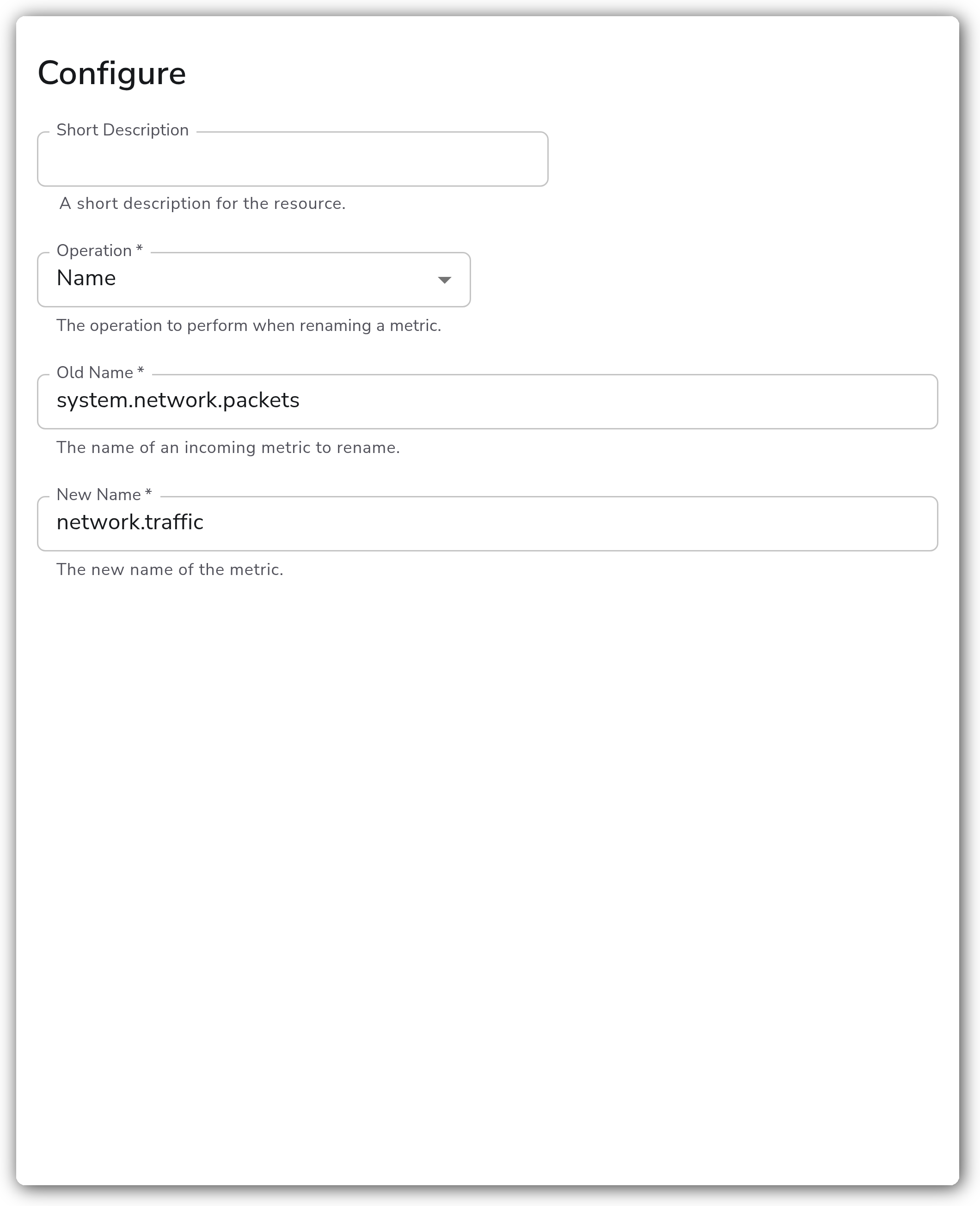
| Operation | Enum: Name, Prefix | Yes | Name | The operation to perform when renaming a metric. `Name` renames a single metric by its exact name. `Prefix` rewrites a shared name prefix across every metric that starts with it. |
| Old Name | String | Yes | *(empty)* | The name of an incoming metric to rename. Shown when Operation is `Name`. |
| New Name | String | Yes | *(empty)* | The new name of the metric. Shown when Operation is `Name`. |
| Old Prefix | String | Yes | *(empty)* | The prefix of incoming metrics to rename. Shown when Operation is `Prefix`. |
| New Prefix | String | Yes | *(empty)* | The new prefix of the metrics. Shown when Operation is `Prefix`. |
`Old Name` / `New Name` apply only to the `Name` operation; `Old Prefix` / `New Prefix` apply only to the `Prefix` operation. Each processor instance performs one rename. To rename several distinct metrics, add one instance per rename.
### Examples
#### Rename a single metric
Operation is `Name`. The `system.network.packets` metric is renamed to `network.traffic`. Other metrics pass through untouched.
```yaml
apiVersion: bindplane.observiq.com/v1
kind: Processor
metadata:
name: rename-metric
spec:
type: rename_metric
parameters:
- name: operation
value: Name
- name: old_name
value: system.network.packets
- name: new_name
value: network.traffic
```
#### Rewrite a shared prefix across many metrics
Operation is `Prefix`. Every metric whose name starts with `system.` is renamed so the prefix becomes `macos.`. For example, `system.cpu.time` becomes `macos.cpu.time` and `system.memory.usage` becomes `macos.memory.usage`. The remainder of each metric name is preserved.
```yaml
apiVersion: bindplane.observiq.com/v1
kind: Processor
metadata:
name: rename-metric
spec:
type: rename_metric
parameters:
- name: operation
value: Prefix
- name: old_prefix
value: system.
- name: new_prefix
value: macos.
```
#### Rename several metrics with multiple instances
A single instance renames one metric or one prefix. To rename a set of distinct metrics, chain one Rename Metric instance per rename in the pipeline:
| Instance | Operation | From | To |
| -------- | --------- | ---------------------------- | ------------------ |
| 1 | Name | `system.network.packets` | `network.traffic` |
| 2 | Name | `system.cpu.load_average.1m` | `host.cpu.load.1m` |
| 3 | Name | `system.filesystem.usage` | `host.disk.usage` |
### Configuration Tips
* `Name` matches exactly. The value of `Old Name` must equal the incoming metric name in full. There is no wildcard or substring matching in the `Name` operation.
* `Prefix` matches the leading characters of the metric name and replaces only that leading segment. The rest of the name is left intact. Include the trailing separator (for example `system.` rather than `system`) so partial-word collisions are avoided.
* A `Prefix` rename affects every metric starting with the prefix. Confirm the prefix is specific enough that you do not rename metrics you intended to leave alone.
### Troubleshooting
#### The metric was not renamed
Symptoms: the original metric name still appears downstream.
Solutions:
1. For the `Name` operation, confirm `Old Name` matches the incoming metric name exactly, including case and the full dotted path.
2. Confirm the metric actually reaches this processor. A filter or earlier processor in the pipeline may drop or rename it first.
3. Confirm the processor is on a metrics pipeline. This processor operates on metrics only.
#### Too many metrics were renamed
Symptoms: metrics you did not intend to change were also renamed.
Solutions:
1. The `Prefix` operation rewrites every metric starting with `Old Prefix`. Make the prefix more specific, and include the trailing separator (for example `system.`) so it does not match unrelated names.
2. Switch to the `Name` operation if you intend to rename exactly one metric.
#### A downstream rename or dashboard broke
Symptoms: a later processor, exporter, or backend no longer finds the metric.
Solutions:
1. Renaming changes the metric name everywhere downstream. Update any later processors, routing rules, dashboards, or alerts that reference the old name.
2. If multiple Rename Metric instances are chained, remember each operates on the output of the previous one. Order them so each instance sees the name it expects.
### Standalone Processor
```yaml
apiVersion: bindplane.observiq.com/v1
kind: Processor
metadata:
name: rename-metric
spec:
type: rename_metric
parameters:
- name: operation
value: Name
- name: old_name
value: system.network.packets
- name: new_name
value: network.traffic
```
### Related Resources
* [Metrics Transform Processor — OpenTelemetry Collector Contrib](https://github.com/open-telemetry/opentelemetry-collector-contrib/blob/main/processor/metricstransformprocessor/README.md), the upstream processor this resource configures.
---
# Agent Instructions
This documentation is published with GitBook. GitBook is the documentation platform designed so that both humans and AI agents can read, navigate, and reason over technical content effectively. Learn more at gitbook.com.
## Querying This Documentation
If you need additional information that is not directly available in this page, you can query the documentation by asking a question.
Perform an HTTP GET request on the following URL with the `ask` and `goal` query parameters:
```
GET https://docs.bindplane.com/integrations/processors/rename-metric.md?ask=&goal=
```
`ask` is the immediate question: it should be specific, self-contained, and written in natural language.
`goal` is what the user is ultimately trying to achieve, the reason they need the answer. Sharing it helps GitBook give you a better, more relevant answer. A goal is most helpful when it describes the outcome the user wants rather than restating the question. For example, with `ask=how do I create an API token`, a goal like `automate deployments from our CI pipeline` lets GitBook tailor the answer to that use case.
The response will contain a direct answer to the question and relevant excerpts and sources from the documentation.
Use this mechanism when the answer is not explicitly present in the current page, you need clarification or additional context, or you want to retrieve related documentation sections.