> For the complete documentation index, see [llms.txt](https://docs.bindplane.com/llms.txt). Markdown versions of documentation pages are available by appending `.md` to page URLs; this page is available as [Markdown](https://docs.bindplane.com/integrations/sources/splunk-search-api.md).
# Splunk Search API
The Splunk Search API source uses the [Splunk Search API](https://docs.splunk.com/Documentation/Splunk/latest/RESTREF/RESTsearch) to collect past events from a Splunk search head. Unlike streaming sources, it runs one or more saved searches over a fixed time range, retrieves the matching events, and forwards them to a destination while preserving the original Splunk event timestamp.
### Supported Telemetry Types
| Platform | Metrics | Logs | Traces |
| -------- | ------- | ---- | ------ |
| Linux | | ✓ | |
| Windows | | ✓ | |
| macOS | | ✓ | |
### Prerequisites
* A reachable Splunk search head endpoint (hostname and management port, default `8089`).
* Splunk credentials with permission to run searches over the target index. Basic authentication (username and password) or token authentication is supported.
* For token authentication, a Splunk authentication token and its type (`Bearer` or `Splunk`).
### Configuration
#### General
| Parameter | Type | Default | Description |
| ----------------- | ------- | ------- | ------------------------------------------------------------------- |
| Hostname | String | | The Splunk search head endpoint hostname. Required. |
| Port | String | `8089` | The Splunk search head endpoint port. Required. |
| Job Poll Interval | Integer | `5` | How many seconds to wait between polling for search job completion. |
#### Authentication
| Parameter | Type | Default | Description |
| ------------------- | ------ | -------- | ------------------------------------------------------------------------------------------------------------------------------- |
| Authentication Mode | Enum | `basic` | The authentication mode to use when connecting to Splunk. Valid values are `basic` and `token`. Required. |
| Username | String | | The username used to authenticate to Splunk. Required when `auth_mode` is `basic`. |
| Password | String | | The password used to authenticate to Splunk. Required when `auth_mode` is `basic`. Stored as a sensitive value. |
| Auth Token | String | | The auth token used to authenticate to Splunk. Required when `auth_mode` is `token`. Stored as a sensitive value. |
| Token Type | Enum | `Bearer` | The type of token used to authenticate to Splunk. Valid values are `Bearer` and `Splunk`. Required when `auth_mode` is `token`. |
#### Searches
The **Searches** parameter is a list of Splunk searches to run. Each entry has the following fields:
| Field | Type | Default | Description |
| ---------------- | ------- | ------- | ------------------------------------------------------------------------------------------------------------- |
| Query | String | | The Splunk search to run. Must be prefixed with `search` and must not use additional commands or time fields. |
| Earliest Time | String | | Earliest event timestamp to collect (inclusive), in UTC. |
| Latest Time | String | | Latest event timestamp to collect (inclusive), in UTC. |
| Event Batch Size | Integer | `100` | Number of events to query from Splunk in a single request. |
#### TLS
| Parameter | Type | Default | Description |
| --------------------------------- | ------- | ------- | ------------------------------------------------------------------------------------- |
| Enable TLS | Boolean | `true` | Whether or not to use TLS. |
| Skip TLS Certificate Verification | Boolean | `false` | Skip TLS certificate verification. Applies when TLS is enabled. |
| TLS Certificate Authority File | String | | Certificate authority used to validate TLS certificates. Applies when TLS is enabled. |
| TLS Client Certificate File | String | | A TLS certificate used for client authentication. Applies when TLS is enabled. |
| TLS Client Private Key File | String | | A TLS private key used for client authentication. Applies when TLS is enabled. |
#### Advanced
| Parameter | Type | Default | Description |
| -------------------- | ------- | ------------------------------------ | ---------------------------------------------------------------------------------------------------------------------------------------------- |
| Enable Checkpoint | Boolean | `true` | Enable checkpointing for the Splunk Search API source. Recommended in all environments so the source can resume after a restart. |
| Checkpoint Directory | String | `${OIQ_OTEL_COLLECTOR_HOME}/storage` | Directory for storing checkpoint state. Used to maintain state and resume operations after disruptions. Applies when checkpointing is enabled. |
### Example Configuration
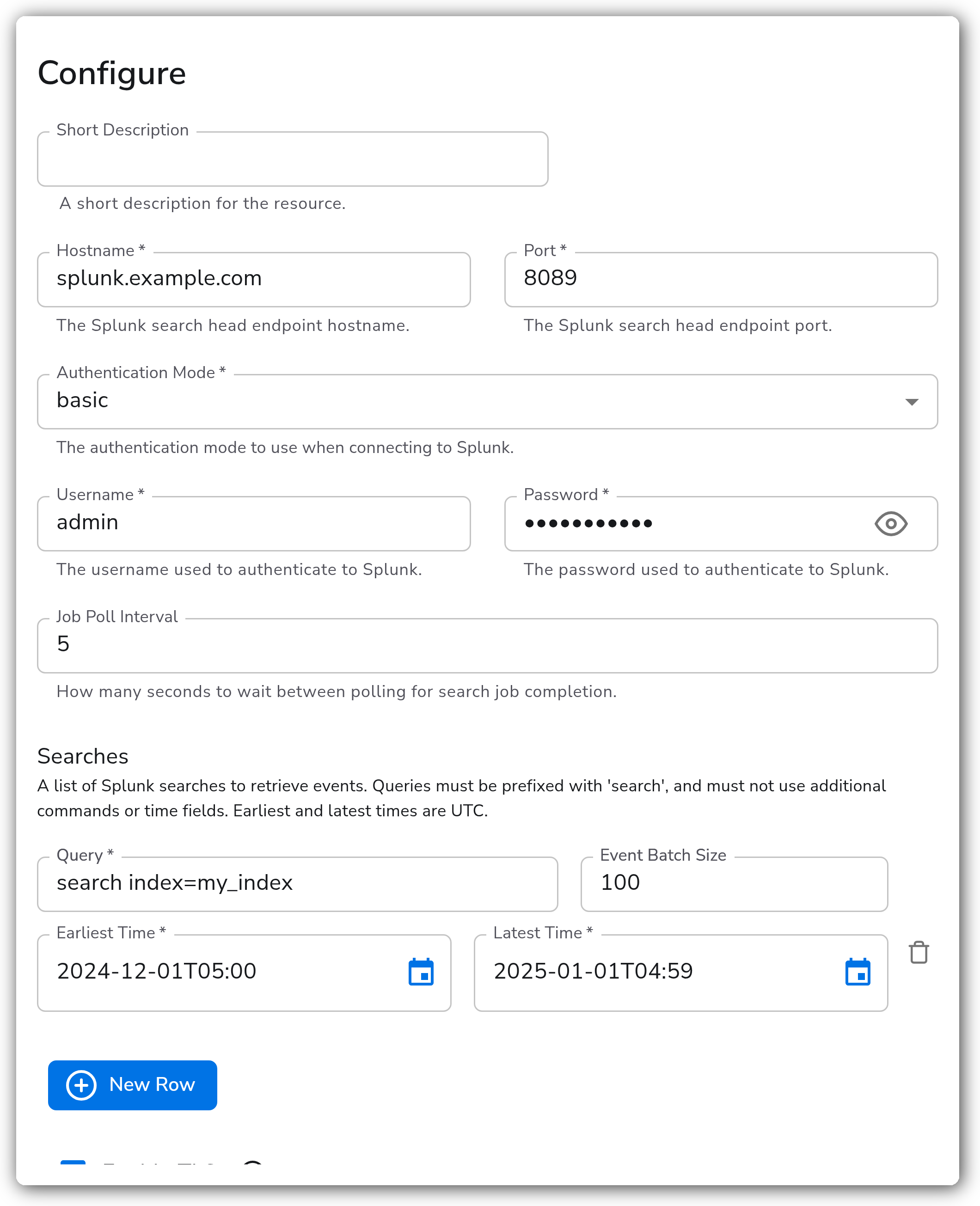
1. Identify the Splunk index to collect events from and write a search that captures those events. This becomes the `query` for a search entry.
* Example: `search index=my_index`
* Queries must begin with the explicit `search` command and must not include additional commands or time fields (for example `earliest`).
2. Determine the timeframe to collect events from, and set the **Earliest Time** and **Latest Time** fields accordingly (both are UTC).
* To collect events from December 2024 in EST (UTC-5):
* Earliest Time: `2024-12-01T05:00`
* Latest Time: `2025-01-01T04:59`
3. Add a search entry per index you want to collect from. The source can run multiple searches at once, but configuring one at a time makes testing and debugging easier.
4. Configure the remaining fields (hostname, port, authentication, TLS) for your Splunk environment.
#### Standalone Source
The following source collects events from a single index over December 2024 (UTC) using basic authentication over TLS:
```yaml
apiVersion: bindplane.observiq.com/v1
kind: Source
metadata:
id: splunk_search_api
name: splunk_search_api
spec:
type: splunk_search_api
parameters:
- name: hostname
value: 'splunk.example.com'
- name: port
value: '8089'
- name: auth_mode
value: 'basic'
- name: splunk_username
value: 'admin'
- name: splunk_password
value: 'my-password'
- name: job_poll_interval
value: '5'
- name: searches
value:
- query: 'search index=my_index'
earliestTime: '2024-12-01T05:00'
latestTime: '2025-01-01T04:59'
eventBatchSize: 100
- name: enable_tls
value: 'true'
- name: enable_storage
value: 'true'
```
To use token authentication instead, set `auth_mode` to `token`, provide `auth_token` and `token_type`, and omit `splunk_username` / `splunk_password`:
```yaml
- name: auth_mode
value: 'token'
- name: auth_token
value: 'my-splunk-token'
- name: token_type
value: 'Bearer'
```
### Configuration Tips
#### Writing search queries
* Every query must begin with the explicit `search` command, for example `search index=my_index sourcetype=access_combined`.
* Do not include time modifiers (`earliest`, `latest`) or additional pipe commands in the query. Set the time range with the **Earliest Time** and **Latest Time** fields instead.
* Earliest and Latest times are interpreted as UTC. Convert local times to UTC before entering them.
#### One search at a time
* The Splunk Search API source is not built to stream live data. It collects a finite set of events over a fixed time range and forwards them, preserving the original Splunk event timestamp.
* Once the source begins collecting events for a search, allow it to complete unless stopping is absolutely necessary. To resume an interrupted search, run that same search again so the source picks up from its checkpoint.
* Switching to a different search before the current one completes wipes the checkpoint for the interrupted search from storage, so its progress is lost.
#### Checkpointing
* Leave `enable_storage` enabled so the source can track progress and resume after a collector restart. The checkpoint is keyed to the search, which is why interrupted searches must be re-run rather than replaced.
### Troubleshooting
**Symptom:** The source cannot connect or authentication fails. **Solution:** Confirm the `hostname` and `port` point at the Splunk search head management endpoint (default `8089`, not the web UI port `8000`). Verify the credentials for the selected `auth_mode`: username and password for `basic`, or `auth_token` and the correct `token_type` (`Bearer` or `Splunk`) for `token`.
**Symptom:** TLS handshake errors or certificate validation failures. **Solution:** If Splunk uses a certificate signed by a private CA, set `ca_file` to that authority. For testing against a self-signed certificate, you can set `insecure_skip_verify` to `true`, but avoid this in production. If Splunk requires client certificate authentication, set both `cert_file` and `key_file`.
**Symptom:** A search returns no events, or fewer than expected. **Solution:** Confirm the query begins with `search` and contains no time fields or extra commands. Check that the **Earliest Time** and **Latest Time** range is in UTC and actually covers the events you expect. Run the same query directly in Splunk over the same UTC range to confirm it matches.
**Symptom:** An interrupted search restarts from the beginning instead of resuming. **Solution:** Ensure `enable_storage` is enabled and `storage_directory` points to a writable, persistent path. Re-run the exact same search to resume from its checkpoint. Switching searches before completion wipes the prior checkpoint.
### Related Resources
* [Splunk REST API Reference — Search endpoints](https://docs.splunk.com/Documentation/Splunk/latest/RESTREF/RESTsearch)
* [Splunk REST API authentication tokens](https://docs.splunk.com/Documentation/Splunk/latest/Security/UseAuthTokens)
* [About writing Splunk searches](https://docs.splunk.com/Documentation/Splunk/latest/Search/Aboutthesearchlanguage)
* [Bindplane Sources documentation](https://docs.bindplane.com/integrations/sources)
---
# Agent Instructions
This documentation is published with GitBook. GitBook is the documentation platform designed so that both humans and AI agents can read, navigate, and reason over technical content effectively. Learn more at gitbook.com.
## Querying This Documentation
If you need additional information that is not directly available in this page, you can query the documentation by asking a question.
Perform an HTTP GET request on the following URL with the `ask` and `goal` query parameters:
```
GET https://docs.bindplane.com/integrations/sources/splunk-search-api.md?ask=&goal=
```
`ask` is the immediate question: it should be specific, self-contained, and written in natural language.
`goal` is what the user is ultimately trying to achieve, the reason they need the answer. Sharing it helps GitBook give you a better, more relevant answer. A goal is most helpful when it describes the outcome the user wants rather than restating the question. For example, with `ask=how do I create an API token`, a goal like `automate deployments from our CI pipeline` lets GitBook tailor the answer to that use case.
The response will contain a direct answer to the question and relevant excerpts and sources from the documentation.
Use this mechanism when the answer is not explicitly present in the current page, you need clarification or additional context, or you want to retrieve related documentation sections.