> For the complete documentation index, see [llms.txt](https://docs.bindplane.com/llms.txt). Markdown versions of documentation pages are available by appending `.md` to page URLs; this page is available as [Markdown](https://docs.bindplane.com/integrations/sources/common-event-format.md).
# Common Event Format
The Common Event Format source reads logs from files written in [Common Event Format (CEF)](https://www.microfocus.com/documentation/arcsight/arcsight-smartconnectors-8.4/cef-implementation-standard/), a standard log format used by many security appliances and SIEM products. Bindplane tails the configured files, tags each record with a type attribute, and can parse the CEF fields into structured data.
### Supported Telemetry Types
| Platform | Metrics | Logs | Traces |
| -------- | ------- | ---- | ------ |
| Linux | | ✓ | |
| Windows | | ✓ | |
| macOS | | ✓ | |
### Prerequisites
* Read access for the collector to the CEF log file paths on the host.
* CEF-formatted log files (for example, output from a security appliance or SIEM forwarder) written to a known location.
### Configuration
#### General
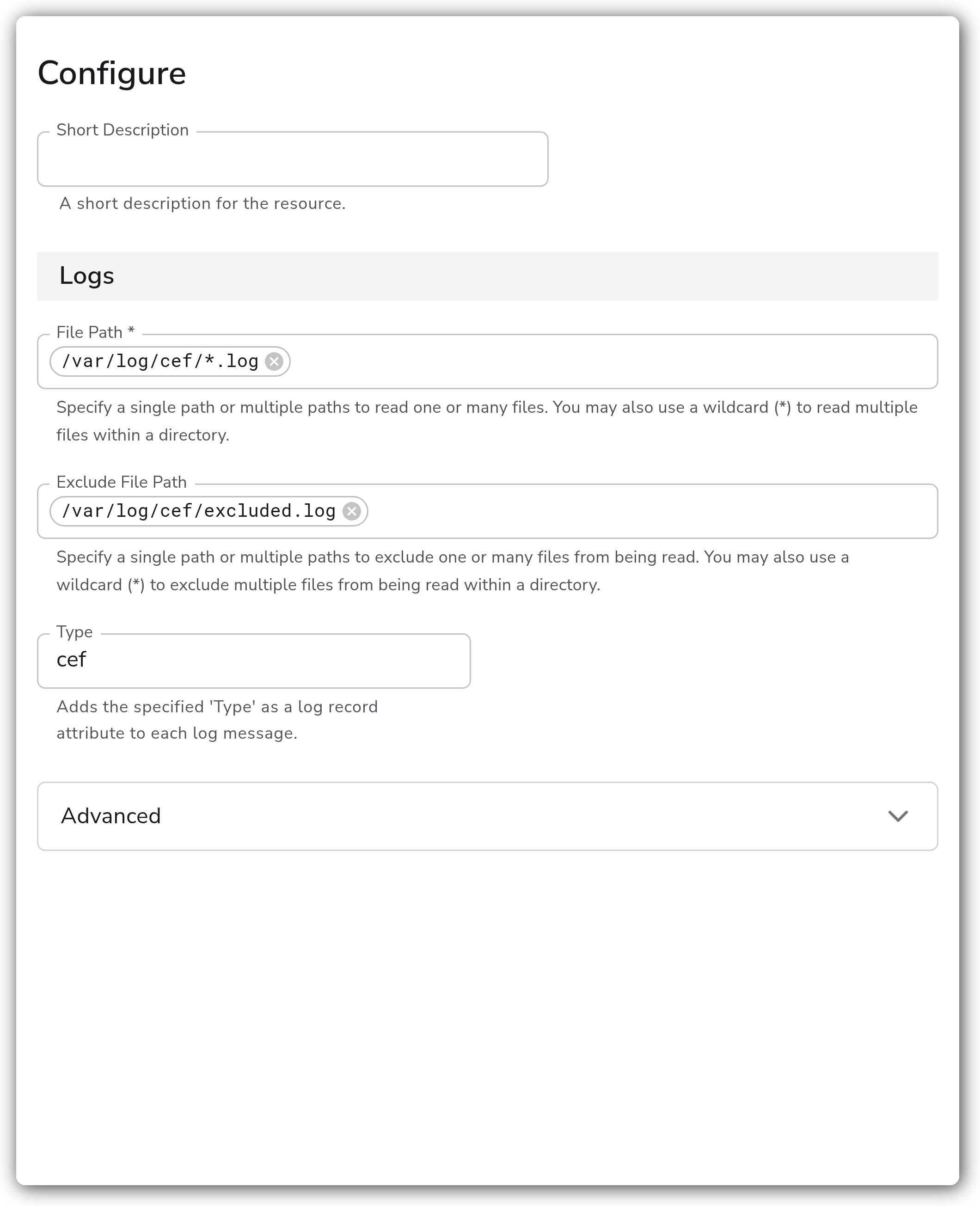
| Parameter | Type | Default | Description |
| ----------------- | ------- | ------- | --------------------------------------------------------------------------------------------------------------------------------------------------------------------- |
| File Path | Strings | `[]` | Specify a single path or multiple paths to read one or many files. You may also use a wildcard (`*`) to read multiple files within a directory. Required. |
| Exclude File Path | Strings | `[]` | Specify a single path or multiple paths to exclude one or many files from being read. You may also use a wildcard (`*`) to exclude multiple files within a directory. |
| Type | String | `cef` | Adds the specified 'Type' as a log record attribute to each log message. |
#### Advanced
| Parameter | Type | Default | Description |
| --------- | -------- | ------- | ----------------------------------------------- |
| Timezone | Timezone | `UTC` | The timezone to use when parsing timestamps. |
| Start At | Enum | `end` | Start reading logs from `beginning` or `end`. |
| Parse | Boolean | `true` | Parses the CEF log fields into structured data. |
### Example Configuration
#### Standalone Source
```yaml
apiVersion: bindplane.observiq.com/v1
kind: Source
metadata:
id: common_event_format
name: common_event_format
spec:
type: common_event_format
parameters:
- name: file_log_path
value:
- '/var/log/cef/*.log'
- name: exclude_file_log_path
value:
- '/var/log/cef/excluded.log'
- name: log_type
value: 'cef'
- name: timezone
value: 'UTC'
- name: start_at
value: 'end'
- name: parse
value: 'true'
```
### Configuration Tips
#### Selecting files
* `file_log_path` accepts multiple entries and supports wildcards, so a pattern like `/var/log/cef/*.log` reads every matching file in a directory.
* Use `exclude_file_log_path` to skip files that match a broad include pattern, for example a rotated or archive file you do not want re-read.
#### Parsing and timestamps
* Leave `parse` enabled to break the CEF fields into structured attributes. Disable it if you prefer to forward the raw record and parse it downstream.
* Set `timezone` to the timezone of the source host when the CEF timestamps do not include an explicit offset, so event times are interpreted correctly.
#### Reading position
* `start_at` defaults to `end`, so only new records written after the collector starts are read. Set it to `beginning` to backfill existing file contents on first run.
### Troubleshooting
**Symptom:** No logs are collected from the configured paths. **Solution:** Confirm the paths in `file_log_path` exist and that the collector's user has read permission on them. Verify any wildcard pattern actually matches files on the host.
**Symptom:** Existing log file contents are not ingested when the source is first deployed. **Solution:** `start_at` defaults to `end`, which only reads new lines. Set `start_at` to `beginning` to read the file from the start.
**Symptom:** Parsed timestamps are off by a fixed number of hours. **Solution:** Set `timezone` to the timezone of the host that produced the logs. CEF timestamps without an explicit offset are interpreted using this value.
### Related Resources
* [ArcSight Common Event Format (CEF) implementation standard](https://www.microfocus.com/documentation/arcsight/arcsight-smartconnectors-8.4/cef-implementation-standard/)
* [Bindplane sources documentation](https://docs.bindplane.com/integrations/sources)
---
# Agent Instructions
This documentation is published with GitBook. GitBook is the documentation platform designed so that both humans and AI agents can read, navigate, and reason over technical content effectively. Learn more at gitbook.com.
## Querying This Documentation
If you need additional information that is not directly available in this page, you can query the documentation by asking a question.
Perform an HTTP GET request on the following URL with the `ask` and `goal` query parameters:
```
GET https://docs.bindplane.com/integrations/sources/common-event-format.md?ask=&goal=
```
`ask` is the immediate question: it should be specific, self-contained, and written in natural language.
`goal` is what the user is ultimately trying to achieve, the reason they need the answer. Sharing it helps GitBook give you a better, more relevant answer. A goal is most helpful when it describes the outcome the user wants rather than restating the question. For example, with `ask=how do I create an API token`, a goal like `automate deployments from our CI pipeline` lets GitBook tailor the answer to that use case.
The response will contain a direct answer to the question and relevant excerpts and sources from the documentation.
Use this mechanism when the answer is not explicitly present in the current page, you need clarification or additional context, or you want to retrieve related documentation sections.