> For the complete documentation index, see [llms.txt](https://docs.bindplane.com/llms.txt). Markdown versions of documentation pages are available by appending `.md` to page URLs; this page is available as [Markdown](https://docs.bindplane.com/integrations/sources/windows-events.md).
# Windows Events
Reads logs from the Windows Event Log. You either pick the channels to collect from or supply an XML QueryList for finer targeting, and the source streams events as they arrive or polls on an interval. Security identifiers in the events can optionally be resolved to account names.
### Supported Telemetry Types
| Platform | Metrics | Logs | Traces |
| -------- | ------- | ---- | ------ |
| Windows | | ✓ | |
### Prerequisites
* The collector service account needs read access to each channel it collects. The Security channel in particular requires elevated rights, so a collector running as a low-privilege user will fail to open it.
* For SID resolution on a domain-joined machine, the collector host needs to reach a domain controller. Well-known SIDs resolve locally without any network call.
### Configuration
The form is organized into Channels, Collection, and Advanced tabs.
#### Basic Configuration
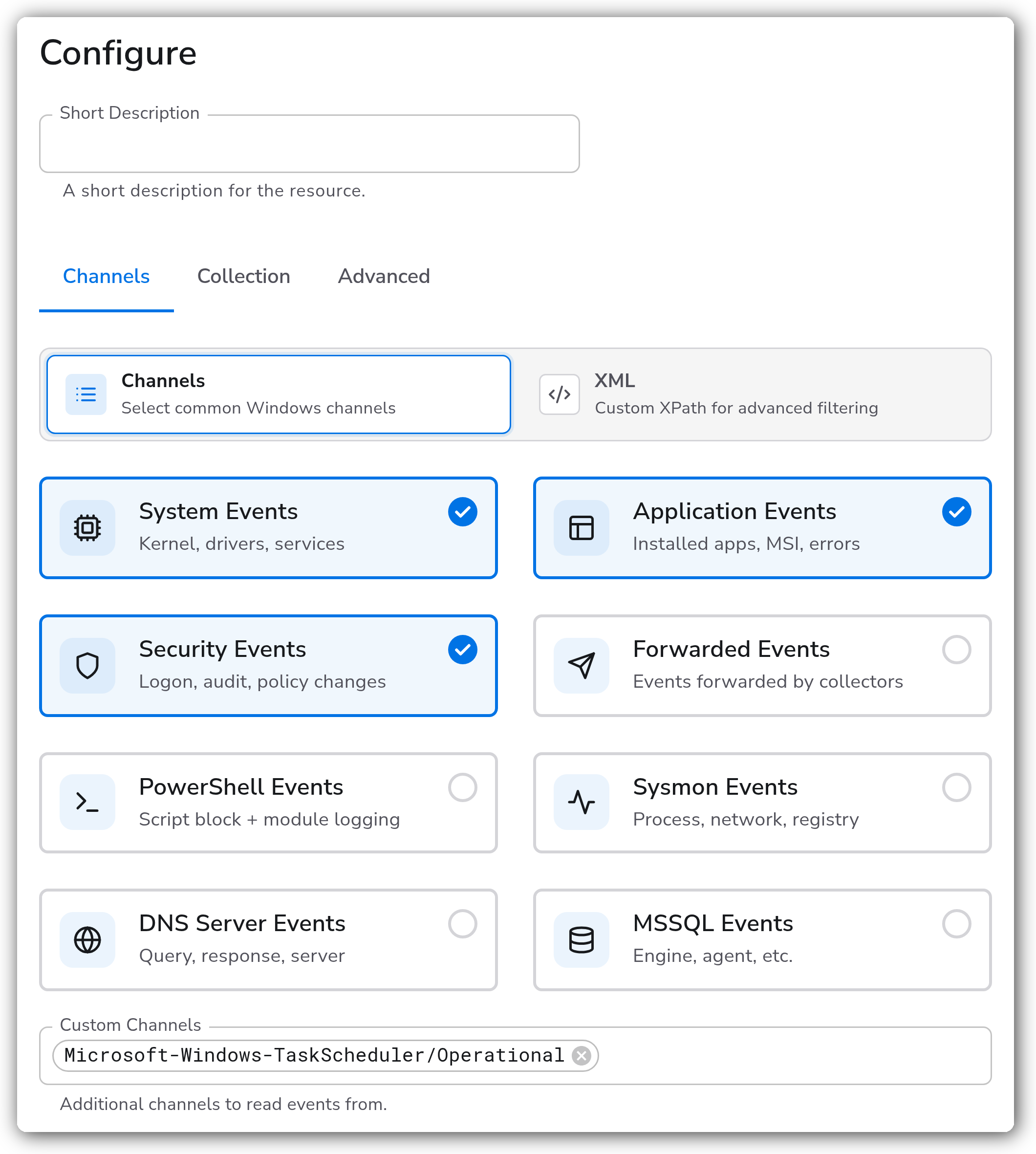
#### Channels
Mode switches the whole tab between picking channels and supplying a query. The two are exclusive.
| Parameter | Type | Required | Default | Description |
| -------------------- | ----------- | -------- | ------------------------------------------- | --------------------------------------------------------------------------------------------------- |
| Mode | Mode Toggle | No | Channels | Choose between selecting channels below or writing an XML QueryList. |
| System Events | Boolean | No | `true` | Collect the System channel. |
| Application Events | Boolean | No | `true` | Collect the Application channel. |
| Security Events | Boolean | No | `true` | Collect the Security channel. Needs elevated rights on the collector service account. |
| Forwarded Events | Boolean | No | `false` | Collect the ForwardedEvents channel, used by Windows Event Forwarding subscriptions. |
| PowerShell Events | Boolean | No | `false` | Collect the Windows PowerShell channel. |
| Sysmon Events | Boolean | No | `false` | Collect Microsoft-Windows-Sysmon/Operational. Requires Sysmon installed on the host. |
| DNS Server Events | Boolean | No | `false` | Collect Microsoft-Windows-DNSServer/Operational. |
| MSSQL Events | Boolean | No | `false` | Collect Microsoft SQL Server events from the Application channel. |
| MSSQL Instance Names | Strings | No | `MSSQLSERVER` | Instance names to collect SQL Server events for. Appears when MSSQL Events is on. |
| Custom Channels | Strings | No | `[]` | Any other channel names to read, for channels not listed above. |
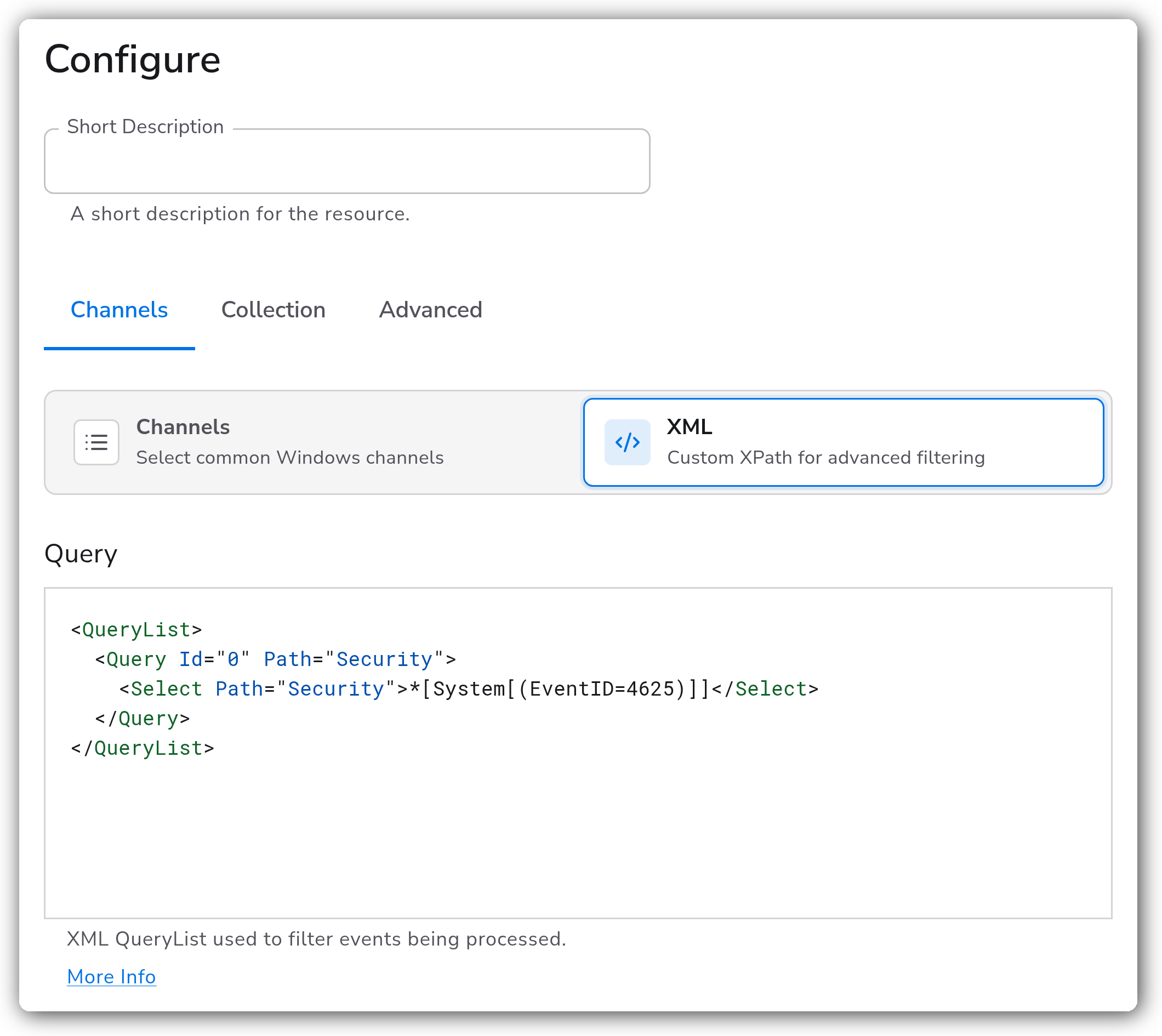
| Query | XML | No | a `` selecting all System events | XML QueryList used to select and filter events. Appears in XML mode instead of the channel toggles. |
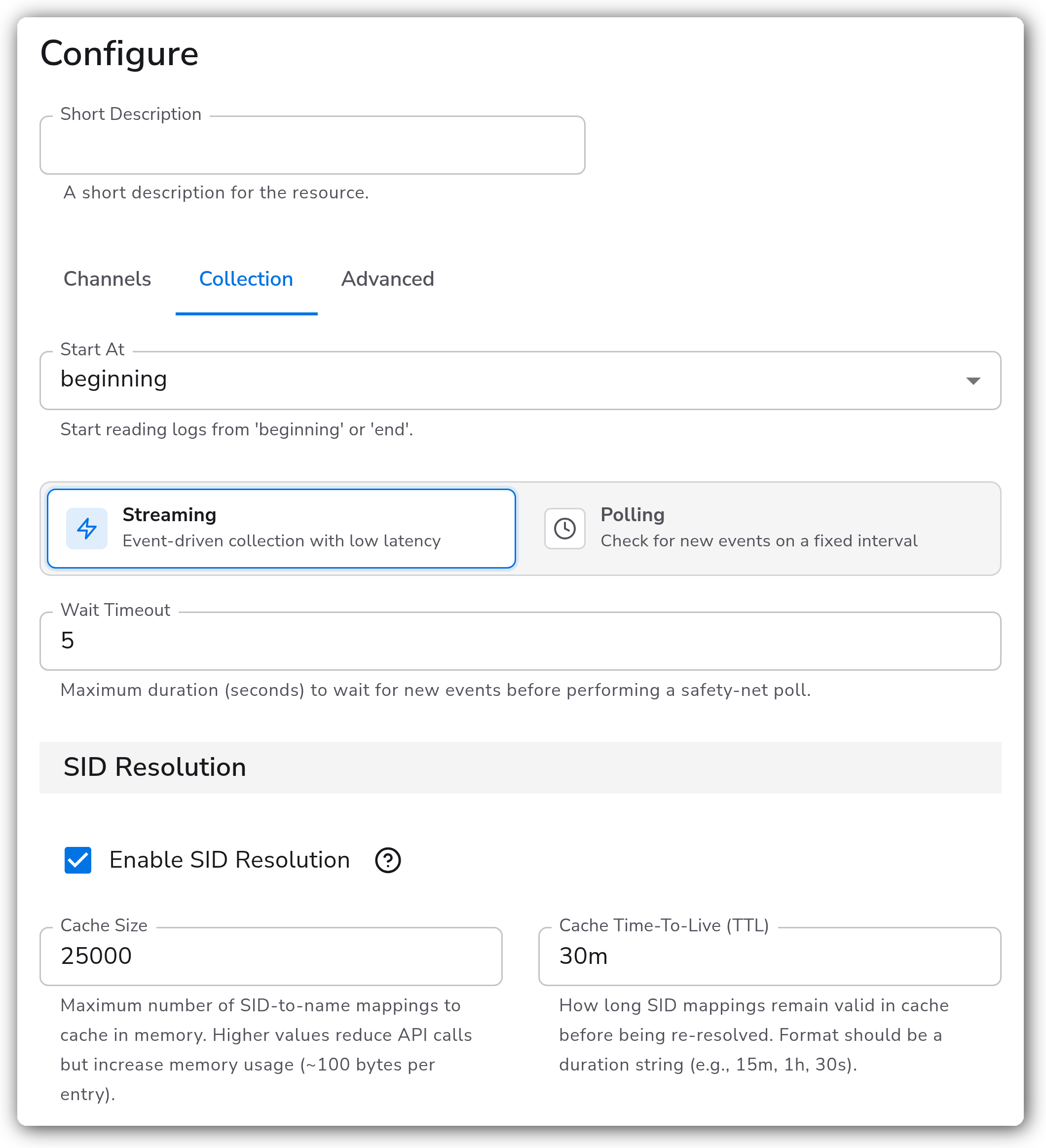
#### Collection
| Parameter | Type | Required | Default | Description |
| ---------------- | ----------- | -------- | --------- | --------------------------------------------------------------------------------------------------------- |
| Collection Mode | Mode Toggle | No | Streaming | Streaming subscribes and receives events as they are written. Polling checks on a fixed interval instead. |
| Polling Interval | Float | No | `5` | Seconds between polls. Appears in Polling mode. |
| Wait Timeout | Float | No | `5` | Seconds to wait for new events before a safety-net poll. Appears in Streaming mode. |
| Start At | Enum | No | `end` | Whether a first run reads the channel's existing backlog (`beginning`) or only new events (`end`). |
#### SID Resolution
Off by default. When on, security identifiers in the event data are resolved to account names.
| Parameter | Type | Required | Default | Description |
| ------------------------ | ------- | -------- | ------- | ---------------------------------------------------------------------------------------------------------------------------------- |
| Enable SID Resolution | Boolean | No | `false` | Resolve SID values such as `S-1-5-18` to names such as `NT AUTHORITY\SYSTEM`. |
| Cache Size | Integer | No | `10000` | Most resolved SIDs to keep cached. Raise it in environments with many distinct accounts. |
| Cache Time-To-Live (TTL) | String | No | `15m` | How long a resolved entry is reused before another lookup. Lower values notice account changes sooner at the cost of more lookups. |
For every event-data field ending in `Sid`, such as `SubjectUserSid` or `TargetUserSid`, resolution adds four companion fields alongside it:
* `{FieldName}_Resolved`, the fully qualified name
* `{FieldName}_Domain`, the domain
* `{FieldName}_Account`, the account
* `{FieldName}_Type`, the account type
Well-known SIDs such as SYSTEM, BUILTIN\Administrators, and LOCAL SERVICE resolve locally with no network call. Everything else goes through the Windows LSA API, which contacts a domain controller on domain-joined machines. A SID that cannot be resolved keeps its original value and the event is still emitted, so nothing is dropped on a lookup failure.
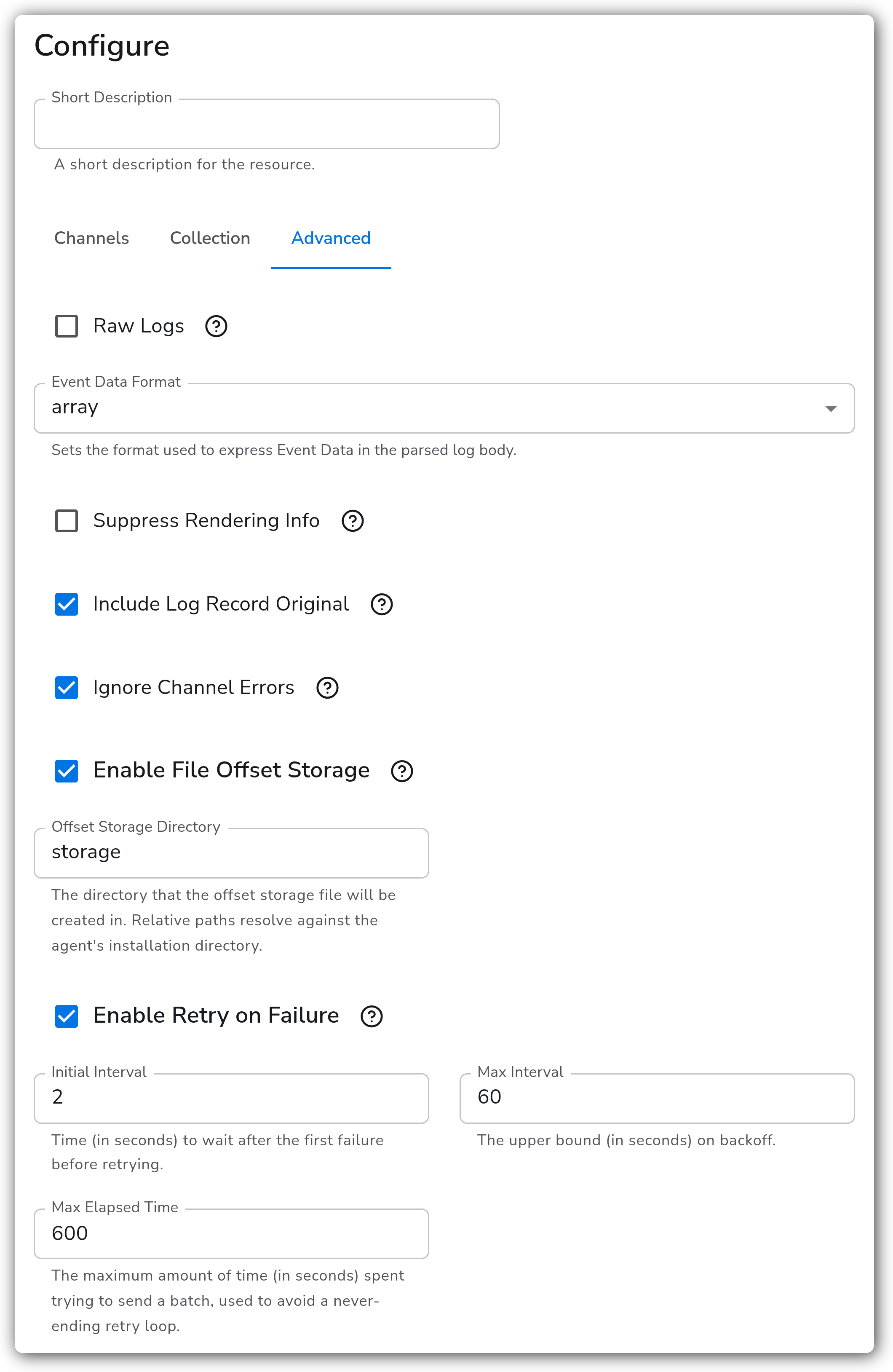
#### Advanced
| Parameter | Type | Required | Default | Description |
| --------------------------- | ------- | -------- | --------- | ---------------------------------------------------------------------------------------------- |
| Raw Logs | Boolean | No | `true` | Keep the event's XML as the log body rather than parsing it into a structure. |
| Event Data Format | Enum | No | `map` | Whether parsed Event Data becomes a `map` or an `array`. Appears when Raw Logs is off. |
| Suppress Rendering Info | Boolean | No | `true` | Skip resolving rendering info. Faster, and it drops some human-readable detail from the event. |
| Include Log Record Original | Boolean | No | `true` | Keep the original record on the log alongside anything derived from it. |
| Ignore Channel Errors | Boolean | No | `true` | Log a warning instead of shutting the collector down when a channel cannot be opened. |
| Enable File Offset Storage | Boolean | No | `true` | Persist read position to disk so a restart resumes where it stopped instead of re-reading. |
| Offset Storage Directory | String | No | `storage` | Directory for the offset file, relative to the collector's home directory. |
| Enable Retry on Failure | Boolean | No | `true` | Retry telemetry that fails to reach the destination. |
| Initial Interval | Integer | No | `1` | Seconds to wait after the first failure before retrying. |
| Max Interval | Integer | No | `30` | Upper bound on the retry backoff, in seconds. |
| Max Elapsed Time | Integer | No | `300` | Longest time to keep retrying one batch, in seconds, so a failing batch cannot retry forever. |
### Examples
#### Target specific events with an XML QueryList
Switches to XML mode and selects only failed logon events from the Security channel, which is far cheaper than collecting the whole channel and filtering downstream.
### Configuration Tips
#### Finding a custom channel name
* Custom Channels takes the channel's full name rather than its display name. List what a host actually exposes with `Get-WinEvent -ListLog *` in PowerShell.
* Sysmon and DNS Server have their own toggles, so they do not need to be added as custom channels.
#### Keeping the event volume manageable
* The Security channel is by far the noisiest on a domain controller. XML mode with a QueryList that selects specific event IDs collects less than enabling the channel and filtering later.
* `Suppress Rendering Info` defaults to on because resolving rendering info is expensive. Turn it off only when you need the human-readable message text.
* `Start At` defaults to `end`, so a new source does not ingest the existing backlog. Set it to `beginning` deliberately, and expect a large initial burst.
### Troubleshooting
#### The Security channel produces nothing while other channels work
Symptoms: System and Application events arrive, Security events do not, and the collector logs a channel-open warning.
Solutions:
1. Confirm the collector service account has rights to read the Security channel. This is the usual cause, since it needs more than the other channels.
2. Note that `Ignore Channel Errors` defaults to on, which turns a failed channel open into a warning rather than a startup failure. Check the collector log for that warning rather than expecting a hard error.
#### Events stop arriving after a collector restart, or arrive twice
Symptoms: a gap or a burst of duplicates around a restart.
Solutions:
1. Confirm `Enable File Offset Storage` is on. Without it, a restart resumes from `Start At` rather than from the last read position.
2. Confirm the collector can write to the offset directory. A directory it cannot write to silently leaves the position untracked.
#### SIDs are not being resolved
Symptoms: event data still carries raw `S-1-5-...` values with no companion fields.
Solutions:
1. Confirm `Enable SID Resolution` is on. It defaults to off.
2. Only fields whose names end in `Sid` are resolved. A SID appearing in the message text is not.
3. On a domain-joined host, confirm a domain controller is reachable. Well-known SIDs resolve locally, so partial resolution points at a connectivity problem rather than a configuration one.
### Standalone Source
```yaml
apiVersion: bindplane.observiq.com/v1
kind: Source
metadata:
name: windows-events
spec:
type: windowsevents_v3
parameters:
- name: use_xml_query
value: false
- name: system_event_input
value: true
- name: app_event_input
value: true
- name: security_event_input
value: true
- name: custom_channels
value:
- Microsoft-Windows-TaskScheduler/Operational
- name: use_polling_collection_mode
value: false
- name: wait_timeout
value: 5
- name: start_at
value: end
- name: resolve_sids_enabled
value: true
- name: resolve_sids_cache_size
value: 10000
- name: resolve_sids_cache_ttl
value: 15m
- name: raw_logs
value: true
- name: enable_offset_storage
value: true
```
### Related Resources
* [Windows Event Log Receiver (windowseventlogreceiver) reference](https://github.com/open-telemetry/opentelemetry-collector-contrib/tree/main/receiver/windowseventlogreceiver)
* [Microsoft: Consuming events with an XML query](https://learn.microsoft.com/en-us/windows/win32/wes/consuming-events)
* [Microsoft: Well-known SID structures](https://learn.microsoft.com/en-us/windows/win32/secauthz/well-known-sids)
### Bindplane Resources
* [Windows Event Forwarding Source](/integrations/sources/windows-event-forwarding.md)
* [Windows Event Trace (ETW) Source](/integrations/sources/windows-event-trace-etw.md)
* [Windows DHCP Source](/integrations/sources/windows-dhcp.md)
---
# Agent Instructions
This documentation is published with GitBook. GitBook is the documentation platform designed so that both humans and AI agents can read, navigate, and reason over technical content effectively. Learn more at gitbook.com.
## Querying This Documentation
If you need additional information that is not directly available in this page, you can query the documentation by asking a question.
Perform an HTTP GET request on the following URL with the `ask` and `goal` query parameters:
```
GET https://docs.bindplane.com/integrations/sources/windows-events.md?ask=&goal=
```
`ask` is the immediate question: it should be specific, self-contained, and written in natural language.
`goal` is what the user is ultimately trying to achieve, the reason they need the answer. Sharing it helps GitBook give you a better, more relevant answer. A goal is most helpful when it describes the outcome the user wants rather than restating the question. For example, with `ask=how do I create an API token`, a goal like `automate deployments from our CI pipeline` lets GitBook tailor the answer to that use case.
The response will contain a direct answer to the question and relevant excerpts and sources from the documentation.
Use this mechanism when the answer is not explicitly present in the current page, you need clarification or additional context, or you want to retrieve related documentation sections.