> For the complete documentation index, see [llms.txt](https://docs.bindplane.com/llms.txt). Markdown versions of documentation pages are available by appending `.md` to page URLs; this page is available as [Markdown](https://docs.bindplane.com/integrations/sources/sql-query.md).
# SQL Query
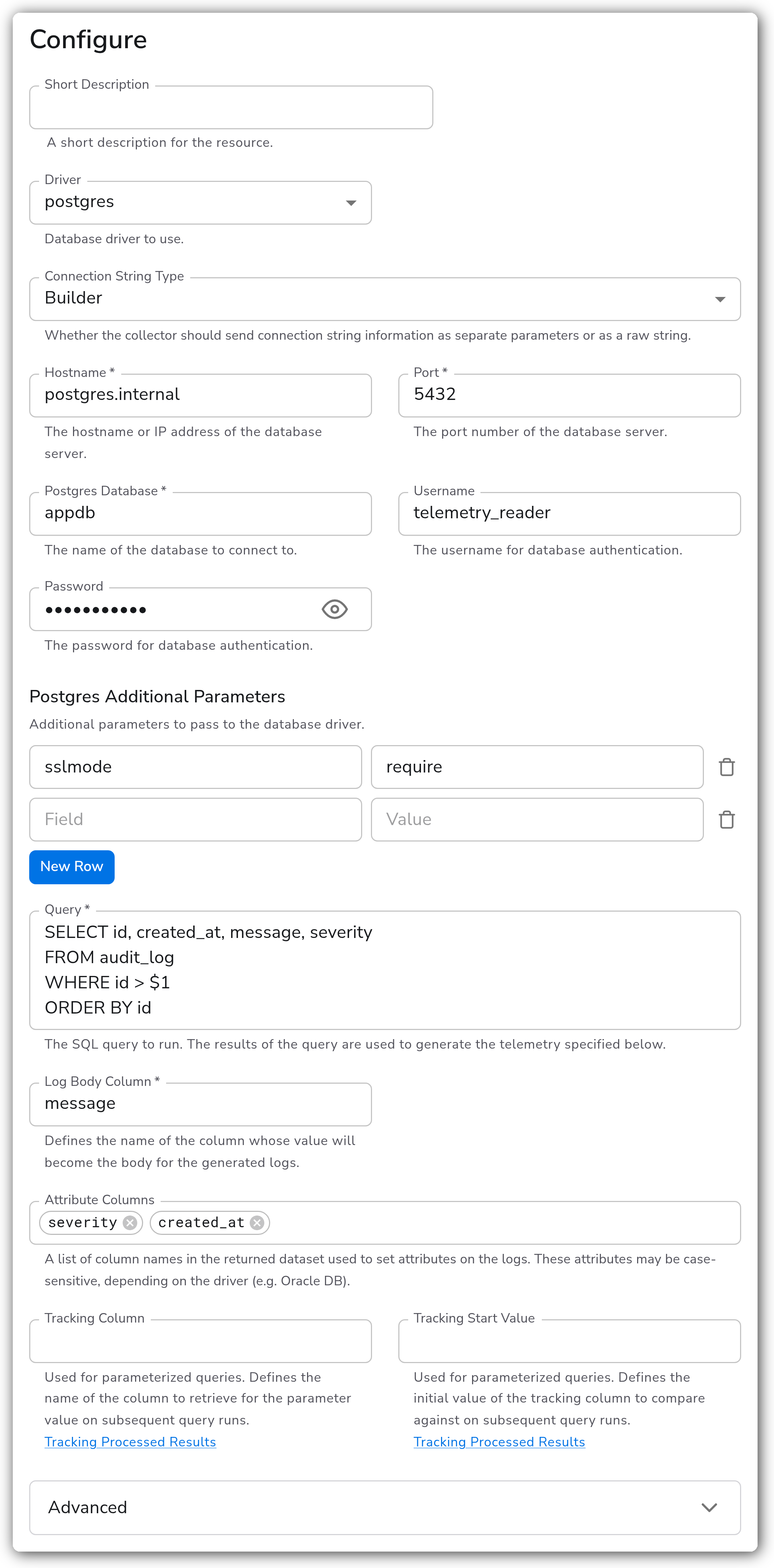
Runs a SQL query against a database on an interval and turns each returned row into a log record. You choose which column becomes the log body and which columns become attributes. For tables that only grow, a tracking column lets each run pick up where the last one stopped instead of re-reading the whole result set.
### Supported Telemetry Types
| Platform | Metrics | Logs | Traces |
| -------- | ------- | ---- | ------ |
| Linux | | ✓ | |
| Windows | | ✓ | |
| macOS | | ✓ | |
### Prerequisites
* A reachable database and a user that can run the query. A read-only account is enough, and least privilege is worth applying since the query text is whatever you supply.
* The database port open from the Bindplane collector host.
* For Oracle, note that column names come back uppercase unless the query quotes them. Attribute Columns are matched case-sensitively, so `"my_column"` in the query and `my_column` in the parameter have to agree.
### Configuration
#### Basic Configuration
| Parameter | Type | Required | Default | Description |
| ---------------------- | ------- | --------------- | ------------------ | ------------------------------------------------------------------------------------------------------------------------------------ |
| Driver | Enum | No | `postgres` | Database driver: postgres, mysql, snowflake, sqlserver, or oracle. Several fields below change with it.1 |
| Connection String Type | Enum | No | `Builder` | `Builder` sends host, port, database, and credentials as separate settings. `Raw` assembles them into one connection string instead. |
| Hostname | String | Yes | *(empty)* | Hostname or IP address of the database server. |
| Instance | String | No | *(empty)* | Named SQL Server instance. Appears for the sqlserver driver only, and is appended to the hostname. |
| Port | Integer | Yes2 | varies3 | Port the database listens on. |
| Database | String | Yes | *(empty)* | Name of the database to connect to. The field is labeled for the selected driver, for example Postgres Database.1 |
| Username | String | No | *(empty)* | User the query runs as. |
| Password | String | No | *(empty)* | Password for that user. Stored as a sensitive value and rendered masked. |
| Additional Parameters | Map | No | varies4 | Extra driver options passed through to the connection, as Field and Value pairs. |
1. *Port, Database, and Additional Parameters exist once per driver and only the selected driver's copy is shown, which is why their labels carry a driver name.*
2. *Optional for the sqlserver driver, required for the other four.*
3. *postgres `5432`, mysql `3306`, snowflake `443`, sqlserver `1433`, oracle `1521`.*
4. *The postgres driver defaults to `sslmode: disable`. The other drivers default to no parameters.*
#### Query and Log Mapping
These decide what the query returns and how a row becomes a log record.
| Parameter | Type | Required | Default | Description |
| ----------------- | ------- | -------- | --------- | ----------------------------------------------------------------------------------------------------------------------- |
| Query | String | Yes | *(empty)* | The SQL to run. Multi-line, so a readable query does not have to be flattened onto one line. |
| Log Body Column | String | Yes | *(empty)* | Column whose value becomes the log body. One column per row becomes the body; the rest are dropped unless listed below. |
| Attribute Columns | Strings | No | `[]` | Columns to attach to the log as attributes. Anything not named here and not the body column is discarded. |
#### Incremental Collection
Without these, every run re-reads whatever the query returns and re-emits it. With them, the query becomes parameterized and each run resumes after the last value it saw.
| Parameter | Type | Required | Default | Description |
| -------------------- | ------ | -------- | --------- | ------------------------------------------------------------------------------------------------------------------ |
| Tracking Column | String | No | *(empty)* | Column holding the value to resume from, typically a monotonic ID or timestamp. |
| Tracking Start Value | String | No | *(empty)* | Value to compare against on the first run. Set it to skip existing rows rather than ingesting the table's history. |
Reference the tracked value in the query with the driver's placeholder syntax, for example `WHERE id > $1` for postgres.
#### Advanced
| Parameter | Type | Required | Default | Description |
| ----------------------- | -------- | -------- | ------- | ----------------------------------------------------------------------------------------------------------------------------------------------------- |
| Collection Interval | Duration | Yes | `10s` | How often the query runs. Raise it for expensive queries, since each run is a real query against the database. |
| Enable Tracking Storage | Boolean | No | `true` | Persist the tracking value across collector restarts, in the collector's `storage` directory. Off means a restart re-reads from Tracking Start Value. |
| Enable Query Logging | Boolean | No | `false` | Log each query and its parameters as it runs. Useful while building a query, and it puts query text in the collector log. |
### Examples
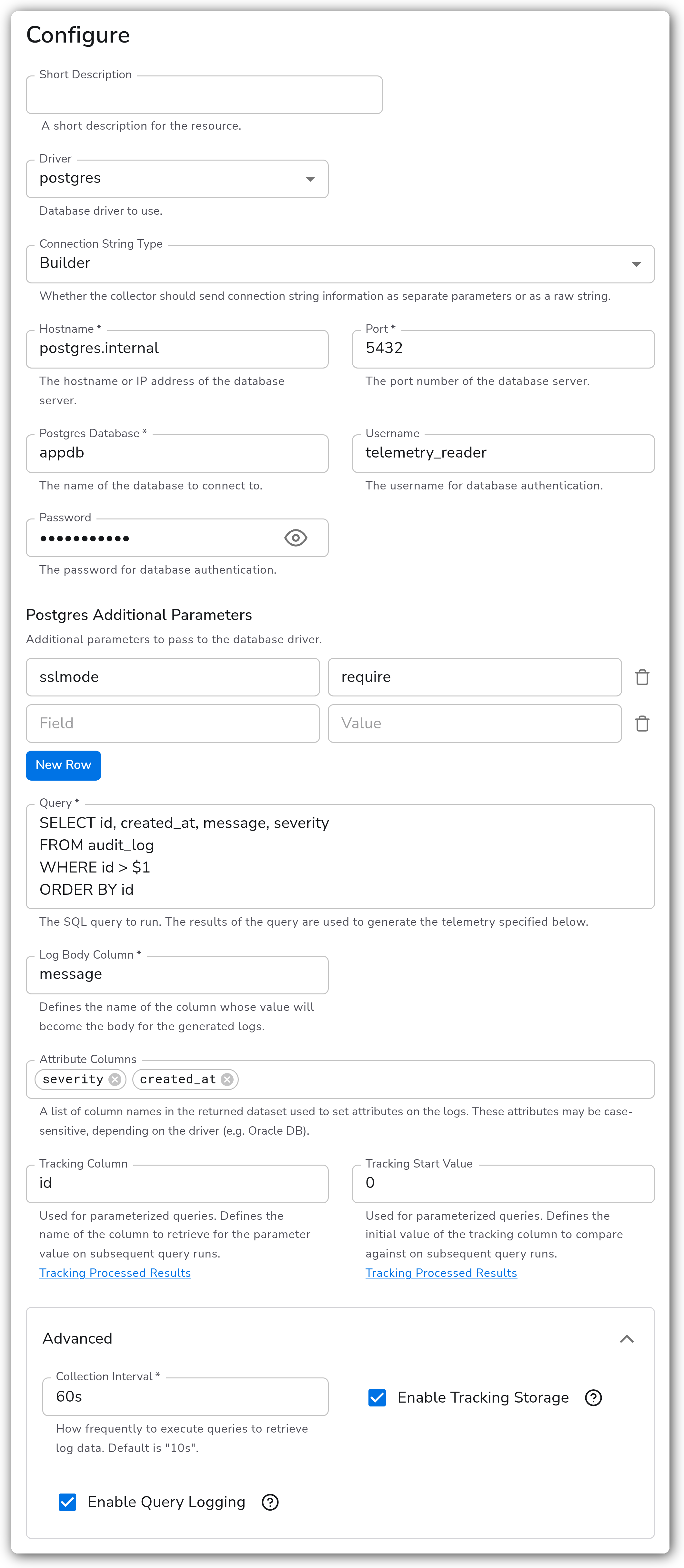
#### Resume from a tracking column across restarts
Reads an append-only audit table, resuming from the highest `id` already seen and persisting that value so a collector restart does not re-ingest the table. Collection is slowed to a minute and query logging is on while the query is being validated.
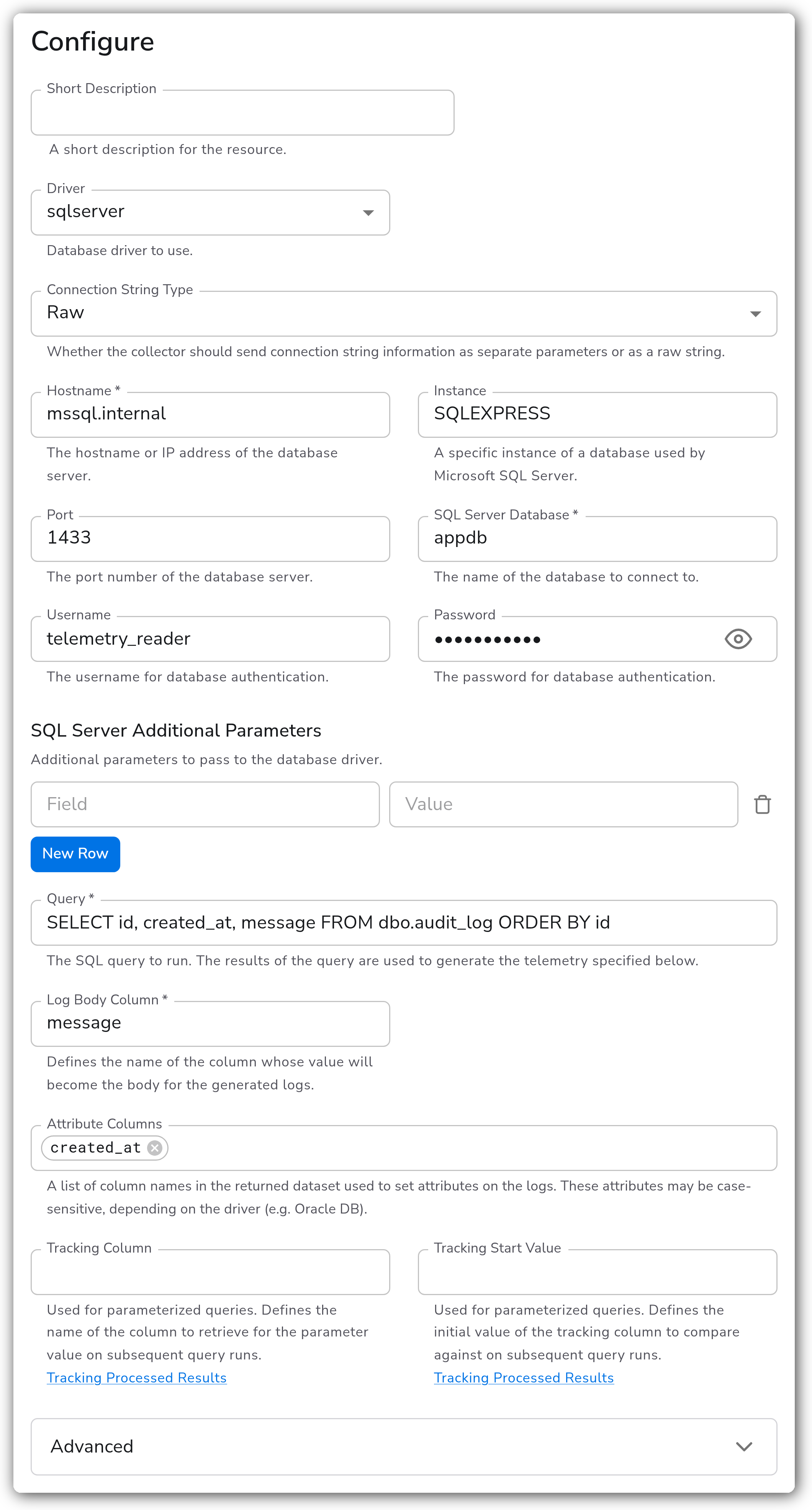
#### Named SQL Server instance over a raw connection string
Targets a named instance on a SQL Server host and hands the driver one assembled connection string rather than separate settings.
### Configuration Tips
#### Keeping the query cheap
* The query runs in full on every interval, so an unbounded `SELECT *` against a large table is a repeated full scan. Constrain it with a `WHERE` clause, or use a tracking column so each run only reads new rows.
* Index the tracking column. It appears in the `WHERE` clause of every run.
#### Choosing the connection string type
* `Builder` is the default and keeps the password out of a single opaque string, which makes it easier to rotate one field.
* `Raw` is the fallback for options the builder does not express, such as a driver-specific DSN feature. It assembles host, port, database, and credentials for you.
### Troubleshooting
#### No logs arrive, and the collector reports no error
Symptoms: the source is healthy and the destination stays empty.
Solutions:
1. Run the query directly against the database as the same user. An empty result set produces no logs and no error.
2. Check whether a tracking value has advanced past your data. When Enable Tracking Storage is on, the stored value survives restarts, so a value set past the rows you expect keeps the query returning nothing. Clear the collector's `storage` directory, or set Tracking Start Value lower.
3. Confirm Log Body Column names a column the query actually returns. A body column that is not in the result set yields no usable record.
#### Attributes are missing from the logs
Symptoms: log bodies arrive, but the columns listed in Attribute Columns are absent.
Solutions:
1. Match the case exactly. Oracle in particular uppercases unquoted identifiers, so a query selecting `id` returns `ID`.
2. Confirm each named column is in the result set. A column selected in a subquery but not projected in the outer query will not be there.
#### Connection refused or authentication failed
Symptoms: the collector logs a connection or authentication error each interval.
Solutions:
1. Confirm the port matches the driver. The default changes with Driver, so switching drivers after setting a port can leave a mismatch.
2. For postgres, the default Additional Parameters set `sslmode: disable`. A server that requires TLS rejects that, so set `sslmode` to `require` or stricter.
3. For SQL Server with a named instance, put the instance in Instance rather than appending it to Hostname yourself.
### Standalone Source
```yaml
apiVersion: bindplane.observiq.com/v1
kind: Source
metadata:
name: sql-query
spec:
type: sqlquery_v2
parameters:
- name: driver
value: postgres
- name: connection_string_type
value: Builder
- name: hostname
value: postgres.internal
- name: port_postgres
value: 5432
- name: postgres_database
value: appdb
- name: username
value: telemetry_reader
- name: password
value: changeme
- name: postgres_additional_params
value:
sslmode: require
- name: query
value: SELECT id, created_at, message, severity FROM audit_log WHERE id > $1 ORDER BY id
- name: body_column
value: message
- name: attribute_columns
value:
- severity
- created_at
- name: tracking_column
value: id
- name: tracking_start_value
value: "0"
- name: interval
value: 60s
- name: enable_storage
value: true
```
### Related Resources
* [SQL Query Receiver (sqlqueryreceiver) reference](https://github.com/open-telemetry/opentelemetry-collector-contrib/tree/main/receiver/sqlqueryreceiver)
* [Tracking processed results](https://github.com/open-telemetry/opentelemetry-collector-contrib/tree/main/receiver/sqlqueryreceiver#tracking-processed-results)
### Bindplane Resources
* [PostgreSQL Source](/integrations/sources/postgresql.md)
* [MySQL Source](/integrations/sources/mysql.md)
* [Microsoft SQL Server Source](/integrations/sources/microsoft-sql-server.md)
* [Oracle Database Source](/integrations/sources/oracle-database.md)
---
# Agent Instructions
This documentation is published with GitBook. GitBook is the documentation platform designed so that both humans and AI agents can read, navigate, and reason over technical content effectively. Learn more at gitbook.com.
## Querying This Documentation
If you need additional information that is not directly available in this page, you can query the documentation by asking a question.
Perform an HTTP GET request on the following URL with the `ask` and `goal` query parameters:
```
GET https://docs.bindplane.com/integrations/sources/sql-query.md?ask=&goal=
```
`ask` is the immediate question: it should be specific, self-contained, and written in natural language.
`goal` is what the user is ultimately trying to achieve, the reason they need the answer. Sharing it helps GitBook give you a better, more relevant answer. A goal is most helpful when it describes the outcome the user wants rather than restating the question. For example, with `ask=how do I create an API token`, a goal like `automate deployments from our CI pipeline` lets GitBook tailor the answer to that use case.
The response will contain a direct answer to the question and relevant excerpts and sources from the documentation.
Use this mechanism when the answer is not explicitly present in the current page, you need clarification or additional context, or you want to retrieve related documentation sections.