> For the complete documentation index, see [llms.txt](https://docs.bindplane.com/llms.txt). Markdown versions of documentation pages are available by appending `.md` to page URLs; this page is available as [Markdown](https://docs.bindplane.com/integrations/sources/packet-capture.md).
# Packet Capture
The Packet Capture (PCAP) source captures network packets directly from a host network interface and emits them as OpenTelemetry logs. It uses system-native capture tools (`tcpdump` on macOS and Linux, Npcap on Windows) and supports Berkeley Packet Filter (BPF) expressions to limit capture to the traffic you care about.
### Supported Telemetry Types
| Platform | Metrics | Logs | Traces |
| -------- | ------- | ---- | ------ |
| Linux | | ✓ | |
| Windows | | ✓ | |
| macOS | | ✓ | |
### Prerequisites
Packet Capture reads directly from a host interface, so the requirements are local to the collector machine.
* **Elevated privileges.** Capturing packets requires root (macOS/Linux) or Administrator (Windows). Run the collector with sufficient privileges or the capture will fail to open the interface.
* **A capture driver/tool must be present:**
* **macOS / Linux:** `tcpdump` is pre-installed on macOS and most Linux distributions. Verify with:
```bash
tcpdump --version
```
* **Windows:** the Npcap driver is required. Install it from [npcap.com](https://npcap.com/), or install Wireshark, which bundles Npcap.
* **A valid interface name.** You must supply the exact interface name as seen by the host. See the platform-specific listing commands below.
#### Listing interfaces
**macOS / Linux** — list available interfaces with:
```bash
tcpdump -D
```
**Windows** — if Wireshark is installed, use the bundled `dumpcap` executable:
```powershell
C:\path-to-wireshark-installation\dumpcap.exe -D
```
Otherwise, list adapters with PowerShell:
```powershell
Get-NetAdapter | Select-Object DeviceName
```
`Get-NetAdapter` returns the device path but not in the Npcap format the receiver expects. Convert it by inserting `NPF_` after `\Device\`:
```
\Device\{1D5B8F34-3D34-47E7-960B-E18EBC729A13} -> \Device\NPF_{1D5B8F34-3D34-47E7-960B-E18EBC729A13}
```
### Configuration
| Parameter | Type | Required | Default | Description |
| ----------------- | ------ | -------- | --------- | ------------------------------------------------------------------------------------------------------------------------------------------ |
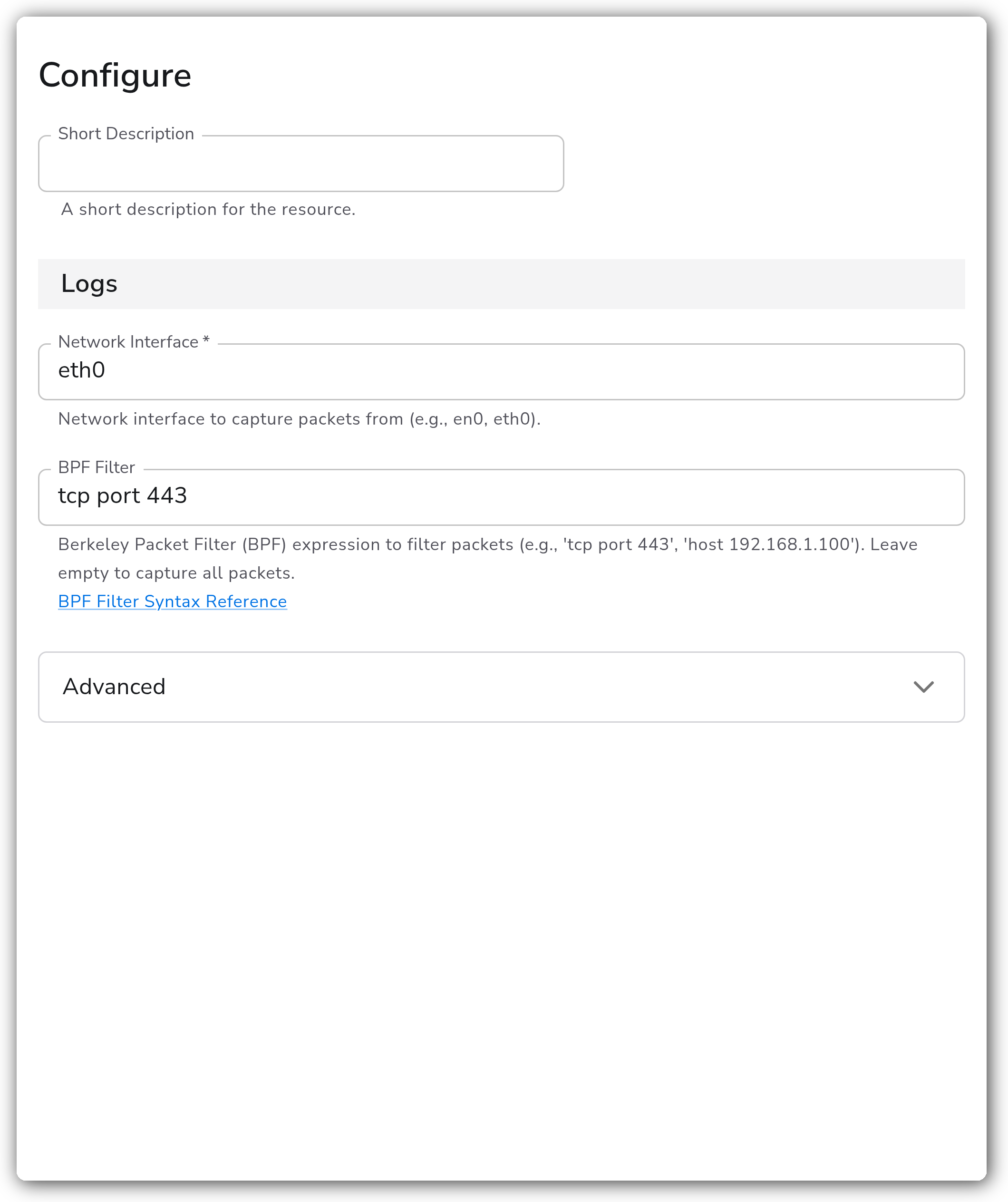
| Network Interface | String | Yes | *(empty)* | Network interface to capture packets from (e.g. `en0`, `eth0`). |
| BPF Filter | String | No | *(empty)* | Berkeley Packet Filter (BPF) expression to filter packets (e.g. `tcp port 443`, `host 192.168.1.100`). Leave empty to capture all packets. |
#### Advanced
| Parameter | Type | Required | Default | Description |
| ---------------- | ------- | -------- | ------- | ----------------------------------------------------------------------------------------------------------------- |
| Parse Attributes | Boolean | No | `true` | Parse packet headers into attributes. |
| Promiscuous Mode | Boolean | No | `true` | Enable promiscuous mode to capture all network traffic on the interface, not just traffic addressed to this host. |
| Snap Length | Integer | No | `65535` | Maximum bytes to capture per packet (64-65535). Packets larger than this are truncated. |
#### BPF filter examples
BPF expressions restrict capture to specific traffic, which keeps log volume manageable:
```yaml
# Capture only HTTPS traffic
filter: "tcp port 443"
# Capture DNS queries and responses
filter: "udp port 53"
# Capture HTTP and HTTPS
filter: "tcp port 80 or tcp port 443"
# Capture traffic to/from a specific host
filter: "host 192.168.1.100"
# Combine conditions and exclude a source
filter: "(tcp port 80 or tcp port 443) and not src 192.168.1.1"
```
See the [BPF filter syntax reference](https://www.tcpdump.org/manpages/pcap-filter.7.html) for the full grammar.
### Examples
#### Capture HTTPS traffic on a Linux interface
This is an end-to-end walkthrough that captures only outbound and inbound HTTPS traffic on the `eth0` interface of a Linux host and parses packet headers into attributes.
1. List interfaces on the host to confirm the name:
```bash
tcpdump -D
```
Assume the relevant interface is reported as `eth0`.
2. Configure the source to capture only TCP traffic on port 443:
```yaml
- name: network_interface
value: eth0
- name: filter
value: tcp port 443
- name: parse_attributes
value: true
```
3. Run the collector with elevated privileges (`sudo`, or grant the binary `CAP_NET_RAW`). Each captured packet arrives as a log record, and with `parse_attributes` enabled the packet headers (source/destination addresses, ports, protocol) are promoted to log attributes for filtering and routing downstream.
### Configuration Tips
* Always set a BPF Filter in production. An unfiltered capture on a busy interface produces a very high log volume.
* Lower **Snap Length** when you only need packet headers and not full payloads. It reduces per-record size and capture overhead.
* **Promiscuous Mode** is enabled by default and captures traffic not addressed to the host. Disable it if you only want this host's own traffic, or if the interface/driver does not support it.
### Troubleshooting
#### No packets are captured
Symptoms: the source applies cleanly but no log records arrive.
Solutions:
1. Confirm the collector is running with root/Administrator privileges. Without them the interface cannot be opened for capture.
2. Verify the **Network Interface** name exactly matches the host (`tcpdump -D` on macOS/Linux, `Get-NetAdapter` on Windows). On Windows, confirm the name uses the `\Device\NPF_{GUID}` format.
3. Temporarily clear the **BPF Filter**. An over-restrictive filter can silently match no traffic.
#### Permission denied opening the interface
Symptoms: the collector logs an error opening or binding the capture interface.
Solutions:
1. macOS/Linux: run the collector as root, or grant the binary the `CAP_NET_RAW` capability.
2. Windows: confirm the Npcap driver is installed and the collector service runs as Administrator.
#### Invalid filter / capture fails to start
Symptoms: the capture errors immediately after applying a filter.
Solutions:
1. Validate the BPF expression against the [filter syntax reference](https://www.tcpdump.org/manpages/pcap-filter.7.html).
2. Test the same expression locally with `tcpdump -i ''` before applying it to the source.
### Standalone Source
```yaml
apiVersion: bindplane.observiq.com/v1
kind: Source
metadata:
name: packet-capture
spec:
type: pcap
parameters:
- name: network_interface
value: eth0
- name: filter
value: tcp port 443
- name: parse_attributes
value: true
- name: promiscuous
value: true
- name: snaplen
value: 65535
```
### Related Resources
* [BPF filter syntax reference (tcpdump)](https://www.tcpdump.org/manpages/pcap-filter.7.html)
* [Npcap (Windows capture driver)](https://npcap.com/)
* [pcapreceiver — Bindplane OpenTelemetry Collector](https://github.com/observIQ/bindplane-otel-collector/tree/main/receiver/pcapreceiver)
---
# Agent Instructions
This documentation is published with GitBook. GitBook is the documentation platform designed so that both humans and AI agents can read, navigate, and reason over technical content effectively. Learn more at gitbook.com.
## Querying This Documentation
If you need additional information that is not directly available in this page, you can query the documentation by asking a question.
Perform an HTTP GET request on the following URL with the `ask` and `goal` query parameters:
```
GET https://docs.bindplane.com/integrations/sources/packet-capture.md?ask=&goal=
```
`ask` is the immediate question: it should be specific, self-contained, and written in natural language.
`goal` is what the user is ultimately trying to achieve, the reason they need the answer. Sharing it helps GitBook give you a better, more relevant answer. A goal is most helpful when it describes the outcome the user wants rather than restating the question. For example, with `ask=how do I create an API token`, a goal like `automate deployments from our CI pipeline` lets GitBook tailor the answer to that use case.
The response will contain a direct answer to the question and relevant excerpts and sources from the documentation.
Use this mechanism when the answer is not explicitly present in the current page, you need clarification or additional context, or you want to retrieve related documentation sections.