> For the complete documentation index, see [llms.txt](https://docs.bindplane.com/llms.txt). Markdown versions of documentation pages are available by appending `.md` to page URLs; this page is available as [Markdown](https://docs.bindplane.com/integrations/sources/azure-event-hub.md).
# Azure Event Hub
The Azure Event Hub source reads telemetry from an [Azure Event Hub](https://learn.microsoft.com/en-us/azure/event-hubs/event-hubs-about) and pushes it through the collector pipeline. Azure resources commonly stream their diagnostic logs and platform metrics to an event hub through [diagnostic settings](https://learn.microsoft.com/en-us/azure/azure-monitor/essentials/diagnostic-settings), which this source consumes. Each event hub should carry only one telemetry type.
### Supported Telemetry Types
| Platform | Metrics | Logs | Traces |
| ------------------ | ------- | ---- | ------ |
| Linux | ✓ | ✓ | |
| Windows | ✓ | ✓ | |
| macOS | ✓ | ✓ | |
| Kubernetes Cluster | ✓ | ✓ | |
| OpenShift Cluster | ✓ | ✓ | |
### Prerequisites
* An Azure Event Hub the collector can reach, with at least the `Listen` permission.
* Either a connection string for the event hub, or an [Azure identity](https://learn.microsoft.com/en-us/azure/active-directory/managed-identities-azure-resources/overview) (managed identity, workload identity, or service principal) with `Listen` on the event hub.
* Source resources configured to stream to the event hub, for example through [diagnostic settings](https://learn.microsoft.com/en-us/azure/azure-monitor/essentials/diagnostic-settings).
* For [Distributed Consumption](#distributed-consumption): an [Azure Blob Storage](https://learn.microsoft.com/en-us/azure/storage/blobs/storage-blobs-introduction) account and an existing container that all participating collectors can read, write, and list blobs in.
#### Required Permissions
| Resource | Connection String | Azure Identity |
| ---------------------------------------------------------------- | -------------------------------------------------------------------------- | ------------------------------------------------------------------------ |
| Event Hub | Shared access policy with `Listen` | `Azure Event Hubs Data Receiver` role on the event hub or namespace |
| Blob Storage checkpoint container (Distributed Consumption only) | Account key or SAS with read, write, and list permissions on the container | `Storage Blob Data Contributor` role on the container or storage account |
When Azure identity authentication is enabled, the same identity is used for both the event hub and the checkpoint store, so it needs both roles.
{% hint style="info" %}
For Kubernetes Gateway and OpenShift Gateway collectors, use the [Kubernetes Gateway Azure Event Hub](/integrations/sources/kubernetes-gateway-azure-event-hub.md) source, which always runs with Distributed Consumption enabled.
{% endhint %}
### Configuration
#### General
| Parameter | Type | Default | Description |
| --------------------- | ------------------ | ----------- | -------------------------------------------------------------------------------------------------------------------------------------------------------------------------------- |
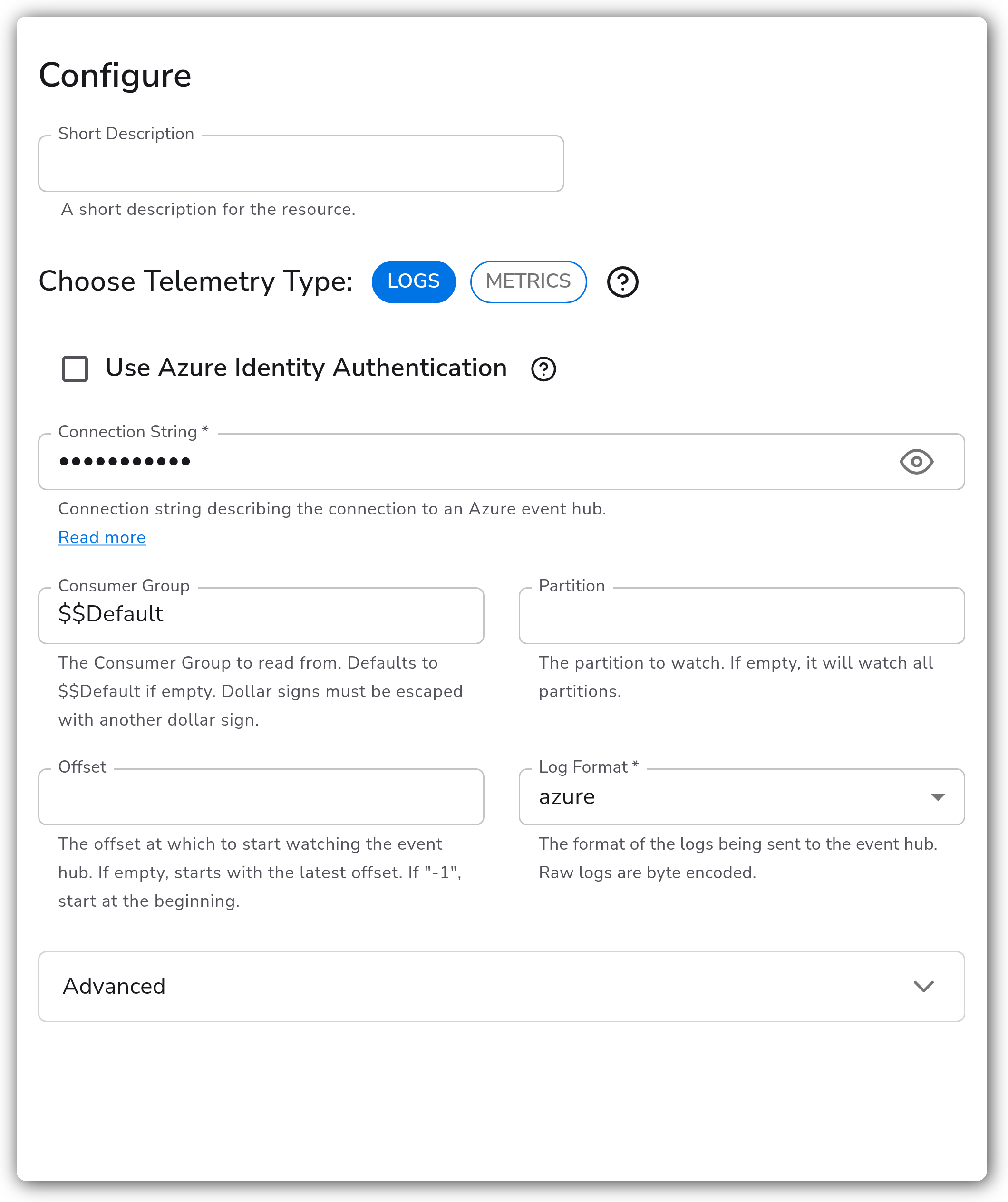
| Choose Telemetry Type | Telemetry Selector | `Logs` | Type of telemetry to accept (`Logs` or `Metrics`). Only one telemetry type should be sent to a given event hub. |
| Consumer Group | String | `$$Default` | The Consumer Group to read from. Defaults to `$$Default` if empty. Dollar signs must be escaped with another dollar sign. |
| Partition | String | | The partition to watch. If empty, all partitions are watched. Ignored when Distributed Consumption is enabled. |
| Offset | String | | The offset at which to start watching the event hub. If empty, starts with the latest offset. If `-1`, starts at the beginning. Ignored when Distributed Consumption is enabled. |
#### Authentication
By default the source authenticates with a connection string. Enable **Use Azure Identity Authentication** (`enable_external_auth`, default `false`) to authenticate with an Azure identity instead.
| Parameter | Type | Default | Description |
| ------------------- | --------- | ------------ | ------------------------------------------------------------------------------------------------------------------------------------------------------------------- |
| Connection String | String | | Connection string describing the connection to the event hub. Required when Azure identity authentication is disabled. Sensitive. |
| Event Hub Name | String | | Name of the event hub to read from. Required when Azure identity authentication is enabled. |
| Event Hub Namespace | String | | Fully qualified Event Hubs namespace, e.g. `my-namespace.servicebus.windows.net`. Required when Azure identity authentication is enabled. |
| Authentication Type | Extension | `azure_auth` | The Azure identity method used to authenticate (managed identity, workload identity, or service principal). Required when Azure identity authentication is enabled. |
#### Log Format
Applies only when `telemetry_types` is `Logs`.
| Parameter | Type | Default | Description |
| ------------ | ---- | ------- | ------------------------------------------------------------------------------------------------------------------------------------------------ |
| Log Format | Enum | `azure` | Format of the logs sent to the event hub. One of `azure` or `raw`. Raw logs are byte encoded. Required. |
| Raw Encoding | Enum | `utf-8` | Encoding of raw logs. One of `utf-8`, `utf-16`, `nop`, or `byte`. When set to `byte`, decoding is disabled. Applies only when `format` is `raw`. |
#### Advanced
| Parameter | Type | Default | Description |
| ------------------------------------ | ------- | ------- | ------------------------------------------------------------------------------------------------------------------------------------------------------------------------------------------------------------------------------------------------------------------------- |
| Max Poll Events | Integer | `100` | Maximum number of events to retrieve per poll. Increase to improve throughput. Minimum `1`. |
| Poll Rate (seconds) | Integer | `5` | Maximum seconds to wait before returning fewer than Max Poll Events. Lower values reduce latency; higher values can improve batch efficiency. Minimum `1`. |
| Enable Prefetching | Boolean | `true` | Prefetch events from the Event Hub. Improves throughput at the cost of additional memory usage. |
| Prefetch Count | Integer | `300` | Number of events to prefetch. Increase to improve throughput at the cost of additional memory. Applies only when prefetching is enabled. Minimum `1`. |
| Enable Distributed Consumption | Boolean | `false` | Coordinate partition ownership across multiple collector instances using an Azure Blob Storage checkpoint store. Mutually exclusive with `partition` and `offset`. |
| Checkpoint Store Connection String | String | | Connection string for the Blob Storage account used for checkpoint coordination. Required when Distributed Consumption is enabled and Azure identity authentication is disabled. Sensitive. |
| Checkpoint Store Storage Account URL | String | | Blob service URL of the storage account used for checkpoint coordination, e.g. `https://myaccount.blob.core.windows.net`. Required when Distributed Consumption and Azure identity authentication are both enabled. The Azure identity must have access to the container. |
| Checkpoint Store Container Name | String | | Blob container used for checkpoint data. The container must already exist before starting the collector. Required when Distributed Consumption is enabled. |
### Example Configuration
#### Standalone Source
```yaml
apiVersion: bindplane.observiq.com/v1
kind: Source
metadata:
id: azure_event_hub
name: azure_event_hub
spec:
type: azure_event_hub
parameters:
- name: telemetry_types
value: 'Logs'
- name: connection
value: ''
- name: group
value: '$$Default'
- name: format
value: 'azure'
```
### Configuration Tips
#### Authenticating with an Azure identity
* Set `enable_external_auth` to `true`, then provide `event_hub_name` and `event_hub_namespace` and choose an authentication method through `auth_extension`. The identity needs at least `Listen` on the event hub, plus read/write access to the checkpoint container when Distributed Consumption is enabled.
* Azure identity authentication uses the [Azure Auth extension](https://github.com/open-telemetry/opentelemetry-collector-contrib/tree/main/extension/azureauthextension). Managed identity, workload identity, and service principal are all supported.
#### Distributed Consumption
* When running multiple collectors against the same event hub, enable `enable_distributed_consumption` to coordinate partition ownership through an Azure Blob Storage container. Each partition is leased to a single collector at a time and ownership rebalances automatically as collectors are added or removed.
* The container must already exist before the collector starts, and every participating collector must use the same `group` and container.
* Distributed Consumption is mutually exclusive with `partition` and `offset`. Leave those unset when it is enabled.
#### Tuning throughput
* Use `max_poll_events` and `poll_rate` to balance latency against batch efficiency. Larger `max_poll_events` and `poll_rate` increase batch size and throughput but add event latency; smaller values reduce per-event latency at the cost of smaller batches.
* When `enable_prefetch` is on (the default), the receiver buffers events before processing. Raising `prefetch_count` (default `300`) can improve throughput under heavy load but increases memory consumption.
### Troubleshooting
**Symptom:** The collector starts but no logs or metrics arrive. **Solution:** Confirm the credentials grant at least the `Listen` permission on the event hub, and that the source resources are actually streaming to it (for example, that diagnostic settings target the correct event hub). Verify `group` matches an existing Consumer Group.
**Symptom:** Records arrive but the telemetry type is wrong, or telemetry is dropped. **Solution:** Send only one telemetry type to a given event hub and set `telemetry_types` to match. A logs source pointed at a metrics event hub (or the reverse) will not parse the data correctly.
**Symptom:** Raw logs appear garbled or unreadable. **Solution:** Set `raw_encoding` to the encoding the producer uses (`utf-8`, `utf-16`, or `nop`). Use `byte` only when you intend to preserve the raw byte encoding without decoding.
**Symptom:** Multiple collectors reprocess the same events, or partitions are not balanced across instances. **Solution:** Enable `enable_distributed_consumption` and point every collector at the same Blob Storage container and `group`. Ensure the container exists ahead of time and that the credentials (connection string or Azure identity) can read and write it. Do not set `partition` or `offset` while Distributed Consumption is enabled.
### Related Resources
* [Azure Event Hubs documentation](https://learn.microsoft.com/en-us/azure/event-hubs/event-hubs-about)
* [Get an Event Hubs connection string](https://learn.microsoft.com/en-us/azure/event-hubs/event-hubs-get-connection-string)
* [Azure Monitor diagnostic settings](https://learn.microsoft.com/en-us/azure/azure-monitor/essentials/diagnostic-settings)
* [Azure Blob Storage overview](https://learn.microsoft.com/en-us/azure/storage/blobs/storage-blobs-introduction)
---
# Agent Instructions
This documentation is published with GitBook. GitBook is the documentation platform designed so that both humans and AI agents can read, navigate, and reason over technical content effectively. Learn more at gitbook.com.
## Querying This Documentation
If you need additional information that is not directly available in this page, you can query the documentation by asking a question.
Perform an HTTP GET request on the following URL with the `ask` and `goal` query parameters:
```
GET https://docs.bindplane.com/integrations/sources/azure-event-hub.md?ask=&goal=
```
`ask` is the immediate question: it should be specific, self-contained, and written in natural language.
`goal` is what the user is ultimately trying to achieve, the reason they need the answer. Sharing it helps GitBook give you a better, more relevant answer. A goal is most helpful when it describes the outcome the user wants rather than restating the question. For example, with `ask=how do I create an API token`, a goal like `automate deployments from our CI pipeline` lets GitBook tailor the answer to that use case.
The response will contain a direct answer to the question and relevant excerpts and sources from the documentation.
Use this mechanism when the answer is not explicitly present in the current page, you need clarification or additional context, or you want to retrieve related documentation sections.