> For the complete documentation index, see [llms.txt](https://docs.bindplane.com/llms.txt). Markdown versions of documentation pages are available by appending `.md` to page URLs; this page is available as [Markdown](https://docs.bindplane.com/integrations/sources/apache-http.md).
# Apache HTTP
The Apache HTTP source collects metrics from an Apache HTTP Server by scraping its `mod_status` endpoint, and collects logs by tailing the server's access and error log files. Choose either signal or both with the telemetry type selector.
### Supported Telemetry Types
| Platform | Metrics | Logs | Traces |
| -------- | ------- | ---- | ------ |
| Linux | ✓ | ✓ | |
| Windows | ✓ | ✓ | |
| macOS | ✓ | ✓ | |
### Prerequisites
#### Metrics
Metrics are scraped from the Apache `mod_status` machine-readable endpoint (`/server-status?auto`). The target server must have:
* `mod_status` loaded and a `/server-status` handler configured.
* `ExtendedStatus On` so the full set of metrics is reported. In Apache 2.3.6 and later, loading `mod_status` enables `ExtendedStatus` by default.
* The endpoint reachable from the collector host at the configured hostname and port (default `localhost:80`), with access control allowing the collector.
See the official [Apache `mod_status` documentation](https://httpd.apache.org/docs/2.4/mod/mod_status.html) for enabling the module and the `/server-status` handler.
#### Logs
The collector must run where it can read the Apache access and error log files, or the files must be shipped to it. The configured paths must match the server's actual log locations. The YAML defaults are `/var/log/apache2/access.log` and `/var/log/apache2/error.log`, which match Debian and Ubuntu package layouts. On Red Hat based systems the logs are typically under `/var/log/httpd/`.
### Configuration
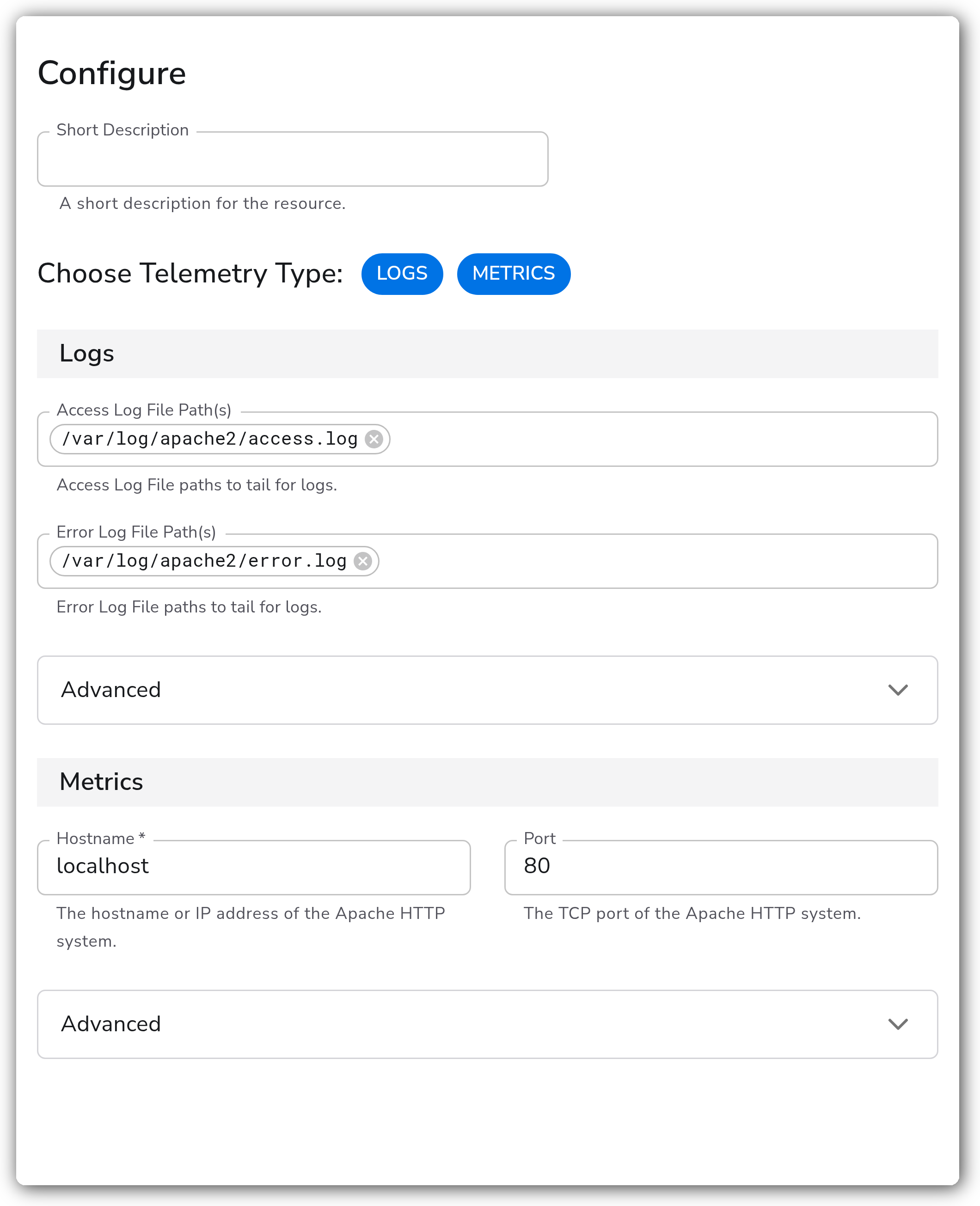
**General**
| Parameter | Type | Required | Default | Description |
| --------------------- | ------------------ | -------- | --------------------- | ----------------------------------------------------------- |
| Choose Telemetry Type | Telemetry Selector | No | `["Logs", "Metrics"]` | Which signals this source collects: Logs, Metrics, or both. |
**Logs**
Relevant when the telemetry type includes Logs.
| Parameter | Type | Required | Default | Description |
| ----------------------- | ------- | -------- | --------------------------------- | --------------------------------------- |
| Access Log File Path(s) | Strings | No | `["/var/log/apache2/access.log"]` | Access log file paths to tail for logs. |
| Error Log File Path(s) | Strings | No | `["/var/log/apache2/error.log"]` | Error log file paths to tail for logs. |
**Metrics**
Relevant when the telemetry type includes Metrics.
| Parameter | Type | Required | Default | Description |
| --------- | ------- | -------- | --------- | ----------------------------------------------------- |
| Hostname | String | Yes | localhost | The hostname or IP address of the Apache HTTP system. |
| Port | Integer | No | 80 | The TCP port of the Apache HTTP system. |
**Advanced**
| Parameter | Type | Required | Default | Description |
| ----------------------------------- | -------------------- | -------- | --------------- | --------------------------------------------------------------------------------------------------------------------------------------------------------------------------------- |
| Timezone | Timezone | No | UTC | The timezone to use when parsing timestamps. Relevant when collecting Logs. |
| Start At | Enum: beginning, end | No | end | Start reading logs from `beginning` or `end`. Relevant when collecting Logs. |
| Parse | Boolean | No | true | Parse the log fields into structured data. Relevant when collecting Logs. |
| Collection Interval | Integer | No | 60 | How often (seconds) to scrape for metrics. Relevant when collecting Metrics. |
| Enable TLS | Boolean | No | false | Use TLS when connecting to the Apache HTTP server. Relevant when collecting Metrics. |
| Strict TLS Certificate Verification | Boolean | No | false | Require TLS certificate verification. Relevant when Enable TLS is true. |
| TLS Certificate Authority File | String | No | *(empty)* | Certificate authority used to validate TLS certificates. Relevant when Enable TLS and Strict TLS Certificate Verification are true. |
| Mutual TLS Authentication | Boolean | No | false | Require TLS mutual authentication. Relevant when Enable TLS and Strict TLS Certificate Verification are true. |
| TLS Client Certificate File | String | Yes | *(empty)* | TLS certificate used for client authentication when mutual TLS is enabled. Relevant when Mutual TLS Authentication, Enable TLS, and Strict TLS Certificate Verification are true. |
| TLS Client Private Key File | String | Yes | *(empty)* | TLS private key used for client authentication when mutual TLS is enabled. Relevant when Mutual TLS Authentication, Enable TLS, and Strict TLS Certificate Verification are true. |
| Metrics | Metric Toggles | No | *(all enabled)* | Select individual Apache metrics to disable. Relevant when collecting Metrics. |
The metric toggle controls these metrics: `apache.current_connections`, `apache.requests`, `apache.scoreboard`, `apache.traffic`, `apache.uptime`, `apache.workers`.
### Examples
#### Collect both metrics and logs from a local Apache server
This source scrapes `mod_status` on the local server and tails the default Debian and Ubuntu log paths.
```yaml
apiVersion: bindplane.observiq.com/v1
kind: Source
metadata:
name: apache-http
spec:
type: apache_http
parameters:
- name: telemetry_types
value:
- Logs
- Metrics
- name: hostname
value: localhost
- name: port
value: 80
- name: access_log_path
value:
- /var/log/apache2/access.log
- name: error_log_path
value:
- /var/log/apache2/error.log
```
### Configuration Tips
* For metrics, set Hostname and Port to point at the server exposing `/server-status`. The source always scrapes the `?auto` machine-readable form of that endpoint.
* When the `/server-status` endpoint is served over HTTPS, enable TLS. Leave Strict TLS Certificate Verification off only for testing with self-signed certificates; turn it on in production and supply a CA file if the certificate is not already trusted by the collector host.
* On Red Hat based systems, override the access and error log paths to `/var/log/httpd/access_log` and `/var/log/httpd/error_log`, since the YAML defaults target Debian and Ubuntu layouts.
### Troubleshooting
#### No metrics are collected
Symptoms: the source produces no Apache metrics.
Solutions:
1. Confirm `mod_status` is loaded and a `/server-status` handler is configured on the target server.
2. Confirm `ExtendedStatus On` is set so the full metric set is reported.
3. Verify the Hostname and Port match the server, and that the access control on `/server-status` permits the collector host.
#### Connection refused or TLS handshake errors
Symptoms: the collector logs connection refused or TLS errors when scraping.
Solutions:
1. Verify the endpoint is reachable from the collector host at the configured hostname and port.
2. If the endpoint uses HTTPS, enable TLS. For self-signed certificates during testing, leave Strict TLS Certificate Verification off, or supply the correct CA file when it is on.
#### No logs are collected
Symptoms: no Apache access or error log entries appear.
Solutions:
1. Confirm the configured Access and Error log paths match the server's actual log locations (Debian and Ubuntu use `/var/log/apache2/`, Red Hat uses `/var/log/httpd/`).
2. Confirm the collector has read permission on those files.
3. If you expect existing log lines, set Start At to `beginning`; the default `end` only reads new lines.
### Standalone Source
```yaml
apiVersion: bindplane.observiq.com/v1
kind: Source
metadata:
name: apache-http
spec:
type: apache_http
parameters:
- name: telemetry_types
value:
- Logs
- Metrics
- name: hostname
value: localhost
- name: port
value: 80
- name: collection_interval
value: 60
- name: access_log_path
value:
- /var/log/apache2/access.log
- name: error_log_path
value:
- /var/log/apache2/error.log
- name: start_at
value: end
- name: parse
value: true
- name: enable_tls
value: false
```
### Related Resources
* [Apache `mod_status` documentation](https://httpd.apache.org/docs/2.4/mod/mod_status.html)
* [`apachereceiver` — OpenTelemetry Collector Contrib](https://github.com/open-telemetry/opentelemetry-collector-contrib/tree/main/receiver/apachereceiver)
---
# Agent Instructions
This documentation is published with GitBook. GitBook is the documentation platform designed so that both humans and AI agents can read, navigate, and reason over technical content effectively. Learn more at gitbook.com.
## Querying This Documentation
If you need additional information that is not directly available in this page, you can query the documentation by asking a question.
Perform an HTTP GET request on the following URL with the `ask` and `goal` query parameters:
```
GET https://docs.bindplane.com/integrations/sources/apache-http.md?ask=&goal=
```
`ask` is the immediate question: it should be specific, self-contained, and written in natural language.
`goal` is what the user is ultimately trying to achieve, the reason they need the answer. Sharing it helps GitBook give you a better, more relevant answer. A goal is most helpful when it describes the outcome the user wants rather than restating the question. For example, with `ask=how do I create an API token`, a goal like `automate deployments from our CI pipeline` lets GitBook tailor the answer to that use case.
The response will contain a direct answer to the question and relevant excerpts and sources from the documentation.
Use this mechanism when the answer is not explicitly present in the current page, you need clarification or additional context, or you want to retrieve related documentation sections.