> For the complete documentation index, see [llms.txt](https://docs.bindplane.com/llms.txt). Markdown versions of documentation pages are available by appending `.md` to page URLs; this page is available as [Markdown](https://docs.bindplane.com/integrations/sources/generic-rest-api.md).
# Generic REST API
The REST API source pulls JSON data from any REST API endpoint. It supports both logs and metrics, with configurable authentication, GET or POST polling, pagination, time-based offset tracking, and checkpointing so collection can resume after a restart.
{% hint style="warning" %}
**Best-effort integration.** Because of the wide range of possible use cases for this source, it targets common API patterns and may not align with every REST API.
{% endhint %}
### Supported Telemetry Types
| Platform | Metrics | Logs | Traces |
| ------------------ | ------- | ---- | ------ |
| Linux | ✓ | ✓ | |
| Windows | ✓ | ✓ | |
| macOS | ✓ | ✓ | |
| Kubernetes Cluster | ✓ | ✓ | |
| OpenShift Cluster | ✓ | ✓ | |
Use the **Choose Telemetry Type** selector to collect Logs, Metrics, or both. Metrics extraction is driven by the [Metrics](#metrics) field mapping below.
### Prerequisites
* A REST API endpoint that returns JSON (a standard JSON array/object or newline-delimited JSON).
* Any authentication credentials the endpoint requires (API key, bearer token, basic credentials, OAuth 2.0 client credentials, or Akamai EdgeGrid).
* For metrics collection, the response must include a field that holds each metric's name.
### Configuration
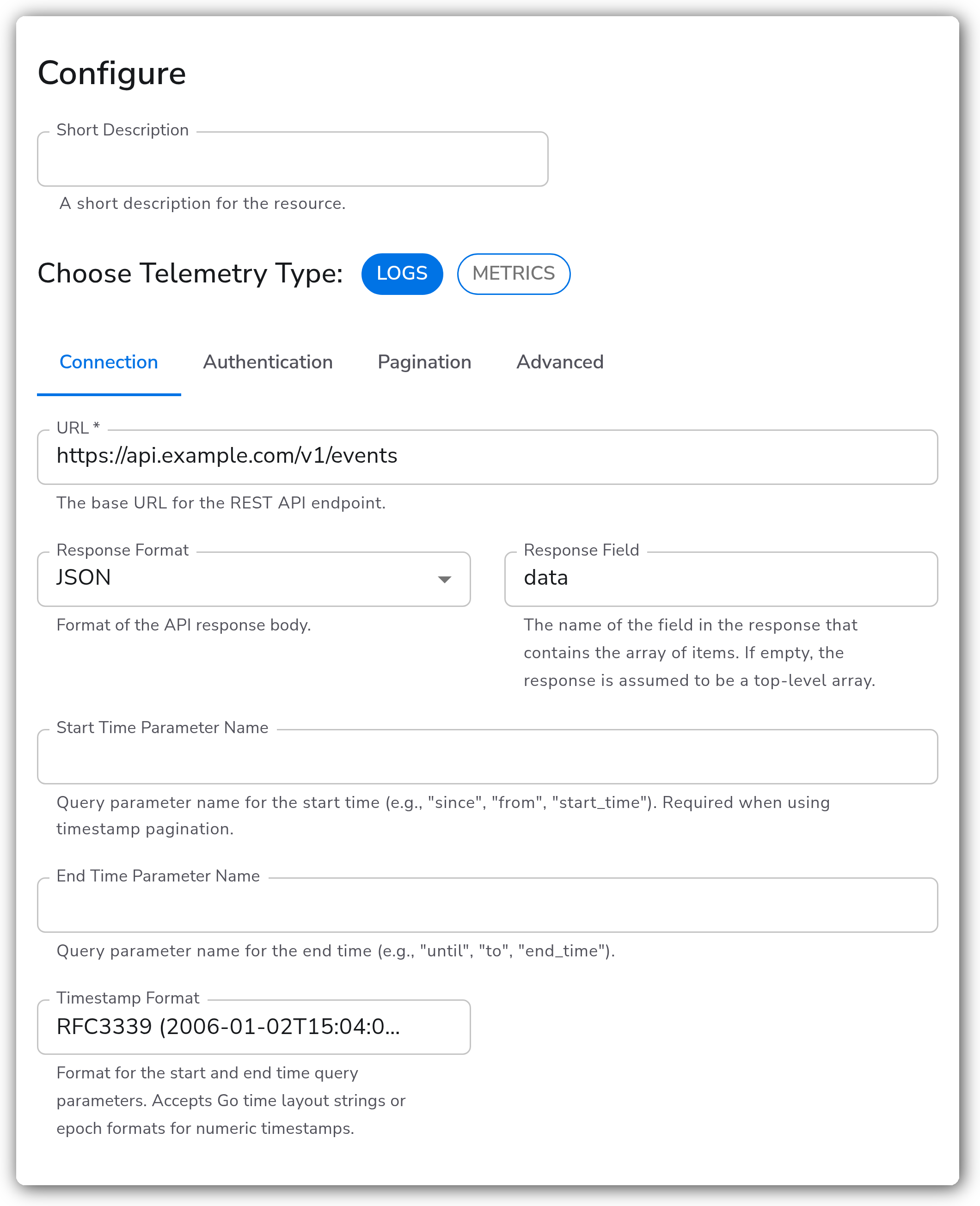
The UI groups parameters into tabs: **Connection**, **Metrics**, **Authentication**, **Pagination**, and **Advanced**. The tables below follow that grouping.
#### Connection
| Parameter | Type | Default | Description |
| ------------------------- | ------------------- | ----------------- | ------------------------------------------------------------------------------------------------------------------------------------------------------------------------------------------------------------------------------------------ |
| Choose Telemetry Type | Telemetry Selector | `[Logs, Metrics]` | Telemetry types to collect. Valid values: `Logs`, `Metrics`. |
| URL | String | | The base URL for the REST API endpoint. Required. |
| Method | Enum | `GET` | HTTP method used for polling requests. Valid values: `GET`, `POST`. See [POST Polling](#post-polling). |
| Request Body | Request Body Editor | | JSON body template sent with each request. Leave empty to send `{}`. Shown when **Method** is `POST`. See [POST Polling](#post-polling). |
| Response Format | Enum | `JSON` | Format of the API response body. Valid values: `JSON`, `NDJSON`. In NDJSON mode each line is a separate JSON object. |
| Response Field | String | | Name of the field in the response that contains the array of items. If empty, the response is assumed to be a top-level array. Use dot notation for nested fields (e.g. `response.data`). Only applies when **Response Format** is `JSON`. |
| Start Time Parameter Name | String | | Query string parameter carrying the start time (e.g. `since`, `from`, `start_time`). Required for timestamp pagination. Leave empty when a POST request body sends the start time instead, or the value is sent twice. |
| Start Time Value | Timestamp | | Timestamp to start collecting data from. For timestamp pagination, this is the initial start value. If not set, collection starts from the beginning. |
| End Time Parameter Name | String | | Query string parameter carrying the end time (e.g. `until`, `to`, `end_time`). When set, an end time is sent on every request. Leave empty when a POST request body sends the end time instead, or the value is sent twice. |
| End Time Value | Timestamp | | Timestamp to stop collecting data at. |
| Timestamp Format | Enum | `RFC3339` | Format for the start and end time values. Accepts Go time layout strings or epoch formats (the field is creatable, so a custom layout can be entered). See [Time-Bounding](#time-bounding). |
#### Metrics
These fields apply only when `Metrics` is selected in **Choose Telemetry Type**. Each value names the field in a response item that supplies the corresponding metric attribute. See [Metrics field mapping](#metrics-field-mapping) for worked examples.
| Parameter | Type | Default | Description |
| ----------------------------- | ------ | ------- | ------------------------------------------------------------------------------------------------------------------------------------------------------------------------ |
| Name Field | String | | Field name in each response item containing the metric name. Required when collecting Metrics. If the field is not found, the metric is dropped and a warning is logged. |
| Description Field | String | | Field name containing the metric description. If unset or not found, defaults to `Metric from REST API`. |
| Type Field | String | | Field name containing the metric type (`gauge`, `sum`, `histogram`, `summary`). If unset or not found, defaults to `gauge`. |
| Unit Field | String | | Field name containing the metric unit. If unset or not found, no unit is set. |
| Monotonic Field | String | | Field name (boolean) indicating whether a `sum` metric is monotonic. Only applies to `sum` metrics. Defaults to `false` if unset or not found. |
| Aggregation Temporality Field | String | | Field name containing the aggregation temporality (`cumulative` or `delta`). Defaults to `cumulative` if unset or not found. |
When a field name is configured, that field is automatically excluded from the metric's attributes to avoid duplication.
#### Authentication
| Parameter | Type | Default | Description |
| ------------------- | ---- | --------- | -------------------------------------------------------------------------------------------------------------- |
| Authentication Mode | Enum | `API Key` | Authentication mode. Valid values: `None`, `API Key`, `Bearer Token`, `Basic`, `Akamai EdgeGrid`, `OAuth 2.0`. |
Each mode exposes its own credential fields, shown only when that mode is selected.
**API Key (`auth_mode: API Key`)**
| Parameter | Type | Default | Description |
| ------------------- | ------ | ------- | ----------------------------------------------------- |
| API Key Header Name | String | | Header name for API key authentication. Required. |
| API Key Value | String | | API key value. Required. Stored as a sensitive value. |
**Bearer Token (`auth_mode: Bearer Token`)**
| Parameter | Type | Default | Description |
| --------------------------- | ------ | -------- | -------------------------------------------------------------------------------------------------------------------------------------------- |
| Bearer Token | String | | Bearer token value. Required. Stored as a sensitive value. |
| Authorization Header Prefix | String | `Bearer` | Prefix placed before the token in the `Authorization` header. See [Custom authorization header prefix](#custom-authorization-header-prefix). |
**Basic (`auth_mode: Basic`)**
| Parameter | Type | Default | Description |
| --------- | ------ | ------- | ------------------------------------------------------------------------- |
| Username | String | | Username for basic authentication. Required. |
| Password | String | | Password for basic authentication. Required. Stored as a sensitive value. |
**OAuth 2.0 (`auth_mode: OAuth 2.0`)**
| Parameter | Type | Default | Description |
| --------------------------- | ------- | -------- | --------------------------------------------------------------------------------------------------------------------------------------------------- |
| Client ID | String | | Client identifier assigned during application registration. Required. Stored as a sensitive value. |
| Client Secret | String | | Client secret issued during application registration. Required. Stored as a sensitive value. |
| Token URL | String | | Endpoint URL used to retrieve the OAuth 2.0 access token. Required. |
| Scopes | Strings | `[]` | Scope(s) of the access request. |
| Endpoint Params | Map | `{}` | Additional parameters to send to the token endpoint. Use the sensitive toggle for parameters containing secrets. |
| Authorization Header Prefix | String | `Bearer` | Prefix placed before the access token in the `Authorization` header. See [Custom authorization header prefix](#custom-authorization-header-prefix). |
**Akamai EdgeGrid (`auth_mode: Akamai EdgeGrid`)**
The Akamai API requires an enterprise license. This authentication method has not been tested against an Akamai API.
| Parameter | Type | Default | Description |
| ------------------ | ------ | ------- | ------------------------------------------------------------------- |
| Access Token | String | | EdgeGrid access token. Required. Stored as a sensitive value. |
| Client Token | String | | EdgeGrid client token. Required. Stored as a sensitive value. |
| Client Secret | String | | EdgeGrid client secret. Required. Stored as a sensitive value. |
| Account Switch Key | String | | Account switch key used to make requests against a managed account. |
**Custom authorization header prefix**
**Bearer Token** and **OAuth 2.0** send the credential as `Authorization: Bearer `. Set **Authorization Header Prefix** to use a different scheme. The value is prepended verbatim, so include a trailing space:
| Value | Header sent |
| ---------------------- | ------------------------------- |
| *(empty, the default)* | `Authorization: Bearer ` |
| `Token` | `Authorization: Token ` |
| `SSWS` | `Authorization: SSWS ` |
For a bare token with no scheme, use **API Key** authentication with **API Key Header Name** set to `Authorization`.
#### Pagination
| Parameter | Type | Default | Description |
| -------------------------- | ------- | ------- | ----------------------------------------------------------------------------------------------------------------------------------------------------------------------------------------------------- |
| Pagination Mode | Enum | `none` | Pagination mode. Valid values: `none`, `offset`, `page`, `timestamp`. |
| Pagination Response Source | Enum | `Body` | Where to read pagination metadata from. Valid values: `Body`, `Header`. Use `Header` when the API returns pagination metadata in HTTP response headers. Shown when **Pagination Mode** is not `none`. |
| Total Record Count Field | String | | Name of the field or header containing the total record count. Shown when **Pagination Mode** is not `none`. |
| Has More Field Name | String | | Name of the response field or header holding the API's own "more data" boolean. Shown for `offset` and `page` modes. See [Using a "has more" flag](#using-a-has-more-flag). |
| Page Limit | Integer | `0` | Maximum number of pages to fetch (`0` = no limit). Shown when **Pagination Mode** is not `none`. |
| Zero-Based Index | Boolean | `false` | Indicates that the requested data starts at index 0. Shown when **Pagination Mode** is not `none`. |
**Offset / Limit (`pagination_mode: offset`)**
| Parameter | Type | Default | Description |
| ---------------------- | ------- | --------- | ----------------------------------------------------------------------------------------------------------------------------------------------------------------------------------------------------------------------- |
| Offset Type | Enum | `Numeric` | Whether the offset field carries a number or an opaque cursor token. Valid values: `Numeric`, `Opaque`. See [Numeric offsets vs. opaque cursors](#numeric-offsets-vs-opaque-cursors). |
| Offset Field Name | String | `offset` | Query string parameter carrying the offset or cursor. Leave empty when a POST request body sends it instead, or the value is sent twice. |
| Limit Field Name | String | | Query string parameter carrying the limit. Leave empty when a POST request body sends it instead, or the value is sent twice. |
| Starting Offset | Integer | `0` | Starting offset value. Shown when **Offset Type** is `Numeric`. |
| Limit | Integer | `0` | Records requested per page, and the value rendered by `.Limit` in a request body template. Unless **Has More Field Name** is set, it should match the page size the API actually returns. Leave at `0` for the default. |
| Next Offset Field Name | String | | Response body field containing the next offset token or cursor. Supports nested fields with dot notation (e.g. `pagination.next_cursor`). Required when **Offset Type** is `Opaque`. |
**Page / Size (`pagination_mode: page`)**
| Parameter | Type | Default | Description |
| ---------------------- | ------- | ------- | -------------------------------------------------------------------------------------------------------------------------------------------------------------------------------- |
| Page Number Field Name | String | `page` | Query string parameter carrying the page number. Leave empty when a POST request body sends it instead, or the value is sent twice. |
| Page Size Field Name | String | | Query string parameter carrying the page size. Leave empty when a POST request body sends it instead, or the value is sent twice. |
| Starting Page | Integer | `1` | Starting page number. |
| Page Size | Integer | `0` | Records requested per page, and the value rendered by `.PageSize` in a request body template. Should match the page size the API actually returns. Leave at `0` for the default. |
| Total Pages Field Name | String | | Field name in the response containing the total page count. |
**Timestamp (`pagination_mode: timestamp`)**
Timestamp pagination sends an advancing start time using the **Start Time Parameter Name** and **Timestamp Format** fields on the Connection tab. The start time advances automatically from response data as pages are consumed. A POST request body can send the start time instead.
| Parameter | Type | Default | Description |
| -------------------- | ------- | ------- | ----------------------------------------------------------------------------------------------------------------------------------------------------------- |
| Timestamp Field Name | String | | Field name in each response item containing the timestamp (e.g. `ts`, `timestamp`). Required. |
| Page Size Field Name | String | | Query string parameter carrying the page size (e.g. `perPage`, `limit`). Leave empty when a POST request body sends it instead, or the value is sent twice. |
| Page Size | Integer | `100` | Page size to use. |
#### Advanced
| Parameter | Type | Default | Description |
| ------------------ | ------------ | ------------------------------------ | ------------------------------------------------------------------------------------------------------------------------------------------------------------------------------ |
| Request Preview | Display only | | The request this source will send, with every query string parameter and header the configuration produces. See [Verifying Your Configuration](#verifying-your-configuration). |
| Min Poll Interval | Integer | `10` | Minimum interval between API polls, in seconds. The source resets to this interval when data is received. Increase it to avoid hitting API rate limits. |
| Max Poll Interval | Integer | `300` | Maximum interval between API polls, in seconds. The source uses adaptive polling that backs off when no data is returned, up to this maximum. |
| Backoff Multiplier | String | `2.0` | Multiplier for increasing the poll interval when no data or a partial page is returned. Must be greater than 1.0. |
| Enable Checkpoint | Boolean | `true` | Enable checkpointing so the source resumes from where it left off after a restart. See [Checkpointing](#checkpointing). |
| Storage Directory | String | `${OIQ_OTEL_COLLECTOR_HOME}/storage` | Directory for storing checkpoint state. Shown when **Enable Checkpoint** is on. |
| Timeout | Integer | `10` | HTTP client timeout, in seconds. |
| Headers | Map | `{}` | Custom headers to include with each request. Use the sensitive toggle for headers containing secrets. |
#### POST Polling
Some APIs take their filters, pagination state, and time bounds in a JSON request body rather than query parameters. Set **Method** to `POST` on the Connection tab to poll those endpoints.
`POST` reveals the **Request Body** field. Leave it empty to send `{}`, or write a JSON template.
**Writing a request body template**
The request body is a [Go template](https://pkg.go.dev/text/template) rendered to JSON before each request. Write the static parts literally and insert the changing values with template actions:
```json
{
"query": "severity:error",
"offset": {{ .Offset }},
"limit": {{ .Limit }}
}
```
Available fields:
| Field | Type | Description |
| ------------ | ------ | ------------------------------------------------------------------------------------------------------------------------------------- |
| `.Cursor` | String | Next-page token, read from the field named by **Next Offset Field Name**. Empty on the first request, so guard it with an `if` block. |
| `.Offset` | Number | Numeric offset. Starts at **Starting Offset** and advances by **Limit** each page. |
| `.Limit` | Number | Offset/limit page size, set by **Limit**. Defaults to 10 when **Limit** is `0`. |
| `.Page` | Number | Page number for page/size pagination. Starts at **Starting Page**. |
| `.PageSize` | Number | Page size for page/size and timestamp pagination, set by **Page Size**. |
| `.StartTime` | String | Start bound from **Start Time Value**, written per **Timestamp Format**. |
| `.EndTime` | String | End bound from **End Time Value**, written per **Timestamp Format**. |
**Quoting values**
Number fields are emitted bare. String fields go through the `json` function, which quotes and escapes them:
```json
"limit": {{ .Limit }},
"after": {{ json .Cursor }}
```
Never hand-quote a string like `"{{ .Cursor }}"`. The value isn't escaped, so a token containing a quote or backslash would produce invalid JSON. Bindplane rejects hand-quoted string fields on save.
`.StartTime` and `.EndTime` follow **Timestamp Format**: emit them bare under an epoch format, and through `json` under RFC3339, ISO8601, or a custom Go layout.
**Conditional sections**
`.Cursor` is empty on the first request, so a body that sends a cursor must omit the field and its preceding comma. Put the comma inside the `if` block:
```json
{
"filter": "status:'new'",
"limit": {{ .Limit }}{{ if .Cursor }},
"after": {{ json .Cursor }}{{ end }}
}
```
**Avoiding duplicated values**
Clear the query parameter name field for every value the body sends — **Offset Field Name**, **Limit Field Name**, **Page Number Field Name**, **Page Size Field Name**, **Start Time Parameter Name**, and **End Time Parameter Name**. If both are set, the API receives the value twice.
Driving pagination through query parameters while the body carries only a static filter is also valid. Just don't send the same value both ways.
**Validation and preview**
On save, Bindplane renders the template twice — as a first request and as a continuation with a cursor — and requires valid JSON from both. This catches a comma stranded outside an `{{ if .Cursor }}` guard, and misspelled fields like `{{ .Cursr }}`.
The editor offers starter templates for common API shapes, field completion with the right quoting per type, and a live preview of both render cases. The **Request Preview** on the Advanced tab shows those same two cases next to the request line and headers - see [Verifying Your Configuration](#verifying-your-configuration).
### Example Configuration
#### GET with offset pagination
```yaml
apiVersion: bindplane.observiq.com/v1
kind: Source
metadata:
id: rest_api
name: rest_api
spec:
type: rest_api
parameters:
- name: telemetry_types
value:
- Logs
- name: url
value: 'https://api.example.com/v1/events'
- name: response_format
value: 'JSON'
- name: response_field
value: 'data'
- name: auth_mode
value: 'API Key'
- name: apikey_header_name
value: 'Authorization'
- name: apikey_value
value: 'my-api-key'
- name: pagination_mode
value: 'offset'
- name: pagination_offset_limit_offset_field_name
value: 'offset'
- name: pagination_offset_limit_limit_field_name
value: 'limit'
- name: min_poll_interval
value: '30'
- name: max_poll_interval
value: '300'
- name: enable_storage
value: 'true'
```
#### POST with cursor pagination
```yaml
apiVersion: bindplane.observiq.com/v1
kind: Source
metadata:
id: rest_api_post
name: rest_api_post
spec:
type: rest_api
parameters:
- name: telemetry_types
value:
- Logs
- name: url
value: 'https://api.example.com/v1/detects/search'
- name: method
value: 'POST'
- name: request_body
value: |
{
"filter": "status:'new'",
"sort": "created_timestamp|asc",
"limit": {{ .Limit }}{{ if .Cursor }},
"after": {{ json .Cursor }}{{ end }}
}
- name: response_field
value: 'resources'
- name: auth_mode
value: 'Bearer Token'
- name: bearer_token
value: 'my-token'
- name: auth_header_prefix
value: 'Token '
- name: pagination_mode
value: 'offset'
- name: pagination_offset_limit_offset_type
value: 'Opaque'
- name: pagination_offset_limit_next_offset_field_name
value: 'meta.pagination.after'
- name: pagination_offset_limit_limit
value: '500'
- name: pagination_offset_limit_offset_field_name
value: ''
- name: pagination_offset_limit_limit_field_name
value: ''
- name: enable_storage
value: 'true'
```
The offset and limit query parameter names are cleared because the request body already sends both values.
### Configuration Tips
#### Mapping the response body
* If the API returns a top-level JSON array, leave **Response Field** empty.
* If the records are wrapped in an object (for example `{ "data": [ ... ], "total": 2 }`), set **Response Field** to the field that holds the array, using dot notation for nested fields (e.g. `result.items`).
* For newline-delimited responses, set **Response Format** to `NDJSON`. Each line is treated as a separate JSON object and **Response Field** is ignored.
#### Choosing a pagination mode
* `offset` suits APIs that page with numeric `offset`/`limit` query parameters, and cursor APIs when you set **Offset Type** to `Opaque`.
* `page` suits APIs that page with a page number and page size.
* `timestamp` suits APIs that page by an advancing time window. It requires a start time — **Start Time Parameter Name** on the Connection tab, or `.StartTime` in a POST request body — and **Timestamp Field Name**.
* When pagination metadata is returned in HTTP headers rather than the body, set **Pagination Response Source** to `Header`.
#### Numeric offsets vs. opaque cursors
**Offset Type** tells the source what the offset field carries:
* **`Numeric`** — a number that starts at **Starting Offset** and advances by the page size each request. Use this for APIs that take `?offset=0&limit=100`.
* **`Opaque`** — a token the API returns with each page. **Next Offset Field Name** names the response field holding it; the source sends it back on the next request and stops when it is absent or empty. **Starting Offset** is hidden, since the first request carries no cursor.
Configurations that set **Next Offset Field Name** without **Offset Type** still page by cursor, but set **Offset Type** to `Opaque` so the intent is visible.
#### Using a "has more" flag
Without an explicit signal, the source stops paging when a response holds fewer records than **Limit**. APIs that return short pages mid-result end collection early.
Set **Has More Field Name** to the API's own continuation boolean (`has_more`, `hasMore`, `more_available`) and that decides when to stop instead, leaving **Limit** to control only how many records to request. Applies to `offset` and `page` modes; with **Pagination Response Source** set to `Header`, the value is read from the named header.
#### Polling and rate limits
* The source polls adaptively between **Min Poll Interval** and **Max Poll Interval**, backing off by **Backoff Multiplier** when a poll returns no data.
* Raise **Min Poll Interval** if you are hitting the API's rate limit. Lower **Max Poll Interval** if you need fresher data when the endpoint is idle.
### Time-Bounding
The Connection-tab time fields add start and/or end time values to every request, as query parameters or through a POST request body. They work with any pagination mode (or none). With `timestamp` pagination, the start time advances automatically through response data.
**Start Time Value** accepts `now` (resolved once at collector start, not dynamically updated) or a fixed timestamp in the configured format. **Timestamp Format** controls how both start and end times are rendered. Supported formats:
* `RFC3339` (`2006-01-02T15:04:05Z07:00`) - default
* `ISO8601 Basic` (`20060102T150405`)
* `24-hour datetime` (`2006-01-02 15:04:05`)
* `Epoch Seconds`, `Epoch Milliseconds`, `Epoch Microseconds`, `Epoch Nanoseconds` - numeric epoch values
* `Epoch Fractional Seconds` - epoch seconds with a fractional component (e.g. `1735734645.5`), for APIs that take sub-second precision in a seconds-based field
The format field is creatable, so a custom Go time layout can be entered if none of the presets match the API.
### Response Format
The source expects JSON responses in one of two shapes.
Top-level array (leave **Response Field** empty):
```json
[
{ "id": "1", "message": "log entry 1" },
{ "id": "2", "message": "log entry 2" }
]
```
Object with a data field (set **Response Field** to `data`):
```json
{
"data": [
{ "id": "1", "message": "log entry 1" },
{ "id": "2", "message": "log entry 2" }
],
"total": 2
}
```
### Metrics field mapping
When `Metrics` is selected, the source builds one metric per response item using the field names you map. Given this response:
```json
{
"data": [
{
"name": "queue.depth",
"value": 42,
"unit": "{items}",
"kind": "gauge",
"help": "Current queue depth"
}
]
}
```
set the following so each item becomes a metric:
* **Response Field**: `data`
* **Name Field**: `name`
* **Type Field**: `kind`
* **Unit Field**: `unit`
* **Description Field**: `help`
The metric is emitted as `queue.depth` (gauge, unit `{items}`). The mapped fields (`name`, `kind`, `unit`, `help`) are excluded from the metric's attributes; remaining fields such as `value` supply the data point. If **Name Field** is not present in an item, that item is dropped and a warning is logged.
### Checkpointing
When checkpointing is enabled (**Enable Checkpoint**, on by default), the source writes its pagination state to a file storage extension at **Storage Directory**. After a restart it resumes from where it left off, preventing duplicate collection. The checkpoint includes the current pagination state (offset, cursor, page number, or timestamp) and the number of pages fetched. For timestamp pagination, the advancing start time is persisted so the source continues from the most recently observed timestamp.
Each checkpoint is tagged with a fingerprint derived from the config fields that define what data the source fetches: **URL**, pagination mode, **Start Time Value**, **End Time Value**, the offset starting value, and the page starting value. If any of these change between runs, the stored checkpoint is discarded because it tracks state for a different query. Other changes (credentials, polling intervals) do not invalidate the checkpoint.
### Verifying Your Configuration
The **Advanced** tab opens with a **Request Preview**: the request this source will send, rebuilt as you edit the form. Use it to confirm what the source sends before deploying it to a collector.
The preview shows:
* **The request line** - the method plus the URL with every query string parameter the configuration produces. Parameters are added to any query string the URL already carries, and the result is sorted by key, exactly as the collector sends it. A parameter whose name field is empty is not sent, so it does not appear here.
* **Headers** - each header the request will carry. Credentials are masked: an API key, bearer token, basic credential, EdgeGrid signature, or a header added through the sensitive toggle is named but shown as `••••••••`.
* **Body** - for a `POST`, the rendered request body and a valid/invalid JSON verdict.
* **First request** and **Next page** views, shown whenever the two differ. A cursor is only in hand for the second, so a configuration can be right for one and wrong for the other.
* A warning naming any value the request body and a query parameter would both send.
#### Reading a rendered time bound
The request line is the only place the time bounds appear as the API will receive them. **Timestamp Format** rewrites them on the way out, so the value the picker stores is often not the value on the wire.
A **Start Time Value** of `2026-09-16T00:00:00-04:00` is sent unchanged under `RFC3339`, which keeps the offset. `ISO8601 Basic` and `24-hour datetime` name no timezone, so the same instant is normalized to UTC:
```
GET https://api.example.com/v1/logs?since=20260916T040000
```
{% hint style="info" %}
Under `timestamp` pagination, **Next page** repeats the configured start time. The collector replaces that bound with the newest record's timestamp from the response and steps it forward one unit of the format's resolution, which cannot be known without a live response.
{% endhint %}
### Troubleshooting
**Symptom:** No data is collected and the collector logs show authentication failures (401/403).
**Solution:** Confirm **Authentication Mode** matches what the API expects and that the credential fields are correct.
* For API Key auth, verify **API Key Header Name** is the exact header the API requires (for example `Authorization` or `X-API-Key`).
* For Bearer Token or OAuth 2.0 against an API that does not use the `Bearer` scheme, set **Authorization Header Prefix** to the scheme it expects, including a trailing space (for example `Token` ).
**Symptom:** The endpoint returns data but no records are produced.
**Solution:** Check **Response Field**. If the records are nested inside an object, set it to the field (or dotted path) that holds the array. For newline-delimited responses, set **Response Format** to `NDJSON` and leave **Response Field** empty.
**Symptom:** Saving the source fails with `request_body must render to valid JSON`.
**Solution:** The [Request Preview](#verifying-your-configuration) shows which of the two render cases failed. Usual causes are a comma left outside an `{{ if .Cursor }}` guard, and a string hand-quoted as `"{{ .Cursor }}"` instead of `{{ json .Cursor }}` - the latter renders fine on **First request**, where the cursor is empty, and fails on **Next page**.
**Symptom:** The API rejects POST requests with a duplicate or conflicting parameter error.
**Solution:** The value is being sent in both the query string and the body. Clear the query parameter name field for every value the body sends. The [Request Preview](#verifying-your-configuration) warns when this happens and names the field to clear.
**Symptom:** A query parameter you configured never reaches the API.
**Solution:** Check the request line in the [Request Preview](#verifying-your-configuration). A parameter is absent because its name field is empty, which is how a POST request body carries the value instead. With **Offset Type** set to `Opaque`, the offset is also absent from the first request of a run: there is no cursor yet, and sending a `0` draws an HTTP 400 from APIs that take a token.
**Symptom:** Collection stops early and misses records, even though the API has more pages.
**Solution:** A page shorter than **Limit** (or **Page Size**) is treated as the last page. If the API returns short pages mid-result, set **Has More Field Name** so the API's own continuation flag decides instead. Otherwise confirm **Limit** matches the page size the API actually returns.
**Symptom:** Metrics are dropped with a warning in the collector logs.
**Solution:** **Name Field** must name a field present in every response item. Set it to the field that holds the metric name, and confirm **Type Field** (if set) resolves to `gauge`, `sum`, `histogram`, or `summary`.
**Symptom:** The same records are collected repeatedly after a restart, or pagination never advances.
**Solution:** Ensure **Enable Checkpoint** is on so checkpoints persist.
* If you intentionally changed the query (URL, pagination mode, or start/end time), the prior checkpoint is discarded by design.
* For cursor pagination, verify **Offset Type** is `Opaque` and **Next Offset Field Name** names the response field holding the token.
* For timestamp pagination, verify **Timestamp Field Name** names a field present in each item so the start time can advance.
**Symptom:** The API returns HTTP 429 (rate limited).
**Solution:** Raise **Min Poll Interval** so the source polls less aggressively, and lower **Page Limit** or the page size to fetch fewer records per cycle.
### Related Resources
* [Storage extension and checkpointing](/integrations/extensions.md)
---
# Agent Instructions
This documentation is published with GitBook. GitBook is the documentation platform designed so that both humans and AI agents can read, navigate, and reason over technical content effectively. Learn more at gitbook.com.
## Querying This Documentation
If you need additional information that is not directly available in this page, you can query the documentation by asking a question.
Perform an HTTP GET request on the following URL with the `ask` and `goal` query parameters:
```
GET https://docs.bindplane.com/integrations/sources/generic-rest-api.md?ask=&goal=
```
`ask` is the immediate question: it should be specific, self-contained, and written in natural language.
`goal` is what the user is ultimately trying to achieve, the reason they need the answer. Sharing it helps GitBook give you a better, more relevant answer. A goal is most helpful when it describes the outcome the user wants rather than restating the question. For example, with `ask=how do I create an API token`, a goal like `automate deployments from our CI pipeline` lets GitBook tailor the answer to that use case.
The response will contain a direct answer to the question and relevant excerpts and sources from the documentation.
Use this mechanism when the answer is not explicitly present in the current page, you need clarification or additional context, or you want to retrieve related documentation sections.