For the complete documentation index, see llms.txt. This page is also available as Markdown.

Syslog

Receives syslog from network devices and applications over UDP or TCP and parses it into structured logs using either the RFC 3164 (BSD) or RFC 5424 message format. The collector binds a listen address and port, and senders forward their syslog to it.

Supported Telemetry Types

Platform
Metrics
Logs
Traces

Linux

Windows

macOS

Kubernetes Gateway

OpenShift Gateway

Prerequisites

This is a network listener, so the prerequisites are network-side:

  • The sending device or application must be configured to forward syslog to the collector's IP address and the listen port you configure here.

  • The listen port must be reachable from the senders. Open it in any host firewall and, for cloud or containerized deployments, in security groups, network policies, and load balancers.

  • Binding to a port below 1024 (for example the well-known syslog port 514) requires running the collector as root on Linux or as Administrator on Windows. The default listen port is 5140, which does not need elevated privileges.

  • For TCP with mutual TLS, have the server certificate, private key, and (when verifying client certificates) the certificate authority file available on the collector host.

Configuration

Parameter
Type
Default
Description

protocol*

enum

"rfc3164"

The RFC protocol to use when parsing incoming syslog. Valid values are rfc3164, rfc5424, and none.

connection_type

enum

udp

The transport protocol to use. Valid values are udp or tcp.

data_flow

enum

high

Enable high flow or reduced low flow.

listen_port*

int

5140

The port to bind to and receive syslog. Collector must be running as root (Linux) or Administrator (windows) when binding to a port below 1024.

listen_ip*

string

"0.0.0.0"

The IP address to bind to and receive syslog.

timezone

enum

UTC

RFC3164 only. The timezone to use when parsing timestamps.

enable_octet_counting

bool

false

Whether or not to parse using a trailer character. This is a special character that will be the termination character for syslog messages. This is only applicable to tcp configurations. For older versions of the source, this is not supported for rfc3164.

non_transparent_framing_trailer

enum

LF

Whether or not to enable octet counting on syslog framing. This framing allows for the transmission of all characters inside a syslog message. This is only applicable to tcp and rfc5424 configurations.

enable_mutual_tls

bool

false

Whether or not to use mutual TLS.

cert_file

string

Path to the TLS cert to use for TLS-required connections.

key_file

string

Path to the TLS key to use for TLS-required connections.

ca_file

string

When set, enforces mutual TLS authentication and verifies client certificates.

tls_min_version

enum

"1.2"

The minimum TLS version to support. 1.0 and 1.1 should not be considered secure.

max_log_size

string

"1Mib"

When using tcp, the maximum size of a log entry to read. A log entry will be truncated if it is larger than max_log_size. Protects against reading large amounts of data into memory.

async_readers

int

1

When using udp, determines how many workers read from UDP port and push to buffer. Generally this value should remain at 1 unless otherwise directed by Bindplane support.

async_processors

int

3

When using udp, determines how many workers read from buffer (pushed by readers) and process logs before sending downstream. Increasing this value can be useful when the collector is under significant load.

max_queue_length

int

100

When using udp, determines size of buffer being used by async reader workers. When buffer reaches max number, reader workers will block until buffer has room. Increasing this value can be useful if you anticipate short durations of increased log volume. Generally, you should increase async_processors before increasing this value.

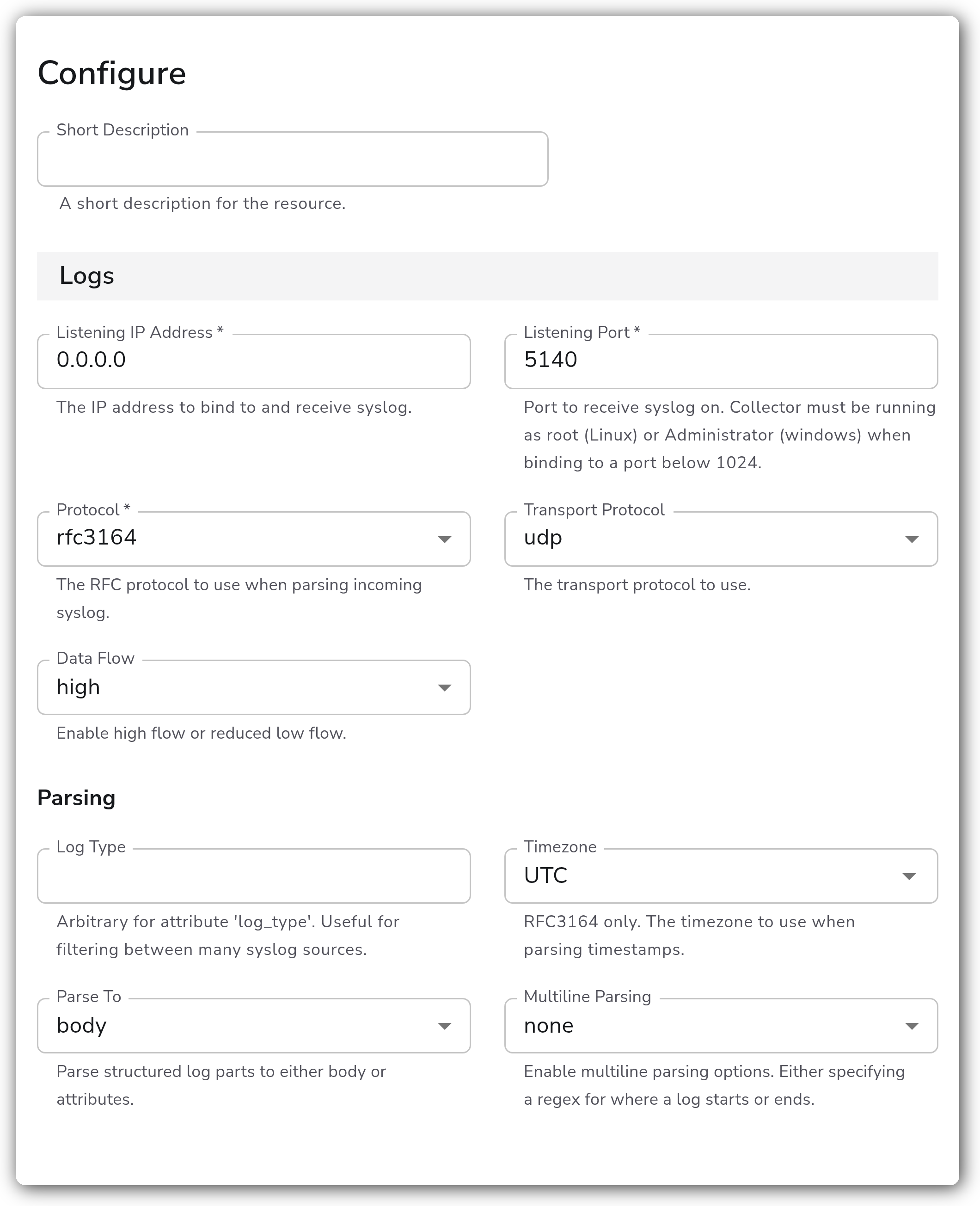
Bindplane docs - Syslog - image 1

Logs

Parameter
Type
Required
Default
Description

Listening IP Address

String

Yes

0.0.0.0

The IP address to bind to and receive syslog.

Listening Port

Integer

Yes

5140

Port to receive syslog on. Collector must be running as root (Linux) or Administrator (Windows) when binding to a port below 1024.

Protocol

Enum: rfc3164, rfc5424, none

Yes

rfc3164

The RFC protocol to use when parsing incoming syslog. Set to none to leave messages unparsed by any RFC.

Transport Protocol

Enum: udp, tcp

No

udp

The transport protocol to use.

Data Flow

Enum: high, low

No

high

Enable high flow or reduced low flow. Low flow filters out lower-priority records and retains a reduced set of fields.

Log Type

String

No

(empty)

Arbitrary value for the log_type attribute. Useful for filtering between many syslog sources.

Timezone

Timezone

No

UTC

RFC 3164 only. The timezone to use when parsing timestamps.

Parse To

Enum: body, attributes

No

body

Parse structured log parts to either the body or attributes.

Multiline Parsing

Enum: none, specify line start, specify line end

No

none

Enable multiline parsing by specifying a regex for where a log starts or ends.

Multiline Start Pattern

String

Yes

(empty)

Regex pattern that matches the beginning of a log entry, for handling multiline logs. Applies when Multiline Parsing is specify line start.

Multiline End Pattern

String

Yes

(empty)

Regex pattern that matches the end of a log entry, for terminating parsing of multiline logs. Applies when Multiline Parsing is specify line end.

Add Attributes

Boolean

No

false

Adds net.* attributes according to OpenTelemetry semantic conventions.

Advanced

Parameter
Type
Required
Default
Description

Enable Octet Counting

Boolean

No

false

Whether to enable RFC 6587 octet counting on syslog framing, allowing transmission of all characters inside a syslog message. Applies when Transport Protocol is tcp, Protocol is rfc5424, and Non-Transparent Framing Trailer is disabled. Incompatible with non-transparent framing trailers.

Enable Non-Transparent Framing Trailer

Boolean

No

false

Whether to parse using a trailer character that terminates each syslog message. Applies when Transport Protocol is tcp, Protocol is rfc5424, and Octet Counting is disabled. Incompatible with octet counting.

Non-Transparent Framing Trailer

Enum: LF, NUL

No

LF

The framing trailer when using RFC 6587 non-transparent framing. Applies when Transport Protocol is tcp and Non-Transparent Framing Trailer is enabled.

Preserve Leading Whitespace

Boolean

No

false

Whether to preserve leading whitespace on the raw log line before parsing. May break parsing when enabled.

Preserve Trailing Whitespace

Boolean

No

false

Whether to preserve trailing whitespace on the raw log line before parsing.

Enable TLS

Boolean

No

false

Whether to use TLS. Applies when Transport Protocol is tcp.

TLS Certificate File

String

Yes

(empty)

Path to the x509 PEM certificate. Applies when Enable TLS is true.

TLS Private Key File

String

Yes

(empty)

Path to the x509 PEM private key. Applies when Enable TLS is true.

TLS Certificate Authority File

String

No

(empty)

When set, enforces mutual TLS authentication and verifies client certificates. Applies when Enable TLS is true.

Minimum TLS Version

Enum: 1.3, 1.2, 1.1, 1.0

No

1.2

The minimum TLS version to support. 1.0 and 1.1 should not be considered secure. Applies when Enable TLS is true.

Max Log Size

String

No

1MiB

The maximum size of a log entry to read. Larger entries are truncated. Protects against reading large amounts of data into memory. Applies when Transport Protocol is tcp.

Async Readers

Integer

No

1

Determines how many workers read from the UDP port and push to the buffer. Applies when Transport Protocol is udp.

Async Processors

Integer

No

3

Determines how many workers read from the buffer and process logs before sending downstream. Applies when Transport Protocol is udp.

Async Max Queue Length

Integer

No

100

Length of the buffer used by async reader workers. When the buffer is full, reader workers block until it has room. Applies when Transport Protocol is udp.

Examples

Receive RFC 5424 syslog over TCP with mutual TLS

Listen on TCP port 6514 for RFC 5424 messages, parse the structured fields into attributes, and require client certificates for mutual TLS.

Configuration Tips

  • UDP (the default) is the simplest transport and is what most appliances send by default, but it offers no delivery guarantee and can drop messages under load. Use TCP when you need reliable delivery or when you require TLS, since TLS, octet counting, non-transparent framing trailers, and max_log_size apply only to TCP.

  • Match the Protocol setting to what the sender emits. RFC 3164 is the older BSD format (and the only one that uses the Timezone setting). RFC 5424 is the structured-data format and is required for octet counting and framing-trailer options.

  • Set Data Flow to low to reduce volume: it filters out lower-priority records and retains only a reduced set of fields (hostname, appname, msg_id, structured_data, version). Leave it at high to keep the full parsed message.

  • For high-volume UDP sources, the async tuning parameters control throughput. Increase Async Processors first when the collector is under load, then increase Async Max Queue Length if you expect short bursts of elevated volume. Async Readers should generally stay at 1 unless directed by Bindplane support.

Troubleshooting

No logs arriving

Symptoms: the source is configured but no syslog records reach the pipeline.

Solutions:

  1. Confirm the sending device or application is forwarding syslog to the collector's IP address and the configured listen port.

  2. Verify the listen port is open in the host firewall and any cloud security groups, network policies, or load balancers between the sender and the collector.

  3. Confirm the Transport Protocol matches the sender (a TCP sender will not reach a UDP listener, and the reverse).

Permission denied binding the port

Symptoms: the collector fails to start or the source errors when binding the listen port.

Solutions:

  1. Ports below 1024 require running the collector as root on Linux or as Administrator on Windows.

  2. Use the default port 5140, or another port above 1024, to avoid needing elevated privileges.

TLS handshake errors

Symptoms: TCP connections from senders fail during the TLS handshake.

Solutions:

  1. Confirm the certificate, private key, and (for mutual TLS) certificate authority file paths are correct and readable by the collector.

  2. Ensure the sender's TLS version meets the configured Minimum TLS Version, and that the client certificate is signed by the configured CA when a CA file is set.

Standalone Source

Kubernetes and OpenShift

When using this source with Kubernetes or OpenShift, you must create a custom Service resource to route traffic to the collector. See the Kubernetes Service for more information.

Last updated

Was this helpful?